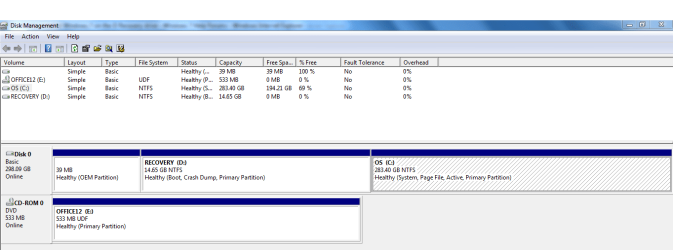
Accidently installed Windows 7 on the D Recovery drive

tkanderson

New member
Local time
4:35 AM
Messages
2
When prompted for installation of W7, I chose the highlighted option which was the D drive (Duh!).


  • I don't care about any programs or data on the system. I am wiping it clean to pass along to my daughter as a Christmas present.
  • The D drive acts as primary and is the only OS installation now.
  • I have plenty of space on the C drive.
  • The D drive is too full to download any programs or .exe files to assist with moving the installation to C.
  • I don't know how to move space from the C drive to the D drive.
  • Windows boots up w/out issue.
  • I am unable to install W7 on C because the registration key is already in use.
  • The D drive will not allow me to uninstall Windows 7.

With those factors in mind, would I be able to highlight and delete all files in the D drive, then install W7 to the C drive? Or, can you think of a simple and elegant way to back out of this quandary?

I appreciate your assistance and guidance.

Thanks!
Tammy
 

My Computer My Computer

At a glance

Windows 7 Home Premium 34 bit4 mgs
Computer type
Laptop
Computer Manufacturer/Model Number
Dell studio
OS
Windows 7 Home Premium 34 bit
Memory
4 mgs
Hard Drives
c, d
Browser
ie

My Computer My Computer

At a glance

Windows 10 Pro x64 ; Xubuntu x64Intel i7 860 @ 2.80 GHz O/C'ed to 4.0GHz16GB Corsair Vengance DDR3 @ 661 MHz Dual Cha...EVGA NVidia GTX 560 1024MB
Computer type
PC/Desktop
Computer Manufacturer/Model Number
Golden Mk. I.4
OS
Windows 10 Pro x64 ; Xubuntu x64
CPU
Intel i7 860 @ 2.80 GHz O/C'ed to 4.0GHz
Motherboard
Gigabyte P55A-UD3R Rev.1. Award BIOS F13
Memory
16GB Corsair Vengance DDR3 @ 661 MHz Dual Channel (9-9-9-24)
Graphics Card(s)
EVGA NVidia GTX 560 1024MB
Sound Card
Realtek Integrated
Monitor(s) Displays
Dual Samsung SyncMaster 2494HS
Screen Resolution
1920*1080 and 1920*1080
Hard Drives
1*Samsung 840 EVO 120GB SSD;
1*OCZ Vertex 2 60GB SSD;
2*Samsung F3 SpinPoint 1TB in RAID0;
1*Samsung F1 SpinPoint 1TB;
2*Western Digital 1TB External USB 3.0
1*Western Digital 500GB External USB 3.0
1*Seagate 500GB External USB 2.0
PSU
Thermaltake ToughPower QFan 750W
Case
Thermaltake Element S VK60001W2Z
Cooling
Corsair H60 Water Cooling, 2*230mm and 2*80mm case fans
Keyboard
Logitech G110
Mouse
Logitech MX518
Thanks so much for your response.
 

Attachments

  • Capture.PNG
    Capture.PNG
    22.2 KB · Views: 13

My Computer My Computer

At a glance

Windows 7 Home Premium 34 bit4 mgs
Computer type
Laptop
Computer Manufacturer/Model Number
Dell studio
OS
Windows 7 Home Premium 34 bit
Memory
4 mgs
Hard Drives
c, d
Browser
ie
It does not look as if there was a system on D. For Windows the partition would be too small anyhow. On C you have a system.
 

My Computer My Computer

At a glance

Vista, Windows7, Mint Mate, Zorin, Windows 8from 1.6GHz Duo to i7
Computer Manufacturer/Model Number
HP, Dell, Gateway, Toshiba - 4 laptops and 2 desktops
OS
Vista, Windows7, Mint Mate, Zorin, Windows 8
CPU
from 1.6GHz Duo to i7
Monitor(s) Displays
2x HP w2207
Hard Drives
5x HDD, 7x SSD, 12x Externals
Keyboard
with trackball - no mices
Mouse
Trackball mice
Internet Speed
DSL 6000
Back
Top