Acer Aspire 5630 4gb ram 3gb usable??

robbbw

New member
Local time
11:59 AM
Messages
3
Hi
i've just installed windows 7 professinal 64bit onto my acer aspire 5633 laptop and for some reason in system it showing 4gb of ram but only 3gb usable.

I had windows vista 32bit before this and after installing service pack 1 it showed 4gb of ram and all was fine.
so now im wondering why this is the case and if it can be remedied?

any help will be greatly appreciated
thanks
rob

graphics card = nvidia geforce go 7300
dual core processor
 

My Computer My Computer

At a glance

Windows 7 Professional4gbGeForce Go 7300
Computer Manufacturer/Model Number
Acer
OS
Windows 7 Professional
Memory
4gb
Graphics Card(s)
GeForce Go 7300
Hi
i've just installed windows 7 professinal 64bit onto my acer aspire 5633 laptop and for some reason in system it showing 4gb of ram but only 3gb usable.

I had windows vista 32bit before this and after installing service pack 1 it showed 4gb of ram and all was fine.
so now im wondering why this is the case and if it can be remedied?

any help will be greatly appreciated
thanks
rob

graphics card = nvidia geforce go 7300
dual core processor

Could you give us more information on the model of the processor?
Like E7700 or E7500 etc.
Perhaps your graphics card is getting those missing 1 GB for it.

EDIT: Take a look at this: http://www.overclock.net/intel-memory/525500-3gb-4gb-being-used.html
EDIT2: Check on DXDIAG how many memory is being used on graphics card.
 

My Computer My Computer

At a glance

Windows 7 Professional x64Intel Core i7 2600k - 3.4 GHz4x4 Ripjaws X79 Series 2133 MHz (9-11-10-28)1x eVGA GTX 580 - 3GB Classified
Computer Manufacturer/Model Number
Custom Built
OS
Windows 7 Professional x64
CPU
Intel Core i7 2600k - 3.4 GHz
Motherboard
Asus Maximus IV Z68 - Extreme
Memory
4x4 Ripjaws X79 Series 2133 MHz (9-11-10-28)
Graphics Card(s)
1x eVGA GTX 580 - 3GB Classified
Sound Card
Realtek ALC 889 HD Audio
Monitor(s) Displays
Full HD Philips TV 32"
Screen Resolution
1920x1080
Hard Drives
1x Crucial m4 SSD 512 GB
PSU
800W Coolermaster Silentpro Gold
Case
Sentey - Renegade GS-6200
Cooling
Stock
Keyboard
Logitech K800 Wireless
Mouse
Logitech Performance MX Laser
Internet Speed
10MB Internet Connection
Thanks for your reply
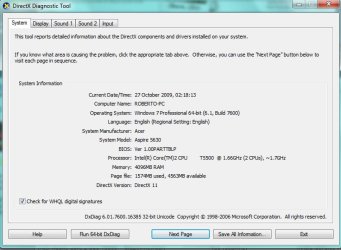
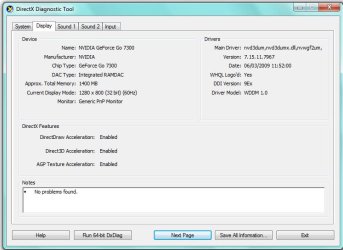
so iv attatched some screenshots of the dxdiag which show all the information you asked for.

processor model - T5500@ 1.66ghz
the memory part confuses me slightly its says display memory approx 1400mb?

I read that other thread although it does not really offer a solution. iv looked on my bios and there doesnt appear to be a memory remapping facility.

I have also tried deleting all of the nvidia drivers and running windows without them but it still said 4gb (3gb usable).
 

Attachments

  • dxd1.jpg
    dxd1.jpg
    70 KB · Views: 882
  • dxd2.jpg
    dxd2.jpg
    62.7 KB · Views: 770

My Computer My Computer

At a glance

Windows 7 Professional4gbGeForce Go 7300
Computer Manufacturer/Model Number
Acer
OS
Windows 7 Professional
Memory
4gb
Graphics Card(s)
GeForce Go 7300
Correct me if im wrong, but i think that your graphics card is using the missing 1 GB.
I believe that your graphics card has 512 MB of dedicated memory, and in DxDIAG its showing 1400 MB. So 1 GB is going there.
 

My Computer My Computer

At a glance

Windows 7 Professional x64Intel Core i7 2600k - 3.4 GHz4x4 Ripjaws X79 Series 2133 MHz (9-11-10-28)1x eVGA GTX 580 - 3GB Classified
Computer Manufacturer/Model Number
Custom Built
OS
Windows 7 Professional x64
CPU
Intel Core i7 2600k - 3.4 GHz
Motherboard
Asus Maximus IV Z68 - Extreme
Memory
4x4 Ripjaws X79 Series 2133 MHz (9-11-10-28)
Graphics Card(s)
1x eVGA GTX 580 - 3GB Classified
Sound Card
Realtek ALC 889 HD Audio
Monitor(s) Displays
Full HD Philips TV 32"
Screen Resolution
1920x1080
Hard Drives
1x Crucial m4 SSD 512 GB
PSU
800W Coolermaster Silentpro Gold
Case
Sentey - Renegade GS-6200
Cooling
Stock
Keyboard
Logitech K800 Wireless
Mouse
Logitech Performance MX Laser
Internet Speed
10MB Internet Connection
The sticker on my laptop say geforce go...128mb.
but yea i do think that the 1gb is being used by the graphics card but id rather have it used as ram, so is there any way this can be changed?

will the graphics card be benefitting alot from this extra graphics ram?
 

My Computer My Computer

At a glance

Windows 7 Professional4gbGeForce Go 7300
Computer Manufacturer/Model Number
Acer
OS
Windows 7 Professional
Memory
4gb
Graphics Card(s)
GeForce Go 7300
The sticker on my laptop say geforce go...128mb.
but yea i do think that the 1gb is being used by the graphics card but id rather have it used as ram, so is there any way this can be changed?

will the graphics card be benefitting alot from this extra graphics ram?

I know a way to do this on Intel integrated graphics card, something like modifying the driver to use MORE memory ram. Google on your graphics card, perhaps you can find something like it.
Oh, and yes i think the graphics card would make a better use of the ram than you would with normal PC use.
 

My Computer My Computer

At a glance

Windows 7 Professional x64Intel Core i7 2600k - 3.4 GHz4x4 Ripjaws X79 Series 2133 MHz (9-11-10-28)1x eVGA GTX 580 - 3GB Classified
Computer Manufacturer/Model Number
Custom Built
OS
Windows 7 Professional x64
CPU
Intel Core i7 2600k - 3.4 GHz
Motherboard
Asus Maximus IV Z68 - Extreme
Memory
4x4 Ripjaws X79 Series 2133 MHz (9-11-10-28)
Graphics Card(s)
1x eVGA GTX 580 - 3GB Classified
Sound Card
Realtek ALC 889 HD Audio
Monitor(s) Displays
Full HD Philips TV 32"
Screen Resolution
1920x1080
Hard Drives
1x Crucial m4 SSD 512 GB
PSU
800W Coolermaster Silentpro Gold
Case
Sentey - Renegade GS-6200
Cooling
Stock
Keyboard
Logitech K800 Wireless
Mouse
Logitech Performance MX Laser
Internet Speed
10MB Internet Connection
robbbw,

Click that "Save All" button on the bottom of DirectX screen then save and attach the text file here.

Also, you can see how much memory the graphics uses in the NVIDIA control panel, provided you have recent drivers installed.
 

My Computer My Computer

At a glance

XP, Seven, 2008R2AMD, Intel, VIACorsair, Kingston, etc.ATI, NVIDIA
Computer Manufacturer/Model Number
Too many to list.
OS
XP, Seven, 2008R2
CPU
AMD, Intel, VIA
Motherboard
Various
Memory
Corsair, Kingston, etc.
Graphics Card(s)
ATI, NVIDIA
Monitor(s) Displays
Samsung
Hard Drives
Maxtor, Western Digital
Keyboard
qwerty
Internet Speed
22 Mb/s @ home, 1 Gb/s @ server
Other Info
All of my systems still run fastest on XP 32-bit for the most part. Win7 is fun to play with, but I still prefer XP for raw speed, security, and functionality.
Hi there, I know this is quite an outdated thread. But still, I wanted to share what worked for me.

I noticed I had this same issue quite a few hours ago. So I started researching and I found a possible answer, if not The only.

This is what made my day:
Just press the start button and type msconfig.
Once there, in the Boot tab click the Advanced Options button.
In the window that pops, go for the upper right and there should be a checkbox, just make sure to leave it UNTICKED.
Click OK in everything you opened, save your work and restart.
Now you should be able to see your whole 4Gigs available in System Properties.

NOTE: That option seems to be quite useless whatsoever. It just seemed to be reset to 0 (Zero) every time you reached that window so just make sure you don't tick it again.

I hope it helps future PC users.

Have a nice day.;)

SantiN90.
 

My Computer My Computer

At a glance

Windows 7 Ultimate x64Intel Core i7 920 ~2,674x1GB Corsair DDR3 ~1066XFX Nvidia GeForce GTX280 1GB vRAM
Computer Manufacturer/Model Number
/Homemade/
OS
Windows 7 Ultimate x64
CPU
Intel Core i7 920 ~2,67
Motherboard
Asus P6T
Memory
4x1GB Corsair DDR3 ~1066
Graphics Card(s)
XFX Nvidia GeForce GTX280 1GB vRAM
Sound Card
/Onboard/
Monitor(s) Displays
LG FLATRON W1934S 19"
Hard Drives
HDD 1TB Seagate Barracuda
PSU
Corsair 750W
Case
Thermaltake M9
Cooling
/Standard/
Back
Top