Acer Aspire 5920G-5a4g25bn nvidia problem

Jendo89

New member
Local time
10:09 AM
Messages
3
Hello all,

I have a problem with my graphics card.
I have an Acer Aspire 5920G-5a4g25bn and just installed windows 7 ultimate for the second time. I noticed i only can install X64 and X86 on ultimate.

But my graphics card: Nvidia geforce 8600 GT (notebook) accepts the driver from nvidia.com but the screen has an flicker in the screen. (i hope i got the right englisch word)

Does somebody knows how te get them away so i dont have the strange flicker in the screen? It's at the bottom of the screen..

Already thanks,
 

My Computer My Computer

At a glance

Windows 7 Ultimate x86Intel core 2 DUO T55504096 MBNvidia Geforce 8600M GT
Computer Manufacturer/Model Number
Acer aspire 5920g-5a4g25bn
OS
Windows 7 Ultimate x86
CPU
Intel core 2 DUO T5550
Motherboard
Acer Chapala Intel PM965 (Crestline-PM) + INCH8M
Memory
4096 MB
Graphics Card(s)
Nvidia Geforce 8600M GT
Screen Resolution
1280x800
Hard Drives
Hitachi HTS (250GB)
Other Info
(BR)DVD±RW DL
Hello there, welcome to the forums!

Does this happens only within Windows, or with any other OS installed? because that could be a hardware's fault.

What do you mean by:
I noticed i only can install X64 and X86 on ultimate.

Are you installing 32-bit or 64-bit? elaborate more, please :)
 

My Computer My Computer

At a glance

Windows
Computer type
PC/Desktop
OS
Windows
i have windows 7 X86 ultimate on my computer.
I already tried X64 but then the card didnt work.

Because i have the ultimate edition i can only install X64 and X86.

My problem is: the whole time the laptop is giving bars and flickers mostly at the bottom of the screen.
This happens when i open internet explorer or media player for example. Even when i start windows and i need to fill in my password.

Can somebody help?

Already tried the nvidia automatic way but the driver doesnt work. Windows prestation indicator says the graphics card works but not for me..
 

My Computer My Computer

At a glance

Windows 7 Ultimate x86Intel core 2 DUO T55504096 MBNvidia Geforce 8600M GT
Computer Manufacturer/Model Number
Acer aspire 5920g-5a4g25bn
OS
Windows 7 Ultimate x86
CPU
Intel core 2 DUO T5550
Motherboard
Acer Chapala Intel PM965 (Crestline-PM) + INCH8M
Memory
4096 MB
Graphics Card(s)
Nvidia Geforce 8600M GT
Screen Resolution
1280x800
Hard Drives
Hitachi HTS (250GB)
Other Info
(BR)DVD±RW DL
Try to boot into safe mode (by pressing F8 on the BIOS screen) to see if the problem remains, IF the problem is still there, then is not a driver's issue, it could be your screen failing!

Please report back :)
 

My Computer My Computer

At a glance

Windows
Computer type
PC/Desktop
OS
Windows
Where did you purchase the laptop? I ask because the USA acer site shows it as having a Radeon card
Acer Support: Drivers & Support Documents - Notebook / Aspire / Aspire 5950G

There is however a hardware detection download program at the top of the page that will give you all your hardware.

You can also use this program to find your hardware HWiNFO32 |MG| Hawing 3.67 Download

Since most laptops come with a modified version of a desktop driver this could be what's causing your problem. Once we narrow down where your laptop is from and what your specs are we can more easily help you figure this out.

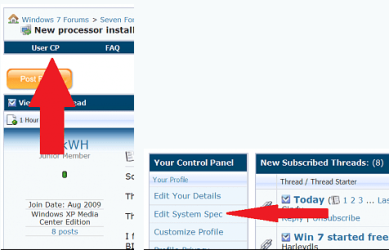
Here is where you can list your specs
usercp 1.png

Thanks. Fabe
 

My Computer My Computer

At a glance

Windows 7 ultimate 64 bit / XP Home sp3intel Core 2 Duo E8400 3.0ghz8 gigs 1066 OCZ Fata1tyEVGA GTX 580 Call of Duty Black Ops Edition
Computer Manufacturer/Model Number
Self Built
OS
Windows 7 ultimate 64 bit / XP Home sp3
CPU
intel Core 2 Duo E8400 3.0ghz
Motherboard
Asus P5ND bios 1401
Memory
8 gigs 1066 OCZ Fata1ty
Graphics Card(s)
EVGA GTX 580 Call of Duty Black Ops Edition
Sound Card
Creative Soundblaster Audigy 2zs
Monitor(s) Displays
Asus 24in LCD's 2MS X2
Screen Resolution
1920x1080p @60Hz
Hard Drives
WD Caviar 500 Black/ WD Caviar 200 Blue
PSU
OCZ 700W GameXtreme
Case
NZXT Apollo
Cooling
Corsair H50 CPU/120mm x3 /60mm x2 /Corsair Dominator Ram
Keyboard
Logitech Bluetooth Wireless MX5000
Mouse
Logitech Bluetooth Wireless MX1000
Internet Speed
Download 19.83 Upload 0.97
Other Info
Logitech Z2300 Speakers/ Bose Noise Cancelling Headphones/Avermedia PCI-e Hybrid TV Bravo/Epson NX415 all in one/ 4 Port Powered USB Hub/ LG 10x Bluray Burner /TSST Corp DVDRW External
@punkster,
no, cant be it because when i will uninstall the driver its fine, but my videocard doesnt work, so i cant play a game.

@the fabe,
I purchased it at a regular shop in the Netherlands, and its a aspire 5920G
I will thy your programm,

This is my laptop: Acer Aspire 5920G-5A4G25BN C2D-T5550 | LX.AKS0X.214 | Informatique (dutch site: scroll down)
Think you guys are clever enough to see what it is:)

Greetz,
 

My Computer My Computer

At a glance

Windows 7 Ultimate x86Intel core 2 DUO T55504096 MBNvidia Geforce 8600M GT
Computer Manufacturer/Model Number
Acer aspire 5920g-5a4g25bn
OS
Windows 7 Ultimate x86
CPU
Intel core 2 DUO T5550
Motherboard
Acer Chapala Intel PM965 (Crestline-PM) + INCH8M
Memory
4096 MB
Graphics Card(s)
Nvidia Geforce 8600M GT
Screen Resolution
1280x800
Hard Drives
Hitachi HTS (250GB)
Other Info
(BR)DVD±RW DL
Ok then try this: on Nvidia's Control Panel, go to Manage 3D settings, and then click on "Restore", you could also try in the main screen of the Nvidia control panel to move the bar from Quality to Performance and see if it solves the issue :)
 

My Computer My Computer

At a glance

Windows
Computer type
PC/Desktop
OS
Windows
Back
Top