Acer eRecovery backup restore

Teeslot

New member
Local time
12:18 AM
Messages
7
Hi All, my laptop,Acer Travelmate 5740 G,had booting trouble which i could not fix. I used recovery disc which i burnt when i bought laptop and tried to restore to factory condition without formatting C-drive and a backup of C-drive would be made in the process which i will find on C-drive after the restore. After the restore all was still the same, so i took my hard drive out, made a copy of this backup file on another laptop, and did restore to factory condition with formatting C-drive. Now my laptop is all good,Windows 7 professional, but i don't know how to get my info back from this backup file. Can somebody PLEASE help me:cry:.All my info is in this backup file!!
 

My Computer My Computer

Computer Manufacturer/Model Number
Acer Travelmate 5740 G
OS
windows professional 64 bit
What is the name and file extension of this backup?
 

My Computer My Computer

Computer Manufacturer/Model Number
Too many to describe...
OS
Windows 7 x64 pro/ Windows 7 x86 Pro/ XP SP3 x86
This backup file was made when i used recovery, i had no backup made of my drive. I had 2 options for recovery,one was restore and a backup would automatically be made by eRecovery,the other option was to restore with formatting drive, I tried the first one and took this backup file and copied it. The name of this file is just BACKUP, if i click on properties of the file it just says FILEFOLDER. Its attributes is Read Only.
 

My Computer My Computer

Computer Manufacturer/Model Number
Acer Travelmate 5740 G
OS
windows professional 64 bit
I guess that backup would be restorable using Acer's erecovery. But naturally, you dont want to restore to that. Try unchecking the read-only box on that file (is it a file or folder?). Also under folder options unhide hidden files and protected OS files. There should be some kind of image files there though Acer may be using an esoteric format. See this thread also.

Anyone know what program opens .dsi and .wsi files? - Neowin Forums
 

My Computer My Computer

Computer Manufacturer/Model Number
Too many to describe...
OS
Windows 7 x64 pro/ Windows 7 x86 Pro/ XP SP3 x86
This backup file was made when i used recovery, i had no backup made of my drive. I had 2 options for recovery,one was restore and a backup would automatically be made by eRecovery,the other option was to restore with formatting drive, I tried the first one and took this backup file and copied it. The name of this file is just BACKUP, if i click on properties of the file it just says FILEFOLDER. Its attributes is Read Only.

Can you browse into the folder?

Browse as far as you can, then post a screenshot of the folder contents and the Properties box (rightclick>Properties) of the backup folder itself.

Use Snipping Tool in Start Menu.
 
Hi Greg
This is the snapshot of Properties of the backup file. If I click on Restore Previous Version will it bring back all my information? When I copied this file it was 1.2GB and it still is. When I browse the file I only get empty folders, so maybe it's hidden? Thx in advance cause I really need to get my files back
 

Attachments

  • Capture.PNG
    Capture.PNG
    10.3 KB · Views: 12

My Computer My Computer

Computer Manufacturer/Model Number
Acer Travelmate 5740 G
OS
windows professional 64 bit
yeah most likely just hidden, or you dont have the rights to access them 1GB is a little small though for a backup

do what the above posters said to view the files, and use the Erecovery to restore files to the system (with a backup of the backup folder)
 

My Computer My Computer

Computer Manufacturer/Model Number
Windows 7 Ultimate 64-bit
OS
Windows 7 Ultimate N 64-bit
CPU
AMD Black Edition - AMD Phenom X4 2.5 GHz Processor
Motherboard
Bio Star
Memory
8GB DDR2 800MHZ BRANDED
Graphics Card(s)
Palti NVIDIA GeForce GTX 460
Monitor(s) Displays
3D 23.6" & 22"
Screen Resolution
1920x1080@120Hz
Hard Drives
313GB SAMSUNG SAMSUNG HD321KJ
PSU
OCZ 600W StealthXStream PSU, PowerWhisper, Active PFC
Internet Speed
22793
It doesn't look like your Backup copied over. Can you still access the original? Post up a screenshot of the file contents of the entire folder. You may need to unhide files in Control Panel>Folder options.
 
Hi again!
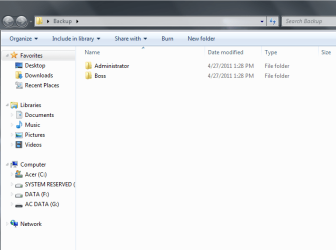
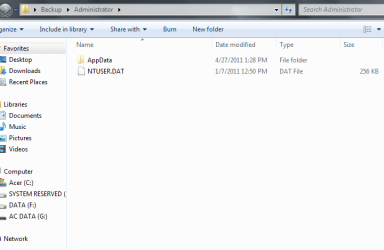
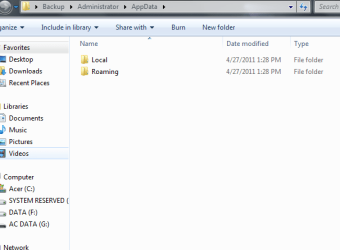
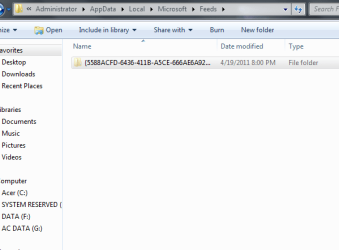
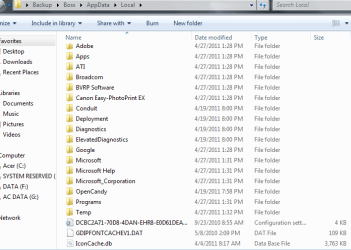
This is the shots of the backup file which Windows made when trying to repair my C-drive, I did not make it myself, but this is the original that I copied. Can I just say that after this repair attempt with no success, I had to do a repair with format. I went to file options and chose "show hidden files" before I took the shots, some files is still empty when I open it. Thx for your patience with me.
 

Attachments

  • Backup1.PNG
    Backup1.PNG
    19 KB · Views: 20
  • backup2.PNG
    backup2.PNG
    13.9 KB · Views: 23
  • backup3.PNG
    backup3.PNG
    11.7 KB · Views: 13
  • backup4.PNG
    backup4.PNG
    11.4 KB · Views: 18
  • backup5.PNG
    backup5.PNG
    18.2 KB · Views: 16

My Computer My Computer

Computer Manufacturer/Model Number
Acer Travelmate 5740 G
OS
windows professional 64 bit
The Appdata is settings which you can't really use now.

What is in the Boss folder, because Administrator has no other data apparently?
 
Restore to factory settings for Acer laptop and desktop is pressing ALT + F10 before the Windows logo appears....

Have you asked Acer tech support?
 

My Computer My Computer

Computer type
PC/Desktop
Computer Manufacturer/Model Number
Custom Build
OS
Win7 Ultimate 64bit
CPU
AMD A8 5600K APU
Motherboard
Gigabyte F2A75MD3H
Memory
16gb DDR3
Graphics Card(s)
Radeon 7560
Sound Card
onboard
Monitor(s) Displays
kingston lcd 23inch wide
Hard Drives
WD 500gb (2)
WD 1TB
Antivirus
EAM + Online Armor Premium -- desktop
The boss folder will be me as the user, my user account name is BOSS.
 

My Computer My Computer

Computer Manufacturer/Model Number
Acer Travelmate 5740 G
OS
windows professional 64 bit
The screenshots provided were for Admin.

Look in the Boss folders/subfolders for your data.

Copy it into the new install's User folders.

In the future, be sure to copy your data first from the OS, or if you can't boot into the OS using a Rescue disk like Paragon Rescue Disk, or Win7 DVD/Repair CD using this trick: Copy & Paste - in Windows Recovery Console

I would always verify the files are readable on external HD, DVD, another internal HD, network share, etc. before wiping out the OS.
 
Sorry I read your question wrong, in the Boss file when I open the files it all shows empty even though I chose to show hidden files in folder options. What will happen if I click Restore Previous Version in this Backup file properties?
 

My Computer My Computer

Computer Manufacturer/Model Number
Acer Travelmate 5740 G
OS
windows professional 64 bit
You can try, but normally that runs System Restore which would need to be on the original System. It is strange if it's showing a previous version, but worth a try since your empty backup folders are otherwise unrecoverable after Factory Recovery.

Any chance you have a windows.old folder in C drive root?
 
To be honest I have no idea how to check for the Windows.old folder. I'll try previous version now and see what happens. Again thx for your patience.
 

My Computer My Computer

Computer Manufacturer/Model Number
Acer Travelmate 5740 G
OS
windows professional 64 bit
As stated, windows.old would be in the C drive if that is your Win7 partition. Go Start>Computer>C Drive to look.
 
Back
Top