Acer Recovery

My Computer My Computer

Computer Manufacturer/Model Number
Acer
OS
Windows 7
CPU
Intel(R) Core(TM)2 Quad CPU Q9300 @ 2.50GHz 2.50 GHz
Memory
4 GB
Graphics Card(s)
GeForce GTX 470
Sound Card
Realtek Digital Output (Realtek High Definition Audio)
Monitor(s) Displays
24" samsung
Screen Resolution
1920 x 1080
Case
Aspire M7711
Keyboard
Razer Lycosa
Mouse
Logitech G9
Internet Speed
20 MB
You may not get a post back for few hour, as we now it 3:00 here.
 

My Computer My Computer

OS
ME/XP/Vista/Win7
You may not get a post back for few hour, as we now it 3:00 here.

Yes i thought that. I'm going to bed and will check this in the morning :sleepy:
Thanks for all the help.
 

My Computer My Computer

Computer Manufacturer/Model Number
Acer
OS
Windows 7
CPU
Intel(R) Core(TM)2 Quad CPU Q9300 @ 2.50GHz 2.50 GHz
Memory
4 GB
Graphics Card(s)
GeForce GTX 470
Sound Card
Realtek Digital Output (Realtek High Definition Audio)
Monitor(s) Displays
24" samsung
Screen Resolution
1920 x 1080
Case
Aspire M7711
Keyboard
Razer Lycosa
Mouse
Logitech G9
Internet Speed
20 MB
Actually, doing a clean install is VERY simple. In fact, you shouldn't even need a tutorial!

Unlike the days of XP and Windows 98, the Vista and 7 installation is practically handed to you on a plate. Each step is clearly labeled, so you don't have to know what to do.

It is designed for non-technical people to be able to do it. All you need to know is where to install the OS!

I encourage you to read through this tutorial: http://www.sevenforums.com/tutorials/1649-clean-install-windows-7-a.html

Our admin Shawn Brink made that tutorial so easy, you can go through the entire installation just looking at his screenshots!

Basically, all you have to do is boot the DVD, and from there, all you have to do is click "Next".

I can't stress enough, You cannot go wrong! Again, here is that tutorial: http://www.sevenforums.com/tutorials/1649-clean-install-windows-7-a.htmlhttp://www.sevenforums.com/tutorials/31402-clean-install-upgrade-windows-7-version.html

If you have any questions about a certain step, don't hesitate to ask. While Gurus in Birmingham, UK are hard to come by here, volunteers from all over the world are happy to help you online.

 

My Computer My Computer

Computer Manufacturer/Model Number
Custom
OS
Windows 7 Professional x64
CPU
Intel i7 2600K OC'd @ 4620 MHz
Motherboard
Asus P8Z68-V Pro
Memory
16GB GSkill Sniper 2133 Mhz (4x4GB)
Graphics Card(s)
EVGA GeForce GTX 480 SuperClocked+
Sound Card
Realtek High Definition Audio
Monitor(s) Displays
2x Acer S273HLbmii 27"
Screen Resolution
2 x 1920x1080
Hard Drives
64GB Crucial M4 SSD

Storage: Hitachi 1TB 5400RPM, Samsung 1.5TB 5400RPM
PSU
Corsair HW Series 750w (modular)
Case
Cooler Master HAF 932 Advanced Blue Edition
Cooling
CM Hyper 212+ CPU cooler, 3x 230mm + 1x 140mm case fans
Keyboard
Logitech MK320 (wireless)
Mouse
Logitech MK320 (wireless)
Internet Speed
30 Mb/s : 2 Mb/s
Actually, doing a clean install is VERY simple. In fact, you shouldn't even need a tutorial!

Unlike the days of XP and Windows 98, the Vista and 7 installation is practically handed to you on a plate. Each step is clearly labeled, so you don't have to know what to do.

It is designed for non-technical people to be able to do it. All you need to know is where to install the OS!

I encourage you to read through this tutorial: http://www.sevenforums.com/tutorials/1649-clean-install-windows-7-a.html

Our admin Shawn Brink made that tutorial so easy, you can go through the entire installation just looking at his screenshots!

Basically, all you have to do is boot the DVD, and from there, all you have to do is click "Next".

I can't stress enough, You cannot go wrong! Again, here is that tutorial: http://www.sevenforums.com/tutorials/1649-clean-install-windows-7-a.html

If you have any questions about a certain step, don't hesitate to ask. While Gurus in Birmingham, UK are hard to come by here, volunteers from all over the world are happy to help you online.


Yes i know how to install win 7 this way, i have done it many times when i have gone back and forward from 32 bit to 64 bit which has caused my problem. the problem was that i when i had 64 bit my computer didn't seem so run as smoothly as 32 bit did so i decided to go back to 32 bit. However, when i went back to 32 bit i didn't boot the disc from startup like the guide shows but just ran the disc normally. I thought 64 bit was causeing problems with my programs but i found out it was just missing drivers so now i am going to re-install 64bit from start up.

Every time i went back and forward installing 32 bit and 64 bit my computer created a folder called 'windows old' [shown below] which takes up quite alot of space. once i install 64 bit again will i be able to delete these folders?

windows odl.PNG
 

My Computer My Computer

Computer Manufacturer/Model Number
Acer
OS
Windows 7
CPU
Intel(R) Core(TM)2 Quad CPU Q9300 @ 2.50GHz 2.50 GHz
Memory
4 GB
Graphics Card(s)
GeForce GTX 470
Sound Card
Realtek Digital Output (Realtek High Definition Audio)
Monitor(s) Displays
24" samsung
Screen Resolution
1920 x 1080
Case
Aspire M7711
Keyboard
Razer Lycosa
Mouse
Logitech G9
Internet Speed
20 MB
Im going to install 64 bit. can someone answer this question for when i get back please.
Every time i went back and forward installing 32 bit and 64 bit my computer created a folder called 'windows old' [shown below] which takes up quite alot of space. once i install 64 bit again will i be able to delete these folders?

windows odl.PNG
 

My Computer My Computer

Computer Manufacturer/Model Number
Acer
OS
Windows 7
CPU
Intel(R) Core(TM)2 Quad CPU Q9300 @ 2.50GHz 2.50 GHz
Memory
4 GB
Graphics Card(s)
GeForce GTX 470
Sound Card
Realtek Digital Output (Realtek High Definition Audio)
Monitor(s) Displays
24" samsung
Screen Resolution
1920 x 1080
Case
Aspire M7711
Keyboard
Razer Lycosa
Mouse
Logitech G9
Internet Speed
20 MB

My Computer My Computer

Computer Manufacturer/Model Number
Acer
OS
Windows 7
CPU
Intel(R) Core(TM)2 Quad CPU Q9300 @ 2.50GHz 2.50 GHz
Memory
4 GB
Graphics Card(s)
GeForce GTX 470
Sound Card
Realtek Digital Output (Realtek High Definition Audio)
Monitor(s) Displays
24" samsung
Screen Resolution
1920 x 1080
Case
Aspire M7711
Keyboard
Razer Lycosa
Mouse
Logitech G9
Internet Speed
20 MB

My Computer My Computer

Computer Manufacturer/Model Number
Acer
OS
Windows 7
CPU
Intel(R) Core(TM)2 Quad CPU Q9300 @ 2.50GHz 2.50 GHz
Memory
4 GB
Graphics Card(s)
GeForce GTX 470
Sound Card
Realtek Digital Output (Realtek High Definition Audio)
Monitor(s) Displays
24" samsung
Screen Resolution
1920 x 1080
Case
Aspire M7711
Keyboard
Razer Lycosa
Mouse
Logitech G9
Internet Speed
20 MB

My Computer My Computer

Computer type
PC/Desktop
Computer Manufacturer/Model Number
Custom Build
OS
Windows 7 Professional SP1 - x64 [Non-UEFI Boot]
CPU
Ivy Bridge Core i5 3570K (Delidded)
Motherboard
Asus P8Z77-V LE PLUS
Memory
G.Skill "Ares" DDR3 PC3-12800 - 1600MHz (16Gb)
Graphics Card(s)
Asus Dual-RX480-O4G
Sound Card
Creative Sound Blaster Z w/5.1 sound system
Monitor(s) Displays
Asus IPS 23"
Screen Resolution
16/9
Hard Drives
Internal:
500Go Sata 6Gb/s (x2)
500Go Sata 3Gb/s (x2)
SSD 60Go Sata 6Gb/s
PSU
In Win C 900W Series 80+ Platinum
Case
Thermaltake Chaser A71
Cooling
Custom Water Cooling Loop
Keyboard
Cooler Master QuickFire XTi
Mouse
Razer Imperator 2012 (4G)
Antivirus
MSE
Browser
IE 11.0.xxx Rtm
Other Info
"Raid0" with Intel Smart Response Technology (HDD/SSD)

Yeh i already know how to do that and just did it. But when i do it i still get the windows.old files. can i delete them?


Can you try here?:
http://www.sevenforums.com/tutorials/19151-windows-old-folder-delete.html

Wipe those .old folders, then do your things.

Thanks alot, thats is exactly what i was looking for.
 

My Computer My Computer

Computer Manufacturer/Model Number
Acer
OS
Windows 7
CPU
Intel(R) Core(TM)2 Quad CPU Q9300 @ 2.50GHz 2.50 GHz
Memory
4 GB
Graphics Card(s)
GeForce GTX 470
Sound Card
Realtek Digital Output (Realtek High Definition Audio)
Monitor(s) Displays
24" samsung
Screen Resolution
1920 x 1080
Case
Aspire M7711
Keyboard
Razer Lycosa
Mouse
Logitech G9
Internet Speed
20 MB

My Computer My Computer

OS
ME/XP/Vista/Win7
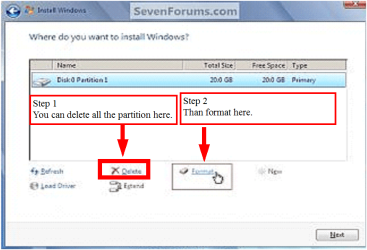
Did you use the Drive Options (Advanced) to Delete all partitions, create New, then Format before install?

Do you still have the utility partitions which will not work now that you clean reinstalled?

This is why I recommended that you clean the disk using DISKPART, since you have the Recovery disks. At the very least you need to Delete, Repartition and Format using the Drive Options which Theog displays in post #77.

Please post back a screenshot of your full Disk Mgmt drive map.
 
Back
Top