Acer wireless lan issues

glennbtn

New member
Local time
5:51 PM
Messages
6
Hi All

I need some help with a wireless lan issue on a windows 7 machine,Aspire 5532 with atheros wireless built in.

I am running a wireless network with wep setup (some older machine not supporting wpa) I have a number of xp pc on the network running fine along with a macbook and a windows 7 Fujitsu with no problems. This new acer can see my home network but as soon as you click connect it just ask you to diagnose the error and does not even ask for the wireless password.

I have updated the drive both on the acer site and on the atheros site and still I can't connect to the network. I have also tried to manually configure the network in the settings as well.

Can anyone shed any light on this as its driving me nuts.
 

My Computer

OS
windows 7
Hi Glennbtn,

I have seen a few cases with later, (win7 ?), drivers having issues with WEP security yet working perfectly with WPA/WPA2.

The only way to check if you are having these issues is to test the adaptor when set to WPA or WPA2. I am not sure if this is a straight driver issue or a win7 one.

If you are having this issue the only things that may work is to revert to a Vista driver, (in compatibility mode if required), or to use a USB adaptor of some type that supports the WEP you are required to use.
 

My Computers

System One System Two

  • Computer type
    PC/Desktop
    Computer Manufacturer/Model Number
    ChillBlast - Custom to my design
    OS
    Windows 11 Pro x64 [Latest Release and Release Preview]
    CPU
    Ryzen 9 5950X, 3.8 - 5.2 MHz
    Motherboard
    Asus Prime X570-Pro
    Memory
    64GB [2 x 32GB] DDR4 3200MHz
    Graphics Card(s)
    4GB NVIDIA GEFORCE GTX 1650 Ti
    Sound Card
    On-board SPDIF to 5.1 System + HDMI [5.1 system]
    Monitor(s) Displays
    32" UHD 32 Bit HDR Monitor + 43" UHD 4K 32Bit HDR TV
    Screen Resolution
    2 x 3840 x 2160 @60Hz
    Hard Drives
    1TB M2 SSD OS, 500GB Fast Access SSD, 2 x 8TB Data + Various Externals from 1TB to 4TB, 10TB NAS
    PSU
    NZXT C750 80 PLUS Gold 750W Modular PSU
    Case
    Workstation Case [Matt Black]
    Cooling
    NZXT Kraken X63 280mm CPU Cooler +2x Quiet Case fans
    Keyboard
    Logitech Wireless MX Keys & K400 + others
    Mouse
    Logitech Wireless MX Master 3S
    Internet Speed
    920 MB Down 50 MB Up
    Antivirus
    BitDefender Total Security Pro
    Browser
    Chrome (always run latest Non-Beta)
    Other Info
    Also run ...
    Laptop - Quad 8GB - Windows 10 Pro x64
    Nexus 7 Android tablet x2
    Samsung 10.2" tablet
    Blackview TAB 8 4G Android Tablet c/w Keyboard
    Wacom Intuos Pro Medium Pen Pad
    Wacom Intuos Pro Small Pen Pad
    Wacom Expresskeys Remote
    Loopdeck+ Graphics Controller
    Shuttle Pro v2 Control
  • Computer type
    Laptop
    System Manufacturer/Model Number
    Dell XPS 17 10750H
    OS
    Windows 11 Pro x64 Latest RP
    CPU
    Intel I7 10750H 5.0GHz
    Motherboard
    Dell XPS
    Memory
    32GB [2x16GB] DDR4 2933 MHz
    Graphics Card(s)
    nVidia GTX1650Ti 4 GB GDDR6
    Sound Card
    Stock [Realtek] 4 Speaker
    Monitor(s) Displays
    17" IPS UHD+ Infinity Edge Touchscreen
    Screen Resolution
    3840 x 2400
    Hard Drives
    2TB M2 NVMe, 4TB External + various 500GB & 1TB External NVMe (also have access to spinner HDD from
    PSU
    Stock
    Case
    Stock XPS Aluminium & Carbon Fibre
    Cooling
    Stock - Active Fan Control
    Keyboard
    Backlit + Various Logitech
    Mouse
    Stock Track Pad + Logitech MX Trackball
    Internet Speed
    72 MB Down 18MB Up
    Browser
    Chrome
    Other Info
    Also run ...
    Laptop - Quad 8GB - Windows 10 Pro x64
    Nexus 7 Android tablet x2
    10.2" tablet
    Sony Z3 Android Smartphone
    Wacom Intuos Pro Medium Pen Pad
    Wacom Intuos Pro Small Pen Pad
    Wacom Expresskeys Remote
    Loopdeck+ Graphics Controller
    Shuttle Pro v2 Control Pad
    10TB NAS
This might be a trivial question but have to made sure that the wireless setup of the ACER W7 machine matches the WEP setting of the wireless network?
 

My Computer

Computer Manufacturer/Model Number
Lenovo ThinkPad T60
OS
Windows 7 Ultimate 64Bit
CPU
GenuineIntel Intel(R) Core(TM) DuoCore T2400 @ 1.83GHz
Motherboard
Intel(R) 82801G (ICH7 Family)
Memory
2.00 GB
Graphics Card(s)
Mobile Intel(R) 945 Express Chipset
Sound Card
SoundMAX Integrated Digital HD Audio
Monitor(s) Displays
ThinkPad Display
Screen Resolution
1400x1050
Hard Drives
100Gb SATA
Keyboard
Standard Keyboard
Mouse
HID-compliant Mouse
Internet Speed
Cable Broadband - 54Mbps
Other Info
Intel(R) PRO/1000 PL Network Connection
11a/b/g Wireless LAN Mini PCI Express Adapter
I have checked the setting. With the acer you don't get to choose 64 0r 128 bit you just type either your phrase or the code directly. I have done both when manually setting up the connection. If I use the wireless network browser and click me home network it just ask you to diagnose it without even trying to connect.
 

My Computer

OS
windows 7
I have checked the setting. With the acer you don't get to choose 64 0r 128 bit you just type either your phrase or the code directly. I have done both when manually setting up the connection. If I use the wireless network browser and click me home network it just ask you to diagnose it without even trying to connect.

I'm not sure what you mean by 64bit or 128bit, in relation to SSID security type.

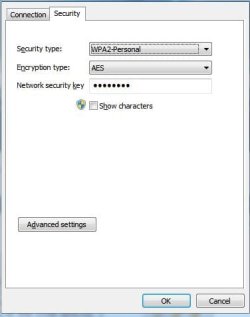
This is what i meant, when i said made sure the setting are the same as the what the router is broadcasting.

Noname.jpg

Otherwise as Barman58 said, try changing the SSID security to WPA.
 

My Computer

Computer Manufacturer/Model Number
Lenovo ThinkPad T60
OS
Windows 7 Ultimate 64Bit
CPU
GenuineIntel Intel(R) Core(TM) DuoCore T2400 @ 1.83GHz
Motherboard
Intel(R) 82801G (ICH7 Family)
Memory
2.00 GB
Graphics Card(s)
Mobile Intel(R) 945 Express Chipset
Sound Card
SoundMAX Integrated Digital HD Audio
Monitor(s) Displays
ThinkPad Display
Screen Resolution
1400x1050
Hard Drives
100Gb SATA
Keyboard
Standard Keyboard
Mouse
HID-compliant Mouse
Internet Speed
Cable Broadband - 54Mbps
Other Info
Intel(R) PRO/1000 PL Network Connection
11a/b/g Wireless LAN Mini PCI Express Adapter
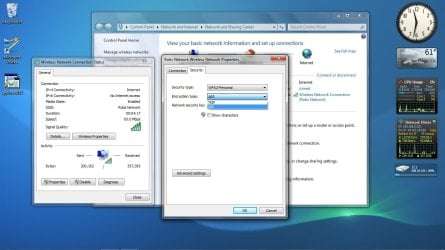
I agree with Aem, the settings need to be changed on the Win 7 machine. Also it's true what Barman says, certain Win 7 wlan drivers do not like using WEP but it may work if you change it from WPA-2 to WEP here where it shows in the picture below.
 

Attachments

  • wireless security change.jpg
    wireless security change.jpg
    103.7 KB · Views: 364

My Computer

Computer type
PC/Desktop
Computer Manufacturer/Model Number
Home built
OS
Windows 7 Ult, Windows 8.1 Pro,
CPU
Q9650-4.275GHz, E8600 4.5GHz, E6750-3.8GHz
Motherboard
Evga 780i FTW
Memory
G.Skill PC2 9600 1200Mhz 5 5 5 15 2T
Graphics Card(s)
GTX480
Sound Card
Asus Xonar D2
Monitor(s) Displays
HannsG
Screen Resolution
1680X1050
Hard Drives
GSkill Phoenix Pro 120GB SSD
PSU
ThermalTake Toughpower 1000Watt modular
Case
ThermalTake XaserV
Cooling
Xigmatek S1283
Keyboard
Logitech G15
Mouse
Logitech G9
Internet Speed
T1
I have checked the setting. With the acer you don't get to choose 64 0r 128 bit you just type either your phrase or the code directly. I have done both when manually setting up the connection. If I use the wireless network browser and click me home network it just ask you to diagnose it without even trying to connect.

A little education on wireless encryption for the uninformed...

There are several types of WEP wireless encryption schemes out there... NONE of which are preferred these days.

WEP was shown way back in 2001 to have serious weaknesses, and is easily hacked by anyone with a packet sniffer/grabber and a brute force crack tool (all of these tools are available to any snot nosed internet surfer). WEP was originally a 64 bit encryption scheme. Some HW manufacturers in an attempt to increase security of WEP went to a proprietary 128 bit WEP schema... but it was determined that the underlying algorithm of WEP was flawed and still easily cracked.

These days you shouldnt even consider WEP.... look to WPA or WPA2 for your wireless encryption. If your router or AP doesnt support WPA, many times a firmware upgrade will give you that ability.

I have used WPA encryption for years... it works fine with XP. You do have all the latest service packs, right??? To switch to WPA on your XP machines you may have to use the Wireless Networking Setup Wizard...
 

My Computer

Computer Manufacturer/Model Number
Homebrew PC - "Alpha_Dawg"
OS
Windows 7 Ultimate 64 bit Steve Ballmer Signature Edition
CPU
Intel Core 2 Quad - Q9550 - 2.83GHz stock - OC'd to 3.6GHz
Motherboard
Gigabyte EP45-UD3P
Memory
4GB DDR2 800MHz (PC6400) OCZ Reaper
Graphics Card(s)
Nvidia GE Force 8800 GTS
Sound Card
Asus Xonar DX
Monitor(s) Displays
Samsung SyncMaster 2333HD
Screen Resolution
1920 x 1080
Hard Drives
WD Caviar Black 750GB - 7200RPM - 32MB cache
WD Caviar Green 1.5TB - 5400RPM - 64MB cache
WD Caviar Green 2.0TB - 5400RPM - 64MB cache
PSU
PC Power & Cooling Silencer 750
Case
Gigabyte 3D Aurora
Cooling
Case is Air - 5ea. 120mm fans (mix of Arctic and Xigmatec)
Keyboard
MS Natural Wireless KB
Mouse
MS Wireless Mouse
Internet Speed
50 mbps down/5 mbps up
Other Info
AVerMedia - AVerTVHD G2 Dual Tuner Card
Back
Top