ACPI non-compliance

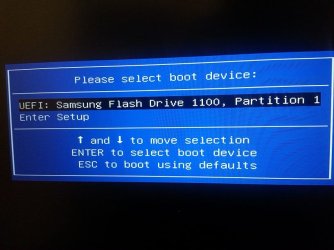
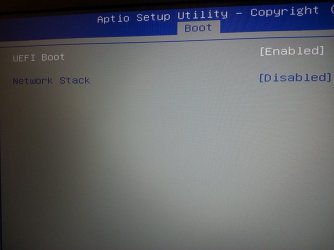
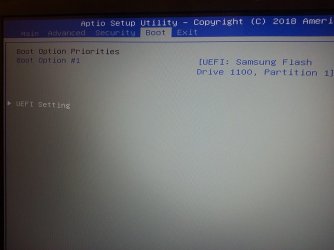
UEFI settings is set to ENABLED...

I think I know what the problem is... I had previously installed windows 10 on the M2. I am going to delete it and leave it un-allocated... that way, there is no BOOT MANAGER for the USB to complete with. I will report back.

*** *** ***

EDIT: No luck. Same error!!! Tomorrow I will upload more pics (BIOS)... also, I will try again after using Gparted to completely wipe the M2 storage... I will report back.
 
Last edited:

My Computer My Computer

At a glance

Windows 7 Ultimate x64
Computer type
Laptop
OS
Windows 7 Ultimate x64
I tried windows 10 in UEFI mode ... USB created using Rufus. It works!

A dirty hack: I tried to use the Windows 10 USB (created using Rufus) but replacing install.wim from Windows 7 ISO as suggested here: Windows USB EFI boot files - Super User... It does do an install, but later, it crashes while starting windows.

I wiped the M2 storage first while windows 10 installation. Later, with gparted... completely un-allocated space.

Memory I have one 8GB DDR4 RAM stick.

I copied BCD file from Windows 10 to Windows 7 USB... same error.

My ISO SHA1 matches exactly as shown here: Official Windows 7 SP1 ISO Image Downloads | Page 6 | Windows 7 Forums post #114
 

Attachments

  • BIOS-BOOT--OPTION.jpg
    BIOS-BOOT--OPTION.jpg
    77.4 KB · Views: 0
  • BIOS-UEFI--SETTING.jpg
    BIOS-UEFI--SETTING.jpg
    56.1 KB · Views: 0
  • BIOS-BOOT--PRIORITY.jpg
    BIOS-BOOT--PRIORITY.jpg
    68.9 KB · Views: 0
  • BIOS-BOOT--OVERRIDE.jpg
    BIOS-BOOT--OVERRIDE.jpg
    65.4 KB · Views: 0
Last edited:

My Computer My Computer

At a glance

Windows 7 Ultimate x64
Computer type
Laptop
OS
Windows 7 Ultimate x64
I was out of town. Did you able to boot the Win 7 installation disk as UEFI?
 

My Computers My Computers

  • At a glance

    Windows 7 HP 64i5 6600K - 800MHz to 4200MHz4+4G GSkill DDR4 3000IG - Intel 530
    Computer type
    PC/Desktop
    Computer Manufacturer/Model Number
    custom build
    OS
    Windows 7 HP 64
    CPU
    i5 6600K - 800MHz to 4200MHz
    Motherboard
    GA-Z170-HD3P
    Memory
    4+4G GSkill DDR4 3000
    Graphics Card(s)
    IG - Intel 530
    Monitor(s) Displays
    Samsung 226BW
    Screen Resolution
    1680x1050
    Hard Drives
    (1) -1 SM951 – 128GB M.2 AHCI PCIe SSD drive for Windows 7 and Lubuntu
    (2) -1 WD SATA 3 - 1T for Data
    (3) -1 WD SATA 3 - 1T for backup
    PSU
    Thermaltake 450W TR2 gold
    Keyboard
    Old and good Chicony mechanical keyboard
    Mouse
    Logitech mX performance - 9 buttons (had to disable some)
    Internet Speed
    500Mb/s
    Browser
    Firefox 64
    Other Info
    TinyWall firewall
  • At a glance

    Windows 7 Proi7-4500U 800MHz to 3.0GHz(4+4)G DDR3 1600IG intel 4400 + NVIDIA GeForce GT 745M
    Computer type
    Laptop
    System Manufacturer/Model Number
    Asus Q550LF
    OS
    Windows 7 Pro
    CPU
    i7-4500U 800MHz to 3.0GHz
    Motherboard
    Asus Q550LF
    Memory
    (4+4)G DDR3 1600
    Graphics Card(s)
    IG intel 4400 + NVIDIA GeForce GT 745M
    Sound Card
    Realtek
    Monitor(s) Displays
    LG Display LP156WF4-SPH1
    Screen Resolution
    1920 x 1080
    Hard Drives
    BX500 120G SSD for Windows and programs +
    1T HDD for data
    Internet Speed
    500 Mb/s
    Browser
    Firefox
    Other Info
    TinyWall firewall
Megahertz07... I thought you abandoned me : )

Nope... I still have the problem.

I think the problem is with my BIOS... it is pure UEFI and it does not support CSM (legacy mode). So, it appears I cannot install win 7.

I have to either mod the BIOS OR maybe something like CLOVER EFI might get windows 7 to work... but I am still trying to understand and see how CLOVER can be used.
 

My Computer My Computer

At a glance

Windows 7 Ultimate x64
Computer type
Laptop
OS
Windows 7 Ultimate x64
Pure UEFI does boot win 7 installation disk as UEFI.
Was you able to boot the Win 7 installation disk as UEFI?
 

My Computers My Computers

  • At a glance

    Windows 7 HP 64i5 6600K - 800MHz to 4200MHz4+4G GSkill DDR4 3000IG - Intel 530
    Computer type
    PC/Desktop
    Computer Manufacturer/Model Number
    custom build
    OS
    Windows 7 HP 64
    CPU
    i5 6600K - 800MHz to 4200MHz
    Motherboard
    GA-Z170-HD3P
    Memory
    4+4G GSkill DDR4 3000
    Graphics Card(s)
    IG - Intel 530
    Monitor(s) Displays
    Samsung 226BW
    Screen Resolution
    1680x1050
    Hard Drives
    (1) -1 SM951 – 128GB M.2 AHCI PCIe SSD drive for Windows 7 and Lubuntu
    (2) -1 WD SATA 3 - 1T for Data
    (3) -1 WD SATA 3 - 1T for backup
    PSU
    Thermaltake 450W TR2 gold
    Keyboard
    Old and good Chicony mechanical keyboard
    Mouse
    Logitech mX performance - 9 buttons (had to disable some)
    Internet Speed
    500Mb/s
    Browser
    Firefox 64
    Other Info
    TinyWall firewall
  • At a glance

    Windows 7 Proi7-4500U 800MHz to 3.0GHz(4+4)G DDR3 1600IG intel 4400 + NVIDIA GeForce GT 745M
    Computer type
    Laptop
    System Manufacturer/Model Number
    Asus Q550LF
    OS
    Windows 7 Pro
    CPU
    i7-4500U 800MHz to 3.0GHz
    Motherboard
    Asus Q550LF
    Memory
    (4+4)G DDR3 1600
    Graphics Card(s)
    IG intel 4400 + NVIDIA GeForce GT 745M
    Sound Card
    Realtek
    Monitor(s) Displays
    LG Display LP156WF4-SPH1
    Screen Resolution
    1920 x 1080
    Hard Drives
    BX500 120G SSD for Windows and programs +
    1T HDD for data
    Internet Speed
    500 Mb/s
    Browser
    Firefox
    Other Info
    TinyWall firewall
Okay, I see.
But, I keep getting errors... ACPI non-compliance OR WINDOWS RECOVERY ERROR.
I just don't understand what more to do. It is so frustrating.
 

My Computer My Computer

At a glance

Windows 7 Ultimate x64
Computer type
Laptop
OS
Windows 7 Ultimate x64
So, I am told in another forum (insanelyMAC) about this: There 8.1 on Kaby Lake CPUs | TheINQUIRER

Basically, Win 7 is not supported on Kaby. So, this patch, sounds like it is for updates, but would it even stop me from installing Win 7 on Kaby in the first place.

If so, how would I go about circumventing that? Quickly reading this: GitHub - zeffy/wufuc: Disables the message in Windows Update, and allows you to continue installing updates on Windows 7 and 8.1 systems with Intel Kaby Lake, AMD Ryzen, or other unsupported processors. does not make much sense.

Let me know what you think.

PS: Or, I am reading this wrong?

If so, how would I go about circumventing that? Quickly reading, this: GitHub - zeffy/wufuc: Disables the message in Windows Update, and allows you to continue installing updates on Windows 7 and 8.1 systems with Intel Kaby Lake, AMD Ryzen, or other unsupported processors. does not make much sense.

Let me know what you think.

PS: Or, I am reading this wrong?
 

My Computer My Computer

At a glance

Windows 7 Ultimate x64
Computer type
Laptop
OS
Windows 7 Ultimate x64
The issue with Kabylake is with the internal graphics driver. Many people here installed Win 7 on Kabylake computers.
You must fist boot the Win 7 installation disk. Was you able to boot the Win 7 installation disk as UEFI?
Boot from the Win 7 installation disk as UEFI. Can you get to the fist image (select language and keyboard)?
Take a picture with your phone and post here as an attachment.
 

My Computers My Computers

  • At a glance

    Windows 7 HP 64i5 6600K - 800MHz to 4200MHz4+4G GSkill DDR4 3000IG - Intel 530
    Computer type
    PC/Desktop
    Computer Manufacturer/Model Number
    custom build
    OS
    Windows 7 HP 64
    CPU
    i5 6600K - 800MHz to 4200MHz
    Motherboard
    GA-Z170-HD3P
    Memory
    4+4G GSkill DDR4 3000
    Graphics Card(s)
    IG - Intel 530
    Monitor(s) Displays
    Samsung 226BW
    Screen Resolution
    1680x1050
    Hard Drives
    (1) -1 SM951 – 128GB M.2 AHCI PCIe SSD drive for Windows 7 and Lubuntu
    (2) -1 WD SATA 3 - 1T for Data
    (3) -1 WD SATA 3 - 1T for backup
    PSU
    Thermaltake 450W TR2 gold
    Keyboard
    Old and good Chicony mechanical keyboard
    Mouse
    Logitech mX performance - 9 buttons (had to disable some)
    Internet Speed
    500Mb/s
    Browser
    Firefox 64
    Other Info
    TinyWall firewall
  • At a glance

    Windows 7 Proi7-4500U 800MHz to 3.0GHz(4+4)G DDR3 1600IG intel 4400 + NVIDIA GeForce GT 745M
    Computer type
    Laptop
    System Manufacturer/Model Number
    Asus Q550LF
    OS
    Windows 7 Pro
    CPU
    i7-4500U 800MHz to 3.0GHz
    Motherboard
    Asus Q550LF
    Memory
    (4+4)G DDR3 1600
    Graphics Card(s)
    IG intel 4400 + NVIDIA GeForce GT 745M
    Sound Card
    Realtek
    Monitor(s) Displays
    LG Display LP156WF4-SPH1
    Screen Resolution
    1920 x 1080
    Hard Drives
    BX500 120G SSD for Windows and programs +
    1T HDD for data
    Internet Speed
    500 Mb/s
    Browser
    Firefox
    Other Info
    TinyWall firewall
I think you are right...

Win 7 installed in UEFI... gives me BOOT/BCD error... also, if I use Win 10 as the base and put install.wim from Win 7, it does install. Then, when I boot, I get a red bar on top, and then ACPI error. I have never gone to language and keyboard in Win 7 on this laptop.

But, I can try again...
 

My Computer My Computer

At a glance

Windows 7 Ultimate x64
Computer type
Laptop
OS
Windows 7 Ultimate x64
RUFUS with UEFI/MBR/NTFS... Win 7 ISO unmodded.

Both USB 2 and USB 3 ports, give /efi/microsoft/boot/bcd ERROR.

[Everything I do, I will post here as documentation]
 

My Computer My Computer

At a glance

Windows 7 Ultimate x64
Computer type
Laptop
OS
Windows 7 Ultimate x64
You can't boot the Win 7 installation disk or you can't boot the SSD after installation?
 

My Computers My Computers

  • At a glance

    Windows 7 HP 64i5 6600K - 800MHz to 4200MHz4+4G GSkill DDR4 3000IG - Intel 530
    Computer type
    PC/Desktop
    Computer Manufacturer/Model Number
    custom build
    OS
    Windows 7 HP 64
    CPU
    i5 6600K - 800MHz to 4200MHz
    Motherboard
    GA-Z170-HD3P
    Memory
    4+4G GSkill DDR4 3000
    Graphics Card(s)
    IG - Intel 530
    Monitor(s) Displays
    Samsung 226BW
    Screen Resolution
    1680x1050
    Hard Drives
    (1) -1 SM951 – 128GB M.2 AHCI PCIe SSD drive for Windows 7 and Lubuntu
    (2) -1 WD SATA 3 - 1T for Data
    (3) -1 WD SATA 3 - 1T for backup
    PSU
    Thermaltake 450W TR2 gold
    Keyboard
    Old and good Chicony mechanical keyboard
    Mouse
    Logitech mX performance - 9 buttons (had to disable some)
    Internet Speed
    500Mb/s
    Browser
    Firefox 64
    Other Info
    TinyWall firewall
  • At a glance

    Windows 7 Proi7-4500U 800MHz to 3.0GHz(4+4)G DDR3 1600IG intel 4400 + NVIDIA GeForce GT 745M
    Computer type
    Laptop
    System Manufacturer/Model Number
    Asus Q550LF
    OS
    Windows 7 Pro
    CPU
    i7-4500U 800MHz to 3.0GHz
    Motherboard
    Asus Q550LF
    Memory
    (4+4)G DDR3 1600
    Graphics Card(s)
    IG intel 4400 + NVIDIA GeForce GT 745M
    Sound Card
    Realtek
    Monitor(s) Displays
    LG Display LP156WF4-SPH1
    Screen Resolution
    1920 x 1080
    Hard Drives
    BX500 120G SSD for Windows and programs +
    1T HDD for data
    Internet Speed
    500 Mb/s
    Browser
    Firefox
    Other Info
    TinyWall firewall
Can't boot Win 7 Installation USB stick when using Win 7 installer. [just tried].
When I use Win 10 installer with Win 7 install.wim file, it works, but then, I can't boot the installation. [tried previously; few days ago].

I am not installing to an SSD; But, an M2 storage media. Something else I am thinking is that I should try a regular SSD; that might work.
 

My Computer My Computer

At a glance

Windows 7 Ultimate x64
Computer type
Laptop
OS
Windows 7 Ultimate x64
Back
Top