

- Local time
- 9:51 AM
- Messages
- 231
I have successfully used my trial version of Acronis 2015 to make a backup of my C: drive (which is on a Windows 7 64 bit machine with a 256 GB SSD) and saved it on a partition on a Western Digital "Elements" ext. USB HD letter "K". I have also successfully made a Bootable Rescue Media (on a CD because a web tutorial suggested it was simpler than using a USB thumb drive).
I then attempted to prove that the Rescue Media actually worked (as advised in Acronis's Manual). The process is to start the computer with the CD in (and then there is some technicality about the boot order, see below). Acronis re-appeared with three buttons. I pressed Acronis True Image 2015 and got a window with a button "Browse Backups". I selected Local Disk K > Acronis Backups and the backup file was listed.
After a large number of mainly ineffective clicks (to get to this window and on this window as well) I managed to select the backup (see first attached image). The OK button lit up but the window was frozen except for a beep at every click. I have tried this many times.
On the boot order question mentioned above, Acronis's manual at p. 119 says "If you have a rescue CD, press any key to start booting from the CD, when you see the prompt "Press any key to boot from CD". I did that and got the familiar Windows Boot Manager window which offers Safe Mode ....... Start your computer normally. Not useful here.
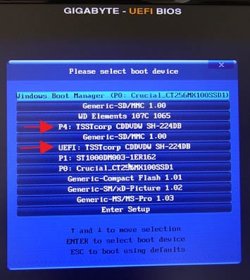
Remembering the screen I got when using Windows 7's System Repair Disc (see second image) I chose to press repeatedly F12 on startup and chose UEFI: TSSTcorp...., and also P4. Each of these produced the frozen result shown in the first image. I also pressed other F keys which did not help but I did not want to go too far in case I messed up the computer).
Any ideas on how to get to the last window and use Acronis's Bootable Rescue Media to boot my computer as the manual describes?
Thanks.
I then attempted to prove that the Rescue Media actually worked (as advised in Acronis's Manual). The process is to start the computer with the CD in (and then there is some technicality about the boot order, see below). Acronis re-appeared with three buttons. I pressed Acronis True Image 2015 and got a window with a button "Browse Backups". I selected Local Disk K > Acronis Backups and the backup file was listed.
After a large number of mainly ineffective clicks (to get to this window and on this window as well) I managed to select the backup (see first attached image). The OK button lit up but the window was frozen except for a beep at every click. I have tried this many times.
On the boot order question mentioned above, Acronis's manual at p. 119 says "If you have a rescue CD, press any key to start booting from the CD, when you see the prompt "Press any key to boot from CD". I did that and got the familiar Windows Boot Manager window which offers Safe Mode ....... Start your computer normally. Not useful here.
Remembering the screen I got when using Windows 7's System Repair Disc (see second image) I chose to press repeatedly F12 on startup and chose UEFI: TSSTcorp...., and also P4. Each of these produced the frozen result shown in the first image. I also pressed other F keys which did not help but I did not want to go too far in case I messed up the computer).
Any ideas on how to get to the last window and use Acronis's Bootable Rescue Media to boot my computer as the manual describes?
Thanks.
Attachments

Last edited:
My Computer
At a glance
Windows 7 Home Premium 64bitIntel Pentium Edition G3220 3.0 GHz8 GB DDR3 1600 MHz DIMMNot Known
- Computer type
- PC/Desktop
- Computer Manufacturer/Model Number
- Gigabyte ATX case with 500 W power supply GZ-M1
- OS
- Windows 7 Home Premium 64bit
- CPU
- Intel Pentium Edition G3220 3.0 GHz
- Motherboard
- Gigabyte Socket 1150 MicroATX Mot Ultra Durable, GA-H81M-S2H
- Memory
- 8 GB DDR3 1600 MHz DIMM
- Graphics Card(s)
- Not Known
- Sound Card
- Not known
- Monitor(s) Displays
- Samsung LS24D590 23.6"
- Screen Resolution
- 1920 x 1080
- Hard Drives
- 256 GB Solid State Drive (C: on which Windows 7 is installed)-
1 TB internal conventional HD (X:)-
Two WD "Elements" " 2TB USB drives as backups
- PSU
- 500 W
- Case
- Gigabyte ATX case
- Cooling
- Several fans!
- Keyboard
- Accuratus 301 USB Compact, white.
- Mouse
- Microsoft Basic Optical Mouse v2.0, two-button, tethered
- Internet Speed
- 10 to 12 Mb per second
- Antivirus
- Kaspersky Internet Security 2016, Malwarebytes (paid)
- Browser
- Firefox (ocassionally Safari)
- Other Info
- The 256 GB SSD (C:) also has Adobe Photoshop CS6 and InDesign CS6, MS Office, Adobe Lightroom, and other small programs.


