Acronis True Image Home 2011/Plus Pack and AIK

One more note, I'm using Win 7 Retail. Not sure if this works with OEM system repair disc.

TJG
 

My Computer My Computer

At a glance

Windows 7 Home Premium 32bitsIntel Pentium 4 521DDR2 4096MBytesATI Radeon HD 2400 Series
Computer Manufacturer/Model Number
Dell Dimension E510
OS
Windows 7 Home Premium 32bits
CPU
Intel Pentium 4 521
Motherboard
Dell Inc. ORD203
Memory
DDR2 4096MBytes
Graphics Card(s)
ATI Radeon HD 2400 Series
Sound Card
On-Board Sigma Tel High Definition Audio
Monitor(s) Displays
Dell ST2210 1920x1080x60 hertz
Hard Drives
320 SATA
500 SATA
PSU
Antec 430 Watts
Case
Dell
Cooling
Standard Fans
This is interesting topic here. Just joined the forum earlier and saw this. Will give this one a try. This is actually my first post also here. I hope damien would not mind. Thanks!
 

My Computer My Computer

At a glance

Windows 7 Ultimate x32
Computer type
PC/Desktop
OS
Windows 7 Ultimate x32
Hard Drives
WD 320gb/500gb/1TB
Seagate 500gb/1TB
I have a residual, probably dumb question before I get started: A System Repair Disc is a System Repair Disc and includes basic Windows start programs and whatnot. It doesn't matter from what computer you make it (tho an SP1-made disc may be slight different from a non-SP1 disc), i.e. it doesn't have PC-specific stuff on it like custom video or other drivers. Is this true?

Can custom drivers e.g. USB3.0 be ADDED to it easily, somehow?
 

My Computer My Computer

At a glance

Windows 7 Professional 64bitIntel Core i7 4600M @ 2.90GHz16.0GB Dual-Channel DDR3 @ 797MHz (11-11-11-28)Intel HD Graphics 4600 (Dell) 2048MB ATI AMD ...
Computer type
Laptop
Computer Manufacturer/Model Number
Dell Latitude E6540 Laptop
OS
Windows 7 Professional 64bit
CPU
Intel Core i7 4600M @ 2.90GHz
Motherboard
Dell Inc. 0CYT5F (SOCKET 0)
Memory
16.0GB Dual-Channel DDR3 @ 797MHz (11-11-11-28)
Graphics Card(s)
Intel HD Graphics 4600 (Dell) 2048MB ATI AMD Radeon HD 8790M
Sound Card
Realtek High Definition Audio
Monitor(s) Displays
HP ZR30w (2560x1600@60Hz)
Hard Drives
256GB LITEONIT LMT-256M6M-41 mm SATA (SSD)
1TB Samsung SSD 860 EVO mSATA SATA (SSD)
2TB USB 3.0 USB Device
115GB SanDisk Ultra Fit USB
Other Info
Multiple Dell E-Port Plus II Port Replicator/Docking Stations 0Y72NH USB 3.0 + 130W AC Adapters
maxseven

The only thing you have to watch for is get a 32 or 64 bit system repair disc that match your system. I think you can use custom drivers in a .inf format but I haven't did that.
 

My Computer My Computer

At a glance

Windows 7 Home Premium 32bitsIntel Pentium 4 521DDR2 4096MBytesATI Radeon HD 2400 Series
Computer Manufacturer/Model Number
Dell Dimension E510
OS
Windows 7 Home Premium 32bits
CPU
Intel Pentium 4 521
Motherboard
Dell Inc. ORD203
Memory
DDR2 4096MBytes
Graphics Card(s)
ATI Radeon HD 2400 Series
Sound Card
On-Board Sigma Tel High Definition Audio
Monitor(s) Displays
Dell ST2210 1920x1080x60 hertz
Hard Drives
320 SATA
500 SATA
PSU
Antec 430 Watts
Case
Dell
Cooling
Standard Fans
TJG I've hit a couple snags. First, I don't seem to have a nu2menu executable anywhere. I saw a dir in damien's Windows dir when the winpe.wim is dism'ed/mounted but I don't have that (I do have Acronis is the Program Files so that does seem to have worked). I have to DL it? And install to Windows?

And when I try to edit the winpeshl.ini file, I can't save it, as though I have no write access to the /mount dir or something. Any ideas?

EDIT: I figured-out to DL the nu2menu files and I also edited the winpeshl.ini file, but only by first creating a winpeshl.txt file, deleting the .ini file, and renaming the winpeshl.txt file to .ini. Not sure why this was necessary but there you go.

Before-dinner drinks are calling, but up next will be creating the .xml menu file. Yours look sorta odd to me TJG as it refers to a nu2shell file in windows that I don't have?
 
Last edited:

My Computer My Computer

At a glance

Windows 7 Professional 64bitIntel Core i7 4600M @ 2.90GHz16.0GB Dual-Channel DDR3 @ 797MHz (11-11-11-28)Intel HD Graphics 4600 (Dell) 2048MB ATI AMD ...
Computer type
Laptop
Computer Manufacturer/Model Number
Dell Latitude E6540 Laptop
OS
Windows 7 Professional 64bit
CPU
Intel Core i7 4600M @ 2.90GHz
Motherboard
Dell Inc. 0CYT5F (SOCKET 0)
Memory
16.0GB Dual-Channel DDR3 @ 797MHz (11-11-11-28)
Graphics Card(s)
Intel HD Graphics 4600 (Dell) 2048MB ATI AMD Radeon HD 8790M
Sound Card
Realtek High Definition Audio
Monitor(s) Displays
HP ZR30w (2560x1600@60Hz)
Hard Drives
256GB LITEONIT LMT-256M6M-41 mm SATA (SSD)
1TB Samsung SSD 860 EVO mSATA SATA (SSD)
2TB USB 3.0 USB Device
115GB SanDisk Ultra Fit USB
Other Info
Multiple Dell E-Port Plus II Port Replicator/Docking Stations 0Y72NH USB 3.0 + 130W AC Adapters
Sounds like you are getting close, the winpeshl.ini file is/was read-only and you have it working now. The nu2menu.xml that I have works on my system, I don't have that nu2shell file either. I don't really know how to program xml files, if you do then fix it and send me a copy. In notepad when you save a file other than a .txt file, put it in quotes "file.ini" that keeps it from putting .txt on the end of file. Let me know how it works out.

TJG :D
 

My Computer My Computer

At a glance

Windows 7 Home Premium 32bitsIntel Pentium 4 521DDR2 4096MBytesATI Radeon HD 2400 Series
Computer Manufacturer/Model Number
Dell Dimension E510
OS
Windows 7 Home Premium 32bits
CPU
Intel Pentium 4 521
Motherboard
Dell Inc. ORD203
Memory
DDR2 4096MBytes
Graphics Card(s)
ATI Radeon HD 2400 Series
Sound Card
On-Board Sigma Tel High Definition Audio
Monitor(s) Displays
Dell ST2210 1920x1080x60 hertz
Hard Drives
320 SATA
500 SATA
PSU
Antec 430 Watts
Case
Dell
Cooling
Standard Fans
One more note, you have to use the Acronis WinPE ISO Builder from the plus pack to install the Acronis program files and reg files. I think the entries for the reg must be in the Builder exe file as I haven't been able to find them in the program.

TJG
 

My Computer My Computer

At a glance

Windows 7 Home Premium 32bitsIntel Pentium 4 521DDR2 4096MBytesATI Radeon HD 2400 Series
Computer Manufacturer/Model Number
Dell Dimension E510
OS
Windows 7 Home Premium 32bits
CPU
Intel Pentium 4 521
Motherboard
Dell Inc. ORD203
Memory
DDR2 4096MBytes
Graphics Card(s)
ATI Radeon HD 2400 Series
Sound Card
On-Board Sigma Tel High Definition Audio
Monitor(s) Displays
Dell ST2210 1920x1080x60 hertz
Hard Drives
320 SATA
500 SATA
PSU
Antec 430 Watts
Case
Dell
Cooling
Standard Fans
If you extract the builder.exe into a folder and post screenies of the contents , I may be able to figure it out just by looking.

I have everything else working in my pe3 build - easy to get the Seagate DiscWizard working , so it should be doable.

Might make a little app. to automate the task.

Does it come in both bit versions? Macrium does a 64 bit pe plugin - everyone else seems to do 32 bit only .

That's no prob. Simpler to make 32 bit pe3 .
 

My Computers My Computers

  • At a glance

    7 X64i5 84002x8gb 3200mhz
    Computer type
    PC/Desktop
    OS
    7 X64
    CPU
    i5 8400
    Motherboard
    gigabyte b365m ds3h
    Memory
    2x8gb 3200mhz
    Hard Drives
    various
    PSU
    pure power 11 400w cm
    Case
    Coolermaster
    Cooling
    cryorig m9i
  • At a glance

    7x64g54008gb ddr4 2400
    Computer type
    PC/Desktop
    OS
    7x64
    CPU
    g5400
    Motherboard
    ga b365m ds3h
    Memory
    8gb ddr4 2400
    PSU
    xfx pro 450w
Thanks for your responses--I think I am close, too, and will work on it today and hopefully get it to work. All I *really* want is to get Acronis to run, but it would be nice too I suppose if I could somehow get the menu to offer me the Windows Repair selections also.

Yes I have ATIH2010 w/Plus Pack and launched the PP Acronis WinPE ISO Builder to make an AcronisMedia.wim. Oddly, the first time I tried it, it didn't work, it simply made an "AcronisMedia.wim" that was an exact duplicate of the boot.wim from my Repair disc. I looked for the registry key the Acronis docs said was supposed to be at HKLM\Software\Acronis\MediaAddons\Settings\TrueImageHome and there was nothing there, but later I noted there WAS such an entry in SysWOW64 instead for this 64-bit setup. Anyway I think somehow I hadn't pointed the WinPE ISO Builder at Acronis' BartPE directory properly, which is where the addon files are located in a .zip file.

Well anyway the files are mounted now--I just have to edit the .xml file and see if the thing will boot.

@TJG sorry about the PM last evening--I was struggling with this at the time and noticed you were on line & tried to get your attention! :o
 

My Computer My Computer

At a glance

Windows 7 Professional 64bitIntel Core i7 4600M @ 2.90GHz16.0GB Dual-Channel DDR3 @ 797MHz (11-11-11-28)Intel HD Graphics 4600 (Dell) 2048MB ATI AMD ...
Computer type
Laptop
Computer Manufacturer/Model Number
Dell Latitude E6540 Laptop
OS
Windows 7 Professional 64bit
CPU
Intel Core i7 4600M @ 2.90GHz
Motherboard
Dell Inc. 0CYT5F (SOCKET 0)
Memory
16.0GB Dual-Channel DDR3 @ 797MHz (11-11-11-28)
Graphics Card(s)
Intel HD Graphics 4600 (Dell) 2048MB ATI AMD Radeon HD 8790M
Sound Card
Realtek High Definition Audio
Monitor(s) Displays
HP ZR30w (2560x1600@60Hz)
Hard Drives
256GB LITEONIT LMT-256M6M-41 mm SATA (SSD)
1TB Samsung SSD 860 EVO mSATA SATA (SSD)
2TB USB 3.0 USB Device
115GB SanDisk Ultra Fit USB
Other Info
Multiple Dell E-Port Plus II Port Replicator/Docking Stations 0Y72NH USB 3.0 + 130W AC Adapters
I have everything else working in my pe3 build - easy to get the Seagate DiscWizard working , so it should be doable.
Oops this went over-my-head the 1st time I read your post. If you have a nu2menu .xml file you've customized SIW2 can you show it to us? As another example we can look at?
 

My Computer My Computer

At a glance

Windows 7 Professional 64bitIntel Core i7 4600M @ 2.90GHz16.0GB Dual-Channel DDR3 @ 797MHz (11-11-11-28)Intel HD Graphics 4600 (Dell) 2048MB ATI AMD ...
Computer type
Laptop
Computer Manufacturer/Model Number
Dell Latitude E6540 Laptop
OS
Windows 7 Professional 64bit
CPU
Intel Core i7 4600M @ 2.90GHz
Motherboard
Dell Inc. 0CYT5F (SOCKET 0)
Memory
16.0GB Dual-Channel DDR3 @ 797MHz (11-11-11-28)
Graphics Card(s)
Intel HD Graphics 4600 (Dell) 2048MB ATI AMD Radeon HD 8790M
Sound Card
Realtek High Definition Audio
Monitor(s) Displays
HP ZR30w (2560x1600@60Hz)
Hard Drives
256GB LITEONIT LMT-256M6M-41 mm SATA (SSD)
1TB Samsung SSD 860 EVO mSATA SATA (SSD)
2TB USB 3.0 USB Device
115GB SanDisk Ultra Fit USB
Other Info
Multiple Dell E-Port Plus II Port Replicator/Docking Stations 0Y72NH USB 3.0 + 130W AC Adapters
hello maxseven
In the mounted image file, in the nu2menu directory is a nu2menu.xml file. Delete that file and use notepad to write a new file. Example
-------------------------------------------------------------------------------------------------------------------------------

<?xml version="1.0"?>
<NU2MENU>
<MENU ID="Startmenu">
<MITEM TYPE="POPUP" DISABLED="@SetMenuPos( 'L','B' )0" MENUID="Programs">Programs</MITEM>
<MITEM TYPE="POPUP" MENUID="System">System</MITEM>
<MITEM TYPE="ITEM" CMD="RUN" FUNC="@GetEnvVar('ComSpec')">Command Prompt (CMD)</MITEM>
<MITEM TYPE="ITEM" CMD="RUN" FUNC="@ShowRunDialog()">Run...</MITEM>
<MITEM TYPE="SEPARATOR"></MITEM>
<MITEM TYPE="POPUP" VISIBILITY="@Shl(@Not(@FileExists(@GetWinDir()\setupldr.bin)),'1')" MENUID="Shutdown">Shut down</MITEM>
<MITEM TYPE="ITEM" VISIBILITY="@Shl(@FileExists(@GetWinDir()\setupldr.bin),'1')" CMD="EXIT">Exit</MITEM>
</MENU>
<MENU ID="Shutdown">
<MITEM TYPE="ITEM" VISIBILITY="@Shl(@FileExists(@GetWinDir()\system32\nu2shell.exe),'1')" CMD="EXIT">Exit Nu2menu</MITEM>
</MENU>
<MENU ID="System">
<MITEM TYPE="ITEM" CMD="RUN" FUNC="taskmgr.exe">Task Manager</MITEM>
</MENU>

</NU2MENU>
<!-- Nu2Menu entry for Acronis-->
<NU2MENU>
<MENU ID="Programs">
<MITEM TYPE="ITEM" DISABLED="@Not(@FileExists(@GetProgramDrive()\Program Files\Acronis\TrueImageHome\TrueImage_starter.exe))" CMD="RUN" FUNC="@GetProgramDrive()\Program Files\Acronis\TrueImageHome\TrueImage_starter.exe">Acronis True Image</MITEM>
</MENU>
</NU2MENU>

--------------------------------------------------------------------------------------------------------------------------------

Hopefully you can copy and paste to notepad then save it as nu2menu.xml in the nu2menu directory of mounted image file. Use quotes to keep it from adding the .txt extension.
From reading your post, looks like your looking for a WinRE.wim file. I'll write another post and explain how to do it.

TJG :)
 

My Computer My Computer

At a glance

Windows 7 Home Premium 32bitsIntel Pentium 4 521DDR2 4096MBytesATI Radeon HD 2400 Series
Computer Manufacturer/Model Number
Dell Dimension E510
OS
Windows 7 Home Premium 32bits
CPU
Intel Pentium 4 521
Motherboard
Dell Inc. ORD203
Memory
DDR2 4096MBytes
Graphics Card(s)
ATI Radeon HD 2400 Series
Sound Card
On-Board Sigma Tel High Definition Audio
Monitor(s) Displays
Dell ST2210 1920x1080x60 hertz
Hard Drives
320 SATA
500 SATA
PSU
Antec 430 Watts
Case
Dell
Cooling
Standard Fans
From reading your post, looks like your looking for a WinRE.wim file.
I am? ;)

Yeah I'd made a Repair disc using Windows--guess I'm fuzzy on the difference betwee a Repair disc and a Recovery disc. Argh... :p

BTW to anyone following this thread, you want to take care what you do after running the "dism /mount-wim..." command from TJG's post on Page 1. I managed to hose something up with either the mounted files or the winpe.wim which DISM did not like at all! Would not unmount, I even tried a System Restore but that didn't work cuz the mounted wim files were locked-up tight like drum. I finally was able to start-over from scratch simply by issuing this command:

dism /unmount-wim /mountdir:c:\work\mount /discard

In fact, even when (I think) I'd gotten the new winpe.wim made, I got errors with dism and the /discard bailed me out. Not sure about the errors, probably I had one of the dirs still open in explorer perhaps.
 
Last edited:

My Computer My Computer

At a glance

Windows 7 Professional 64bitIntel Core i7 4600M @ 2.90GHz16.0GB Dual-Channel DDR3 @ 797MHz (11-11-11-28)Intel HD Graphics 4600 (Dell) 2048MB ATI AMD ...
Computer type
Laptop
Computer Manufacturer/Model Number
Dell Latitude E6540 Laptop
OS
Windows 7 Professional 64bit
CPU
Intel Core i7 4600M @ 2.90GHz
Motherboard
Dell Inc. 0CYT5F (SOCKET 0)
Memory
16.0GB Dual-Channel DDR3 @ 797MHz (11-11-11-28)
Graphics Card(s)
Intel HD Graphics 4600 (Dell) 2048MB ATI AMD Radeon HD 8790M
Sound Card
Realtek High Definition Audio
Monitor(s) Displays
HP ZR30w (2560x1600@60Hz)
Hard Drives
256GB LITEONIT LMT-256M6M-41 mm SATA (SSD)
1TB Samsung SSD 860 EVO mSATA SATA (SSD)
2TB USB 3.0 USB Device
115GB SanDisk Ultra Fit USB
Other Info
Multiple Dell E-Port Plus II Port Replicator/Docking Stations 0Y72NH USB 3.0 + 130W AC Adapters
To make a WinRE.WIM without WAIK.
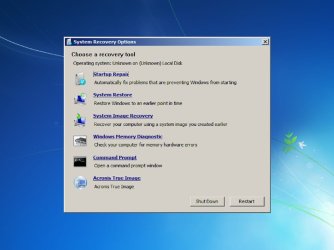
winre_pic.jpg

Get the cd\sources\boot.wim file from the System repair CD and copy into a directory on your HDD. example: copy d:\sources\boot.wim c:\work\boot.wim.
Run Acronis WinPE ISO builder to add Acronis files to this file. When it completes, you should have new file. example: c:\work\AcronisMedia.wim. Delete the c:\work\boot.wim file and rename the AcronisMedia.wim to boot.wim. Next mount the image file in c:\work\mount. Example:

Dism /Mount-Wim /WimFile:C:\work\boot.wim /index:1 /MountDir:C:\work\mount

all on one line.
Then in the mounted image file goto c:\work\mount\sources\recovery and make a new directory called Tools then in the
C:\work\mount\sources\recovery\tools directory make a new file called WinREConfig.xml
Use notepad and quotes to do this

------------------------------------------------------------------------------------------

<Recovery><RecoveryTools><RelativeFilePath>..\..\..\Program Files\Acronis\TrueImageHome\TrueImage_Starter.exe</RelativeFilePath></RecoveryTools></Recovery>

------------------------------------------------------------------------------------------

I write this all on one line because sometimes it doesn't work if the enter key is used.
You can install ONE tool to the winre.wim. I like the acronis because you don't have to set location of factory file and you can save your image.tib files to any drive.
If you plan to use on a recovery partition on you HDD, get a copy of
c:\work\mount\windows\system32\recovery\ReAgent.xml and save to another location for later.
Then unmount the image file.

Dism /Unmount-Wim /MountDir:C:\work\mount /Commit

Once it complete you should have a new boot.wim file to put back into the CD or flash drive. Finished

I use diskpart to make a partition on my HDD that I call Recovery and also use for boot partition so that it is the active partition. In that partition I make a directory called Recovery and in that recovery directory I make another called WindowsRE then copy this boot.wim to it and name it WinRE.WIM.

%SystemRoot%/Recovery\WindowsRE\WinRE.wim

%SystemRoot% = Drive letter of you Recovery partition. Then before I make an image of the partition that windows is installed to, make sure you DO NOT have a
%Root%\Recovery directory and make sure that in
%Root%\Windows\system32\recovery\ that there is NOT a WinRE.wim file. This will keep the restored image from messing up the F8 key. If you upgrade your c partition after the first time this will Not be a problem as the file and directory are NOT on the C partition.

After you have your recovery partition setup you will have to run ReAgentc.exe It seems like alot of people have problems with this and this is part of reason to remove the WinRe.wim and the Recovery directory from the C Drive. The ReAgentc.exe file has to be ran from %DriveLetter%\windows\system32 When you boot computer with a WinPE the drive letter can be different from expected. It might be D: rather than C:
Use NotePad and look and HDD to see what the drive letters are then

?1\Windows\System32\Reagentc.exe /setreimage /path ?2:\Recovery\WindowsRE /target ?1:\Windows

?1 = drive partition of recovery ?2= drive partition of windows

Example:

c:\windows\system32\reagentc /setreimage /path d:\recovery\windowsre /target c:\windows

You should see something that said success. Reboot and try the F8 key at boot and see your Acronis at bottom of the Recovery Con.
If you have problems, just copy that little file: ReAgent.xml that you saved to
C:\windows\system32\recovery and overwrite the old file and then run Reagentc again.

Have fun TJG :)
 

My Computer My Computer

At a glance

Windows 7 Home Premium 32bitsIntel Pentium 4 521DDR2 4096MBytesATI Radeon HD 2400 Series
Computer Manufacturer/Model Number
Dell Dimension E510
OS
Windows 7 Home Premium 32bits
CPU
Intel Pentium 4 521
Motherboard
Dell Inc. ORD203
Memory
DDR2 4096MBytes
Graphics Card(s)
ATI Radeon HD 2400 Series
Sound Card
On-Board Sigma Tel High Definition Audio
Monitor(s) Displays
Dell ST2210 1920x1080x60 hertz
Hard Drives
320 SATA
500 SATA
PSU
Antec 430 Watts
Case
Dell
Cooling
Standard Fans
What about x86 vs x64???

I finally get my USB stick booting, and upon "Loading..." get a screen entitled Windows Boot Manager, saying that Windows can't boot, it is missing snapman.sys. I'm aware that this is Acronis' Snapshot Manager driver, used to deal with open files when Acronis is making a backup from within the running Windows environment. I look at my boot.wim (made from AcronisMedia.wim of course) and it does not have a snapman.sys file in system32\drivers. So I think I will add snapman.sys and maybe it needs snapapi.dll also which is located in Program Files (x86)\Common Files\Acronis\SnapAPI.

Hmm, wait. My boot.wim doesn't *have* the Program Files (x86)\ folder, only Program Files\ i.e. for 64-bit programs. So I look in the ATI manual again and it says

To add Acronis Plug-in to WinPE 2.x or 3.0 ISO:
1. Do one of the following:

When adding the plug-in to the existing Win PE 2 or PE 3 ISO, unpack all files of your Win PE 2 or 3 ISO to a separate folder on the hard disk.

When creating a new PE 2 or 3 ISO:

select from the Start menu Microsoft Windows AIK → Windows PE Tools Command Prompt

run the copype.cmd script to create a folder with Windows PE files. For example, from a command prompt, type:

cd Program Files\Windows AIK\Tools\PETools\
copype <arch> <destination>

Where <arch> is the hardware architecture (can be x86, amd64, or ia64, but Acronis supports x86 only)
and <destination> is a path to the local folder. For example,

copype x86 c:\winpe_x86

2. Select Acronis → Plus Pack for Acronis True Image Home 2010 → Acronis WinPE ISO Builder from
the Start menu.
3. Specify path to the folder WinPE\ISO, e.g. c:\winpe_x86\ISO.
.
.
.
So it appears that since I have started with a boot.wim/winpe.wim from my x64 Windows 7, that Acronis didn't install properly, and won't work?

I only have 64-bit Windows here--do I need to DL a W7 x86 repair disc and use that as my base instead? Guess I will look for one, since I doubt there is any way to create a 32-bit Repair Disc from 64-bit W7HP?
:shock:

EDIT: I do have a W7HP 32-bit Upgrade disc here, that came together with the 64-bit I bought, and it has a boot.wim inside, though not the one I need. So will have to download the <200Mb iso file and start-over again. Stay tuned...
 

My Computer My Computer

At a glance

Windows 7 Professional 64bitIntel Core i7 4600M @ 2.90GHz16.0GB Dual-Channel DDR3 @ 797MHz (11-11-11-28)Intel HD Graphics 4600 (Dell) 2048MB ATI AMD ...
Computer type
Laptop
Computer Manufacturer/Model Number
Dell Latitude E6540 Laptop
OS
Windows 7 Professional 64bit
CPU
Intel Core i7 4600M @ 2.90GHz
Motherboard
Dell Inc. 0CYT5F (SOCKET 0)
Memory
16.0GB Dual-Channel DDR3 @ 797MHz (11-11-11-28)
Graphics Card(s)
Intel HD Graphics 4600 (Dell) 2048MB ATI AMD Radeon HD 8790M
Sound Card
Realtek High Definition Audio
Monitor(s) Displays
HP ZR30w (2560x1600@60Hz)
Hard Drives
256GB LITEONIT LMT-256M6M-41 mm SATA (SSD)
1TB Samsung SSD 860 EVO mSATA SATA (SSD)
2TB USB 3.0 USB Device
115GB SanDisk Ultra Fit USB
Other Info
Multiple Dell E-Port Plus II Port Replicator/Docking Stations 0Y72NH USB 3.0 + 130W AC Adapters
To make a WinRE.WIM without WAIK.

View attachment 175155

Have fun TJG :)
I appreciate your post TJG--it is a thing of beauty.

With all due respect however, that does NOT look like fun!!! :confused: :D

I will try it after I get the basic boot thing working. In fact, it's still not entirely clear to me what I'm going to have when I do finally get it to boot (cuz I might've thought it *was* the screen you've shown above). :o
 

My Computer My Computer

At a glance

Windows 7 Professional 64bitIntel Core i7 4600M @ 2.90GHz16.0GB Dual-Channel DDR3 @ 797MHz (11-11-11-28)Intel HD Graphics 4600 (Dell) 2048MB ATI AMD ...
Computer type
Laptop
Computer Manufacturer/Model Number
Dell Latitude E6540 Laptop
OS
Windows 7 Professional 64bit
CPU
Intel Core i7 4600M @ 2.90GHz
Motherboard
Dell Inc. 0CYT5F (SOCKET 0)
Memory
16.0GB Dual-Channel DDR3 @ 797MHz (11-11-11-28)
Graphics Card(s)
Intel HD Graphics 4600 (Dell) 2048MB ATI AMD Radeon HD 8790M
Sound Card
Realtek High Definition Audio
Monitor(s) Displays
HP ZR30w (2560x1600@60Hz)
Hard Drives
256GB LITEONIT LMT-256M6M-41 mm SATA (SSD)
1TB Samsung SSD 860 EVO mSATA SATA (SSD)
2TB USB 3.0 USB Device
115GB SanDisk Ultra Fit USB
Other Info
Multiple Dell E-Port Plus II Port Replicator/Docking Stations 0Y72NH USB 3.0 + 130W AC Adapters
With all due respect however, that does NOT look like fun!!! :confused: :D
Since I had to start-over anyway, having DL'ed a 32-bit Repair disc, I quickly realized that making a Recovery disc was even easier than a nu2menu disc! :o

And as I suspected Acronis likes the 32-bit Repair boot.wim just fine, and it boots. HOWEVER it immediately points-out to me that I'm using a 32-bit Repair disc on a 64-bit OS and it wants me to Quit.

Well, I was able to click-around and thru these warnings, and eventually get to the pretty menu with Acronis True Image at the bottom, so I launched it and it works. But there are a couple of issues with it:

1. I can't see my network drives. Even the Linus boot disc shows my network drives.

2. There's no change in the GUI ie. I was hoping for a higher-res display.

Point 2. is trivial but point 1 is serious. I wonder why it doesn't see my NIC, or how to get that aspect working.

I'll go back now and make the nu2menu disc and see if it works any differently.
 

My Computer My Computer

At a glance

Windows 7 Professional 64bitIntel Core i7 4600M @ 2.90GHz16.0GB Dual-Channel DDR3 @ 797MHz (11-11-11-28)Intel HD Graphics 4600 (Dell) 2048MB ATI AMD ...
Computer type
Laptop
Computer Manufacturer/Model Number
Dell Latitude E6540 Laptop
OS
Windows 7 Professional 64bit
CPU
Intel Core i7 4600M @ 2.90GHz
Motherboard
Dell Inc. 0CYT5F (SOCKET 0)
Memory
16.0GB Dual-Channel DDR3 @ 797MHz (11-11-11-28)
Graphics Card(s)
Intel HD Graphics 4600 (Dell) 2048MB ATI AMD Radeon HD 8790M
Sound Card
Realtek High Definition Audio
Monitor(s) Displays
HP ZR30w (2560x1600@60Hz)
Hard Drives
256GB LITEONIT LMT-256M6M-41 mm SATA (SSD)
1TB Samsung SSD 860 EVO mSATA SATA (SSD)
2TB USB 3.0 USB Device
115GB SanDisk Ultra Fit USB
Other Info
Multiple Dell E-Port Plus II Port Replicator/Docking Stations 0Y72NH USB 3.0 + 130W AC Adapters
maxseven
From the quote in #34, I think we are doing it different. I just run Acronis WinPE Builder and select the boot.wim file itself.
When it run, it will mount, save files, and unmount.
I don't do this:

When adding the plug-in to the existing Win PE 2 or PE 3 ISO, unpack all files of your Win PE 2 or 3 ISO to a separate folder on the hard disk.

I just tried the WinRE.wim from a 64bit disk and installed Acronis and it did have the missing files you said were not there.
I also run the Acronis WinPE ISO Builder on the .wim file first before I mount it. And yes the pic is what you will end up with, hopefully.
TJG :)
 

My Computer My Computer

At a glance

Windows 7 Home Premium 32bitsIntel Pentium 4 521DDR2 4096MBytesATI Radeon HD 2400 Series
Computer Manufacturer/Model Number
Dell Dimension E510
OS
Windows 7 Home Premium 32bits
CPU
Intel Pentium 4 521
Motherboard
Dell Inc. ORD203
Memory
DDR2 4096MBytes
Graphics Card(s)
ATI Radeon HD 2400 Series
Sound Card
On-Board Sigma Tel High Definition Audio
Monitor(s) Displays
Dell ST2210 1920x1080x60 hertz
Hard Drives
320 SATA
500 SATA
PSU
Antec 430 Watts
Case
Dell
Cooling
Standard Fans
maxseven
From the quote in #34, I think we are doing it different. I just run Acronis WinPE Builder and select the boot.wim file itself.
When it run, it will mount, save files, and unmount.
I don't do this:

When adding the plug-in to the existing Win PE 2 or PE 3 ISO, unpack all files of your Win PE 2 or 3 ISO to a separate folder on the hard disk.

I just tried the WinRE.wim from a 64bit disk and installed Acronis and it did have the missing files you said were not there.
I also run the Acronis WinPE ISO Builder on the .wim file first before I mount it. And yes the pic is what you will end up with, hopefully.
TJG :)
I confused you--I don't use the Acronis procedure, I use yours, to the letter. I was just citing their statement about "x86 only" from their User Guide.

But now you have me confused when you say it works w/your 64-bit Repair disc. I may have to try again.

But I have SUCCESS with both the RE and the original nu2menu procedures, after DL'ing the 32-bit Repair disc off'n the internet! Unfortunately, neither gives me an Acronis that can see my network.

If you have any ideas about that I'd appreciate it, cuz otherwise I have to stick with the Linux boot method...
 

My Computer My Computer

At a glance

Windows 7 Professional 64bitIntel Core i7 4600M @ 2.90GHz16.0GB Dual-Channel DDR3 @ 797MHz (11-11-11-28)Intel HD Graphics 4600 (Dell) 2048MB ATI AMD ...
Computer type
Laptop
Computer Manufacturer/Model Number
Dell Latitude E6540 Laptop
OS
Windows 7 Professional 64bit
CPU
Intel Core i7 4600M @ 2.90GHz
Motherboard
Dell Inc. 0CYT5F (SOCKET 0)
Memory
16.0GB Dual-Channel DDR3 @ 797MHz (11-11-11-28)
Graphics Card(s)
Intel HD Graphics 4600 (Dell) 2048MB ATI AMD Radeon HD 8790M
Sound Card
Realtek High Definition Audio
Monitor(s) Displays
HP ZR30w (2560x1600@60Hz)
Hard Drives
256GB LITEONIT LMT-256M6M-41 mm SATA (SSD)
1TB Samsung SSD 860 EVO mSATA SATA (SSD)
2TB USB 3.0 USB Device
115GB SanDisk Ultra Fit USB
Other Info
Multiple Dell E-Port Plus II Port Replicator/Docking Stations 0Y72NH USB 3.0 + 130W AC Adapters
When I said it worked, I got the winre.wim from my win7 64 disc and ran acronis on it to see if snapman files were loaded to it. I would have to break down my system and install my win 7 64 bit drive to test it and haven't did that. I did see a big difference in the files for the 64 bit as to 32 bit winre. Might have to give it a try later.
TJG
 

My Computer My Computer

At a glance

Windows 7 Home Premium 32bitsIntel Pentium 4 521DDR2 4096MBytesATI Radeon HD 2400 Series
Computer Manufacturer/Model Number
Dell Dimension E510
OS
Windows 7 Home Premium 32bits
CPU
Intel Pentium 4 521
Motherboard
Dell Inc. ORD203
Memory
DDR2 4096MBytes
Graphics Card(s)
ATI Radeon HD 2400 Series
Sound Card
On-Board Sigma Tel High Definition Audio
Monitor(s) Displays
Dell ST2210 1920x1080x60 hertz
Hard Drives
320 SATA
500 SATA
PSU
Antec 430 Watts
Case
Dell
Cooling
Standard Fans
No joy I'm afraid. I was only able to get the nu2menu method to work with a 32-bit Repair Disc, and in the end Acronis doesn't see my network. And the Recovery menu method worked/booted too, though the Repair aspect doesn't work with my 64-bit PC, and once again Acronis didn't see my network, nor even does it offer a "Network Settings" selection in Options, which it is supposed to. Very bizarre. Nothing special about this PC except that it has an Nvidia chipset and nvidia ethernet. I'm surprised that Windows doesn't have native drivers for it, especially given that Acronis' Linux rescue disk works just fine with the network.

Not a good day here--I tried also the Acronis BartPE with PEBuilder, and after realizing PEBuilder doesn't work w/64-bit W7, I instead made a disc on a 32-bit XP machine I have here. That method got a little past the "Windowsxp" screen and BSODs.

Thanks anyway TLG, I learned a few new tricks in the last 24 hours! :cool:
 

My Computer My Computer

At a glance

Windows 7 Professional 64bitIntel Core i7 4600M @ 2.90GHz16.0GB Dual-Channel DDR3 @ 797MHz (11-11-11-28)Intel HD Graphics 4600 (Dell) 2048MB ATI AMD ...
Computer type
Laptop
Computer Manufacturer/Model Number
Dell Latitude E6540 Laptop
OS
Windows 7 Professional 64bit
CPU
Intel Core i7 4600M @ 2.90GHz
Motherboard
Dell Inc. 0CYT5F (SOCKET 0)
Memory
16.0GB Dual-Channel DDR3 @ 797MHz (11-11-11-28)
Graphics Card(s)
Intel HD Graphics 4600 (Dell) 2048MB ATI AMD Radeon HD 8790M
Sound Card
Realtek High Definition Audio
Monitor(s) Displays
HP ZR30w (2560x1600@60Hz)
Hard Drives
256GB LITEONIT LMT-256M6M-41 mm SATA (SSD)
1TB Samsung SSD 860 EVO mSATA SATA (SSD)
2TB USB 3.0 USB Device
115GB SanDisk Ultra Fit USB
Other Info
Multiple Dell E-Port Plus II Port Replicator/Docking Stations 0Y72NH USB 3.0 + 130W AC Adapters
Back
Top
