
Activate Windows 7 by Phone

How to Activate Windows 7 by Phone

   Information
Activation is the required process of ensuring that Windows 7 on your computer is genuine and used according to the Microsoft Software License Terms.

If you are unable to activate Windows 7 online or do not have the internet, then this will show you how to activate Windows 7 by phone instead with your entered product key number.
   Note
Genuine Windows is a recurring process that checks your product key to ensure it's being used with the hardware it was paired with during activation. If the product key is found to be non-genuine, or not valid, it's likely that the product key is either being used on another computer or is counterfeit. Try doing the Diagnostics and Validate Windows options. For more information about genuine Windows, go to the genuine Windows website for FAQ's.

  • A Windows 7 product key number can only be used to activate the same edition of Windows 7 that it was for, and cannot be used to activate a different edition of Windows 7.
  • A Family Pack Windows 7 product key number can be used to activate the Family Pack Windows 7 copy on up to 3 computers at any one time.
  • A OEM Windows 7 product key number can only be used to activate a OEM Windows 7 copy on the same computer that it was first activated on, and no other computer.
  • A retail Windows 7 product key number can be used to activate a retail Windows 7 copy on any computer, but only on up to one computer at any one time.
You might have to activate Windows 7 again if:
  • You uninstall Windows 7 on one computer and then install it on another. During installation, enter the product key that came with Windows. If automatic activation fails, follow the instructions that walk you through activating Windows by phone. You will have 30 days to activate Windows.
  • You make a significant hardware change to your computer, such as upgrading the hard disk and memory at the same time. If a major hardware change requires activating Windows again, you will be notified and will have three days to activate Windows.
  • You reformat your hard disk. Reformatting erases your activation status. In this case, you’ll have 30 days to activate Windows again.
  • A virus or malware infects your computer and deletes your activation status.

   Warning

  • You must activate Windows 7 within the 30 days grace period after installation before it expires. When Windows 7 is activated, you'll be able to use every feature of Windows 7.
  • If you chose to Automatically activate Windows when I'm online when you set up your computer, automatic activation begins trying to activate your copy of Windows 7 three days after you log on for the first time. See METHOD ONE below.
  • If you install Windows 7 on a second computer, you must buy an additional product key number to activate the second installation to continue using Windows 7 on both computers.
What happens if you don't activate Windows 7?


Despite what you may have read elsewhere, there's no "reduced functionality mode" in Windows 7 like there was in Vista. If the 30-day trial or activation key expires:
  • Your desktop background goes black. You can change it, but every 60 minutes, it will return to black until you activate Windows.
  • You will have a "This copy of windows is not genuine" watermark on the bottom right corner of your desktop.
  • You will get a notification balloon stating that you may be a victim of software piracy.
  • You will be prompted to activate Windows every time you log in.
  • You will receive periodic reminders to activate Windows.
  • Windows Updates will be limited, but you will still be able to get critical security updates. However, access to optional updates or benefits available exclusively to genuine Windows customers, such as Microsoft Security Essentials, might be restricted.
See also: Genuine Windows: frequently asked questions - Microsoft Windows


Here's How:
NOTE: This is only for the retail version of Windows 7.
1. If Online Activation Failed First
NOTE: This is if you have tried to activate Windows 7 online and it failed. Otherwise, go to step 2.
A) Select the Use the automated phone system to activate option.

B) Go to step 3.
2. To Activate by Phone
A) Open the Start Menu, and type slui.exe 4 and press Enter.
3. If prompted by UAC, then click on Yes.

4. Click on the drop down menu and select the nearest location to you for a toll free number to call, then click on the Next button. (See screenshot below)
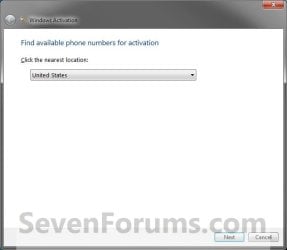
Step1.jpg
5. A local phone number should apear under the Step 1 section with a set of installation ID numbers generated by Windows and displayed on your screen under the 1 to 9 in the Step 2 section. (See screenshot below)

   Tip
If needed, Microsoft Activation Centers Worldwide Telephone Numbers lists toll and toll-free telephone numbers for worldwide Microsoft activation centers that you can call to get your Windows 7 activated as well.

Step2.jpg
6. Call the "Microsoft activation phone number" (Under Step 1 in screenshot above).

7. At first, the activation line will be automated, so you will be asked to enter or speak the installation ID numbers displayed on your screen into the phone. (See screenshot below step 5)

   Tip
If you want to speak to an activation operator and bypass the automated service, then do nothing instead until you are transferred automatically to an available operator.


8. If Automated Service is Successful
NOTE: Usually this is not always successful.
A) The automated service will issue you a confirmation ID number.
NOTE: Have a pen and paper handy to write these numbers down.

B) Go to step 10.
9. If Automated Service is Unsuccessful
A) If the automated activation service informs you that it was unsuccessful and cannot help you with activation, then STAY ON THE LINE and your call will be transferred to an activation operator who will assist you in activating your copy of Windows 7. If you get hanged up on while waiting, then phone back, but this time DO NOT respond when the ansafone requests which service you require (twice). This puts you in the queue to speak to an operator, and doesn't seem to time out so quickly. The operator will give you a confirmation ID number if they agree your copy of Windows 7 is legitimate.
NOTE: Just explain to the operator your situation and what you did to require activation. (EX: hardware upgrade, installed Windows 7 on a new computer after uninstalling it from the old one, etc...)
10. Type in the confirmation ID number given to you into the Step 3 section to be able to activate Windows 7, and click on Next. (See screenshot below step 5)
NOTE: You will get these numbers from the phone automated system or operator after they have confirmed the numbers you gave them in step 8 above.

11. If Activation is Successful
A) When you get the Activation was successful window, click on Close to finish. (See screenshot below)
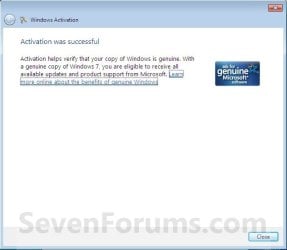
Step3.jpg
12. If Activation Failed
A) If you got an activation error code, then look it up at the link below to see what it means.
Activation Error Codes


That's it,
Shawn


Last edited:
The fact that you purchased the Windows package on eBay is not a good sign - well over 50% of such packages are counterfeit.

To check, please post an MGADiag report, and we'll take a look.

Please followthis tutorial and post an MGADiag report - then we can see what the problem is.


http://www.sevenforums.com/windows-updates-activation/234159-windows-genuine-activation-issue-posting-instructions.html


Ignore errors produced when clicking on theCopy button - they simply mean that the tool could not create the backup filesfor some reason. The data is still copied to the clipboard for pasting to yourresponse.


Please also statethe Version and Edition of Windows quoted on your COA sticker (if you have one)on the case of your machine (or inside the battery compartment), but do NOTquote the Key on the sticker!

http://www.microsoft.com/en-us/howtotell/Hardware.aspx


My Computer My Computer

Computer type
Laptop
Computer Manufacturer/Model Number
Asus K52F or Lenovo B51-80
OS
Win 7 x64 Home Premium (and x86 VirtualBox VM)/Win10
CPU
i3 370M/i7 6500U
Motherboard
Asus/Lenovo
Memory
8GB - finally :)/8GB
Graphics Card(s)
it's an i3, dude!/dual Intel&nVidia
Sound Card
onboard
Monitor(s) Displays
15.6" built-in
Screen Resolution
1366x768/1920x1080
Hard Drives
750GB Seagate internal
Sundry external drives attached to other computers on the local network
1TB SSD on the Lenovo
PSU
n/a
Internet Speed
as much as I can get - usually on a dongle/phone, so <1MB/s
Antivirus
MSE/Defender
Browser
IE11/12/Edge/Chrome/FF(if I must)
I hope it turns out well.

I will wait until the disk comes in the mail then try to re-install Win-7 or put XP back then upgrade, etc., then activate it with the proper key and by phone. The guy e-mailed me confused so at least he is trying to resolve the situation and not robbing me. My error in thinking, while being distracted by stuff, made me do something I never do; that is install software when my mind was not on the Job :)

Hopefully all it will take is to load the disk and follow the prompts, enter the proper product key and go on from there. Otherwise it is just a time consuming task of putting XP back on and go from here. Seems like a simple job can be muddled into a confused mess when one's mind of off day dreaming.
 

My Computer My Computer

Computer type
PC/Desktop
Computer Manufacturer/Model Number
eMachines EL 1333G-01W
OS
Microsoft Windows 7 Home Premium 64-bit 7601 Multiprocessor Free Service Pack 1
CPU
AMD Athlon(tm) Processor 2850e
Motherboard
eMachines WMCP61M
Memory
4.00 GB
Graphics Card(s)
NVIDIA GeForce 6150SE nForce 430
Sound Card
Realtek High Definition Audio
Monitor(s) Displays
Samsung 730B
Screen Resolution
1280 x 1024 x 32 bits (4294967296 colors) @ 60 Hz
Hard Drives
(1) ST332041 8AS SCSI Disk Device (2) Generic- Compact Flash USB Device (3) Multiple Flash Reader USB Device
Hum, I must misunderstand Microsoft upgrades. The guy who sold me the product key advises me to re-install Windows 7 using my upgrade disk, then enter his product key when it asks for it during that process, then after the re-install use the phone method to activate it. Sounds right to me, but I thought the product key was integral to the OEM disks. I guess as long as the product key is validated by Microsoft during re-installation it will work okay? Just asking :) because the COA on the sticker looks okay.
 

My Computer My Computer

Computer type
PC/Desktop
Computer Manufacturer/Model Number
eMachines EL 1333G-01W
OS
Microsoft Windows 7 Home Premium 64-bit 7601 Multiprocessor Free Service Pack 1
CPU
AMD Athlon(tm) Processor 2850e
Motherboard
eMachines WMCP61M
Memory
4.00 GB
Graphics Card(s)
NVIDIA GeForce 6150SE nForce 430
Sound Card
Realtek High Definition Audio
Monitor(s) Displays
Samsung 730B
Screen Resolution
1280 x 1024 x 32 bits (4294967296 colors) @ 60 Hz
Hard Drives
(1) ST332041 8AS SCSI Disk Device (2) Generic- Compact Flash USB Device (3) Multiple Flash Reader USB Device

My Computer My Computer

Computer type
PC/Desktop
Computer Manufacturer/Model Number
Self built custom
OS
64-bit Windows 11 Pro for Workstations
CPU
Intel i7-8700K OC'd to 5 GHz
Motherboard
ASUS ROG Maximus XI Formula Z390
Memory
64 GB (4x16GB) G.SKILL TridentZ RGB DDR4 3600 MHz
Graphics Card(s)
ASUS ROG-STRIX-GTX1080TI-O11G-GAMING
Sound Card
Integrated
Monitor(s) Displays
2 x Samsung Odyssey G7 27"
Screen Resolution
2560x1440
Hard Drives
1TB Samsung 990 PRO M.2,
4TB Samsung 990 PRO PRO M.2,
TerraMaster F8 SSD Plus NAS
PSU
Seasonic Prime Titanium 850W
Case
Thermaltake Core P3
Cooling
Corsair Hydro H115i
Keyboard
Logitech wireless K800
Mouse
Logitech MX Master 4
Internet Speed
2 Gb/s Download and 100 Mb/s Upload
Antivirus
Malwarebyte Anti-Malware Premium
Browser
Google Chrome
Other Info
Logitech Z625 speaker system,
Logitech BRIO 4K Pro webcam,
HP Color LaserJet Pro MFP M477fdn,
APC SMART-UPS RT 1000 XL - SURT1000XLI,
Galaxy S23 Plus phone
Ah, ok. I misunderstood as well. There's a special way you have to do a clean install with an upgrade copy of Windows 7 before it will activate.

http://www.sevenforums.com/tutorials/31402-clean-install-upgrade-windows-7-version.html

Thanks, that will do better. This should be the end of it and my daughter can be happy and me too...... The next upgrade here will be a new PC sometime down the road so installing will not be a problem. Thanks again

Jeff (aka dustymars)
 

My Computer My Computer

Computer type
PC/Desktop
Computer Manufacturer/Model Number
eMachines EL 1333G-01W
OS
Microsoft Windows 7 Home Premium 64-bit 7601 Multiprocessor Free Service Pack 1
CPU
AMD Athlon(tm) Processor 2850e
Motherboard
eMachines WMCP61M
Memory
4.00 GB
Graphics Card(s)
NVIDIA GeForce 6150SE nForce 430
Sound Card
Realtek High Definition Audio
Monitor(s) Displays
Samsung 730B
Screen Resolution
1280 x 1024 x 32 bits (4294967296 colors) @ 60 Hz
Hard Drives
(1) ST332041 8AS SCSI Disk Device (2) Generic- Compact Flash USB Device (3) Multiple Flash Reader USB Device
You're most welcome Jeff. :)
 

My Computer My Computer

Computer type
PC/Desktop
Computer Manufacturer/Model Number
Self built custom
OS
64-bit Windows 11 Pro for Workstations
CPU
Intel i7-8700K OC'd to 5 GHz
Motherboard
ASUS ROG Maximus XI Formula Z390
Memory
64 GB (4x16GB) G.SKILL TridentZ RGB DDR4 3600 MHz
Graphics Card(s)
ASUS ROG-STRIX-GTX1080TI-O11G-GAMING
Sound Card
Integrated
Monitor(s) Displays
2 x Samsung Odyssey G7 27"
Screen Resolution
2560x1440
Hard Drives
1TB Samsung 990 PRO M.2,
4TB Samsung 990 PRO PRO M.2,
TerraMaster F8 SSD Plus NAS
PSU
Seasonic Prime Titanium 850W
Case
Thermaltake Core P3
Cooling
Corsair Hydro H115i
Keyboard
Logitech wireless K800
Mouse
Logitech MX Master 4
Internet Speed
2 Gb/s Download and 100 Mb/s Upload
Antivirus
Malwarebyte Anti-Malware Premium
Browser
Google Chrome
Other Info
Logitech Z625 speaker system,
Logitech BRIO 4K Pro webcam,
HP Color LaserJet Pro MFP M477fdn,
APC SMART-UPS RT 1000 XL - SURT1000XLI,
Galaxy S23 Plus phone
Wow, after attempts with no results entering the product key it just would not come up valid. So, as an old naive nave I thought it interesting to ask for a refund. Well, not that naive, but to my surprise and the guy used eBay’s resolution process and immediately refunded my money! We find honest people like this guy only rarely these days. He will most certainly go in my good seller list.

So, guess I’ll just wait fro Christmas to get her a Windows 7 upgrade; that works. Can you imagine how long it takes to re-install Windows XP. :)

So, thanks for the advice, something did not work so it was just an education; after 53 years doing computers (hardware and software) I learned something new every day.
 

My Computer My Computer

Computer type
PC/Desktop
Computer Manufacturer/Model Number
eMachines EL 1333G-01W
OS
Microsoft Windows 7 Home Premium 64-bit 7601 Multiprocessor Free Service Pack 1
CPU
AMD Athlon(tm) Processor 2850e
Motherboard
eMachines WMCP61M
Memory
4.00 GB
Graphics Card(s)
NVIDIA GeForce 6150SE nForce 430
Sound Card
Realtek High Definition Audio
Monitor(s) Displays
Samsung 730B
Screen Resolution
1280 x 1024 x 32 bits (4294967296 colors) @ 60 Hz
Hard Drives
(1) ST332041 8AS SCSI Disk Device (2) Generic- Compact Flash USB Device (3) Multiple Flash Reader USB Device
That's great news. Yeah, Windows is box of surprises. Always something new. :)
 

My Computer My Computer

Computer type
PC/Desktop
Computer Manufacturer/Model Number
Self built custom
OS
64-bit Windows 11 Pro for Workstations
CPU
Intel i7-8700K OC'd to 5 GHz
Motherboard
ASUS ROG Maximus XI Formula Z390
Memory
64 GB (4x16GB) G.SKILL TridentZ RGB DDR4 3600 MHz
Graphics Card(s)
ASUS ROG-STRIX-GTX1080TI-O11G-GAMING
Sound Card
Integrated
Monitor(s) Displays
2 x Samsung Odyssey G7 27"
Screen Resolution
2560x1440
Hard Drives
1TB Samsung 990 PRO M.2,
4TB Samsung 990 PRO PRO M.2,
TerraMaster F8 SSD Plus NAS
PSU
Seasonic Prime Titanium 850W
Case
Thermaltake Core P3
Cooling
Corsair Hydro H115i
Keyboard
Logitech wireless K800
Mouse
Logitech MX Master 4
Internet Speed
2 Gb/s Download and 100 Mb/s Upload
Antivirus
Malwarebyte Anti-Malware Premium
Browser
Google Chrome
Other Info
Logitech Z625 speaker system,
Logitech BRIO 4K Pro webcam,
HP Color LaserJet Pro MFP M477fdn,
APC SMART-UPS RT 1000 XL - SURT1000XLI,
Galaxy S23 Plus phone
Activation by phone - can I use same confirmation id on 2 discs?

Hi there,

I just bought a copy of Windows 7 Professional DVD, from a friend, who is an ex-microsoft employee. It
has a "company store purchase" sticker on it. Not sure if that makes it a retail version or other? I got it
brand new, sealed.

I want to put this (64bit version) onto several hard discs in the same PC. None of these discs will ever
connect to the internet, so it'll be the phone activation route I'll take.

My first question: is this allowed for my version of Windows 7? Different installs on multiple discs in the
same PC?

Second question: after I install on disc 1, I'll go through the phone activation process and receive a
"confirmation id" to activate this disc. When I then go to install on disc 2,3,4,5,... will I be able to just
reuse the same confirmation id, or will I need to do a new phone activation for each disc?

Many thanks for any help!
 

My Computer My Computer

Computer type
PC/Desktop
Computer Manufacturer/Model Number
Asus
OS
Windows 7 64bit
Hello Shanex, and welcome to Seven Forums.

Sorry, but no. You are only allowed one activation per product key at the same time. You cannot have multiple installations activated with the same key even if they are on the same computer. That would against the EULA, considered to be theft, and could get your product key invalidated.
 

My Computer My Computer

Computer type
PC/Desktop
Computer Manufacturer/Model Number
Self built custom
OS
64-bit Windows 11 Pro for Workstations
CPU
Intel i7-8700K OC'd to 5 GHz
Motherboard
ASUS ROG Maximus XI Formula Z390
Memory
64 GB (4x16GB) G.SKILL TridentZ RGB DDR4 3600 MHz
Graphics Card(s)
ASUS ROG-STRIX-GTX1080TI-O11G-GAMING
Sound Card
Integrated
Monitor(s) Displays
2 x Samsung Odyssey G7 27"
Screen Resolution
2560x1440
Hard Drives
1TB Samsung 990 PRO M.2,
4TB Samsung 990 PRO PRO M.2,
TerraMaster F8 SSD Plus NAS
PSU
Seasonic Prime Titanium 850W
Case
Thermaltake Core P3
Cooling
Corsair Hydro H115i
Keyboard
Logitech wireless K800
Mouse
Logitech MX Master 4
Internet Speed
2 Gb/s Download and 100 Mb/s Upload
Antivirus
Malwarebyte Anti-Malware Premium
Browser
Google Chrome
Other Info
Logitech Z625 speaker system,
Logitech BRIO 4K Pro webcam,
HP Color LaserJet Pro MFP M477fdn,
APC SMART-UPS RT 1000 XL - SURT1000XLI,
Galaxy S23 Plus phone
Thanks Brink, I think I understand. So if multiple discs have the OS on them, but only one disc is ever powered up at a time, is this still a breach?

Thx!
 

My Computer My Computer

Computer type
PC/Desktop
Computer Manufacturer/Model Number
Asus
OS
Windows 7 64bit
Yep, that's not allowed either. Only one installation can be activated with the key. All other installations will either need a different key, or remain unactivated.
 

My Computer My Computer

Computer type
PC/Desktop
Computer Manufacturer/Model Number
Self built custom
OS
64-bit Windows 11 Pro for Workstations
CPU
Intel i7-8700K OC'd to 5 GHz
Motherboard
ASUS ROG Maximus XI Formula Z390
Memory
64 GB (4x16GB) G.SKILL TridentZ RGB DDR4 3600 MHz
Graphics Card(s)
ASUS ROG-STRIX-GTX1080TI-O11G-GAMING
Sound Card
Integrated
Monitor(s) Displays
2 x Samsung Odyssey G7 27"
Screen Resolution
2560x1440
Hard Drives
1TB Samsung 990 PRO M.2,
4TB Samsung 990 PRO PRO M.2,
TerraMaster F8 SSD Plus NAS
PSU
Seasonic Prime Titanium 850W
Case
Thermaltake Core P3
Cooling
Corsair Hydro H115i
Keyboard
Logitech wireless K800
Mouse
Logitech MX Master 4
Internet Speed
2 Gb/s Download and 100 Mb/s Upload
Antivirus
Malwarebyte Anti-Malware Premium
Browser
Google Chrome
Other Info
Logitech Z625 speaker system,
Logitech BRIO 4K Pro webcam,
HP Color LaserJet Pro MFP M477fdn,
APC SMART-UPS RT 1000 XL - SURT1000XLI,
Galaxy S23 Plus phone
So then if I installed Win7 on a disk, and that disk died, and I buy a new disk, I have to buy a new Win7 installation?
 

My Computer My Computer

Computer type
PC/Desktop
Computer Manufacturer/Model Number
Asus
OS
Windows 7 64bit
No. You would be able to install and activate it again on another hard drive since the other drive is dead, and the installation is technically no more.

Basically, if you want to activate the product key for a Windows 7 installation, the product key cannot currently be activated on any other installation, active or not. Any other activated installation with that same key would need to be formatted.
 

My Computer My Computer

Computer type
PC/Desktop
Computer Manufacturer/Model Number
Self built custom
OS
64-bit Windows 11 Pro for Workstations
CPU
Intel i7-8700K OC'd to 5 GHz
Motherboard
ASUS ROG Maximus XI Formula Z390
Memory
64 GB (4x16GB) G.SKILL TridentZ RGB DDR4 3600 MHz
Graphics Card(s)
ASUS ROG-STRIX-GTX1080TI-O11G-GAMING
Sound Card
Integrated
Monitor(s) Displays
2 x Samsung Odyssey G7 27"
Screen Resolution
2560x1440
Hard Drives
1TB Samsung 990 PRO M.2,
4TB Samsung 990 PRO PRO M.2,
TerraMaster F8 SSD Plus NAS
PSU
Seasonic Prime Titanium 850W
Case
Thermaltake Core P3
Cooling
Corsair Hydro H115i
Keyboard
Logitech wireless K800
Mouse
Logitech MX Master 4
Internet Speed
2 Gb/s Download and 100 Mb/s Upload
Antivirus
Malwarebyte Anti-Malware Premium
Browser
Google Chrome
Other Info
Logitech Z625 speaker system,
Logitech BRIO 4K Pro webcam,
HP Color LaserJet Pro MFP M477fdn,
APC SMART-UPS RT 1000 XL - SURT1000XLI,
Galaxy S23 Plus phone
Ok, but how does microsoft know that the first disk is truly dead? Like I said, I'm never going on the www with any of my disks? Sorry, I'm not trying to be awkward, I'm just curious as to how they actually can police this..
 

My Computer My Computer

Computer type
PC/Desktop
Computer Manufacturer/Model Number
Asus
OS
Windows 7 64bit
When you activate them, they will be kept track of on the Microsoft activation servers. If more than one installation shows activated with the same key often, then it's going to be pretty obvious something is wrong. They may then get red flagged and all be deactivated.

They'll know the other one is dead, when it no longer shows up after the key is activated on anther installation.
 

My Computer My Computer

Computer type
PC/Desktop
Computer Manufacturer/Model Number
Self built custom
OS
64-bit Windows 11 Pro for Workstations
CPU
Intel i7-8700K OC'd to 5 GHz
Motherboard
ASUS ROG Maximus XI Formula Z390
Memory
64 GB (4x16GB) G.SKILL TridentZ RGB DDR4 3600 MHz
Graphics Card(s)
ASUS ROG-STRIX-GTX1080TI-O11G-GAMING
Sound Card
Integrated
Monitor(s) Displays
2 x Samsung Odyssey G7 27"
Screen Resolution
2560x1440
Hard Drives
1TB Samsung 990 PRO M.2,
4TB Samsung 990 PRO PRO M.2,
TerraMaster F8 SSD Plus NAS
PSU
Seasonic Prime Titanium 850W
Case
Thermaltake Core P3
Cooling
Corsair Hydro H115i
Keyboard
Logitech wireless K800
Mouse
Logitech MX Master 4
Internet Speed
2 Gb/s Download and 100 Mb/s Upload
Antivirus
Malwarebyte Anti-Malware Premium
Browser
Google Chrome
Other Info
Logitech Z625 speaker system,
Logitech BRIO 4K Pro webcam,
HP Color LaserJet Pro MFP M477fdn,
APC SMART-UPS RT 1000 XL - SURT1000XLI,
Galaxy S23 Plus phone
Ok, thanks again. One other question: what exactly happens if you don't activate after the 30 days? I read that you just don't get windows updates anymore? Is that true?
 

My Computer My Computer

Computer type
PC/Desktop
Computer Manufacturer/Model Number
Asus
OS
Windows 7 64bit
I don't remember the full details, but you would have some features no longer work, and be constantly nagged to activate.
 

My Computer My Computer

Computer type
PC/Desktop
Computer Manufacturer/Model Number
Self built custom
OS
64-bit Windows 11 Pro for Workstations
CPU
Intel i7-8700K OC'd to 5 GHz
Motherboard
ASUS ROG Maximus XI Formula Z390
Memory
64 GB (4x16GB) G.SKILL TridentZ RGB DDR4 3600 MHz
Graphics Card(s)
ASUS ROG-STRIX-GTX1080TI-O11G-GAMING
Sound Card
Integrated
Monitor(s) Displays
2 x Samsung Odyssey G7 27"
Screen Resolution
2560x1440
Hard Drives
1TB Samsung 990 PRO M.2,
4TB Samsung 990 PRO PRO M.2,
TerraMaster F8 SSD Plus NAS
PSU
Seasonic Prime Titanium 850W
Case
Thermaltake Core P3
Cooling
Corsair Hydro H115i
Keyboard
Logitech wireless K800
Mouse
Logitech MX Master 4
Internet Speed
2 Gb/s Download and 100 Mb/s Upload
Antivirus
Malwarebyte Anti-Malware Premium
Browser
Google Chrome
Other Info
Logitech Z625 speaker system,
Logitech BRIO 4K Pro webcam,
HP Color LaserJet Pro MFP M477fdn,
APC SMART-UPS RT 1000 XL - SURT1000XLI,
Galaxy S23 Plus phone
Source: What happens to Windows 7 after the 30 day activation has expired? - Microsoft Community


What happens if you don’t Activate Windows?
If you choose not to activate Windows, the operating system will go into what is called Reduced Functional mode.

Meaning, certain functionality will be disabled. Certain software included with windows will not work.

Benefits you gain from activating:

- Access to all Windows Updates with confidence that your Windows software has the latest security and reliability enhancements from Microsoft.

*If you do not activate, you do not get security updates. This alone is why you should activate*

- Support for your software, including downloads reserved exclusively for genuine Windows software.
Image

A Windows 7 installation in Reduced functional mode (notice the watermark at the right hand corner).
If you don’t activate your Windows software
- You will be prompted every time you log in to Activate.
- You will receive periodic prompts to activate your software.
- Certain visual experiences will be disabled such as the Windows Aero Glass theme.
- Won't be able to update software such as Microsoft Security Essentials.
 

My Computer My Computer

Computer type
PC/Desktop
Computer Manufacturer/Model Number
Custom Built
OS
Windows 10 Pro
CPU
AMD Ryzen 5 2400G Processor with Radeon RX Vega 11 Graphics
Motherboard
ASRock X470 Master SLI/AC AM4 AMD Promontory X470 SATA 6Gb/s
Memory
G.SKILL Ripjaws V Series 16GB (2 x 8GB) 288-Pin DDR4 SDRAM D
Graphics Card(s)
2047MB NVIDIA GeForce GTX 1060 6GB (EVGA)
Sound Card
Motherboard Built in
Monitor(s) Displays
Acer R240HY bidx 23.8-Inch IPS HDMI DVI VGA (1920 x 1080) Wi
Screen Resolution
1920 x 1080
Hard Drives
1TB Sandisk SSD PLUS (Main drive)
500 GB Seagate 7200 RPM (Games)
500 GB Western Digital 7200 RPM (Virtual Machines)
PSU
CORSAIR TX Series TX650M 650W 80+ Gold Modular Power Supply
Case
CORSAIR CARBIDE SPEC-02 Mid-Tower Gaming Case, Red LED Fan
Cooling
220mm, two 120mm, and four 60mm fans
Keyboard
Wired Dell keyboard
Mouse
Wireless Logitech mouse
Internet Speed
250mb down, 30mb up
Antivirus
Panda Cloud Antivirus
Browser
Chrome-ish x64
Other Info
Your awesome for reading this.
Thank you Andrew. I've updated the tutorial for more information about this in the red warning box at the top. :)
 

My Computer My Computer

Computer type
PC/Desktop
Computer Manufacturer/Model Number
Self built custom
OS
64-bit Windows 11 Pro for Workstations
CPU
Intel i7-8700K OC'd to 5 GHz
Motherboard
ASUS ROG Maximus XI Formula Z390
Memory
64 GB (4x16GB) G.SKILL TridentZ RGB DDR4 3600 MHz
Graphics Card(s)
ASUS ROG-STRIX-GTX1080TI-O11G-GAMING
Sound Card
Integrated
Monitor(s) Displays
2 x Samsung Odyssey G7 27"
Screen Resolution
2560x1440
Hard Drives
1TB Samsung 990 PRO M.2,
4TB Samsung 990 PRO PRO M.2,
TerraMaster F8 SSD Plus NAS
PSU
Seasonic Prime Titanium 850W
Case
Thermaltake Core P3
Cooling
Corsair Hydro H115i
Keyboard
Logitech wireless K800
Mouse
Logitech MX Master 4
Internet Speed
2 Gb/s Download and 100 Mb/s Upload
Antivirus
Malwarebyte Anti-Malware Premium
Browser
Google Chrome
Other Info
Logitech Z625 speaker system,
Logitech BRIO 4K Pro webcam,
HP Color LaserJet Pro MFP M477fdn,
APC SMART-UPS RT 1000 XL - SURT1000XLI,
Galaxy S23 Plus phone
Back
Top