Activate Windows 7 Online

How to Activate Windows 7 Online

   Information
Activation is the required process of ensuring that Windows 7 on your computer is genuine and used according to the Microsoft Software License Terms. This will show you how to activate Windows 7 online with your valid product key number. To activate online, your computer will need an Internet connection.
   Note
Genuine Windows is a recurring process that checks your product key to ensure it's being used with the hardware it was paired with during activation. If the product key is found to be non-genuine, or not valid, it's likely that the product key is either being used on another computer or is counterfeit. Try doing the Diagnostics and Validate Windows options. For more information about genuine Windows, go to the genuine Windows website for FAQ's.

  • A Windows 7 product key number can only be used to activate the same edition of Windows 7 that it was for, and cannot be used to activate a different edition of Windows 7.
  • A Family Pack Windows 7 product key number can be used to activate the Family Pack Windows 7 copy on up to 3 computers at any one time.
  • A OEM Windows 7 product key number can only be used to activate a OEM Windows 7 copy on the same computer that it was first activated on, and no other computer.
  • A retail Windows 7 product key number can be used to activate a retail Windows 7 copy on any computer, but only on up to one computer at any one time.
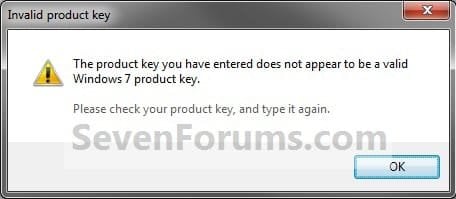
Windows 7 activation error: invalid product key

If you receive an error indicating that your product key is not valid when installing Windows 7, it could be for the following reasons:
  • You might have mistyped your product key. Try retyping it.
  • You might be using a product key that doesn't match the version of Windows 7 that came preinstalled on your computer. Check the product key to make sure it is for the version that you are trying to activate. You can't use a product key for Windows 7 with Service Pack 1 (SP1) to activate a copy of Windows 7 without SP1.
  • The product key is for an upgrade version of Windows 7 and a previous version of Windows wasn't on your computer when Windows 7 was installed. To install an upgrade version of Windows 7, Windows Vista or Windows XP must be installed on your computer. If you formatted the drive before starting the installation process, you won't be able to use the upgrade product key to activate Windows 7. To activate Windows 7, you'll need to install your previous version of Windows, and then reinstall Windows 7.
For more information about Windows 7 activation errors, see Windows 7 activation error: 0xC004F061 and Activation Error Codes.


You might have to activate Windows 7 again if:
  • You uninstall Windows 7 on one computer and then install it on another. During installation, enter the product key that came with Windows. If automatic activation fails, follow the instructions that walk you through activating Windows by phone. You will have 30 days to activate Windows.
  • You make a significant hardware change to your computer, such as upgrading the hard disk and memory at the same time. If a major hardware change requires activating Windows again, you will be notified and will have three days to activate Windows.
  • You reformat your hard disk. Reformatting erases your activation status. In this case, you’ll have 30 days to activate Windows again.
  • A virus or malware infects your computer and deletes your activation status.

   Warning

  • You must activate Windows 7 within the 30 days grace period after installation before it expires. When Windows 7 is activated, you'll be able to use every feature of Windows 7.
  • If you chose to Automatically activate Windows when I'm online when you set up your computer, automatic activation begins trying to activate your copy of Windows 7 three days after you log on for the first time. See METHOD ONE below.
  • If you install Windows 7 on a second computer, you must buy an additional product key number to activate the second installation to continue using Windows 7 on both computers.
What happens if you don't activate Windows 7?


Despite what you may have read elsewhere, there's no "reduced functionality mode" in Windows 7 like there was in Vista. If the 30-day trial or activation key expires:
  • Your desktop background goes black. You can change it, but every 60 minutes, it will return to black until you activate Windows.
  • You will have a "This copy of windows is not genuine" watermark on the bottom right corner of your desktop.
  • You will get a notification balloon stating that you may be a victim of software piracy.
  • You will be prompted to activate Windows every time you log in.
  • You will receive periodic reminders to activate Windows.
  • Windows Updates will be limited, but you will still be able to get critical security updates. However, access to optional updates or benefits available exclusively to genuine Windows customers, such as Microsoft Security Essentials, might be restricted.
See also: Genuine Windows: frequently asked questions - Microsoft Windows


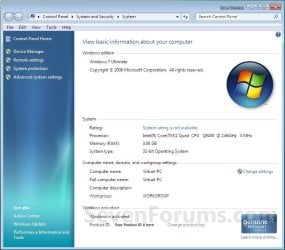
EXAMPLE: Windows 7 Activated
System_Activated.jpg


OPTION ONE

To Automatically Activate Windows 7 Online


NOTE: This is for when you are doing a Clean install or Upgrade install of Windows 7.
1. When you get to this step during installation below, type in your valid product key number and check the Automatically activate Windows when I'm online box.
NOTE: Automatic activation will now begin trying to activate your copy of Windows 7 three days after you log on for the first time.
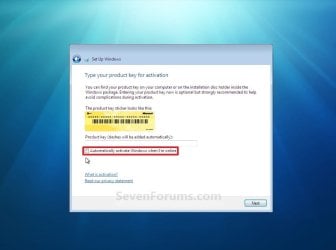
Install.jpg


OPTION TWO

To Manually Activate Windows 7


1. Open the Control Panel (icons view), and click on the System icon.
A) Go to step 3 or 4.
OR

2. Open the Start Menu, and right click on the Computer button and click on Properties. (See screenshot below)
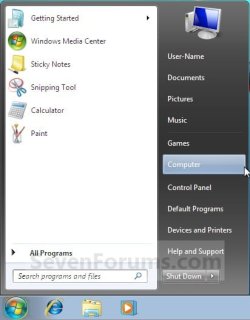
Start_Menu-Computer.jpg
A) Go to step 3 or 4.
3. If You Have a "Activate Windows now" Link in System Properties
A) Under the Windows activation secton at the bottom, click on the 30 days to activate. Activate Windows now link. (See screenshot below)
NOTE: If you did METHOD ONE above, then you will see 3 days to activate. Activate Windows now instead.
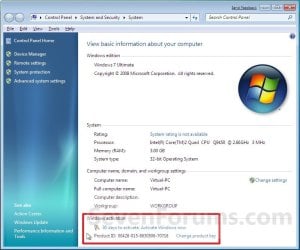
System.jpg
B) Select the Activate Windows online now option. (See screenshot below)
Activate_Now.jpg
C) If prompted by UAC, then click on Yes.

D) Go to step 5.
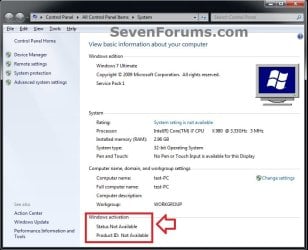
4. If You Do Not Have a "Activate Windows now" Link in System Properties
A) Close the System Properties window.
No-options.jpg
B) Open the Start Menu, type slui.exe in the search box and press Enter.

C) Continue on to step 5.
5. Type in your valid Windows 7 product key number, and click on the Next button. (See screenshot below)
NOTE: You will not see this screen if you have entered your product key number during the Clean installation or Upgrade installation of Windows 7, or if you did METHOD ONE above.
Enter_Key.jpg
6. If Activation is Successful
A) click on the Close button. (See screenshot below)

   Note
If the product key is found to be non-genuine, or not valid, it's likely that the product key is either being used on another computer or is counterfeit. For more information about genuine Windows, go to the genuine Windows website.
Invalid.jpg


Activated.jpg
B) Windows 7 is now activated and genuine. (See screenshot below)
NOTE: Genuine Windows is a recurring process that checks your product key is being used with the hardware it was paired with during activation.
System_Activated.jpg
7. If Activation Failed
A) If you got an activation error code, then look it up at the link below to see what it means.
Activation Error Codes
B) You may need to try and activate by phone instead.
That's it,
Shawn


Last edited:
Hello Q, and welcome to Seven Forums.

Strange. You should be able to activate Windows 7 whether you have SP1 installed yet or not.

What type of Windows 7 do you have, and is that the one that your product key number came with? For example: full or upgrade, and OEM, retail, anytime upgrade, student, etc...

Win 7 Professional, Full, OEM, yes the disc the product key came with. As I mentioned the only way it would work was to authenticate win7 online before upgrading to SP1. I tired it the other way the first time and even after uninstalling SP1 and cold boot it still gave the invalid key for version message.

Cheers Q
 

My Computer

OS
Windows 7 64 bit
Ah, ok. If that is a Windows 7 that came preinstalled on your computer, then that would be why. :)

You might be using a product key that doesn't match the version of Windows 7 that came preinstalled on your computer. Check the product key to make sure it is for the version that you are trying to activate. You can't use a product key for Windows 7 with Service Pack 1 (SP1) to activate a copy of Windows 7 without SP1.
 

My Computer

Computer type
PC/Desktop
Computer Manufacturer/Model Number
Self built custom
OS
64-bit Windows 11 Pro for Workstations
CPU
Intel i7-8700K OC'd to 5 GHz
Motherboard
ASUS ROG Maximus XI Formula Z390
Memory
64 GB (4x16GB) G.SKILL TridentZ RGB DDR4 3600 MHz
Graphics Card(s)
ASUS ROG-STRIX-GTX1080TI-O11G-GAMING
Sound Card
Integrated
Monitor(s) Displays
2 x Samsung Odyssey G7 27"
Screen Resolution
2560x1440
Hard Drives
1TB Samsung 990 PRO M.2,
4TB Samsung 990 PRO PRO M.2,
TerraMaster F8 SSD Plus NAS
PSU
Seasonic Prime Titanium 850W
Case
Thermaltake Core P3
Cooling
Corsair Hydro H115i
Keyboard
Logitech wireless K800
Mouse
Logitech MX Master 4
Internet Speed
2 Gb/s Download and 100 Mb/s Upload
Antivirus
Malwarebyte Anti-Malware Premium
Browser
Google Chrome
Other Info
Logitech Z625 speaker system,
Logitech BRIO 4K Pro webcam,
HP Color LaserJet Pro MFP M477fdn,
APC SMART-UPS RT 1000 XL - SURT1000XLI,
Galaxy S23 Plus phone
Ah, ok. If that is a Windows 7 that came preinstalled on your computer, then that would be why. :)

You might be using a product key that doesn't match the version of Windows 7 that came preinstalled on your computer. Check the product key to make sure it is for the version that you are trying to activate. You can't use a product key for Windows 7 with Service Pack 1 (SP1) to activate a copy of Windows 7 without SP1.

It wasn't pre installed, it is a Windows 7 OEM disc, I bought all the components, and built the PC myself, then installed Win7 from the disc. It isn't a PC manufacturer disc like a Dell one or something it is an official Windows 7 OEM disc but I understand what you're saying and that this applies to my disc.

Still a pretty stupid way to do things by MS but what's new, I can't see what the big deal is authenticating after you have installed SP1 and SP1 should warn you of this or check before performing the upgrade. Anyway its all solved now I found that info buried on the MS site after the Authentication failed the first time.

Cheers Q
 
Last edited by a moderator:

My Computer

OS
Windows 7 64 bit
Since it's a retail OEM copy, I would think that you should be able to activate online with or without SP1 installed. Otherwise a phone activation should work.
 

My Computer

Computer type
PC/Desktop
Computer Manufacturer/Model Number
Self built custom
OS
64-bit Windows 11 Pro for Workstations
CPU
Intel i7-8700K OC'd to 5 GHz
Motherboard
ASUS ROG Maximus XI Formula Z390
Memory
64 GB (4x16GB) G.SKILL TridentZ RGB DDR4 3600 MHz
Graphics Card(s)
ASUS ROG-STRIX-GTX1080TI-O11G-GAMING
Sound Card
Integrated
Monitor(s) Displays
2 x Samsung Odyssey G7 27"
Screen Resolution
2560x1440
Hard Drives
1TB Samsung 990 PRO M.2,
4TB Samsung 990 PRO PRO M.2,
TerraMaster F8 SSD Plus NAS
PSU
Seasonic Prime Titanium 850W
Case
Thermaltake Core P3
Cooling
Corsair Hydro H115i
Keyboard
Logitech wireless K800
Mouse
Logitech MX Master 4
Internet Speed
2 Gb/s Download and 100 Mb/s Upload
Antivirus
Malwarebyte Anti-Malware Premium
Browser
Google Chrome
Other Info
Logitech Z625 speaker system,
Logitech BRIO 4K Pro webcam,
HP Color LaserJet Pro MFP M477fdn,
APC SMART-UPS RT 1000 XL - SURT1000XLI,
Galaxy S23 Plus phone
Thankyou

Thankyou soooooo much. This will help me and my family in soooooooooooo many ways and i don't now how i can repay you. You have literally saved my life.
Sincerely Scottyl:)
 

My Computer

Computer type
PC/Desktop
OS
mac osx
You're most welcome Scotty, and welcome to Seven Forums. :)
 

My Computer

Computer type
PC/Desktop
Computer Manufacturer/Model Number
Self built custom
OS
64-bit Windows 11 Pro for Workstations
CPU
Intel i7-8700K OC'd to 5 GHz
Motherboard
ASUS ROG Maximus XI Formula Z390
Memory
64 GB (4x16GB) G.SKILL TridentZ RGB DDR4 3600 MHz
Graphics Card(s)
ASUS ROG-STRIX-GTX1080TI-O11G-GAMING
Sound Card
Integrated
Monitor(s) Displays
2 x Samsung Odyssey G7 27"
Screen Resolution
2560x1440
Hard Drives
1TB Samsung 990 PRO M.2,
4TB Samsung 990 PRO PRO M.2,
TerraMaster F8 SSD Plus NAS
PSU
Seasonic Prime Titanium 850W
Case
Thermaltake Core P3
Cooling
Corsair Hydro H115i
Keyboard
Logitech wireless K800
Mouse
Logitech MX Master 4
Internet Speed
2 Gb/s Download and 100 Mb/s Upload
Antivirus
Malwarebyte Anti-Malware Premium
Browser
Google Chrome
Other Info
Logitech Z625 speaker system,
Logitech BRIO 4K Pro webcam,
HP Color LaserJet Pro MFP M477fdn,
APC SMART-UPS RT 1000 XL - SURT1000XLI,
Galaxy S23 Plus phone
Product Key Number is different

I just finished a repair-install -- quite successfully, thank you -- .
Having now activated, I note that the Product ID as shown in the System info differs from the Product Key on my original copy, which is the key I entered while doing the install.
Am I right that this is nothing to worry about? I think the Product ID is not the same as the Product Key.
 

My Computer

Computer type
PC/Desktop
Computer Manufacturer/Model Number
custom build
OS
Win 7 Home Premium 64bit
CPU
Intel IvyBridge i5
Motherboard
Asus
Memory
16Gb
Hard Drives
12GB SSD, 2 1Tb Western Digital, 1 2Tb
Antivirus
Comodo
Browser
Chromium, Chrome, Firefox
Hello OldYogi,

Yes, that's correct. The product ID is not the same as the product key.

http://www.sevenforums.com/tutorials/153626-product-key-number-windows-7-find-see.html

The 20 character Product ID is created during the installation
process and is prominently displayed towards the bottom (in the
Activation section) on the opening panel window resulting from
right-clicking the Computer icon and selecting "Properties" from the
context menu. It is used to obtain/qualify for technical support
(limited though that may be) from Microsoft; it is of no use during the
installation process.

The 25 character Product Key is used to prove ownership of a
legitimate license and is required to perform the installation, and is
either stored on the DVD packaging on a sticker that says "Do not lose
this number," or is on a Certificate of Authenticity (CoA) label affixed
to an OEM computer.

Hope this helps, :)
Shawn
 

My Computer

Computer type
PC/Desktop
Computer Manufacturer/Model Number
Self built custom
OS
64-bit Windows 11 Pro for Workstations
CPU
Intel i7-8700K OC'd to 5 GHz
Motherboard
ASUS ROG Maximus XI Formula Z390
Memory
64 GB (4x16GB) G.SKILL TridentZ RGB DDR4 3600 MHz
Graphics Card(s)
ASUS ROG-STRIX-GTX1080TI-O11G-GAMING
Sound Card
Integrated
Monitor(s) Displays
2 x Samsung Odyssey G7 27"
Screen Resolution
2560x1440
Hard Drives
1TB Samsung 990 PRO M.2,
4TB Samsung 990 PRO PRO M.2,
TerraMaster F8 SSD Plus NAS
PSU
Seasonic Prime Titanium 850W
Case
Thermaltake Core P3
Cooling
Corsair Hydro H115i
Keyboard
Logitech wireless K800
Mouse
Logitech MX Master 4
Internet Speed
2 Gb/s Download and 100 Mb/s Upload
Antivirus
Malwarebyte Anti-Malware Premium
Browser
Google Chrome
Other Info
Logitech Z625 speaker system,
Logitech BRIO 4K Pro webcam,
HP Color LaserJet Pro MFP M477fdn,
APC SMART-UPS RT 1000 XL - SURT1000XLI,
Galaxy S23 Plus phone
Hello Shawn I seem to remember there is a way of checking to see if your copy of Windows is genuine - online and I thought there was a tutorial for it.
I ask because I have used it out of pure curiosity at home and it worked fine but I have a thread going with a member who I feel might have been taken for a ride by an unscrupulous source of obtaining his Windows. I could be wrong but I just want to get him to check out the correct way.
Thanks John
 

My Computer

Computer type
PC/Desktop
Computer Manufacturer/Model Number
Own build (new) Desk1 / Asus ROG Win 7 / Desk2 1st build
OS
Desk1 7 Home Prem / Desk2 10 Pro / Main lap Asus ROG 10 Pro 2 laptop Toshiba 7 Pro Asus P2520 7 & 10
CPU
Desk1 i5 3750K / Laptop i7 GTX 860M / Desk2 i5 2500
Motherboard
Desk1 Asus P877-V / Desk2 Gigabyte H67 UD3H / Laptop ?
Memory
Desk1 8GB (1866) / Desk2 16GB (1333) / Laptop 8Gb DDR3
Graphics Card(s)
Desk 1& 2NVidia GTX 650 & Laptops on board Intel
Sound Card
Desk 1 & 2 -XONAR DG Realtek High Def audio Laptop
Monitor(s) Displays
Desk 1 Benq HD 2450 / Desk2 Philips 24" / Laptop 17.5"
Screen Resolution
1920x1080 D1 & D2 & Laptop 1
Hard Drives
Desk1 Samsung 120GB 830 SSD
Asus ROG 256GB 850 Pro SSD
Desk2 Samsung 840 256 SSD
Toshiba 120GB EVO
PSU
Desk 1 Corsair HX 1050/ Laptop ? / Desk 2 Corsair HX 650
Case
Desk 1 Cooler HAF XM ? Toshiba laptop / Desk2 Coolermaster
Cooling
Fans on all Desk1 -2 Desk2 - all Coolermasters 5 Laptop ?
Keyboard
Desk 1 MS Sidewinder X6 Desk 2 MS Sidewinder X 4
Mouse
Desk 1&2 - Gigabyte MS 900 gamer - laptop - Logitec wireless
Internet Speed
ADSL2+
Other Info
One other Desktop (tester) and spare Toshba laptop both with SSD's
Running Kaspersky 2016 ISS on all machines config'd identically
Logitec audio stereo systems on each machine (x3)
Canon MG5250MFC
Router/modem TP-Link running WPA2SK
Hey John, :)

You can go to the site below at Microsoft to verify genuine Windows, but it's only compatible up to Windows 7.

Genuine Microsoft Software
 

My Computer

Computer type
PC/Desktop
Computer Manufacturer/Model Number
Self built custom
OS
64-bit Windows 11 Pro for Workstations
CPU
Intel i7-8700K OC'd to 5 GHz
Motherboard
ASUS ROG Maximus XI Formula Z390
Memory
64 GB (4x16GB) G.SKILL TridentZ RGB DDR4 3600 MHz
Graphics Card(s)
ASUS ROG-STRIX-GTX1080TI-O11G-GAMING
Sound Card
Integrated
Monitor(s) Displays
2 x Samsung Odyssey G7 27"
Screen Resolution
2560x1440
Hard Drives
1TB Samsung 990 PRO M.2,
4TB Samsung 990 PRO PRO M.2,
TerraMaster F8 SSD Plus NAS
PSU
Seasonic Prime Titanium 850W
Case
Thermaltake Core P3
Cooling
Corsair Hydro H115i
Keyboard
Logitech wireless K800
Mouse
Logitech MX Master 4
Internet Speed
2 Gb/s Download and 100 Mb/s Upload
Antivirus
Malwarebyte Anti-Malware Premium
Browser
Google Chrome
Other Info
Logitech Z625 speaker system,
Logitech BRIO 4K Pro webcam,
HP Color LaserJet Pro MFP M477fdn,
APC SMART-UPS RT 1000 XL - SURT1000XLI,
Galaxy S23 Plus phone
Thanks Shawn I knew you would come up with the goods ;)
 

My Computer

Computer type
PC/Desktop
Computer Manufacturer/Model Number
Own build (new) Desk1 / Asus ROG Win 7 / Desk2 1st build
OS
Desk1 7 Home Prem / Desk2 10 Pro / Main lap Asus ROG 10 Pro 2 laptop Toshiba 7 Pro Asus P2520 7 & 10
CPU
Desk1 i5 3750K / Laptop i7 GTX 860M / Desk2 i5 2500
Motherboard
Desk1 Asus P877-V / Desk2 Gigabyte H67 UD3H / Laptop ?
Memory
Desk1 8GB (1866) / Desk2 16GB (1333) / Laptop 8Gb DDR3
Graphics Card(s)
Desk 1& 2NVidia GTX 650 & Laptops on board Intel
Sound Card
Desk 1 & 2 -XONAR DG Realtek High Def audio Laptop
Monitor(s) Displays
Desk 1 Benq HD 2450 / Desk2 Philips 24" / Laptop 17.5"
Screen Resolution
1920x1080 D1 & D2 & Laptop 1
Hard Drives
Desk1 Samsung 120GB 830 SSD
Asus ROG 256GB 850 Pro SSD
Desk2 Samsung 840 256 SSD
Toshiba 120GB EVO
PSU
Desk 1 Corsair HX 1050/ Laptop ? / Desk 2 Corsair HX 650
Case
Desk 1 Cooler HAF XM ? Toshiba laptop / Desk2 Coolermaster
Cooling
Fans on all Desk1 -2 Desk2 - all Coolermasters 5 Laptop ?
Keyboard
Desk 1 MS Sidewinder X6 Desk 2 MS Sidewinder X 4
Mouse
Desk 1&2 - Gigabyte MS 900 gamer - laptop - Logitec wireless
Internet Speed
ADSL2+
Other Info
One other Desktop (tester) and spare Toshba laptop both with SSD's
Running Kaspersky 2016 ISS on all machines config'd identically
Logitec audio stereo systems on each machine (x3)
Canon MG5250MFC
Router/modem TP-Link running WPA2SK
Glad to have been a help John. :)
 

My Computer

Computer type
PC/Desktop
Computer Manufacturer/Model Number
Self built custom
OS
64-bit Windows 11 Pro for Workstations
CPU
Intel i7-8700K OC'd to 5 GHz
Motherboard
ASUS ROG Maximus XI Formula Z390
Memory
64 GB (4x16GB) G.SKILL TridentZ RGB DDR4 3600 MHz
Graphics Card(s)
ASUS ROG-STRIX-GTX1080TI-O11G-GAMING
Sound Card
Integrated
Monitor(s) Displays
2 x Samsung Odyssey G7 27"
Screen Resolution
2560x1440
Hard Drives
1TB Samsung 990 PRO M.2,
4TB Samsung 990 PRO PRO M.2,
TerraMaster F8 SSD Plus NAS
PSU
Seasonic Prime Titanium 850W
Case
Thermaltake Core P3
Cooling
Corsair Hydro H115i
Keyboard
Logitech wireless K800
Mouse
Logitech MX Master 4
Internet Speed
2 Gb/s Download and 100 Mb/s Upload
Antivirus
Malwarebyte Anti-Malware Premium
Browser
Google Chrome
Other Info
Logitech Z625 speaker system,
Logitech BRIO 4K Pro webcam,
HP Color LaserJet Pro MFP M477fdn,
APC SMART-UPS RT 1000 XL - SURT1000XLI,
Galaxy S23 Plus phone
Back
Top