Solved Activating New Email Notification in WLMail 2011

kristalsoldier

New member
Power User
Local time
3:10 PM
Messages
142
Hi...

As the title indicates, how to activate the new email notification in WLMail 2011? It's like a small envelope that pops up in the System Tray or thereabout.

Thanks in advance.
 

My Computer My Computer

OS
Win 7 Professional 64bit
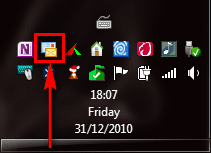
The New Mail notification is on by default, and you can not turn it off. When WLM is running, its icon in notification area shows if there are new messages.

WLM, no new mail:

WLM_No_Mail.png

WLM_No_Mail_2.png

WLM, new mail:

WLM_New_Mail.png

WLM_New_Mail_2.png

(My taskbar is vertically on the left so the screenshot might look a bit funny, but the icons are the same where ever taskbar is located)

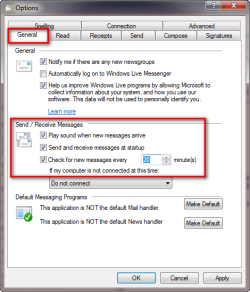
The only notification you can turn on or off is the audio signal. You can do it from main menu > Options > Mail:

WLM_Main_Menu.png

WLM_Mail_Settings.png

Notice that new mail notification works only when WLM is online and set to receive new messages automatically.

Kari
 

My Computer My Computer

Computer type
Laptop
Computer Manufacturer/Model Number
HP ENVY 17-1150eg
OS
Windows 10 Pro x64 EN-GB
CPU
1.6 GHz Intel Core i7-720QM Processor
Memory
6 GB
Graphics Card(s)
ATI Mobility Radeon HD 5850 Graphics
Sound Card
Beats sound system with integrated subwoofer
Monitor(s) Displays
17" laptop display, 22" LED and 32" Full HD TV through HDMI
Screen Resolution
1600*900 (1), 1920*1080 (2&3)
Hard Drives
Internal: 2 x 500 GB SATA Hard Disk Drive 7200 rpm
External: 2TB for backups, 3TB USB3 network drive for media
Cooling
As Envy runs a bit warm, I have it on a Cooler Master pad
Keyboard
Logitech diNovo Media Desktop Laser (bluetooth)
Mouse
Logitech Performance Mouse MX
Internet Speed
50/10 Mbps VDSL
Antivirus
Windows Defender 4.3.9431.0
Browser
Maxthon 3.5.2., IE11
Is there anyway to see the WL email notificiation if Windows Live Mail program is closed?
 

My Computer My Computer

OS
Windows 7

My Computer My Computer

Computer Manufacturer/Model Number
Vostro
OS
Windows 7 Ultimate (SP1)
CPU
AMD Sempron 3600+
Graphics Card(s)
ATI Radeon Xpress 1150
Screen Resolution
1200 x 800
Hard Drives
WD Scorpio Blue 500 GB
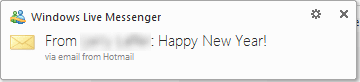
If you are using Hotmail, Live or MSN email, also Windows Live Messenger will notify you of new mail. Live Mail must not be on and running. Messenger does not show an icon in notification area when mail arrives as Live Mail does; instead you get a text notification which pops out next to notification area for a few seconds when new mail arrives:

Messenger_Mail_notification_2.png.png

Of course, if you don't happen to see this pop out during those few seconds it's visible, you have no other indicator that new mail has arrived.

Kari
 

My Computer My Computer

Computer type
Laptop
Computer Manufacturer/Model Number
HP ENVY 17-1150eg
OS
Windows 10 Pro x64 EN-GB
CPU
1.6 GHz Intel Core i7-720QM Processor
Memory
6 GB
Graphics Card(s)
ATI Mobility Radeon HD 5850 Graphics
Sound Card
Beats sound system with integrated subwoofer
Monitor(s) Displays
17" laptop display, 22" LED and 32" Full HD TV through HDMI
Screen Resolution
1600*900 (1), 1920*1080 (2&3)
Hard Drives
Internal: 2 x 500 GB SATA Hard Disk Drive 7200 rpm
External: 2TB for backups, 3TB USB3 network drive for media
Cooling
As Envy runs a bit warm, I have it on a Cooler Master pad
Keyboard
Logitech diNovo Media Desktop Laser (bluetooth)
Mouse
Logitech Performance Mouse MX
Internet Speed
50/10 Mbps VDSL
Antivirus
Windows Defender 4.3.9431.0
Browser
Maxthon 3.5.2., IE11
I know this is an old thread, but I'm posting this anyway as I have been jacking with this problem for 4 days, and I'm sure other new Win 7/Windows Live Mail are, too.

Was annoyed, having been a Windows Mail user (Vista) that I was not getting new email (received) notification in the Sys Tray (very lower right corner). I have no idea why this worked, but it did. See Kari's post above (2nd post in this thread).....the last pic IN that post. BOTH the Default Message programs needed to be LIGHT gray (grayed out), AND you need the WLM icon in the sys tray showing. After changing the default msg programs to light gray, AT LAST I am receiving new mail notification in the sys tray!! The WLM icon is ALWAYS there, but when i new message arrives, the icon changes (see the 3rd pic in Kari's email above).

Don't know if it will work for you, but it worked for me. Hope this saves someone the 4 days of teeth gnashing I have just endured!!

 

My Computer My Computer

OS
Win 7 Home Prem, x64
Back
Top