adb interface cannot start error code 10

kaybee327

New member
Local time
7:10 PM
Messages
25
Trying (very) to install Samsung ADB interface to connect to Android Tablet via OTG cable and for some reason tablet has lost its plug and play. Here comes the catch 22 situation Can not update firmware or reinstall firmware without ADB interface so well and truly screwed. :cry::cry:


I have tried other drivers but cannot get them to work. Also tried delete, restart,reinstall,remove driver restart reinstall :cry: Every one a loser.

Can anyone suggest how I can get the darn thing to work please.

Using win7 Home Premium with SP1.

Had thought of trying Virtual pc but not compatible needs win 7 Pro or better so screwed again.

Best wishes to all

Keith
 

My Computer

Computer Manufacturer/Model Number
Advent 8212
OS
Windows 7 Home Premium
CPU
T7100 core 2 duo
Memory
4Gb
Graphics Card(s)
Intel 965GM
Sound Card
Realtek high definition
Screen Resolution
1280 x 800 x 59hertz
Hard Drives
Hitachi HTS541612J9SA00 ATA 120Gb
Internet Speed
8Gb
...Had thought of trying Virtual pc but...
You can install virtualbox on W7 hp.

You might want to show a screenshot of the error you are getting with adb.
 

My Computer

Computer type
Laptop
Computer Manufacturer/Model Number
Employer provided Dell Latitude
OS
W7 Pro SP1 64bit
CPU
i7
Memory
8GB
Graphics Card(s)
Intel HD Graphics
Hard Drives
crappy SSD
Antivirus
Employer mandated Symantec Endpoint Protection
Browser
Pale Moon 64bit, IE11 64bit & Chrome 64bit
Thanks for the reply will give virtual box a try. Did try Virtual PC 2007 but got compatability error.

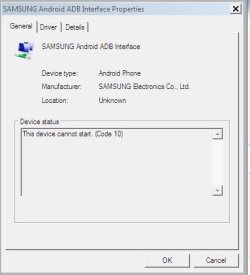
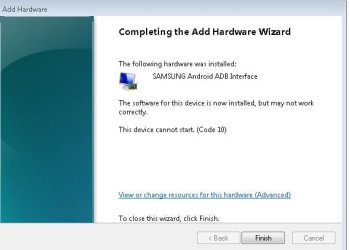
Here is screenshot of error:
 

Attachments

  • adb error.JPG
    adb error.JPG
    31.9 KB · Views: 28

My Computer

Computer Manufacturer/Model Number
Advent 8212
OS
Windows 7 Home Premium
CPU
T7100 core 2 duo
Memory
4Gb
Graphics Card(s)
Intel 965GM
Sound Card
Realtek high definition
Screen Resolution
1280 x 800 x 59hertz
Hard Drives
Hitachi HTS541612J9SA00 ATA 120Gb
Internet Speed
8Gb
Oh, so a device manager error. I was thinking adb command line stuff.

You said that you tried other drivers - but you did not say which ones.

Have you tried installing the whole SDK?
Android SDK | Android Developers

I'm using an old version and a USB connection:

adb.JPG
 

My Computer

Computer type
Laptop
Computer Manufacturer/Model Number
Employer provided Dell Latitude
OS
W7 Pro SP1 64bit
CPU
i7
Memory
8GB
Graphics Card(s)
Intel HD Graphics
Hard Drives
crappy SSD
Antivirus
Employer mandated Symantec Endpoint Protection
Browser
Pale Moon 64bit, IE11 64bit & Chrome 64bit
Yes I have SDK for 2.3

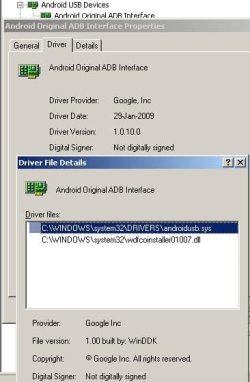
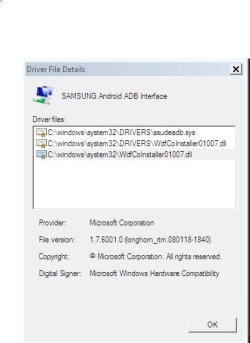
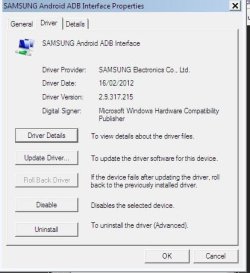
As for other drivers virtually everything I could find.

These are what is in Dev Mgr now
 

Attachments

  • dev_snip2.JPG
    dev_snip2.JPG
    31.1 KB · Views: 39
  • dev_snip3.JPG
    dev_snip3.JPG
    41 KB · Views: 36

My Computer

Computer Manufacturer/Model Number
Advent 8212
OS
Windows 7 Home Premium
CPU
T7100 core 2 duo
Memory
4Gb
Graphics Card(s)
Intel 965GM
Sound Card
Realtek high definition
Screen Resolution
1280 x 800 x 59hertz
Hard Drives
Hitachi HTS541612J9SA00 ATA 120Gb
Internet Speed
8Gb
Try uninstalling what you have now and use the standard USB driver for adb that comes with the latest SDK. You will lose the OTG stuff, but that should not matter for what you are doing.
 

My Computer

Computer type
Laptop
Computer Manufacturer/Model Number
Employer provided Dell Latitude
OS
W7 Pro SP1 64bit
CPU
i7
Memory
8GB
Graphics Card(s)
Intel HD Graphics
Hard Drives
crappy SSD
Antivirus
Employer mandated Symantec Endpoint Protection
Browser
Pale Moon 64bit, IE11 64bit & Chrome 64bit
Done that no difference I think next jobs will be sfc check and then reinstall :cry:
 

My Computer

Computer Manufacturer/Model Number
Advent 8212
OS
Windows 7 Home Premium
CPU
T7100 core 2 duo
Memory
4Gb
Graphics Card(s)
Intel 965GM
Sound Card
Realtek high definition
Screen Resolution
1280 x 800 x 59hertz
Hard Drives
Hitachi HTS541612J9SA00 ATA 120Gb
Internet Speed
8Gb
Let us know how it goes.
 

My Computer

Computer type
Laptop
Computer Manufacturer/Model Number
Employer provided Dell Latitude
OS
W7 Pro SP1 64bit
CPU
i7
Memory
8GB
Graphics Card(s)
Intel HD Graphics
Hard Drives
crappy SSD
Antivirus
Employer mandated Symantec Endpoint Protection
Browser
Pale Moon 64bit, IE11 64bit & Chrome 64bit
sfc found no faults so next job put xp on ext hdd and if that dont work win 7 and if that does not work then a format and clean installation (as last resort) but I am not going to be beaten.

As a last, last ,last resort put Linux on ext hdd :sick: if I can remember the commands

Keith
 

My Computer

Computer Manufacturer/Model Number
Advent 8212
OS
Windows 7 Home Premium
CPU
T7100 core 2 duo
Memory
4Gb
Graphics Card(s)
Intel 965GM
Sound Card
Realtek high definition
Screen Resolution
1280 x 800 x 59hertz
Hard Drives
Hitachi HTS541612J9SA00 ATA 120Gb
Internet Speed
8Gb
I wonder if VirtualBox will pass the USB from the host to a VM without the host's driver working - probably not.
 

My Computer

Computer type
Laptop
Computer Manufacturer/Model Number
Employer provided Dell Latitude
OS
W7 Pro SP1 64bit
CPU
i7
Memory
8GB
Graphics Card(s)
Intel HD Graphics
Hard Drives
crappy SSD
Antivirus
Employer mandated Symantec Endpoint Protection
Browser
Pale Moon 64bit, IE11 64bit & Chrome 64bit
Well I tried :mad:

At least I can save money on a barber as I can now shave all over.

Put win xp pro on as new installation exactly same error.

Tried virtual image same

Tried virtual pc 2007 no change

I guess the only thing left is to try Linux and remove internal sdcard from android tablet and see if I can flash that. Only trouble is that if I cock-up the I get an expensive brick. Ah well C'est la vie mon amis.

Keith
 

My Computer

Computer Manufacturer/Model Number
Advent 8212
OS
Windows 7 Home Premium
CPU
T7100 core 2 duo
Memory
4Gb
Graphics Card(s)
Intel 965GM
Sound Card
Realtek high definition
Screen Resolution
1280 x 800 x 59hertz
Hard Drives
Hitachi HTS541612J9SA00 ATA 120Gb
Internet Speed
8Gb

My Computer

Computer type
PC/Desktop
Computer Manufacturer/Model Number
Home built
OS
Windows 7 Ult, Windows 8.1 Pro,
CPU
Q9650-4.275GHz, E8600 4.5GHz, E6750-3.8GHz
Motherboard
Evga 780i FTW
Memory
G.Skill PC2 9600 1200Mhz 5 5 5 15 2T
Graphics Card(s)
GTX480
Sound Card
Asus Xonar D2
Monitor(s) Displays
HannsG
Screen Resolution
1680X1050
Hard Drives
GSkill Phoenix Pro 120GB SSD
PSU
ThermalTake Toughpower 1000Watt modular
Case
ThermalTake XaserV
Cooling
Xigmatek S1283
Keyboard
Logitech G15
Mouse
Logitech G9
Internet Speed
T1
Chev65 many thanks.

Will give it a go and start from scratch so am downloading java and sdk again . Like the "Relentless patience" ---
(You will need it with me :D )

Keith
 

My Computer

Computer Manufacturer/Model Number
Advent 8212
OS
Windows 7 Home Premium
CPU
T7100 core 2 duo
Memory
4Gb
Graphics Card(s)
Intel 965GM
Sound Card
Realtek high definition
Screen Resolution
1280 x 800 x 59hertz
Hard Drives
Hitachi HTS541612J9SA00 ATA 120Gb
Internet Speed
8Gb
Chev65 many thanks.

Will give it a go and start from scratch so am downloading java and sdk again . Like the "Relentless patience" ---
(You will need it with me :D )

Keith

Yes it looks like you need to have Java SDK installed and you have to have the Android development kit installed as well. Doesn't look too difficult to me. ;)
 

My Computer

Computer type
PC/Desktop
Computer Manufacturer/Model Number
Home built
OS
Windows 7 Ult, Windows 8.1 Pro,
CPU
Q9650-4.275GHz, E8600 4.5GHz, E6750-3.8GHz
Motherboard
Evga 780i FTW
Memory
G.Skill PC2 9600 1200Mhz 5 5 5 15 2T
Graphics Card(s)
GTX480
Sound Card
Asus Xonar D2
Monitor(s) Displays
HannsG
Screen Resolution
1680X1050
Hard Drives
GSkill Phoenix Pro 120GB SSD
PSU
ThermalTake Toughpower 1000Watt modular
Case
ThermalTake XaserV
Cooling
Xigmatek S1283
Keyboard
Logitech G15
Mouse
Logitech G9
Internet Speed
T1
Well did it loaded java and android SDK having removed the earlier versions and guess what

NO B****Y CHANGE :mad::mad::mad:

kEITH
 

Attachments

  • Code 10.JPG
    Code 10.JPG
    35.7 KB · Views: 27

My Computer

Computer Manufacturer/Model Number
Advent 8212
OS
Windows 7 Home Premium
CPU
T7100 core 2 duo
Memory
4Gb
Graphics Card(s)
Intel 965GM
Sound Card
Realtek high definition
Screen Resolution
1280 x 800 x 59hertz
Hard Drives
Hitachi HTS541612J9SA00 ATA 120Gb
Internet Speed
8Gb
Back
Top