Updates fail - BITS won't start. "error code -2147024894"

soho1

New member
Power User
Local time
12:02 AM
Messages
458
Location
Earth, Mostly Chicago and London
All the dependencies for BITS are running, but BITS won't start.

SFC says everything is OK.

CHKDSK is OK.

Now what?


UPDATE: After rebooting, found the following 3 errors in SYSTEM log:

DCOM got error "1053" attempting to start the service WSearch with arguments "" in order to run the server:
{7D096C5F-AC08-4F1F-BEB7-5C22C517CE39}

DCOM got error "1053" attempting to start the service WSearch with arguments "" in order to run the server:
{9E175B6D-F52A-11D8-B9A5-505054503030}

The server {4991D34B-80A1-4291-83B6-3328366B9097} did not register with DCOM within the required timeout.

Examined the first key ....CE39 (i.e. WSearch) and found
it contained a REG_SZ named AppID with Data {9E175B6D-F52A-11D8-B9A5-505054503030}

...
Examined the third key ... 9097 which is the BITS, so all this is telling me is that BITS didn't start and register with DCOM? But why?

UPDATE: Followed the steps in http://www.sevenforums.com/tutorials/113399-windows-update-error-80246008-windows-7-fix.html

NOTE: followed the instructions, using admin elevated command file, but never saw the word "RESET" appear in the updates window, though it now thinks I have "never" applied an update, despite being able to see applied update history.

Also, I can check for updates, but still not apply any because BITS is not running and won't start.

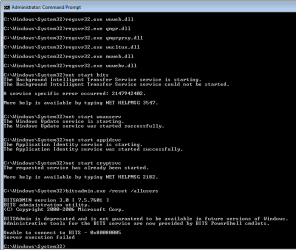
Tried the alternative batch files, which resulted only in warnings about BITSadmin being deprecated, but also "Unable to connect to BITS - 0x80080005" from the reregister bat file.

The reset...full.bat file issued a "A service specific error occured: 2147942402." and finished with the same 0x80080005 as in the above try.

Included the requisite reboots and followed the additional steps II through V in the procedures outlined in the guide. No change.

I should have titled this "BITS is BRICKED."
 

Attachments

  • BITS fail.png
    BITS fail.png
    4.4 KB · Views: 22
Last edited:

My Computer

Computer type
Laptop
Computer Manufacturer/Model Number
Dell Insprion 7559 next to a Toshiba Portege
OS
Win 7 Pro 64-bit
CPU
Intel Core i5
Motherboard
Intel
Memory
16 GB Dell, 6 GB Toshiba
Graphics Card(s)
Intel crap on both but Dell also has nVidia GeForce GTX960M
Sound Card
RealTek
Monitor(s) Displays
internal and external ACER KA270H 27"
Screen Resolution
1920x1080
Hard Drives
SSD 256 GB plus numerous WD Red or Purple on USB3 docks. Used to buy a lot of Seagate but tossed them the second time I got unrecoverable disc corruption in the midst of use.
Keyboard
Garage Mouse SW and some cheap Amazon China made USB device
Mouse
Garage Mouse and some cheap Amazon China made USB device
Internet Speed
50 Mbps (allegedly, depends on server)
Antivirus
Defender, Malwarebytes Premium and Kaspersky
Browser
IE 11, and Chrome something
Hello Soho, :)

If you haven't already, you might see if doing a system restore using a restore point dated when this did work may sort it for you.
 

My Computer

Computer type
PC/Desktop
Computer Manufacturer/Model Number
Self built custom
OS
64-bit Windows 11 Pro for Workstations
CPU
Intel i7-8700K OC'd to 5 GHz
Motherboard
ASUS ROG Maximus XI Formula Z390
Memory
64 GB (4x16GB) G.SKILL TridentZ RGB DDR4 3600 MHz
Graphics Card(s)
ASUS ROG-STRIX-GTX1080TI-O11G-GAMING
Sound Card
Integrated
Monitor(s) Displays
2 x Samsung Odyssey G7 27"
Screen Resolution
2560x1440
Hard Drives
1TB Samsung 990 PRO M.2,
4TB Samsung 990 PRO PRO M.2,
TerraMaster F8 SSD Plus NAS
PSU
Seasonic Prime Titanium 850W
Case
Thermaltake Core P3
Cooling
Corsair Hydro H115i
Keyboard
Logitech wireless K800
Mouse
Logitech MX Master 4
Internet Speed
2 Gb/s Download and 100 Mb/s Upload
Antivirus
Malwarebyte Anti-Malware Premium
Browser
Google Chrome
Other Info
Logitech Z625 speaker system,
Logitech BRIO 4K Pro webcam,
HP Color LaserJet Pro MFP M477fdn,
APC SMART-UPS RT 1000 XL - SURT1000XLI,
Galaxy S23 Plus phone
I tried a restore to a recent point, but that did not work. In frustration, I have since set this problem aside and my Windows installation is now aging without updates. I may have resort to a reinstall I suppose - something I have no time for just now.
 

My Computer

Computer type
Laptop
Computer Manufacturer/Model Number
Dell Insprion 7559 next to a Toshiba Portege
OS
Win 7 Pro 64-bit
CPU
Intel Core i5
Motherboard
Intel
Memory
16 GB Dell, 6 GB Toshiba
Graphics Card(s)
Intel crap on both but Dell also has nVidia GeForce GTX960M
Sound Card
RealTek
Monitor(s) Displays
internal and external ACER KA270H 27"
Screen Resolution
1920x1080
Hard Drives
SSD 256 GB plus numerous WD Red or Purple on USB3 docks. Used to buy a lot of Seagate but tossed them the second time I got unrecoverable disc corruption in the midst of use.
Keyboard
Garage Mouse SW and some cheap Amazon China made USB device
Mouse
Garage Mouse and some cheap Amazon China made USB device
Internet Speed
50 Mbps (allegedly, depends on server)
Antivirus
Defender, Malwarebytes Premium and Kaspersky
Browser
IE 11, and Chrome something
My Computer

Computer type
PC/Desktop
Computer Manufacturer/Model Number
Self built custom
OS
64-bit Windows 11 Pro for Workstations
CPU
Intel i7-8700K OC'd to 5 GHz
Motherboard
ASUS ROG Maximus XI Formula Z390
Memory
64 GB (4x16GB) G.SKILL TridentZ RGB DDR4 3600 MHz
Graphics Card(s)
ASUS ROG-STRIX-GTX1080TI-O11G-GAMING
Sound Card
Integrated
Monitor(s) Displays
2 x Samsung Odyssey G7 27"
Screen Resolution
2560x1440
Hard Drives
1TB Samsung 990 PRO M.2,
4TB Samsung 990 PRO PRO M.2,
TerraMaster F8 SSD Plus NAS
PSU
Seasonic Prime Titanium 850W
Case
Thermaltake Core P3
Cooling
Corsair Hydro H115i
Keyboard
Logitech wireless K800
Mouse
Logitech MX Master 4
Internet Speed
2 Gb/s Download and 100 Mb/s Upload
Antivirus
Malwarebyte Anti-Malware Premium
Browser
Google Chrome
Other Info
Logitech Z625 speaker system,
Logitech BRIO 4K Pro webcam,
HP Color LaserJet Pro MFP M477fdn,
APC SMART-UPS RT 1000 XL - SURT1000XLI,
Galaxy S23 Plus phone
Have returned to mucking with this problem.

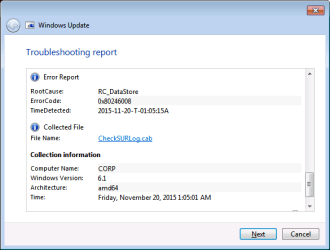
Ran FIXIT for WIndows Update to automatically reset the Update components. It reported two things:
1) RC_DATAstore problem with ErrorCode 0x80246008
and
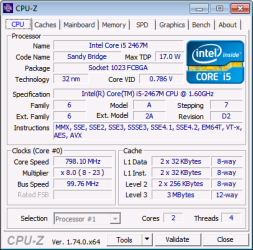
2) that my architecture is amd64, though I am running an Intel i5, verified by CPU-Z.

... more to come...
 

Attachments

  • WIndows Update FIXIT report.png
    WIndows Update FIXIT report.png
    8.5 KB · Views: 6
  • Intel i5.png
    Intel i5.png
    14.9 KB · Views: 7

My Computer

Computer type
Laptop
Computer Manufacturer/Model Number
Dell Insprion 7559 next to a Toshiba Portege
OS
Win 7 Pro 64-bit
CPU
Intel Core i5
Motherboard
Intel
Memory
16 GB Dell, 6 GB Toshiba
Graphics Card(s)
Intel crap on both but Dell also has nVidia GeForce GTX960M
Sound Card
RealTek
Monitor(s) Displays
internal and external ACER KA270H 27"
Screen Resolution
1920x1080
Hard Drives
SSD 256 GB plus numerous WD Red or Purple on USB3 docks. Used to buy a lot of Seagate but tossed them the second time I got unrecoverable disc corruption in the midst of use.
Keyboard
Garage Mouse SW and some cheap Amazon China made USB device
Mouse
Garage Mouse and some cheap Amazon China made USB device
Internet Speed
50 Mbps (allegedly, depends on server)
Antivirus
Defender, Malwarebytes Premium and Kaspersky
Browser
IE 11, and Chrome something
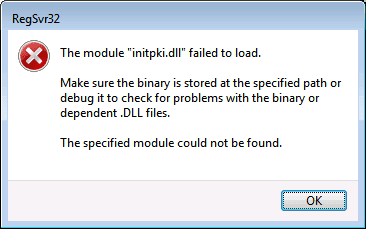
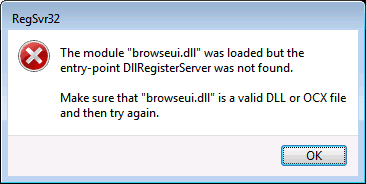
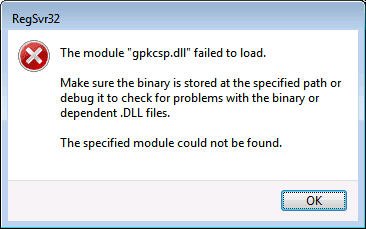
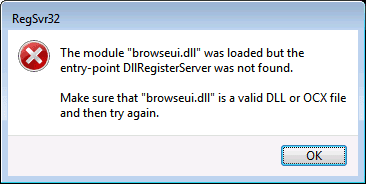
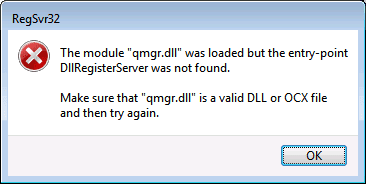
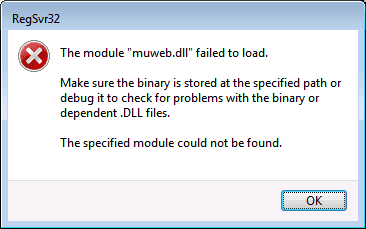
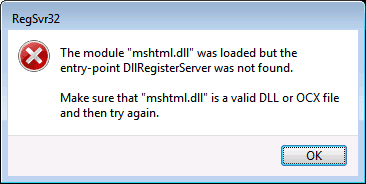
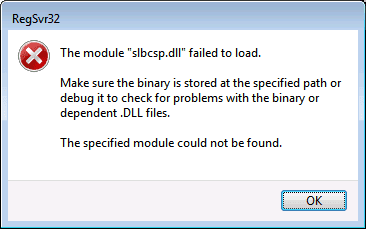
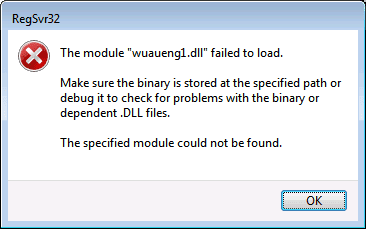
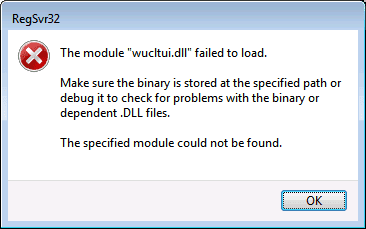
Performed the Manual reset in the above KB article and got
entry point errors reported on several modules.
 

Attachments

  • reregister_prob_initpki.dll.png
    reregister_prob_initpki.dll.png
    3.9 KB · Views: 7
  • reregister_prob_msxml.dll.png
    reregister_prob_msxml.dll.png
    3.7 KB · Views: 7
  • reregister_prob_gpkcsp.dll.png
    reregister_prob_gpkcsp.dll.png
    3.9 KB · Views: 7
  • reregister_prob_browseui.dll.png
    reregister_prob_browseui.dll.png
    3.7 KB · Views: 7
  • BITS error 2147942402.png
    BITS error 2147942402.png
    10.5 KB · Views: 0
  • reregister_prob_sccbase.dll.png
    reregister_prob_sccbase.dll.png
    3.9 KB · Views: 7
  • reregister_prob_qmgr.dll.png
    reregister_prob_qmgr.dll.png
    3.6 KB · Views: 7
  • reregister_prob_muweb.dll.png
    reregister_prob_muweb.dll.png
    3.8 KB · Views: 7
  • reregister_prob_mshtml.dll.png
    reregister_prob_mshtml.dll.png
    3.6 KB · Views: 7
  • reregister_prob_wuweb.dll.png
    reregister_prob_wuweb.dll.png
    3.9 KB · Views: 7
  • reregister_prob_slbcsp.dll.png
    reregister_prob_slbcsp.dll.png
    3.8 KB · Views: 7
  • reregister_prob_wuaueng1.dll.png
    reregister_prob_wuaueng1.dll.png
    3.9 KB · Views: 7
  • reregister_prob_wucltui.dll.png
    reregister_prob_wucltui.dll.png
    3.8 KB · Views: 7

My Computer

Computer type
Laptop
Computer Manufacturer/Model Number
Dell Insprion 7559 next to a Toshiba Portege
OS
Win 7 Pro 64-bit
CPU
Intel Core i5
Motherboard
Intel
Memory
16 GB Dell, 6 GB Toshiba
Graphics Card(s)
Intel crap on both but Dell also has nVidia GeForce GTX960M
Sound Card
RealTek
Monitor(s) Displays
internal and external ACER KA270H 27"
Screen Resolution
1920x1080
Hard Drives
SSD 256 GB plus numerous WD Red or Purple on USB3 docks. Used to buy a lot of Seagate but tossed them the second time I got unrecoverable disc corruption in the midst of use.
Keyboard
Garage Mouse SW and some cheap Amazon China made USB device
Mouse
Garage Mouse and some cheap Amazon China made USB device
Internet Speed
50 Mbps (allegedly, depends on server)
Antivirus
Defender, Malwarebytes Premium and Kaspersky
Browser
IE 11, and Chrome something
Attachments

Last edited:

My Computer

Computer type
Laptop
Computer Manufacturer/Model Number
Dell Insprion 7559 next to a Toshiba Portege
OS
Win 7 Pro 64-bit
CPU
Intel Core i5
Motherboard
Intel
Memory
16 GB Dell, 6 GB Toshiba
Graphics Card(s)
Intel crap on both but Dell also has nVidia GeForce GTX960M
Sound Card
RealTek
Monitor(s) Displays
internal and external ACER KA270H 27"
Screen Resolution
1920x1080
Hard Drives
SSD 256 GB plus numerous WD Red or Purple on USB3 docks. Used to buy a lot of Seagate but tossed them the second time I got unrecoverable disc corruption in the midst of use.
Keyboard
Garage Mouse SW and some cheap Amazon China made USB device
Mouse
Garage Mouse and some cheap Amazon China made USB device
Internet Speed
50 Mbps (allegedly, depends on server)
Antivirus
Defender, Malwarebytes Premium and Kaspersky
Browser
IE 11, and Chrome something
DISM.exe /online /cleanup-image /scanhealth

reports version 6.1.7600.16385
image version: 6.1.7601.18489
.....
The operation completed successfully.
(log attached)
 

Attachments

My Computer

Computer type
Laptop
Computer Manufacturer/Model Number
Dell Insprion 7559 next to a Toshiba Portege
OS
Win 7 Pro 64-bit
CPU
Intel Core i5
Motherboard
Intel
Memory
16 GB Dell, 6 GB Toshiba
Graphics Card(s)
Intel crap on both but Dell also has nVidia GeForce GTX960M
Sound Card
RealTek
Monitor(s) Displays
internal and external ACER KA270H 27"
Screen Resolution
1920x1080
Hard Drives
SSD 256 GB plus numerous WD Red or Purple on USB3 docks. Used to buy a lot of Seagate but tossed them the second time I got unrecoverable disc corruption in the midst of use.
Keyboard
Garage Mouse SW and some cheap Amazon China made USB device
Mouse
Garage Mouse and some cheap Amazon China made USB device
Internet Speed
50 Mbps (allegedly, depends on server)
Antivirus
Defender, Malwarebytes Premium and Kaspersky
Browser
IE 11, and Chrome something
So, after various other poking around, I think there should be something called initpki.dll in the windows\system32 directory, but it does not exist on my hard drive!

Where can I get this?
 

My Computer

Computer type
Laptop
Computer Manufacturer/Model Number
Dell Insprion 7559 next to a Toshiba Portege
OS
Win 7 Pro 64-bit
CPU
Intel Core i5
Motherboard
Intel
Memory
16 GB Dell, 6 GB Toshiba
Graphics Card(s)
Intel crap on both but Dell also has nVidia GeForce GTX960M
Sound Card
RealTek
Monitor(s) Displays
internal and external ACER KA270H 27"
Screen Resolution
1920x1080
Hard Drives
SSD 256 GB plus numerous WD Red or Purple on USB3 docks. Used to buy a lot of Seagate but tossed them the second time I got unrecoverable disc corruption in the midst of use.
Keyboard
Garage Mouse SW and some cheap Amazon China made USB device
Mouse
Garage Mouse and some cheap Amazon China made USB device
Internet Speed
50 Mbps (allegedly, depends on server)
Antivirus
Defender, Malwarebytes Premium and Kaspersky
Browser
IE 11, and Chrome something
On hold now. My work around is a new computer. Could have reinstalled windows I suppose.
 
Last edited:

My Computer

Computer type
Laptop
Computer Manufacturer/Model Number
Dell Insprion 7559 next to a Toshiba Portege
OS
Win 7 Pro 64-bit
CPU
Intel Core i5
Motherboard
Intel
Memory
16 GB Dell, 6 GB Toshiba
Graphics Card(s)
Intel crap on both but Dell also has nVidia GeForce GTX960M
Sound Card
RealTek
Monitor(s) Displays
internal and external ACER KA270H 27"
Screen Resolution
1920x1080
Hard Drives
SSD 256 GB plus numerous WD Red or Purple on USB3 docks. Used to buy a lot of Seagate but tossed them the second time I got unrecoverable disc corruption in the midst of use.
Keyboard
Garage Mouse SW and some cheap Amazon China made USB device
Mouse
Garage Mouse and some cheap Amazon China made USB device
Internet Speed
50 Mbps (allegedly, depends on server)
Antivirus
Defender, Malwarebytes Premium and Kaspersky
Browser
IE 11, and Chrome something
Personally, I would have done a clean install. :(
 

My Computer

Computer type
PC/Desktop
Computer Manufacturer/Model Number
Self built custom
OS
64-bit Windows 11 Pro for Workstations
CPU
Intel i7-8700K OC'd to 5 GHz
Motherboard
ASUS ROG Maximus XI Formula Z390
Memory
64 GB (4x16GB) G.SKILL TridentZ RGB DDR4 3600 MHz
Graphics Card(s)
ASUS ROG-STRIX-GTX1080TI-O11G-GAMING
Sound Card
Integrated
Monitor(s) Displays
2 x Samsung Odyssey G7 27"
Screen Resolution
2560x1440
Hard Drives
1TB Samsung 990 PRO M.2,
4TB Samsung 990 PRO PRO M.2,
TerraMaster F8 SSD Plus NAS
PSU
Seasonic Prime Titanium 850W
Case
Thermaltake Core P3
Cooling
Corsair Hydro H115i
Keyboard
Logitech wireless K800
Mouse
Logitech MX Master 4
Internet Speed
2 Gb/s Download and 100 Mb/s Upload
Antivirus
Malwarebyte Anti-Malware Premium
Browser
Google Chrome
Other Info
Logitech Z625 speaker system,
Logitech BRIO 4K Pro webcam,
HP Color LaserJet Pro MFP M477fdn,
APC SMART-UPS RT 1000 XL - SURT1000XLI,
Galaxy S23 Plus phone
Back
Top