
Add Advanced Sharing and Security Locations

SI5K

New member
Local time
10:48 AM
Messages
18
[Unsolved]Add Advanced Sharing and Security Locations
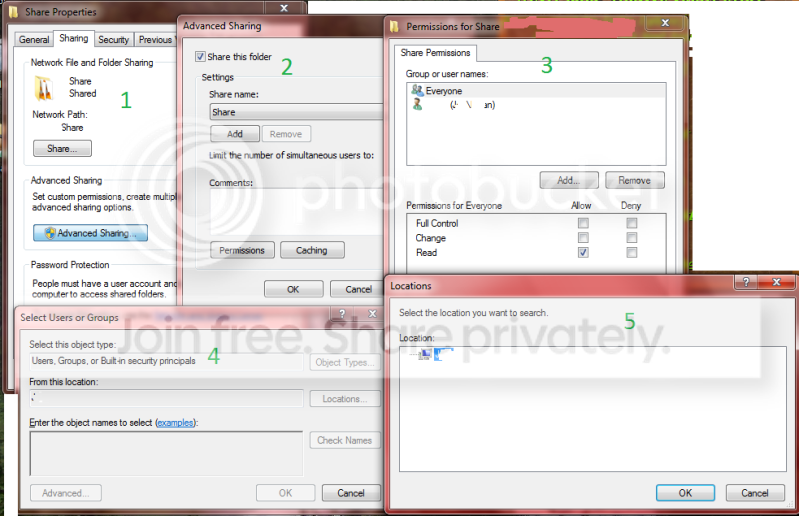
PermissionsLocationsEdited.png


In panel 5, 'Locations' I can only ever see the PC which the dialog box is located on, despite the ability to share with other PC's, moreover my laptop on some crossover ethernet.
Could somebody help or tell me how to add more locations here?
Alternatively, you could suggest some search terms that might yield better results. 'Share' Advanced' Windows 7 'Locations' just returns newbie guides to Windows 7 networking.

Thanks.
 
Last edited:

My Computer My Computer

Computer Manufacturer/Model Number
Moimeme4cheap inc.
OS
Windows XP Home/Vista/7, Ubuntu
CPU
Athlon II X2 250
Motherboard
Gigabyte MA790XT-UD4P
Memory
Patriot Viper DDR3 1333 mhz clocked at 1066 for some reason
Graphics Card(s)
Nvidia 9800GT
Sound Card
Inboard
Monitor(s) Displays
SAMSUNG 753DF
Hard Drives
x2 WD 250 gig IDE, w/ Sil680 raid
If adapters arrive in the mail, sil689 will be ditched in favour of on-board raid.
PSU
1000 Watt OCZ Pro-Stream
Case
Bent up old thing
Cooling
FAN.
Keyboard
Dynex thang
Mouse
Logitech Laser
Im not sure I understand what you want....

The box you are seeing is configuring the network permissions. What you are seeing in that box, is Windows 7 asking what machine the file is hosted on (and the host controls the permissions).

Adding another Location would tell the network is stored on another computer... which it isn't

Example:
I have 3 machines, we will call them "Host" "Client 1" and "Client 2", a file called "Shared" is stored on "Host" The "Location" box tells the other machines that the File is stored on "Host" If the Location was changed, say to "Client 1" then if "Client 2" requested the file, it would (incorrectly) ask "Client 1" for the file rather than asking (correctly) "Host", which would obviously result in "Client 1" reporting that it doesn't have it, and thus produce an error message.

In Summary: There is nothing wrong with that picture, thats exactly how it is supposed to work, If it were possible to change it, you would break your network. As long as you give everyone permission from the Host machine then the file will share fine.

I hope thats clear enough for you.
 

My Computer My Computer

Computer type
PC/Desktop
Computer Manufacturer/Model Number
Medion Erazer (note to self: insert model number) - with custom additions
OS
Windows 10 Pro x64
CPU
Intel Core i5 7400 @ 3.00GHz
Motherboard
OEM supllied with PC
Memory
8GB 2133Mhz DDR4 (OEM supplied)
Graphics Card(s)
Gygabyte Windforce GTX 1050Ti (Factory Overclocked)
Sound Card
Realtek
Monitor(s) Displays
Acer Al1980 + HKC
Screen Resolution
1360*768(HKC) / 1280*1024(Acer)
Hard Drives
1TB Toshiba
1TB WD Caviar Green
120GB Samsung Evo 840
PSU
OEM supplied (no power rating on case)
Case
OEM Supplied
Cooling
Stock
Keyboard
Logitech Wireless
Mouse
Logitect Wireless
Internet Speed
40Mb/s Down 10Mb/s Up
Antivirus
Defender
Browser
Firefox
I'm trying to add file permissions for users on a different domain/computer.
(Both these users are me...)

This is a dialog box for adding more users names to the permissions list.
Are you confused with another dialog box?

The last box is supposed to alter the contents of the 'from this location' box to complete the phrase 'add user [to permissions list]' '[which is a] Users, Groups, or built in security principals' 'from this location [: Host]'
The last dialog box should show me 'Client' so I can change it to add a user which is a user from 'client'.
Currently client is available in the network caterogry and accessible as \\Client\ but it won't show here.
And windows won't let me text edit any of those boxes so that I can type \\Client\User manually. I have to type 'User' and have it automatically search and find \\Client\User. But since the location box says \\Host\, I get only \\Host\User.
 

My Computer My Computer

Computer Manufacturer/Model Number
Moimeme4cheap inc.
OS
Windows XP Home/Vista/7, Ubuntu
CPU
Athlon II X2 250
Motherboard
Gigabyte MA790XT-UD4P
Memory
Patriot Viper DDR3 1333 mhz clocked at 1066 for some reason
Graphics Card(s)
Nvidia 9800GT
Sound Card
Inboard
Monitor(s) Displays
SAMSUNG 753DF
Hard Drives
x2 WD 250 gig IDE, w/ Sil680 raid
If adapters arrive in the mail, sil689 will be ditched in favour of on-board raid.
PSU
1000 Watt OCZ Pro-Stream
Case
Bent up old thing
Cooling
FAN.
Keyboard
Dynex thang
Mouse
Logitech Laser
Aha I see, My apologies, I misunderstood.

Quick question: are there machines/users on the network that you DONT want to have permission? or are you the only user on the network?
 

My Computer My Computer

Computer type
PC/Desktop
Computer Manufacturer/Model Number
Medion Erazer (note to self: insert model number) - with custom additions
OS
Windows 10 Pro x64
CPU
Intel Core i5 7400 @ 3.00GHz
Motherboard
OEM supllied with PC
Memory
8GB 2133Mhz DDR4 (OEM supplied)
Graphics Card(s)
Gygabyte Windforce GTX 1050Ti (Factory Overclocked)
Sound Card
Realtek
Monitor(s) Displays
Acer Al1980 + HKC
Screen Resolution
1360*768(HKC) / 1280*1024(Acer)
Hard Drives
1TB Toshiba
1TB WD Caviar Green
120GB Samsung Evo 840
PSU
OEM supplied (no power rating on case)
Case
OEM Supplied
Cooling
Stock
Keyboard
Logitech Wireless
Mouse
Logitect Wireless
Internet Speed
40Mb/s Down 10Mb/s Up
Antivirus
Defender
Browser
Firefox
There are 2 networks, one is a direct crossover link with my laptop.
If you're thinking work around, I'd still like to learn how add other users.
 

My Computer My Computer

Computer Manufacturer/Model Number
Moimeme4cheap inc.
OS
Windows XP Home/Vista/7, Ubuntu
CPU
Athlon II X2 250
Motherboard
Gigabyte MA790XT-UD4P
Memory
Patriot Viper DDR3 1333 mhz clocked at 1066 for some reason
Graphics Card(s)
Nvidia 9800GT
Sound Card
Inboard
Monitor(s) Displays
SAMSUNG 753DF
Hard Drives
x2 WD 250 gig IDE, w/ Sil680 raid
If adapters arrive in the mail, sil689 will be ditched in favour of on-board raid.
PSU
1000 Watt OCZ Pro-Stream
Case
Bent up old thing
Cooling
FAN.
Keyboard
Dynex thang
Mouse
Logitech Laser
As I said, I dont think it can be done. Permissions are handled by the host machine, they dont take the network into consideration.

Few things I can think of that might work:

1. Try adding your username from another machine into the list (if its different) see if it finds it anyway. (you may have to put \\<other machines IP address>\<Username>

2.use an identical username and password on both machines. Give permission just to your username, and everyone else is set to "deny" that would probably work.

Or if number 1 doesnt work then and you dont want to use the same username, just give "Administrators" permission?
 

My Computer My Computer

Computer type
PC/Desktop
Computer Manufacturer/Model Number
Medion Erazer (note to self: insert model number) - with custom additions
OS
Windows 10 Pro x64
CPU
Intel Core i5 7400 @ 3.00GHz
Motherboard
OEM supllied with PC
Memory
8GB 2133Mhz DDR4 (OEM supplied)
Graphics Card(s)
Gygabyte Windforce GTX 1050Ti (Factory Overclocked)
Sound Card
Realtek
Monitor(s) Displays
Acer Al1980 + HKC
Screen Resolution
1360*768(HKC) / 1280*1024(Acer)
Hard Drives
1TB Toshiba
1TB WD Caviar Green
120GB Samsung Evo 840
PSU
OEM supplied (no power rating on case)
Case
OEM Supplied
Cooling
Stock
Keyboard
Logitech Wireless
Mouse
Logitect Wireless
Internet Speed
40Mb/s Down 10Mb/s Up
Antivirus
Defender
Browser
Firefox
K thanks for the help, I'll try synchronizing my passwords.
But if it can't be done the question must be asked: why is that box there?
 

My Computer My Computer

Computer Manufacturer/Model Number
Moimeme4cheap inc.
OS
Windows XP Home/Vista/7, Ubuntu
CPU
Athlon II X2 250
Motherboard
Gigabyte MA790XT-UD4P
Memory
Patriot Viper DDR3 1333 mhz clocked at 1066 for some reason
Graphics Card(s)
Nvidia 9800GT
Sound Card
Inboard
Monitor(s) Displays
SAMSUNG 753DF
Hard Drives
x2 WD 250 gig IDE, w/ Sil680 raid
If adapters arrive in the mail, sil689 will be ditched in favour of on-board raid.
PSU
1000 Watt OCZ Pro-Stream
Case
Bent up old thing
Cooling
FAN.
Keyboard
Dynex thang
Mouse
Logitech Laser

My Computer My Computer

Computer type
PC/Desktop
Computer Manufacturer/Model Number
Home built
OS
Windows 7 Ult, Windows 8.1 Pro,
CPU
Q9650-4.275GHz, E8600 4.5GHz, E6750-3.8GHz
Motherboard
Evga 780i FTW
Memory
G.Skill PC2 9600 1200Mhz 5 5 5 15 2T
Graphics Card(s)
GTX480
Sound Card
Asus Xonar D2
Monitor(s) Displays
HannsG
Screen Resolution
1680X1050
Hard Drives
GSkill Phoenix Pro 120GB SSD
PSU
ThermalTake Toughpower 1000Watt modular
Case
ThermalTake XaserV
Cooling
Xigmatek S1283
Keyboard
Logitech G15
Mouse
Logitech G9
Internet Speed
T1
Then why is that dialog box there? Half implemented feature that they forgot to remove?
 

My Computer My Computer

Computer Manufacturer/Model Number
Moimeme4cheap inc.
OS
Windows XP Home/Vista/7, Ubuntu
CPU
Athlon II X2 250
Motherboard
Gigabyte MA790XT-UD4P
Memory
Patriot Viper DDR3 1333 mhz clocked at 1066 for some reason
Graphics Card(s)
Nvidia 9800GT
Sound Card
Inboard
Monitor(s) Displays
SAMSUNG 753DF
Hard Drives
x2 WD 250 gig IDE, w/ Sil680 raid
If adapters arrive in the mail, sil689 will be ditched in favour of on-board raid.
PSU
1000 Watt OCZ Pro-Stream
Case
Bent up old thing
Cooling
FAN.
Keyboard
Dynex thang
Mouse
Logitech Laser
Like I mentioned before, it's to add sharing for Users who are on the same machine. Or you can add a Windows live User account name and share with only that user.

Believe me I wish it were possible to share with individual Users on the network but unless you create another User group on both machines then you can't share with individual users. I usually assume that when a person asks these questions they want the actual answer, even if it's not the answer they wanted to hear. ;)

Read the link I already posted, it should work for you but you need to set up both machines with Windows live accounts then add those account names to the list. It's explained in the link I posted pretty well. :geek:
 

My Computer My Computer

Computer type
PC/Desktop
Computer Manufacturer/Model Number
Home built
OS
Windows 7 Ult, Windows 8.1 Pro,
CPU
Q9650-4.275GHz, E8600 4.5GHz, E6750-3.8GHz
Motherboard
Evga 780i FTW
Memory
G.Skill PC2 9600 1200Mhz 5 5 5 15 2T
Graphics Card(s)
GTX480
Sound Card
Asus Xonar D2
Monitor(s) Displays
HannsG
Screen Resolution
1680X1050
Hard Drives
GSkill Phoenix Pro 120GB SSD
PSU
ThermalTake Toughpower 1000Watt modular
Case
ThermalTake XaserV
Cooling
Xigmatek S1283
Keyboard
Logitech G15
Mouse
Logitech G9
Internet Speed
T1
Dialog Box 5 is for selecting another machine on the network.
"create another User group on both machines"
Sounds like a good idea too...
 

My Computer My Computer

Computer Manufacturer/Model Number
Moimeme4cheap inc.
OS
Windows XP Home/Vista/7, Ubuntu
CPU
Athlon II X2 250
Motherboard
Gigabyte MA790XT-UD4P
Memory
Patriot Viper DDR3 1333 mhz clocked at 1066 for some reason
Graphics Card(s)
Nvidia 9800GT
Sound Card
Inboard
Monitor(s) Displays
SAMSUNG 753DF
Hard Drives
x2 WD 250 gig IDE, w/ Sil680 raid
If adapters arrive in the mail, sil689 will be ditched in favour of on-board raid.
PSU
1000 Watt OCZ Pro-Stream
Case
Bent up old thing
Cooling
FAN.
Keyboard
Dynex thang
Mouse
Logitech Laser
A lot of people are saying what I want is immpossible, but windows help says
"
Locations
Click to define the root location from which to begin your search.
Check Names
Locates all matching or similar object names listed in the Enter the object names to select box by using the selected object types and directory location.
Enter the object names to select (examples)
Provides a space for you to type the object names that you want to find. You can search for multiple objects by separating each name with a semicolon. Use one of the following syntax examples:
DisplayName (example: FirstName LastName)
ObjectName (example: Computer1)
UserName (example: User1)
ObjectName@DomainName (example: User1@Domain1)
DomainName\ObjectName (example: Domain1\User1)
"

Someone needs to report this as an error, tell me how to get it working, or reconcile these contradictory facts by telling me that Microsoft is in the habit of leaving broken, pointless dialog boxes in the operating system as well as help documents detailing their supposed use.
 

My Computer My Computer

Computer Manufacturer/Model Number
Moimeme4cheap inc.
OS
Windows XP Home/Vista/7, Ubuntu
CPU
Athlon II X2 250
Motherboard
Gigabyte MA790XT-UD4P
Memory
Patriot Viper DDR3 1333 mhz clocked at 1066 for some reason
Graphics Card(s)
Nvidia 9800GT
Sound Card
Inboard
Monitor(s) Displays
SAMSUNG 753DF
Hard Drives
x2 WD 250 gig IDE, w/ Sil680 raid
If adapters arrive in the mail, sil689 will be ditched in favour of on-board raid.
PSU
1000 Watt OCZ Pro-Stream
Case
Bent up old thing
Cooling
FAN.
Keyboard
Dynex thang
Mouse
Logitech Laser
Sorries for bumping an old topic, but it's one of the first results for this problem and doesn't solve it.

Those options are widely-used in Domains. I suppose the reason for asking the Location is for when you have multiple Domain Servers, you get the option to set a user from a different Server (Since both are active at the same time), which is why it is no use on home networks.

There ARE Workarounds though. Windows may or may not ask for a password when connecting computers, plus if in the same HomeGroup Windows just skips asking for a password.

My suggestion: Change your advanced sharing options to ask for a password, and let Windows manage the Homegroup. Then only add the Notebook and Computer to the Homegroup. From any other computer you'll need to input your username and password from your machine to connect. Not the perfect security, but hey, it's windows... :p
 
Last edited:

My Computer My Computer

OS
Windows 7 Ultimate 64bit
CPU
AMD Athlon XP x64
Motherboard
ECS Black Series GF8200A
Memory
Kingston 6Gb
Hard Drives
240Gb Samsung HD250HJ;
160Gb Seagate Barracuda.
To help explain, this is a feature pared down from a Windows Domain environment. If your computer were a member of a Windows Domain, you could enter a \\computer_name\user and gave the entity rights to your computer. A Windows Domain is managed by a computer on your network that is running some variation of Windows Server software.
Jerry
 

My Computer My Computer

Computer type
PC/Desktop
Computer Manufacturer/Model Number
Asrock
OS
WINDOWS 7 PRO
CPU
AMD
Motherboard
Asrock
Hard Drives
AData SSD
Antivirus
Security Essentials
Browser
FireFox
Back
Top