Add Custom Folder/Library to the Start Menu

SI5K

New member
Local time
11:13 PM
Messages
18
Hello, I have added a custom folder to my Username folder, and I would like it to appear on the start menu alongside Videos, documents etc.
Any links, walkthroughs etc appreciated. A quick search revealed nothing at
Seven Forums about this. . .
Despite the brevity of this post I'm quite adept with Windows and software in general, I'll look up any words used that I do not know...
 

My Computer My Computer

Computer Manufacturer/Model Number
Moimeme4cheap inc.
OS
Windows XP Home/Vista/7, Ubuntu
CPU
Athlon II X2 250
Motherboard
Gigabyte MA790XT-UD4P
Memory
Patriot Viper DDR3 1333 mhz clocked at 1066 for some reason
Graphics Card(s)
Nvidia 9800GT
Sound Card
Inboard
Monitor(s) Displays
SAMSUNG 753DF
Hard Drives
x2 WD 250 gig IDE, w/ Sil680 raid
If adapters arrive in the mail, sil689 will be ditched in favour of on-board raid.
PSU
1000 Watt OCZ Pro-Stream
Case
Bent up old thing
Cooling
FAN.
Keyboard
Dynex thang
Mouse
Logitech Laser
You can't add custom folders to the right side of the start menu, only the left side.

You can however set your User folder to open as a menu instead of a link and it will expand out and you can get to your custom folder that way. One extra step but that's about alll you can do.

http://www.sevenforums.com/tutorials/265-start-menu-customize.html
 
Last edited by a moderator:

My Computer My Computer

Computer Manufacturer/Model Number
Custom by me.
OS
Windows 7 64bit RTM
CPU
Intel Core i7 920 Nehalem Over clocked to 3.5 Ghz
Motherboard
EVGA 132-BL-E758-A1 LGA 1366 Intel X58
Memory
CORSAIR DOMINATOR 6GB (3 x 2GB) 240-Pin DDR3 SDRAM DDR3 1600
Graphics Card(s)
EVGA 01G-P3-1280-AR GeForce GTX 280 1GB
Sound Card
Soundblaster X-Fi Fatal1ty
Monitor(s) Displays
2 x 20in Dell Flatpanels 3200x1200
Screen Resolution
3200x1200
Hard Drives
150GB WD Velociraptor(C:), WD 750GB (D:Games), WD 1TB Black (E:Data1), WD 1TB Green (F:Data2)
PSU
CORSAIR HX1000 1000 watt
Case
Desktop
Cooling
Air
Keyboard
Logitech G15
Mouse
Logitech Revolution MX
Internet Speed
25 MB/s
Got it on left sie

I could get it on the left side by dropping and dragging, but not the right. I even created a file inside "Custom Folder" to see if it would give me options to "expand" such as Word 2010, Windows Live Writer, Firefox, Getting Started, and Sticky notes, but I could not see a way for it to make it expand. If it would expand so that you could see the contents of the file, you might even be better off having it on the left side, but I wasn't able to find that function :-( At least you can have it on the left side by dropping and dragging though. If you need screen shots, let me know.

In the meantime, maybe I can find a registry hack or something to get it on the right side.
 

My Computer My Computer

Computer Manufacturer/Model Number
Dell
OS
Vista and Virtual Win 7 RC
CPU
2.5 GHz Core 2 Duo
Motherboard
Dell
Memory
4 GB
Graphics Card(s)
ATI Radeon HD 2400 Pro
Monitor(s) Displays
Dual Asus 19" - 1 DSub, 1 Digital
Hard Drives
220 GB
Case
Dell 530
In practical applications, there no such thing as can't for software. . .
Theres gotta be some setting somewhere. Even if it requires editing a .dll or some other cryptic OS file...
 

My Computer My Computer

Computer Manufacturer/Model Number
Moimeme4cheap inc.
OS
Windows XP Home/Vista/7, Ubuntu
CPU
Athlon II X2 250
Motherboard
Gigabyte MA790XT-UD4P
Memory
Patriot Viper DDR3 1333 mhz clocked at 1066 for some reason
Graphics Card(s)
Nvidia 9800GT
Sound Card
Inboard
Monitor(s) Displays
SAMSUNG 753DF
Hard Drives
x2 WD 250 gig IDE, w/ Sil680 raid
If adapters arrive in the mail, sil689 will be ditched in favour of on-board raid.
PSU
1000 Watt OCZ Pro-Stream
Case
Bent up old thing
Cooling
FAN.
Keyboard
Dynex thang
Mouse
Logitech Laser
Adding custom links to the right hand side of the start menu would require a code guru.

Taken that I'm not a code guru and would still like a custom link on the right hand side of my start menu, there are a few work arounds to this.


Option 1:


The Documents, Pictures, Music, Video, Download links can be routed to whatever folder you want.(You can enable/disable these librarys from showing in your start menu by right clicking on the taskbar, going to the start menu tab, and selecting customize.) The downside of this is that you can't change the names of the libraries.

In my example, I have all my documents stored on a secondary internal HDD. (E:/)
Step 1: Start -> Right click on Documents -> Select Properties

Step 2: Click "Include a folder"

Step 3: Browse to your given directory, and click "Include Folder"
(In my case it is "E:\My Documents")
Step 4: In the Library locations box, select the directory you just chose, then click "Set save location"

Step 5(Optional): you can remove the default directories so only the directory you specified is opened when you go to the documents library

Step 6: Click Ok, and it prompts you if you want to move all the files from the old location(s) to your new directory. This is up to you, I say no.

Step 7: Hit Start -> Click Documents to verify it points to your new directory.

Option 2:

Very similar to option 1, but with a little more customization.

Step 1: Enable favorites menu in taskbar properties -> start menu -> customize

Step 2: Right click on favorites when in the start menu, and select properties.

Step 3: Under the location tab, change the directory to whatever you wish.

Step 4: Click ok.

This option is nice because it allows you to browse the directory as a menu.


I think of these as redneck workarounds, but take from it what you want :)
 

My Computer My Computer

OS
Windows 7 Pro x64
CPU
Intel Core2 Quad @ 2.83 GHz
Motherboard
GIGABYTE GA-EP45-UD3R
Memory
6 Gb Corsair XMS2 DDR2 800
Graphics Card(s)
NVIDIA GeForce GTS250 1 Gb Memory
Monitor(s) Displays
Samsung Snycmaster 2253 22" Display x2
Hard Drives
WD Caviar Green SATA 500Gb
WD Caviar Black SATA 1Tb
PSU
XION Sueprnova 600W
Case
BFG NZXT
Keyboard
Saitek Eclipse
Mouse
Logitech G5
Typical Windows crap. Let's see I can add Favorites, Games, Homegroup, Recorded TV, Videos

NONE of which I care to ever open let alone have quick access to from the Start menu but hey I cannot add a custom folder!! Stupid

So far I am not impressed with Windows 7 and will stick with the competitors OS. Microsoft keeps to trying to think for the user which I guess is what you need to do for dumber users.
 

My Computer My Computer

OS
windows 7
Have been searching for ages for a way to do this - I want to have a link to my Music folder on the right side of the Start Menu. Can't believe there is no way to get such a simple thing!

I disabled the library view because of it's sheer annoyingness (the number of times i had to right click and select 'open folder location' just to be able to work with my files properly) and now i don't have links to my my picture folder and music folder.

Grr!!!
 

My Computer My Computer

Computer Manufacturer/Model Number
Self-built
OS
Win7 Pro; Linux Mint 7
CPU
E8500 @ 3.8GHz
Motherboard
Asus P5QL PRO
Memory
Corsair XMS2 2GB @800MHz
Graphics Card(s)
Nvidia 9800GT
Sound Card
onboard
Hard Drives
Western Digital Caviar 500GB x2
Favorites, Games, Homegroup, Recorded TV, Videos have something in common.
i can't believe that this area is hard-coded.
 

My Computer My Computer

OS
7
Hey,
I was looking for this as well.
The most sensible thing to do for me was adding the (for me unused) downloads folder as a link (dunno how its called exactly in english) and then before you do anything else, change it's name to whatever you want it to be.
Then right click it and select properties.
Go to the location tab and enter your designated folder.
Thats all, Easy as that.

Tim
 

My Computer My Computer

Computer Manufacturer/Model Number
TARGA
OS
Windows 7 Home Premium 32/64bit. (2PC's)
CPU
Intel Core 2Quad Q8200 @2.33GHz
Memory
3Gb DDR2
Graphics Card(s)
nVidia GeForce 9500GS
Monitor(s) Displays
Packard Bell Maestro 222WS 22" Full HD
I did the same thing as timmiej93 but I used the 'My Videos' library.
  1. Right click the library link you want to use (e.g. My Videos) select Rename.
  2. Type in the name you want to give the library (e.g. Programming), hit enter.
  3. Navigate to the folder you want to add to the renamed library (e.g. Python 3.1).
  4. Right click the folder, select 'Include in library' and click the newly renamed library.
After doing the above, I had to restart my machine. Prior to restarting, the folder stores within my libraries would not expand when I hovered on them. After reboot, all works great. I also went back and right clicked on the default My Videos folders to remove them from the now named Programming library just to clean things up.

It's a shame that this work around had to be performed but at least my machine is now customized the way I prefer it. It makes no sense that Microsoft included the option to easily add new libraries yet doesn't allow the user to access a new library from the navigation pane of the start menu. :sarc:
 

My Computer My Computer

OS
Windows 7 Professional x64
You can add the Video Floder to the Right side of the Start menu by right clicking the start menu and choosing properties, then Customize then scroll all the way to the bottom and click display as link beside Videos.
 

My Computer My Computer

Computer Manufacturer/Model Number
Custom HTPC
OS
Windows 7 Professional 64 bit
CPU
Core I5
Motherboard
Gigabyte
Memory
Corsair 4 gb 1600
Graphics Card(s)
PNY 512 mb
Sound Card
onboard Gigabyte
Monitor(s) Displays
Panasonic 50 in Plasma
Hard Drives
2 X 1 Tb Western Digital Caviar Black 7200
PSU
650 OCZ
Case
Silverstone
Cooling
Intel Stock
Adding custom links to the right hand side of the start menu would require a code guru.

Taken that I'm not a code guru and would still like a custom link on the right hand side of my start menu, there are a few work arounds to this.


Option 1:

The Documents, Pictures, Music, Video, Download links can be routed to whatever folder you want.(You can enable/disable these librarys from showing in your start menu by right clicking on the taskbar, going to the start menu tab, and selecting customize.) The downside of this is that you can't change the names of the libraries.

In my example, I have all my documents stored on a secondary internal HDD. (E:/)
Step 1: Start -> Right click on Documents -> Select Properties

Step 2: Click "Include a folder"

Step 3: Browse to your given directory, and click "Include Folder"
(In my case it is "E:\My Documents")
Step 4: In the Library locations box, select the directory you just chose, then click "Set save location"

Step 5(Optional): you can remove the default directories so only the directory you specified is opened when you go to the documents library

Step 6: Click Ok, and it prompts you if you want to move all the files from the old location(s) to your new directory. This is up to you, I say no.

Step 7: Hit Start -> Click Documents to verify it points to your new directory.

Option 2:

Very similar to option 1, but with a little more customization.

Step 1: Enable favorites menu in taskbar properties -> start menu -> customize

Step 2: Right click on favorites when in the start menu, and select properties.

Step 3: Under the location tab, change the directory to whatever you wish.

Step 4: Click ok.

This option is nice because it allows you to browse the directory as a menu.


I think of these as redneck workarounds, but take from it what you want :)
Option 2 is the way to go. You can really only replace an existing folder and Favorites is a good candidate - although I use Games.
 

My Computer My Computer

Computer Manufacturer/Model Number
HP, Dell, Gateway, Toshiba - 4 laptops and 2 desktops
OS
Vista, Windows7, Mint Mate, Zorin, Windows 8
CPU
from 1.6GHz Duo to i7
Monitor(s) Displays
2x HP w2207
Hard Drives
5x HDD, 7x SSD, 12x Externals
Keyboard
with trackball - no mices
Mouse
Trackball mice
Internet Speed
DSL 6000
I was referring to adding Videos to here.
 

Attachments

  • Videos.png
    Videos.png
    25.6 KB · Views: 415

My Computer My Computer

Computer Manufacturer/Model Number
Custom HTPC
OS
Windows 7 Professional 64 bit
CPU
Core I5
Motherboard
Gigabyte
Memory
Corsair 4 gb 1600
Graphics Card(s)
PNY 512 mb
Sound Card
onboard Gigabyte
Monitor(s) Displays
Panasonic 50 in Plasma
Hard Drives
2 X 1 Tb Western Digital Caviar Black 7200
PSU
650 OCZ
Case
Silverstone
Cooling
Intel Stock

My Computer My Computer

OS
Several, including Windows 7 x64 Ultimate
Fix and customize start menu win 7

First off download classic shell32.
It's allows you to have the windows 98 / xp classix start menu.
then go into classic shell's startmenusettings.exe.
there you can completely sort / delete / rename edit your start menu.

cheers
 

My Computer My Computer

OS
Windows 7 home premium
I did the same thing as timmiej93 but I used the 'My Videos' library.
  1. Right click the library link you want to use (e.g. My Videos) select Rename.
  2. Type in the name you want to give the library (e.g. Programming), hit enter.
  3. Navigate to the folder you want to add to the renamed library (e.g. Python 3.1).
  4. Right click the folder, select 'Include in library' and click the newly renamed library.
After doing the above, I had to restart my machine. Prior to restarting, the folder stores within my libraries would not expand when I hovered on them. After reboot, all works great. I also went back and right clicked on the default My Videos folders to remove them from the now named Programming library just to clean things up.

It's a shame that this work around had to be performed but at least my machine is now customized the way I prefer it. It makes no sense that Microsoft included the option to easily add new libraries yet doesn't allow the user to access a new library from the navigation pane of the start menu. :sarc:


Nice, I did it with my Favorites menu. Turned it into a nice library for everything I needed(currently, Audacity projects editing Minecraft parodies of songs like Timber by Pitbull, basically snipping the audio I need and converting it to WAV).
 

My Computer My Computer

Computer type
PC/Desktop
Computer Manufacturer/Model Number
Dell/Alienware
OS
Windows 7 Home Premium 64-bit
CPU
Intel Core i5 4200m 2.5 GHz dual core processor
Motherboard
Alienware product #07MJ2Y version A01
Memory
16GB RAM
Graphics Card(s)
nVidia GT 750M 1GB dedicated RAM
Hard Drives
Local Fixed Disk
Antivirus
Norton 360
Browser
Google Chrome
Typical Windows crap. Let's see I can add Favorites, Games, Homegroup, Recorded TV, Videos

NONE of which I care to ever open let alone have quick access to from the Start menu but hey I cannot add a custom folder!! Stupid

So far I am not impressed with Windows 7 and will stick with the competitors OS. Microsoft keeps to trying to think for the user which I guess is what you need to do for dumber users.

What is it you want to link to, and have your tried symbolic links or junctions?

Have been searching for ages for a way to do this - I want to have a link to my Music folder on the right side of the Start Menu. Can't believe there is no way to get such a simple thing!

I disabled the library view because of it's sheer annoyingness (the number of times i had to right click and select 'open folder location' just to be able to work with my files properly) and now i don't have links to my my picture folder and music folder.

Grr!!!

What path is your mypics etc that you want to link to?

For your purposes I'm surprised you're not making use of the library folders. ie music folder(s) in music library...


Wish I could read assembly!
 

My Computer My Computer

Computer type
Laptop
Computer Manufacturer/Model Number
Dell
OS
Windows 7 Ultimate 64bit
CPU
2.2
Memory
8Gb
Graphics Card(s)
NVIDIA
Screen Resolution
1280/762
Mouse
built in pad || iphone || MS wireless
Internet Speed
100MB
Antivirus
Avast
Browser
Chrome, Chrome portable
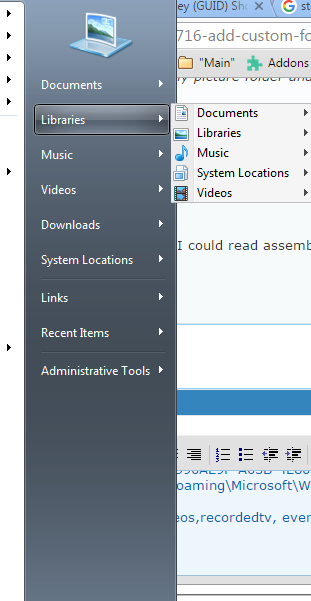
1) Enable (as menus) your libraries - documents, music, videos, pictures... note the order (i think it's fixed, renaming them didn't affect)

I started with the (never used) RecordedTv.
In HKEY_CURRENT_USER\Software\Microsoft\Windows\CurrentVersion\Explorer\User Shell Folders
I added {1A6FDBA2-F42D-4358-A798-B74D745926C5} with value
C:\Users\Jonny\AppData\Roaming\Microsoft\Windows\Libraries\System Locations.library-ms

On a roll, I tried recycling the (former photos) library.
I changed the value for {A990AE9F-A03B-4E80-94BC-9912D7504104} to
C:\Users\Jonny\AppData\Roaming\Microsoft\Windows\Libraries

So you can use photos,videos,recordedtv, even documents... recycle them, to point to libraries, or folders!

zBgTT1d.png


EDIT: This will create some interesting side-effects, namely

- The Libraries structure needs revising (I'm working on a fix). currently, the above hack gives you libraries within libraries (in the navspace)

xJQZgK4.png


- any libraries that you reference as 'new User Shell Folders' (redirectors referenced to get custom startpanel-menus) will be systemised, and you can't see them in libraries (root) and worse they're hidden from the 'Include in Library' options!!!

Thankfully there's an easy fix for this, ie create a library-symbolic-link to the (now-hidden) system-library:

Here I linked my (now hidden) System Locations library
mklink "System Places.library-ms" "System Locations.library-ms"

AL85etq.png
 
Last edited:

My Computer My Computer

Computer type
Laptop
Computer Manufacturer/Model Number
Dell
OS
Windows 7 Ultimate 64bit
CPU
2.2
Memory
8Gb
Graphics Card(s)
NVIDIA
Screen Resolution
1280/762
Mouse
built in pad || iphone || MS wireless
Internet Speed
100MB
Antivirus
Avast
Browser
Chrome, Chrome portable
Back
Top