
Add or remove icons from shell extensions in right click menu

NFSFM

New member
Local time
11:08 PM
Messages
3
Hi,

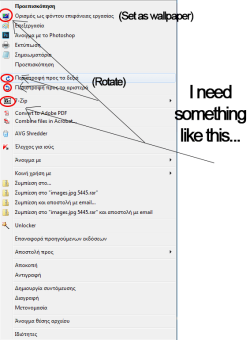
I was trying 2 days in a row to add some icons in the right click context menu. I was able to add some of them, for example next to "print" or "play". But I ouldn't find any way to add icons next to shell extensions, for example "7-zip". Is this any way via registry or via any other program to manage this ? I think that this is possible with Visual Studio, but I don't know much about it (but if it's possible a tutorial is appreciated). I have some experience with editing dlls via Resource Hacker e.t.c. Any help ?

P.S. : I have some screenshots attached, explaining what I want to do...
 

Attachments
  • Untitled-2.png
    Untitled-2.png
    34.4 KB · Views: 0

My Computer My Computer

Computer type
PC/Desktop
Computer Manufacturer/Model Number
Custom Build
OS
Windows 7 Ultimate x64
CPU
Intel® Core™ i5-3570 CPU @ 3.40GHz Quad Core
Motherboard
Asus P8B75-MLX
Memory
Kingston 8GB
Graphics Card(s)
ASUS & nVidia ENBGT-430
Hard Drives
Samsung SSD 840 Series 111GB
2x 150GB
Antivirus
Kaspersky PURE 3.0
Browser
Firefox

My Computer My Computer

Computer type
PC/Desktop
OS
Windows 10 Home x64
CPU
INTEL Core i5-750 Quad-Core 3.37GHz
Motherboard
ASUS P7P55D
Memory
HyperX Fury Black Series 8GB (2 x 4GB) 1866Mhz
Graphics Card(s)
EVGA GeForce GTX 750 Superclocked 1GB 128-Bit GDDR5
Monitor(s) Displays
LG 32MA68HY 32" IPS
Screen Resolution
1920 x 1080
Hard Drives
Samsung 840 Evo 120GB, SEAGATE 500GB Barracuda® 7200.12, SATA 3 Gb/s, 7200 RPM, 16MB cache
PSU
ANTEC TruePower New TP-550, 80 PLUS, 550W
Case
ANTEC Three Hundred Illusion
Cooling
COOLER MASTER Hyper 212 Plus, 4 x 120mm 1 x 140mm Noctua's
Internet Speed
85 + Mbps
Antivirus
Avast
Browser
Vivaldi
Thanks for the advice, but I don't have problems with the /shell folder. I had already managed to change the icons for this folder.
My problem is with the shell extensions (/shellex directory). Example : 7-zip shell extension in right-click context menu but no icon (that is what I want to add).
 

My Computer My Computer

Computer type
PC/Desktop
Computer Manufacturer/Model Number
Custom Build
OS
Windows 7 Ultimate x64
CPU
Intel® Core™ i5-3570 CPU @ 3.40GHz Quad Core
Motherboard
Asus P8B75-MLX
Memory
Kingston 8GB
Graphics Card(s)
ASUS & nVidia ENBGT-430
Hard Drives
Samsung SSD 840 Series 111GB
2x 150GB
Antivirus
Kaspersky PURE 3.0
Browser
Firefox
I believe that icons for shell extensions are controlled by the extension itself. I don't think you can control this.
 

My Computer My Computer

Computer type
PC/Desktop
Computer Manufacturer/Model Number
HP
OS
Windows 7 Pro 64 bit
CPU
Xeon W3520
Memory
8 GB
Graphics Card(s)
Nvidia Geforce 210
I 've an idea about modifying the shellextension's dll (7z.dll). But how do I add the icon in the dll ?
 

My Computer My Computer

Computer type
PC/Desktop
Computer Manufacturer/Model Number
Custom Build
OS
Windows 7 Ultimate x64
CPU
Intel® Core™ i5-3570 CPU @ 3.40GHz Quad Core
Motherboard
Asus P8B75-MLX
Memory
Kingston 8GB
Graphics Card(s)
ASUS & nVidia ENBGT-430
Hard Drives
Samsung SSD 840 Series 111GB
2x 150GB
Antivirus
Kaspersky PURE 3.0
Browser
Firefox
Back
Top