Add to Favorites and Log out on websites not working

evhid1

New member
Member
Local time
3:50 AM
Messages
28
1. OS: windows 7 w/sp1
2. tried windows 10, didn't like it tried the roll back
3. roll back didn't work corrupted my start up files
3. repair start up files didn't work
4. reloaded from a windows image backup
5. long struggle but back up with windows 7
6. now when I click on favorites and then add to favorite nothing happens
7. when I visit a website (any website) and sign in I then click on log out and nothing happens
8. spent all day searching this windows 7 forums site and tried all the fixes that I thought related to my problem.
9. no of them worked
10. went to Microsoft IE 11 help site and tried their suggestions again no help.

Can anybody help me get these function working again? thanks in advance for any help.
 

My Computer My Computer

At a glance

Windows 7 Home Premium 64 bit
OS
Windows 7 Home Premium 64 bit

My Computer My Computer

At a glance

W7 Pro SP1 64biti78GBIntel HD Graphics
Computer type
Laptop
Computer Manufacturer/Model Number
Employer provided Dell Latitude
OS
W7 Pro SP1 64bit
CPU
i7
Memory
8GB
Graphics Card(s)
Intel HD Graphics
Hard Drives
crappy SSD
Antivirus
Employer mandated Symantec Endpoint Protection
Browser
Pale Moon 64bit, IE11 64bit & Chrome 64bit
First let me say thank you very very much for your help. Below is the things I did to try to follow your help and how it turned out. With one last question.

I did the sfc /scannow before about 5 times before but went ahead and did it one more time and no problems found.
Removed IE11 after saving your install fies. I did not go back to an earlier version of IE, could not fine and or install IE8. Microsoft support site kept telling me my computer was up to date.
Installed IE9 and it took care of both issues.
Installed IE10 and problems came back.
Tried to install IE11 and part way through the installation it stopped and said I didn't need to install IE11 for this machine because IE11 was for Windows 8 and 8.1 but left a link on the desk top to try again.
I removed IE10 and it reverted back to IE9 x64 version. and had one cummulative security update to install for IE9. Installed that and no more problems.
Now I am currently using IE9 everything seems fine.

Should I just leave well enough alone or is there something else I should to get back to IE11?
 

My Computer My Computer

At a glance

Windows 7 Home Premium 64 bit
OS
Windows 7 Home Premium 64 bit
> Removed IE11...
> ...did not go back to an earlier version of IE,
Removing IE11 per that tutorial should have taken you to some earlier version of IE. Which version that is depends on which versions were installed before installing IE11. It could take you from IE11 to IE8.

> ...could not fine and or install IE8.
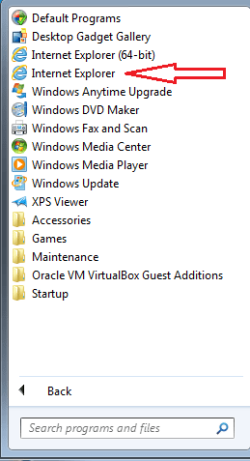
IE8 is built into Windows 7 (except for Windows 7 E - silly European lawsuits).
Uninstalling IE updates/upgrades should eventually revert you to IE8.

> Installed IE9 and it took care of both issues.
Interesting. More comments later.

> Installed IE10 and problems came back.
By default, (on 64bit systems) IE10 and above will start both a 64bit and 32 bit browser to show you websites. Troubleshooting gets harder.

> Tried to install IE11 and part way through the installation it stopped and said I didn't need to install IE11 for this machine because IE11 was for Windows 8 and 8.1 but left a link on the desk top to try again.
That is odd. The link that I supplied works for me.

> I removed IE10 and it reverted back to IE9 x64 version.
~~~
> Now I am currently using IE9 everything seems fine.
Does the 32bit version of IE9 work as well?

IE9.png


> Should I just leave well enough alone or is there something else I should to get back to IE11?
It would be best to get you up to IE11.
 

My Computer My Computer

At a glance

W7 Pro SP1 64biti78GBIntel HD Graphics
Computer type
Laptop
Computer Manufacturer/Model Number
Employer provided Dell Latitude
OS
W7 Pro SP1 64bit
CPU
i7
Memory
8GB
Graphics Card(s)
Intel HD Graphics
Hard Drives
crappy SSD
Antivirus
Employer mandated Symantec Endpoint Protection
Browser
Pale Moon 64bit, IE11 64bit & Chrome 64bit
>Removing IE11 per that tutorial should have taken you to some earlier version of IE. Which version that is depends on which versions were installed before installing IE11. It could take you from IE11 to IE8.

When I removed IE11 I had "no" internet explorer. I clicked on my start button but for the familiar "e" but there was none.

>Interesting. More comments later.

After installing IE9 I did have the 32bit and 64bit version in the start menu

>Does the 32bit version of IE9 work as well?

Yes

>IE8 is built into Windows 7 (except for Windows 7 E - silly European lawsuits).
Uninstalling IE updates/upgrades should eventually revert you to IE8.

I know but removing IE11 did not take me back to IE10, 9 or 8. I only looked and removed IE11 once though

I can try upgrading to IE10 then to IE11 again to see what happens? Or should I?
 

My Computer My Computer

At a glance

Windows 7 Home Premium 64 bit
OS
Windows 7 Home Premium 64 bit
Even if there is no "e" in the start menu, the Internet Explorer files for IE8 should have been here:
Code:
C:\Program Files (x86)\Internet Explorer
It is not a big deal that we did not see IE8. We were not going to use it anyway.

Thanks for taking the time to try all of those versions of IE. I was sure hoping that one of the installations would fix your Favorites issue. Go ahead and install IE10, its patches (if any), then IE11 its patches (if any).

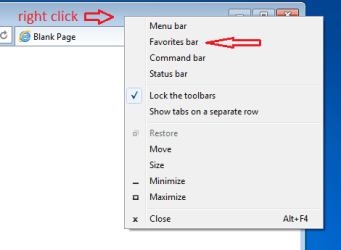
After IE11 is back - if the Favorites issue still happens, please turn on the Favorites bar:

IE11-1.png


Visit any website and drag and drop the icon onto the Favorites bar:

IE11-2.png


If that shortcut goes onto the Favorites bar, then we know that the NTFS permissions are probably okay for that folder (even though the Favorites bar folder is a sub-folder of the main Favorites folder).
 

My Computer My Computer

At a glance

W7 Pro SP1 64biti78GBIntel HD Graphics
Computer type
Laptop
Computer Manufacturer/Model Number
Employer provided Dell Latitude
OS
W7 Pro SP1 64bit
CPU
i7
Memory
8GB
Graphics Card(s)
Intel HD Graphics
Hard Drives
crappy SSD
Antivirus
Employer mandated Symantec Endpoint Protection
Browser
Pale Moon 64bit, IE11 64bit & Chrome 64bit
Been trying everything today and I'm back to IE 9 with the cummulative security updates for it. Never could get IE 11 to load and IE 10 would load but the no add to favs and logout problems came back. I tried uninstalling all IE's and then trying to loading IE 11 and that didn't work. Went the Microsoft support site and did severl things there that they suggested and no good. I have the windows 7 with SP1 and all the updates installed that IE 11 needs but still won't install. At one point I had an error code 9c59 that microsoft website addressed but didn't help me. Even uninstalling IE 9 I didn't have IE 8 on file even though it was suppose to be with windows 7. I did some of these things 2 or 3 times and no help. I have been at it since 7:00 AM PST and now it's 1:50 pm. I give up. I've already lost all the data I am going to lose so it would be no loss to upgrade to windows 10 again and play with that until I learn it. But I do know I am fricking to tired for one day. Thanks again for your help.
 

My Computer My Computer

At a glance

Windows 7 Home Premium 64 bit
OS
Windows 7 Home Premium 64 bit
Computers are such time saving devices - aren't they :-)

Not sure what else to try. you could make a thread in the windows update sub-forum and let them try to get IE11 installed correctly.
 

My Computer My Computer

At a glance

W7 Pro SP1 64biti78GBIntel HD Graphics
Computer type
Laptop
Computer Manufacturer/Model Number
Employer provided Dell Latitude
OS
W7 Pro SP1 64bit
CPU
i7
Memory
8GB
Graphics Card(s)
Intel HD Graphics
Hard Drives
crappy SSD
Antivirus
Employer mandated Symantec Endpoint Protection
Browser
Pale Moon 64bit, IE11 64bit & Chrome 64bit
I've been working on it for the last 4 hours and now have IE11 installed on my computer. Whew, that was the good news. Now I am back to "unable to use add to favorites " and " can't use the logout button on websites". Now I will work on it.

To get IE11 back I installed it in safe mode. The first time I tried that it said I had to go to a Microsoft website to install an update file. But couldn't see which update file. So I closed that window and tried the install again and it then installed ok.

So that's where I stand, pretty much at the beginning again.
 

My Computer My Computer

At a glance

Windows 7 Home Premium 64 bit
OS
Windows 7 Home Premium 64 bit
Good job getting IE11 installed.

Now that you have IE11, please try the drag/drop test mentioned in post #6.
 

My Computer My Computer

At a glance

W7 Pro SP1 64biti78GBIntel HD Graphics
Computer type
Laptop
Computer Manufacturer/Model Number
Employer provided Dell Latitude
OS
W7 Pro SP1 64bit
CPU
i7
Memory
8GB
Graphics Card(s)
Intel HD Graphics
Hard Drives
crappy SSD
Antivirus
Employer mandated Symantec Endpoint Protection
Browser
Pale Moon 64bit, IE11 64bit & Chrome 64bit
Ok, I can drag and drop things into the favorites bar. And Organize Favorites works too. And there are a few websites that logout works on. Windows 7 Forum and a Motorcycle website right now are two that logout don't work.
 

My Computer My Computer

At a glance

Windows 7 Home Premium 64 bit
OS
Windows 7 Home Premium 64 bit
Thanks for checking drag/drop. Folder file permissions are probably ok.

Within IE11, when you click on the Favorites star, the Favorites Center should fly out from the right side of IE. That Favorites Center has a button named Add to Favorites. When I click on Add to Favorites, I see a window popup that lets me add (create) a new favorite. In your original post, you seem to be saying that this popup window never appears. Is that correct?

Pressing Ctrl+D while in IE should also produce this popup. Does it for you?

What antivirus app is installed? Any other security apps?

Can you add favorites if you open IE without any add-ons?

Code:
"C:\Program Files\Internet Explorer\iexplore.exe"  -extoff
 

My Computer My Computer

At a glance

W7 Pro SP1 64biti78GBIntel HD Graphics
Computer type
Laptop
Computer Manufacturer/Model Number
Employer provided Dell Latitude
OS
W7 Pro SP1 64bit
CPU
i7
Memory
8GB
Graphics Card(s)
Intel HD Graphics
Hard Drives
crappy SSD
Antivirus
Employer mandated Symantec Endpoint Protection
Browser
Pale Moon 64bit, IE11 64bit & Chrome 64bit
I have the star upper right side and when I click on it, the Favorites menu opens up with my favorites. It too has an "Add to Favorites" button. I was initially talking about the Favorites in the upper left side just under the back arrow that I have File Edit View Favorites Tools Help. However, neither "Add to Favorites" work. There is no pop up with the website name and a choice of what favorite folder to put it in.

I tried running with no add-ons and that didn't help either.

I am using Kaspersky Internet Security software with the update for windows 10.

And pressing Ctrl+D while in IE does not produce a pop up window either.
 

My Computer My Computer

At a glance

Windows 7 Home Premium 64 bit
OS
Windows 7 Home Premium 64 bit
> I have the star upper right side and when I click on it, the Favorites menu opens up with my favorites.
I recently learned that the box created by clicking on that star is called the Favorites Center.
:::useless trivia:::


I used Process Monitor to see some of what happens when I made that Add Favorites popup happen.

Sadly, I saw nothing that helps us here.

Grasping at straws:
Use Windows (file) Explorer to...
...copy/paste all of your favorites to a safe location
...delete your favorites from the Favorites folder.
(Leave the sub-folder named favorites bar or links.)

See if that lets you create the pop-up.

If that fails, delete the contents of this folder...
C:\Users\username\AppData\Local\Microsoft\Windows\Caches
...and try for the popup again.
 

My Computer My Computer

At a glance

W7 Pro SP1 64biti78GBIntel HD Graphics
Computer type
Laptop
Computer Manufacturer/Model Number
Employer provided Dell Latitude
OS
W7 Pro SP1 64bit
CPU
i7
Memory
8GB
Graphics Card(s)
Intel HD Graphics
Hard Drives
crappy SSD
Antivirus
Employer mandated Symantec Endpoint Protection
Browser
Pale Moon 64bit, IE11 64bit & Chrome 64bit
I tried those suggestions and sadly no help. But I want to thank you for all your work trying to help me. I am just going to live with it. It is one of those minor things I can work around no problem. I have all my data I want to keep backed up and lost just the last 4 months of stuff I was keeping in my email storage folders.

One strange thing I noticed today is when I expanded the tree in windows explorer there were a lot of duplicate folders files. I think a lot of the stuff was from me going from Windows Essentials 2011 to Windows Essentials 2012. I deleted a bunch of those folders and sure enough computer was acting weird and still didn't fix my "add to favorites" problem. So I did a restore to my saved restore point I did yesterday and all is fine.

I think at this point I have nothing to lose and I'm going to try windows 10 again and just learn it.

Thanks again for all your help.
 

My Computer My Computer

At a glance

Windows 7 Home Premium 64 bit
OS
Windows 7 Home Premium 64 bit
Hi,
One thing you might try,
Click Start and your user name near the top under your user image,
Open the favorites folder,
Click on New folder
Name it what ever you like test..
Then close and restart your machine

Restart and test to try and save to the new folder from either add to favorites location.
Browse to the folder you created.

Last resort would be create a new administrator user account and test.
 

My Computer My Computer

At a glance

Win-7-Pro64bit 7-H-Prem-64biti7-5930K 2nd i9-9940x both water blocked VRM'...Trident-z 3200C14 2nd Trident-z 3600C16EVGA 1080ti ftw3 2nd Titan Xp both water blocked
Computer type
PC/Desktop
Computer Manufacturer/Model Number
Custom assembled by me :}
OS
Win-7-Pro64bit 7-H-Prem-64bit
CPU
i7-5930K 2nd i9-9940x both water blocked VRM's too
Motherboard
ASUS SABERTOOTH X99 2nd ASUS x299 Apex
Memory
Trident-z 3200C14 2nd Trident-z 3600C16
Graphics Card(s)
EVGA 1080ti ftw3 2nd Titan Xp both water blocked
Sound Card
Built-in Realtek
Monitor(s) Displays
1-AOC G2460PG 24"G-Sync 144Hz/ 2nd 1-ASUS VG248QE 24" 144Hz
Screen Resolution
1920 x 1080 144Hz
Hard Drives
2-Samsung M.2 Evo & Evo Plus
2-Samsung 850 EVO 500GB SSD's/ 3-2.5 W.D. Black 1tb-&3-1tb/3-3.5 WD Black 1tb hdd's
PSU
EVGA SuperNOVA 1000-P2 2nd 1200-P2
Case
2-Corsair Obsidian Series 450D Black ATX Mid Tower
Cooling
Custom water loops
Keyboard
Logitech G710+/ 2nd Logitech G910
Mouse
2-RedDragon M901 Perdition 16400 dpi Gaming mouse = wired
Internet Speed
Comcast Ping 19ms 89.31mbps download speed 6.12mbps upload
Antivirus
Malwarebytes Pro/ Superantispyware Pro
Browser
FireFox & Pale moon
Other Info
2nd ASUS X299 Apex/Intel i9-9940x with Custom water loop/7H-Prem-x64/Corsair 450D case/Ram Trident-z 3600C16 4x8gb / Samsung970Evo plus 500gb SSD/Dual ssd EZ swap evo/PSU EVGA SuperNova 1200w-P2 80+Platinum/GPU Titan Xp /8-ML-140 on push-pull on 2-280GTX rads
Installed windows 10 and am using IE 11. That has taken care of all IE 11 problems. Now to learn how to use windows 10. Thank you for your help though.
 

My Computer My Computer

At a glance

Windows 7 Home Premium 64 bit
OS
Windows 7 Home Premium 64 bit

My Computer My Computer

At a glance

Win-7-Pro64bit 7-H-Prem-64biti7-5930K 2nd i9-9940x both water blocked VRM'...Trident-z 3200C14 2nd Trident-z 3600C16EVGA 1080ti ftw3 2nd Titan Xp both water blocked
Computer type
PC/Desktop
Computer Manufacturer/Model Number
Custom assembled by me :}
OS
Win-7-Pro64bit 7-H-Prem-64bit
CPU
i7-5930K 2nd i9-9940x both water blocked VRM's too
Motherboard
ASUS SABERTOOTH X99 2nd ASUS x299 Apex
Memory
Trident-z 3200C14 2nd Trident-z 3600C16
Graphics Card(s)
EVGA 1080ti ftw3 2nd Titan Xp both water blocked
Sound Card
Built-in Realtek
Monitor(s) Displays
1-AOC G2460PG 24"G-Sync 144Hz/ 2nd 1-ASUS VG248QE 24" 144Hz
Screen Resolution
1920 x 1080 144Hz
Hard Drives
2-Samsung M.2 Evo & Evo Plus
2-Samsung 850 EVO 500GB SSD's/ 3-2.5 W.D. Black 1tb-&3-1tb/3-3.5 WD Black 1tb hdd's
PSU
EVGA SuperNOVA 1000-P2 2nd 1200-P2
Case
2-Corsair Obsidian Series 450D Black ATX Mid Tower
Cooling
Custom water loops
Keyboard
Logitech G710+/ 2nd Logitech G910
Mouse
2-RedDragon M901 Perdition 16400 dpi Gaming mouse = wired
Internet Speed
Comcast Ping 19ms 89.31mbps download speed 6.12mbps upload
Antivirus
Malwarebytes Pro/ Superantispyware Pro
Browser
FireFox & Pale moon
Other Info
2nd ASUS X299 Apex/Intel i9-9940x with Custom water loop/7H-Prem-x64/Corsair 450D case/Ram Trident-z 3600C16 4x8gb / Samsung970Evo plus 500gb SSD/Dual ssd EZ swap evo/PSU EVGA SuperNova 1200w-P2 80+Platinum/GPU Titan Xp /8-ML-140 on push-pull on 2-280GTX rads
Ok, I'm back. Windows 10 just has way too much junk to be worth it to me. All though the "add to favorites" and the "logout" issues were fixed, it was just wasn't worth it. I am back to Windows 7 SP1 x64 using IE11 with the about issues back.

Soooo, if anyone has more info to help it would greatly be appreciated.

And since it was quite a battle to get IE 11 installed back to my computer the suggestion of using "reset" in internet options is a little scary so I need a few more instruction on how to put things back after the reset, that would be helpful.
 

My Computer My Computer

At a glance

Windows 7 Home Premium 64 bit
OS
Windows 7 Home Premium 64 bit
Hi,
Well settings should be on default except for your preference for a home page and possibly how tabs are created... and use software rendering instead of gpu rendering in Internet Options/ Advanced settings :/

Possibly you should show us a Manage add-ons page looks like ?
Go to the Gear symbol on the top right and click on Manage add-ons,
Toolbars and extensions,
On the bottom left make sure it says Show All add-ons and take a screen shot.
 

My Computer My Computer

At a glance

Win-7-Pro64bit 7-H-Prem-64biti7-5930K 2nd i9-9940x both water blocked VRM'...Trident-z 3200C14 2nd Trident-z 3600C16EVGA 1080ti ftw3 2nd Titan Xp both water blocked
Computer type
PC/Desktop
Computer Manufacturer/Model Number
Custom assembled by me :}
OS
Win-7-Pro64bit 7-H-Prem-64bit
CPU
i7-5930K 2nd i9-9940x both water blocked VRM's too
Motherboard
ASUS SABERTOOTH X99 2nd ASUS x299 Apex
Memory
Trident-z 3200C14 2nd Trident-z 3600C16
Graphics Card(s)
EVGA 1080ti ftw3 2nd Titan Xp both water blocked
Sound Card
Built-in Realtek
Monitor(s) Displays
1-AOC G2460PG 24"G-Sync 144Hz/ 2nd 1-ASUS VG248QE 24" 144Hz
Screen Resolution
1920 x 1080 144Hz
Hard Drives
2-Samsung M.2 Evo & Evo Plus
2-Samsung 850 EVO 500GB SSD's/ 3-2.5 W.D. Black 1tb-&3-1tb/3-3.5 WD Black 1tb hdd's
PSU
EVGA SuperNOVA 1000-P2 2nd 1200-P2
Case
2-Corsair Obsidian Series 450D Black ATX Mid Tower
Cooling
Custom water loops
Keyboard
Logitech G710+/ 2nd Logitech G910
Mouse
2-RedDragon M901 Perdition 16400 dpi Gaming mouse = wired
Internet Speed
Comcast Ping 19ms 89.31mbps download speed 6.12mbps upload
Antivirus
Malwarebytes Pro/ Superantispyware Pro
Browser
FireFox & Pale moon
Other Info
2nd ASUS X299 Apex/Intel i9-9940x with Custom water loop/7H-Prem-x64/Corsair 450D case/Ram Trident-z 3600C16 4x8gb / Samsung970Evo plus 500gb SSD/Dual ssd EZ swap evo/PSU EVGA SuperNova 1200w-P2 80+Platinum/GPU Titan Xp /8-ML-140 on push-pull on 2-280GTX rads
Back
Top