Adding no-install apps to All Programs

Maybe it's a rights issue?
 

My Computer

Computer Manufacturer/Model Number
Self Built
OS
Win 7 Ultimate 32bit
CPU
C2D E6600 2.4Ghz
Motherboard
Intel D965WH
Memory
4G Kingston KHX5400D2
Graphics Card(s)
EVGA GTX 570 HD SC (012-P3-1573-KR)
Sound Card
On-Board
Monitor(s) Displays
Samsung 226BW
Screen Resolution
1680 x 1050
Hard Drives
2 x 250 Seagate Barracuda
2 x 500 Seagate Barracuda (Raid1)
PSU
Corsair TX750W
Case
In-Win C589
Cooling
Stock Intel Cooling
Are you talking about the ICON like the one here for Adobe Reader that I have highlighted in the screen shot?

No. That's an icon inside All Programs put there by an installer.

I have a lot of small programs which I use every day, none of which have installers. You just unzip them and double-click the .exe to run them. Since they're not installed in the regular way, they don't appear as an entry in All Programs.

My problem is that if I drag them to the Start menu folder (in explorer), I don't get a Properties dialog with a shortcut option. If I drag them to the Start menu> All Programs, I can assign a shortcut, but after I reboot, the shortcut no longer works, (although it's still shown in Properties).

If someone cares to try this, they can maybe conform/refute what I'm getting.

Anyway, I've now pinned these apps to the Start menu and I'm getting the shortcuts no problem, so I guess I'll go with that. My only gripe is that I wish we could add things to All Programs the way we could in XP - ie. through the Taskbar dialog. But probably MS reckon it's a very minor issue and not worth adding it to the dialog.

Thanks to everyone for the replies and help.

mac

 

My Computer

OS
windows 7
Maybe it's a rights issue?

I don't think so, Tepid. I'm the only user, an administrator, and UAC is switched off. (My work pc isn't allowed on the net, so there's no need for UAC - In fact, I was slightly miffed to discover I had to install my modem just to activate W7, but that's the only time it'll ever be connected).

Anyway, unless there's a rights option I don't know about, I don't think it's that. The dialogs all show Full Control.

mac
 

My Computer

OS
windows 7
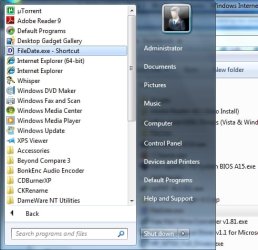
Ok I am confused: If you highlight the .EXE and then hold the ALT key and drag the icon to the ORB then hold it over the "All Programs" and wait, when it opens let the mouse button go you have a shortcut (see screen shot) This does not work for you? My screen shot is "FileDate.exe" which is a stand-alone utility no installer. My shortcut works.
 

Attachments

  • ProgramFiles2.jpg
    ProgramFiles2.jpg
    38.6 KB · Views: 4

My Computer

Computer type
PC/Desktop
Computer Manufacturer/Model Number
Dell OP7010
OS
Windows 7 Enterprise (x64); Windows Server 2008 R2 (x64)
Memory
16GB
Monitor(s) Displays
4 Dell 24" LCD
Screen Resolution
1280x1024
Keyboard
Dell
Mouse
Dell Optical
Internet Speed
40meg
WindowsStar,

That method works perfectly..... except for one thing. After rebooting, the shortcut no longer works. The app is in All Programs, it's Properties shows the correct shortcut, but CTRL-ALT+LETTER doesn't work. I just tried it again with Everest and it's fine until I reboot, then the shortcut's dead. I've also tried it with several other apps, so it's not just one program.

Does it work for you after a reboot? I'd be interested to know if anyone can get this to work. It could be it's a bug somewhere in my system.

mac
 

My Computer

OS
windows 7
Works fine after log off and log on, works fine for other users and works after reboot.
 

My Computer

Computer type
PC/Desktop
Computer Manufacturer/Model Number
Dell OP7010
OS
Windows 7 Enterprise (x64); Windows Server 2008 R2 (x64)
Memory
16GB
Monitor(s) Displays
4 Dell 24" LCD
Screen Resolution
1280x1024
Keyboard
Dell
Mouse
Dell Optical
Internet Speed
40meg
Hell! That's weird.

I've tried again and again, but after reboot, shortcuts just don't work.

Oh well, at least pinning apps to the Start menu works for me. I can live with that.

cheers

mac
 

My Computer

OS
windows 7
Back
Top