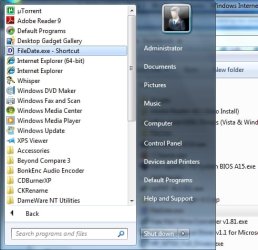
Are you talking about the ICON like the one here for Adobe Reader that I have highlighted in the screen shot?
No. That's an icon inside All Programs put there by an installer.
I have a lot of small programs which I use every day, none of which have installers. You just unzip them and double-click the .exe to run them. Since they're not installed in the regular way, they don't appear as an entry in All Programs.
My problem is that if I drag them to the Start menu folder (in explorer), I don't get a Properties dialog with a shortcut option. If I drag them to the Start menu> All Programs, I can assign a shortcut, but after I reboot, the shortcut no longer works, (although it's still shown in Properties).
If someone cares to try this, they can maybe conform/refute what I'm getting.
Anyway, I've now pinned these apps to the Start menu and I'm getting the shortcuts no problem, so I guess I'll go with that. My only gripe is that I wish we could add things to All Programs the way we could in XP - ie. through the Taskbar dialog. But probably MS reckon it's a very minor issue and not worth adding it to the dialog.
Thanks to everyone for the replies and help.
mac