
Adding "Open Command Prompt" Option

drfsupercenter

New member
Power User
Local time
7:28 PM
Messages
198
Hey guys,

I know there's a way to add a "Open command window here" when you click ON a folder... but what I'm curious about is if there's a way to do that if you're IN a folder. It never made sense to me, if I want to run a command-line utility like ffmpeg on a file, to have to go up a folder, click that option, then enter the folder again.

Does anybody know if there can be an option like this? To clarify:
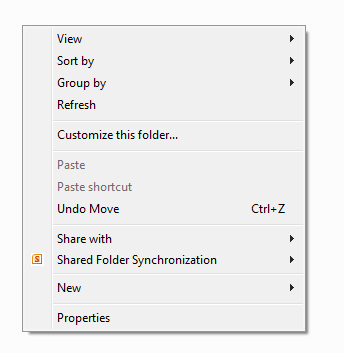
LjjP5.png


This is what I'm referring to. I know MS Office Groove added an option there, so theoretically couldn't there also be one for command prompt? I know if you right-click on the desktop while holding Shift, the option shows up, but ONLY on the desktop.

Any answers would be appreciated.
 

My Computer

Computer Manufacturer/Model Number
MSI
OS
Windows 7 Ultimate and Ubuntu 9.04
CPU
Intel Core 2 Quad
Memory
4GB DDR3 RAM
Graphics Card(s)
NVIDIA GTS 160M (1GB GPU)
Sound Card
Realtek HD Audio
Screen Resolution
1680x1050
Hard Drives
500GB SATA
Hotkeys

PromptHere

It doesn't use the context menu. It's a hotkey.
If you hit the hotkey while you are in a folder with nothing selected, it uses a macro to go up, get the current folder, then go back where you were and open a command prompt. It has to macro up to get the current folder using the clipboard.

Also unlike other Command Prompt Here type utilities, you can select several folders and hit the hotkey. A prompt will open with each as the current directory.
IOW, if you had 3 folders selected you'd get 3 command prompts.

It's free for you to use at your own risk.
 

My Computer

Computer Manufacturer/Model Number
HP Media Center
OS
Windows 7 32 bit
CPU
AMD 5200+ dual core
Memory
2 GB
Graphics Card(s)
NVidia GeForce 6150SE 128 MB
Monitor(s) Displays
CRT
Screen Resolution
1280x1024
Hard Drives
500 GB Sata internal :

SIIG USB 3.0 docking stations w/WD Caviar Black 6 Gb/s drives
Keyboard
PS/2
Mouse
PS/2 Wheel Mouse
Other Info
SIIG USB 3.0 PCIexpress card.
Hey guys,

I know there's a way to add a "Open command window here" when you click ON a folder... but what I'm curious about is if there's a way to do that if you're IN a folder. It never made sense to me, if I want to run a command-line utility like ffmpeg on a file, to have to go up a folder, click that option, then enter the folder again.

Does anybody know if there can be an option like this? To clarify:
LjjP5.png


This is what I'm referring to. I know MS Office Groove added an option there, so theoretically couldn't there also be one for command prompt? I know if you right-click on the desktop while holding Shift, the option shows up, but ONLY on the desktop.

Any answers would be appreciated.

HOLD DOWN THE SHIFT KEY | RIGHT-CLICK ON THE FOLDER |

The option will appear.
 

My Computer

Computer Manufacturer/Model Number
Toshiba Satellite S875D-S7239 laptop
OS
MS Windows 7 Ultimate SP1 64-bit
CPU
AMD A10-4600M
Motherboard
AMD Pumori (Socket FT1)
Memory
6.00 GB Dual-Channel DDR3 @ 798MHz (11-11-12-28)
Graphics Card(s)
AMD Radeon HD 7660G
Sound Card
High Definition Audio Device
Monitor(s) Displays
Generic PnP Monitor (1600x900@60Hz)
Screen Resolution
1600x900@60Hz
Hard Drives
SSD 119GB Corsair CSSD-V128GB2 ATA Device
Keyboard
Standard PS/2 Keyboard
Mouse
HP Wireless Optical Mobile Mouse Model FHA-3410
Internet Speed
What the local pub, local coffee shop offers.
Other Info
Optical Drive:MATSHITA BD-CMB UJ160B ATA Device


Also have an Asus ha1002xp netbook with Win 7 Ultimate installed.
Any idea how to do it without a hotkey? Is it possible?
 

My Computer

Computer Manufacturer/Model Number
MSI
OS
Windows 7 Ultimate and Ubuntu 9.04
CPU
Intel Core 2 Quad
Memory
4GB DDR3 RAM
Graphics Card(s)
NVIDIA GTS 160M (1GB GPU)
Sound Card
Realtek HD Audio
Screen Resolution
1680x1050
Hard Drives
500GB SATA

My Computer

Computer type
PC/Desktop
Computer Manufacturer/Model Number
Self built custom
OS
64-bit Windows 11 Pro for Workstations
CPU
Intel i7-8700K OC'd to 5 GHz
Motherboard
ASUS ROG Maximus XI Formula Z390
Memory
64 GB (4x16GB) G.SKILL TridentZ RGB DDR4 3600 MHz
Graphics Card(s)
ASUS ROG-STRIX-GTX1080TI-O11G-GAMING
Sound Card
Integrated
Monitor(s) Displays
2 x Samsung Odyssey G7 27"
Screen Resolution
2560x1440
Hard Drives
1TB Samsung 990 PRO M.2,
4TB Samsung 990 PRO PRO M.2,
TerraMaster F8 SSD Plus NAS
PSU
Seasonic Prime Titanium 850W
Case
Thermaltake Core P3
Cooling
Corsair Hydro H115i
Keyboard
Logitech wireless K800
Mouse
Logitech MX Master 4
Internet Speed
2 Gb/s Download and 100 Mb/s Upload
Antivirus
Malwarebyte Anti-Malware Premium
Browser
Google Chrome
Other Info
Logitech Z625 speaker system,
Logitech BRIO 4K Pro webcam,
HP Color LaserJet Pro MFP M477fdn,
APC SMART-UPS RT 1000 XL - SURT1000XLI,
Galaxy S23 Plus phone
I don't think you guys understand my question.

I do not want to have to go up a folder, then click on the folder itself. I want to be able to be inside a folder, say Documents, and click in the open area - same way you would click to paste something, and have it open a command prompt. Not ON the folder.
 

My Computer

Computer Manufacturer/Model Number
MSI
OS
Windows 7 Ultimate and Ubuntu 9.04
CPU
Intel Core 2 Quad
Memory
4GB DDR3 RAM
Graphics Card(s)
NVIDIA GTS 160M (1GB GPU)
Sound Card
Realtek HD Audio
Screen Resolution
1680x1050
Hard Drives
500GB SATA
I don't think you guys understand my question.

I do not want to have to go up a folder, then click on the folder itself. I want to be able to be inside a folder, say Documents, and click in the open area - same way you would click to paste something, and have it open a command prompt. Not ON the folder.

No, you don't understand. The program sends keys(macro) to go up and folder, copy the folder to clipboard, then return to the initial location. All you have to do is hit the hotkey with nothing selected in a folder to get a prompt with that folder as the current directory. If you try it then it might be more obvious than reading the description.
 

My Computer

Computer Manufacturer/Model Number
HP Media Center
OS
Windows 7 32 bit
CPU
AMD 5200+ dual core
Memory
2 GB
Graphics Card(s)
NVidia GeForce 6150SE 128 MB
Monitor(s) Displays
CRT
Screen Resolution
1280x1024
Hard Drives
500 GB Sata internal :

SIIG USB 3.0 docking stations w/WD Caviar Black 6 Gb/s drives
Keyboard
PS/2
Mouse
PS/2 Wheel Mouse
Other Info
SIIG USB 3.0 PCIexpress card.
Yeah, I saw your post - I was curious if there was a way to add a right-click option though.
 

My Computer

Computer Manufacturer/Model Number
MSI
OS
Windows 7 Ultimate and Ubuntu 9.04
CPU
Intel Core 2 Quad
Memory
4GB DDR3 RAM
Graphics Card(s)
NVIDIA GTS 160M (1GB GPU)
Sound Card
Realtek HD Audio
Screen Resolution
1680x1050
Hard Drives
500GB SATA
Yeah, I saw your post - I was curious if there was a way to add a right-click option though.

The reason I did it the way I did it is Windows will only tell you the name of the folder in context menu if you select the folder and right click it. That's why you don't see them the way you want them. To select the folder you have to be in the containing folder(above the one you want.)

If it was easy to do it the way you describe I would have.
I searched a bunch of the free download sites looking for what you describe. I didn't find it. That's why I wrote the hotkey one instead for my own use.

I seem to remember a right click one that worked in the free space like you describe. But I think it was way back in Win98.
 

My Computer

Computer Manufacturer/Model Number
HP Media Center
OS
Windows 7 32 bit
CPU
AMD 5200+ dual core
Memory
2 GB
Graphics Card(s)
NVidia GeForce 6150SE 128 MB
Monitor(s) Displays
CRT
Screen Resolution
1280x1024
Hard Drives
500 GB Sata internal :

SIIG USB 3.0 docking stations w/WD Caviar Black 6 Gb/s drives
Keyboard
PS/2
Mouse
PS/2 Wheel Mouse
Other Info
SIIG USB 3.0 PCIexpress card.
I don't think you guys understand my question.

I do not want to have to go up a folder, then click on the folder itself. I want to be able to be inside a folder, say Documents, and click in the open area - same way you would click to paste something, and have it open a command prompt. Not ON the folder.
I don't understand what you don't understand about what we understand! ;)

If you are in Explorer, and have a window open, if you hold-down the Shift key and right-click in a blank area of the list/open space, you get a "Open command window here". Is that not what you want?

Note you can't have anything selected for this to work.
 

My Computer

Computer type
Laptop
Computer Manufacturer/Model Number
Dell Latitude E6540 Laptop
OS
Windows 7 Professional 64bit
CPU
Intel Core i7 4600M @ 2.90GHz
Motherboard
Dell Inc. 0CYT5F (SOCKET 0)
Memory
16.0GB Dual-Channel DDR3 @ 797MHz (11-11-11-28)
Graphics Card(s)
Intel HD Graphics 4600 (Dell) 2048MB ATI AMD Radeon HD 8790M
Sound Card
Realtek High Definition Audio
Monitor(s) Displays
HP ZR30w (2560x1600@60Hz)
Hard Drives
256GB LITEONIT LMT-256M6M-41 mm SATA (SSD)
1TB Samsung SSD 860 EVO mSATA SATA (SSD)
2TB USB 3.0 USB Device
115GB SanDisk Ultra Fit USB
Other Info
Multiple Dell E-Port Plus II Port Replicator/Docking Stations 0Y72NH USB 3.0 + 130W AC Adapters
Hello Drfsupercomputer,

You could use the tutorial below to make is so that you do not have to press and hold Shift to see the Open command window here context menu item while right clicking on the folder.

http://www.sevenforums.com/tutorial...window-here-add-remove-shift-right-click.html

Hope this helps,
Shawn

I don't think you guys understand my question.

I do not want to have to go up a folder, then click on the folder itself. I want to be able to be inside a folder, say Documents, and click in the open area - same way you would click to paste something, and have it open a command prompt. Not ON the folder.

That's what this will allow you to do as well. Give it a try and see. :)

Apply step 2 in Option One of the tutorial above. Afterwards, right click on a blank space in your say Documents folder, and you will see Open command window here in the context menu.
 

My Computer

Computer type
PC/Desktop
Computer Manufacturer/Model Number
Self built custom
OS
64-bit Windows 11 Pro for Workstations
CPU
Intel i7-8700K OC'd to 5 GHz
Motherboard
ASUS ROG Maximus XI Formula Z390
Memory
64 GB (4x16GB) G.SKILL TridentZ RGB DDR4 3600 MHz
Graphics Card(s)
ASUS ROG-STRIX-GTX1080TI-O11G-GAMING
Sound Card
Integrated
Monitor(s) Displays
2 x Samsung Odyssey G7 27"
Screen Resolution
2560x1440
Hard Drives
1TB Samsung 990 PRO M.2,
4TB Samsung 990 PRO PRO M.2,
TerraMaster F8 SSD Plus NAS
PSU
Seasonic Prime Titanium 850W
Case
Thermaltake Core P3
Cooling
Corsair Hydro H115i
Keyboard
Logitech wireless K800
Mouse
Logitech MX Master 4
Internet Speed
2 Gb/s Download and 100 Mb/s Upload
Antivirus
Malwarebyte Anti-Malware Premium
Browser
Google Chrome
Other Info
Logitech Z625 speaker system,
Logitech BRIO 4K Pro webcam,
HP Color LaserJet Pro MFP M477fdn,
APC SMART-UPS RT 1000 XL - SURT1000XLI,
Galaxy S23 Plus phone
I don't understand what you don't understand about what we understand!
wink.gif


If you are in Explorer, and have a window open, if you hold-down the Shift key and right-click in a blank area of the list/open space, you get a "Open command window here". Is that not what you want?

Note you can't have anything selected for this to work.
Ah, I see. Though, that's weird. It seems like it only works in directories that are sorted in a list, if it's something like a folder of music, where it shows the title/album/artist data, that option doesn't show up. Any idea why? That's why I was assuming it doesn't work, as all my A/V folders where I might need to use ffmpeg show up that way.

--EDIT--

That registry file is only for right clicking ON folders. Still have to hold shift if I'm inside one.
 

My Computer

Computer Manufacturer/Model Number
MSI
OS
Windows 7 Ultimate and Ubuntu 9.04
CPU
Intel Core 2 Quad
Memory
4GB DDR3 RAM
Graphics Card(s)
NVIDIA GTS 160M (1GB GPU)
Sound Card
Realtek HD Audio
Screen Resolution
1680x1050
Hard Drives
500GB SATA
...if it's something like a folder of music, where it shows the title/album/artist data, that option doesn't show up. Any idea why?
I see what you are talking about--I've never tried that before and sure enough, shift-right-click doesn't work. I dunno, maybe Brink to the rescue?
:confused:
 

My Computer

Computer type
Laptop
Computer Manufacturer/Model Number
Dell Latitude E6540 Laptop
OS
Windows 7 Professional 64bit
CPU
Intel Core i7 4600M @ 2.90GHz
Motherboard
Dell Inc. 0CYT5F (SOCKET 0)
Memory
16.0GB Dual-Channel DDR3 @ 797MHz (11-11-11-28)
Graphics Card(s)
Intel HD Graphics 4600 (Dell) 2048MB ATI AMD Radeon HD 8790M
Sound Card
Realtek High Definition Audio
Monitor(s) Displays
HP ZR30w (2560x1600@60Hz)
Hard Drives
256GB LITEONIT LMT-256M6M-41 mm SATA (SSD)
1TB Samsung SSD 860 EVO mSATA SATA (SSD)
2TB USB 3.0 USB Device
115GB SanDisk Ultra Fit USB
Other Info
Multiple Dell E-Port Plus II Port Replicator/Docking Stations 0Y72NH USB 3.0 + 130W AC Adapters
You will not have the Open command window here context menu item in library folders or on a library folder, but only it there on a included folder in the library instead. However, it should be there in say your C:\Users\(user-name)\Music folder.
 

My Computer

Computer type
PC/Desktop
Computer Manufacturer/Model Number
Self built custom
OS
64-bit Windows 11 Pro for Workstations
CPU
Intel i7-8700K OC'd to 5 GHz
Motherboard
ASUS ROG Maximus XI Formula Z390
Memory
64 GB (4x16GB) G.SKILL TridentZ RGB DDR4 3600 MHz
Graphics Card(s)
ASUS ROG-STRIX-GTX1080TI-O11G-GAMING
Sound Card
Integrated
Monitor(s) Displays
2 x Samsung Odyssey G7 27"
Screen Resolution
2560x1440
Hard Drives
1TB Samsung 990 PRO M.2,
4TB Samsung 990 PRO PRO M.2,
TerraMaster F8 SSD Plus NAS
PSU
Seasonic Prime Titanium 850W
Case
Thermaltake Core P3
Cooling
Corsair Hydro H115i
Keyboard
Logitech wireless K800
Mouse
Logitech MX Master 4
Internet Speed
2 Gb/s Download and 100 Mb/s Upload
Antivirus
Malwarebyte Anti-Malware Premium
Browser
Google Chrome
Other Info
Logitech Z625 speaker system,
Logitech BRIO 4K Pro webcam,
HP Color LaserJet Pro MFP M477fdn,
APC SMART-UPS RT 1000 XL - SURT1000XLI,
Galaxy S23 Plus phone
Hmm, I see. But the odd thing is, say I go to Music/iTunes/iTunes Music/[artist here], that option is still not there. I have to go through C:/Users/[name]/Music instead.

So you don't know of a trick to get the open command prompt option on library folders? Or, is there some way to replace the library shortcuts with shortcuts to the actual folders?
 

My Computer

Computer Manufacturer/Model Number
MSI
OS
Windows 7 Ultimate and Ubuntu 9.04
CPU
Intel Core 2 Quad
Memory
4GB DDR3 RAM
Graphics Card(s)
NVIDIA GTS 160M (1GB GPU)
Sound Card
Realtek HD Audio
Screen Resolution
1680x1050
Hard Drives
500GB SATA
I don't think you guys understand my question.

I do not want to have to go up a folder, then click on the folder itself. I want to be able to be inside a folder, say Documents, and click in the open area - same way you would click to paste something, and have it open a command prompt. Not ON the folder.
I don't understand what you don't understand about what we understand! ;)

If you are in Explorer, and have a window open, if you hold-down the Shift key and right-click in a blank area of the list/open space, you get a "Open command window here". Is that not what you want?

Note you can't have anything selected for this to work.


The hotkey approach has several adavantages.

1)You can open more than one prompt

For example if in a folder with Folder1 Folder2 and a file selected and hit the hotkey you'll get 3 prompts. One with Folder1 current directory, one with Folder2 current directory, and one with the folder you are in as current directory(my program gets the current folder by parsing the selected file's path. In which case you don't have to find a blank spot. Just select a file and hotkey.)

2) It works the same in XP and later.

I run several flavors of Windows and it's annoying to think which option is on what.

3) I hate right clicking generally

I use Middle Mouse Button with left finger and a modifier key.
It only takes one click not two.

4) No registry editing.

5) On Vista and W7 with Aero you get a glassy prompt instead of black box. :)


Glad you got the context menu option. :)
 

My Computer

Computer Manufacturer/Model Number
HP Media Center
OS
Windows 7 32 bit
CPU
AMD 5200+ dual core
Memory
2 GB
Graphics Card(s)
NVidia GeForce 6150SE 128 MB
Monitor(s) Displays
CRT
Screen Resolution
1280x1024
Hard Drives
500 GB Sata internal :

SIIG USB 3.0 docking stations w/WD Caviar Black 6 Gb/s drives
Keyboard
PS/2
Mouse
PS/2 Wheel Mouse
Other Info
SIIG USB 3.0 PCIexpress card.
So you don't know of a trick to get the open command prompt option on library folders? Or, is there some way to replace the library shortcuts with shortcuts to the actual folders?

Other than using the option MilesAhead posted above, you could press Shift+right click on a folder itself (included folder) in the library, you will also see it.

You could also use what I posted above to do this without having to press Shift.
 

My Computer

Computer type
PC/Desktop
Computer Manufacturer/Model Number
Self built custom
OS
64-bit Windows 11 Pro for Workstations
CPU
Intel i7-8700K OC'd to 5 GHz
Motherboard
ASUS ROG Maximus XI Formula Z390
Memory
64 GB (4x16GB) G.SKILL TridentZ RGB DDR4 3600 MHz
Graphics Card(s)
ASUS ROG-STRIX-GTX1080TI-O11G-GAMING
Sound Card
Integrated
Monitor(s) Displays
2 x Samsung Odyssey G7 27"
Screen Resolution
2560x1440
Hard Drives
1TB Samsung 990 PRO M.2,
4TB Samsung 990 PRO PRO M.2,
TerraMaster F8 SSD Plus NAS
PSU
Seasonic Prime Titanium 850W
Case
Thermaltake Core P3
Cooling
Corsair Hydro H115i
Keyboard
Logitech wireless K800
Mouse
Logitech MX Master 4
Internet Speed
2 Gb/s Download and 100 Mb/s Upload
Antivirus
Malwarebyte Anti-Malware Premium
Browser
Google Chrome
Other Info
Logitech Z625 speaker system,
Logitech BRIO 4K Pro webcam,
HP Color LaserJet Pro MFP M477fdn,
APC SMART-UPS RT 1000 XL - SURT1000XLI,
Galaxy S23 Plus phone
So you don't know of a trick to get the open command prompt option on library folders? Or, is there some way to replace the library shortcuts with shortcuts to the actual folders?

Other than using the option MilesAhead posted above, you could press Shift+right click on a folder itself (included folder) in the library, you will also see it.

You could also use what I posted above to do this without having to press Shift.

It is kind of interesting. If I highlight anything in Explorer left pane Favorites and hit my hotkey it just opens in the user's Links folder. Guess copy to clipboard AHK doesn't have an analog for shell objects.
 

My Computer

Computer Manufacturer/Model Number
HP Media Center
OS
Windows 7 32 bit
CPU
AMD 5200+ dual core
Memory
2 GB
Graphics Card(s)
NVidia GeForce 6150SE 128 MB
Monitor(s) Displays
CRT
Screen Resolution
1280x1024
Hard Drives
500 GB Sata internal :

SIIG USB 3.0 docking stations w/WD Caviar Black 6 Gb/s drives
Keyboard
PS/2
Mouse
PS/2 Wheel Mouse
Other Info
SIIG USB 3.0 PCIexpress card.
Back
Top