Adding "Program Manager" window to Win7

Dan Mitchell

New member
Local time
2:14 PM
Messages
3
Been running Win 7 on a new build. I'm not nuts about it. Been using Windows since 3.1, and I always liked "program manager". I like having a window I can toggle to with all my APP shortcut cons, sorted by application, etc. I used to just set up a folder for this in XP, but in XP you could have the right side folder bar showing or not, which you can't do in Win7 (as far as I know). Is there any way to get rid of that frame and not have it affect ALL folders (like in WE) or is there any other way I could have a box/window/frame to hold sorted icons which I can toggle to. I hope this is clear, and great forum!

Of course, I know I can put them on the desktop, but I prefer this ;-)

TIA,

Dan
 

My Computer

OS
Windows 7 Home Premium 64bit.
CPU
Intel Core i7-950 Bloomfield 3.06GHz 4 x 256KB L2 Cache 8MB
Motherboard
GIGABYTE GA-X58A-UD3R LGA 1366 Intel X58 SATA 6Gb/s USB 3.0
Memory
CORSAIR XMS3 6GB (3 x 2GB) 240-Pin DDR3 SDRAM DDR3 1333 (PC3
Graphics Card(s)
MSI R5450-MD1GD3H/LP Radeon HD 5450 1GB 64-bit DDR3
Sound Card
On MOBO
Monitor(s) Displays
Hanns G LCD on desktop, 58" Panasonic Plasma remotely
Hard Drives
HITACHI Deskstar 5K3000 HDS5C3020ALA632 (0F12117) 2TB 32MB Cache SATA 6.0Gb/s
And 6 other SATAs, (2) 1TB (2) 500gig) (2) 320 Gig
PSU
Thermaltake Black Widow W0319RU 850W CrossFire Certified 80
Case
Antec Performance One P180B ATX Mid Tower Computer Case
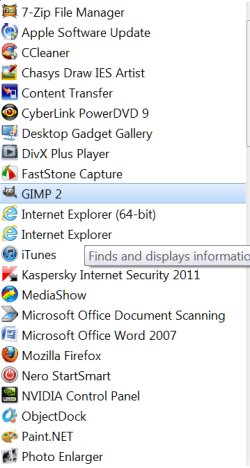
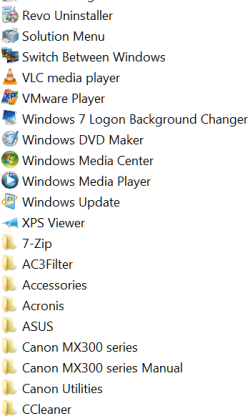
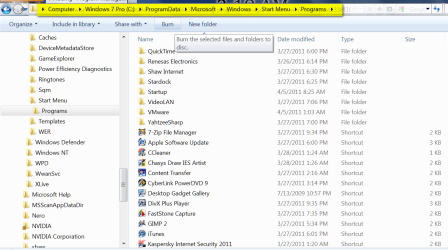
The method I use is to place all of my shortcuts in the All Programs menu by navigating to the location highlighted in yellow below and copying the shortcut from the folders (top) and pasting your shortcuts to the list (below).

The advantage is you can add as many shortcuts as you want and is readily available in Alphabetical order from the top of All Programs.

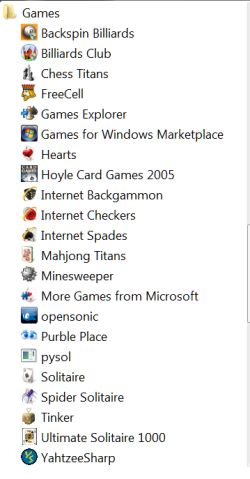
Or you can create a new customized folder then placing it in the folder list at top and adding your shortcuts to the folder see games folder screenie for example as I have placed all of my game shortcuts in that folder.

2011-04-10_022437.pngGames folder.png

All Programs PART 1.pngAll Programs PART 2png.png
All Programs list

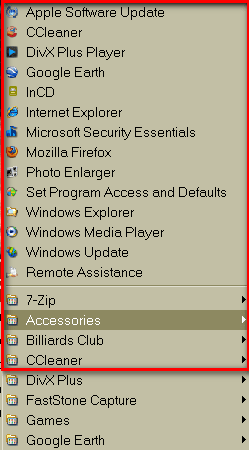
Same concept used in XP (see below) where shortcuts were in Alphabetical order at top before the program folders list begins

XP menu.png
 

My Computer

Computer type
PC/Desktop
Computer Manufacturer/Model Number
My own abomination, I call it the Money Pit
OS
Windows 10 Pro x 2/Windows 11 Home
CPU
Intel i7 2600K @ 3.40 GHz
Motherboard
ASUS Sabertooth P67
Memory
Corsair Vengeance 16GB DDR3 1600MHz CL8 Dual Channel Kit
Graphics Card(s)
EVGA GeForce RTX 3080 XC3 ULTRA GAMING 10GB GDDR6X
Sound Card
Onboard Realtek or Nvidia High Definition Audio (HDMI)
Monitor(s) Displays
Samsung JS7000 50" SUHD TV or Samsung 27" FHD 60Hz 8ms GTG V
Screen Resolution
1920 x 1080
Hard Drives
1 x Samsung 870 EVO 250 GB SSD (Windows 10 Pro), 1 x Samsung 850 EVO 250 GB SSD (Windows 10 Pro)
PSU
Corsair AX860 - 860W Modular Power Supply
Case
Phanteks Enthoo Luxe Full Tower Case - Black
Cooling
CORSAIR Hydro Series H150i PRO RGB 360mm Liquid CPU Cooler
Keyboard
Logitech K830 Illuminated Living-Room Keyboard
Mouse
Logitech MX Anywhere 2S Wireless Mouse
Internet Speed
100 Mbps
Antivirus
ESET Internet Security
Browser
Latest Version Of Firefox & Microsoft Edge Chromium Stable
Other Info
LG Super Multi Blue Internal Blu-ray Disk Rewriter - BH10LS30
6x2 HDMI Switcher (6 inputs, 2 outputs) so I can send the output of my Cable Box, Roku, or any my 4 computers to either my TV or Monitor separately or simultaneously.
From Wikipedia:

http://en.wikipedia.org/wiki/Program_Manager


It is still possible to use the Program Manager in Windows XP Service Pack 2 or 3 (and Windows Vista or 7) by replacing (or copying if there was Windows Vista or 7 computer) the Progman.exe executable with the executable from Service Pack 1 or the Windows XP original retail release. With the SP1 (or original release) CD, one can expand it by typing expand -r D:\i386\progman.ex_ %Windir%at the command prompt (replacing D: with the CD-ROM drive letter). It is also possible to bypass theWindows File Protection and overwrite the SP2/SP3 version of Program Manager completely. Alternatively, the file can be saved to a different location or using a different filename. If Service Pack 3 has backed up previous files on an RTM or SP1 Windows XP installation, the backed up version can be accessed from: %Windir%\$NtServicePackUninstall$\Progman.exe

View attachment progman.zip

Give it a go! I can't get it to run in compatibility mode, but you may have better luck!
 

My Computer

Computer Manufacturer/Model Number
Acer 7520, Packard Bell dot se, Acer travelmate 2423
OS
Win 7 Ult + Starter, XP Pro +Home, 2kAS, Linux Mint 8, SuperOS
CPU
AMD 64 Athlon X2 , Intel Atom N450, Intel Celeron M 1.50 Ghz
Motherboard
Acer Fuquene
Memory
2.5GB ; 1GB; 2GB
Graphics Card(s)
Nvidia GeForce7000m; Intel; Intel
Sound Card
Realtek AC57
Monitor(s) Displays
17" ;10.1"; 19"
Screen Resolution
1440x900;1024x600;1440x900;
Hard Drives
WD 80, WD 320;
PSU
19v
Case
Laptop
Cooling
Air
Internet Speed
9.7Mb/s down 0.99Mb/s up
Other Info
ISP VIRGINMEDIA 10M cable broadband - D-Link DIR615 wireless router, 3Com OfficeConnect ASDL router used as wireless extender switch
Thanks for the replies. Money Pit, can you eleborate on "Or you can create a new customized folder then placing it in the folder list at top and adding your shortcuts to the folder see games folder screenie for example as I have placed all of my game shortcuts in that folder." Not really sure what you're referring to.

Thanks also Fafhrd. I found this page, which is somewhat related File Manager under Windows Vista, Windows 7 and Windows Server 2008. I tried getting the Progman.exe file to run (both in your link & a copy I had from XP) but like you, even with a lot of compatibility back and forth (different OS's, etc.) NOGO.

Seems like this shouldn't be so hard... :confused:
 

My Computer

OS
Windows 7 Home Premium 64bit.
CPU
Intel Core i7-950 Bloomfield 3.06GHz 4 x 256KB L2 Cache 8MB
Motherboard
GIGABYTE GA-X58A-UD3R LGA 1366 Intel X58 SATA 6Gb/s USB 3.0
Memory
CORSAIR XMS3 6GB (3 x 2GB) 240-Pin DDR3 SDRAM DDR3 1333 (PC3
Graphics Card(s)
MSI R5450-MD1GD3H/LP Radeon HD 5450 1GB 64-bit DDR3
Sound Card
On MOBO
Monitor(s) Displays
Hanns G LCD on desktop, 58" Panasonic Plasma remotely
Hard Drives
HITACHI Deskstar 5K3000 HDS5C3020ALA632 (0F12117) 2TB 32MB Cache SATA 6.0Gb/s
And 6 other SATAs, (2) 1TB (2) 500gig) (2) 320 Gig
PSU
Thermaltake Black Widow W0319RU 850W CrossFire Certified 80
Case
Antec Performance One P180B ATX Mid Tower Computer Case
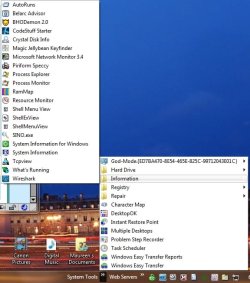
You could also create a new Folder and place a shortcut for each program you want it in it, then add that folder as a new ToolBar. I do this for System Tools because I use a lot of them in posts I make here and on other forums.

SysTools.jpg
 
Last edited:

My Computer

Computer type
PC/Desktop
Computer Manufacturer/Model Number
Lenovo IdeaCenter 450
OS
Windows 10 Pro X64
CPU
Intel Quad Core i7-4770 @ 3.4Ghz
Memory
16.0GB PC3-12800 DDR3 SDRAM 1600 MHz
Graphics Card(s)
Intel Integrated HD Graphics
Sound Card
Realtek HD Audio
Monitor(s) Displays
HP 22" LCD
Screen Resolution
1680 x 1050
Hard Drives
250GB Samsung EVO SATA-3 SSD
2TB Seagate ST2000DM001 SATA-2
1.5TB Seagate ST3150041AS SATA
Keyboard
Dell USB
Mouse
Lenovo USB
Internet Speed
Cable via Road Runner 3MB Upload, 30MB Download
Antivirus
Windows Defender, MBAM Pro, MBAE
Browser
Seamonkey
Other Info
UEFI/GPT
PLDS DVD-RW DH16AERSH
Thanks for the replies. Money Pit, can you eleborate on "Or you can create a new customized folder then placing it in the folder list at top and adding your shortcuts to the folder see games folder screenie for example as I have placed all of my game shortcuts in that folder." Not really sure what you're referring to.

Thanks also Fafhrd. I found this page, which is somewhat related File Manager under Windows Vista, Windows 7 and Windows Server 2008. I tried getting the Progman.exe file to run (both in your link & a copy I had from XP) but like you, even with a lot of compatibility back and forth (different OS's, etc.) NOGO.

Seems like this shouldn't be so hard... :confused:

Sorry about that, I also forgot to mention that the program data folder is hidden by default since I have always had it unhidden.

However our Tutorial expert Brink has written this tutorial Start Menu All Programs - Add or Delete Shortcuts that explains 10 times better than what I was trying to say.

In Step 4 of Brinks tutorial you can create a new folder, rename to what you want then place the applicable shortcuts inside. So if you look at Brinks example screen shot in step 4 and notice the new folder called maintenance you could place all of your maintenance type shortcuts into this folder, IE: registry cleaner , fragmentation tools, HDD testing tools - etc.
 

My Computer

Computer type
PC/Desktop
Computer Manufacturer/Model Number
My own abomination, I call it the Money Pit
OS
Windows 10 Pro x 2/Windows 11 Home
CPU
Intel i7 2600K @ 3.40 GHz
Motherboard
ASUS Sabertooth P67
Memory
Corsair Vengeance 16GB DDR3 1600MHz CL8 Dual Channel Kit
Graphics Card(s)
EVGA GeForce RTX 3080 XC3 ULTRA GAMING 10GB GDDR6X
Sound Card
Onboard Realtek or Nvidia High Definition Audio (HDMI)
Monitor(s) Displays
Samsung JS7000 50" SUHD TV or Samsung 27" FHD 60Hz 8ms GTG V
Screen Resolution
1920 x 1080
Hard Drives
1 x Samsung 870 EVO 250 GB SSD (Windows 10 Pro), 1 x Samsung 850 EVO 250 GB SSD (Windows 10 Pro)
PSU
Corsair AX860 - 860W Modular Power Supply
Case
Phanteks Enthoo Luxe Full Tower Case - Black
Cooling
CORSAIR Hydro Series H150i PRO RGB 360mm Liquid CPU Cooler
Keyboard
Logitech K830 Illuminated Living-Room Keyboard
Mouse
Logitech MX Anywhere 2S Wireless Mouse
Internet Speed
100 Mbps
Antivirus
ESET Internet Security
Browser
Latest Version Of Firefox & Microsoft Edge Chromium Stable
Other Info
LG Super Multi Blue Internal Blu-ray Disk Rewriter - BH10LS30
6x2 HDMI Switcher (6 inputs, 2 outputs) so I can send the output of my Cable Box, Roku, or any my 4 computers to either my TV or Monitor separately or simultaneously.
Hello and sorry for bring up this old thread.
Is there someone who still wants "Progman-like" software for Windows 7?
I can suggest one, but not sure should I do it or not, because it was a commercial software and may violate this forum rules ("3) No spamming, advertising, selling, or promoting products or other sites.").
Thank you.
 

My Computer

Computer type
PC/Desktop
OS
Windows 7 Ultimate x64
Help

Did anyone get this to work?
 

My Computer

Computer type
PC/Desktop
OS
Windows 7 Ultimate x86-64
Sadly, I have not been able to get it to work. Wish that there was a workaround.
 

My Computer

Computer type
PC/Desktop
OS
Windows 8.1 64
Back
Top