

Frank80
New member
- Local time
- 3:52 PM
- Messages
- 29
Hello all. I'm pretty fresh here so please don't kill me if i post this wrong.
Here goes.
I used one of the tutorials for placing the Recycle bin and others on the taskbar
(link to tutorial). all works great but for one thing.
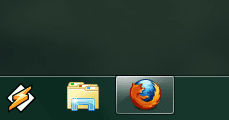
When using Large icons on the toolbar they seem to make the active
icons (programs in use) frame not reach all the way down to the bottom
of the bar. (see image)
Question: Is there any way to fix this problem without setting
the icon size to small? maybe adjusting the size
just 3 pixels or something?
Some information about my desktop/screen:
1680x1050, Dpi = 100%, default sized taskbar, Nvidia 8600gt. BenQ FP222W a.
Here goes.
I used one of the tutorials for placing the Recycle bin and others on the taskbar
(link to tutorial). all works great but for one thing.
When using Large icons on the toolbar they seem to make the active
icons (programs in use) frame not reach all the way down to the bottom
of the bar. (see image)
Question: Is there any way to fix this problem without setting
the icon size to small? maybe adjusting the size
just 3 pixels or something?
Some information about my desktop/screen:
1680x1050, Dpi = 100%, default sized taskbar, Nvidia 8600gt. BenQ FP222W a.
Attachments
Last edited:
My Computer
- OS
- vista, windows 7
- CPU
- AMD Phenom 9850
- Motherboard
- ASUS M3N-HT Deluxe
- Memory
- Kingston ddr2 2x2gb
- Graphics Card(s)
- Nvidia Gforce 8600gt
- Sound Card
- M-audio Audiophile USB
- Monitor(s) Displays
- BenQ 22"
- Screen Resolution
- 1680x1050
- Hard Drives
- 2x750gb samsung
1x350gb ^^
- Case
- Antech Coolmaster
- Keyboard
- Microsoft Sidewinder x4
- Mouse
- Logitech Mx620 / Oscar X7 gaming mouse.
- Internet Speed
- 10mb fiber








