
Adding Steam UT3 to games explorer

Local time
9:28 AM
Messages
94
Hey guys,
I have a question on adding ut3 black edition on steam,


So far i have followed the adding games to games explorer (steam) tutorial, and have done the following
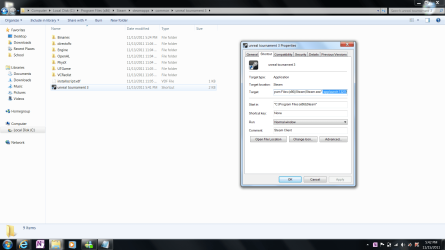
  • Creating a steam shortcut with the app id and placing it in the game directory
Properties.png
  • Placing that shortcut in the games explorer window
Properties.png
And then im stuck the info does not get updated etc here is a picture of the registry view

Please note that i have tried changing the application path to the steam.exe but no joy either :(
regedit.png

Please help!
Thank you so much in advance!
 

Attachments
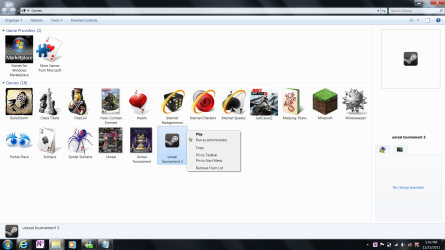
  • Game_Explorer.png
    Game_Explorer.png
    179 KB · Views: 16

My Computer My Computer

At a glance

Windows 7 Ultimate x64Intel(R) Core(TM)2 Duo CPU T9600 @ 2.80 GHz 6...6 GB DDR3ATI Mobility Radeon HD 4670
Computer Manufacturer/Model Number
Dell Studio XPS 16
OS
Windows 7 Ultimate x64
CPU
Intel(R) Core(TM)2 Duo CPU T9600 @ 2.80 GHz 6MB cache
Memory
6 GB DDR3
Graphics Card(s)
ATI Mobility Radeon HD 4670
Monitor(s) Displays
1
Screen Resolution
1920x1080
Cooling
NZXT Cryo LX
Mouse
Logitech G9X
Internet Speed
512 Kbps
Doing this with Steam games is always hit and miss, it depends on the game. If you still want to try, go ask Steam Support. And don't make a new topic just because your previous one wasn't answered.
 

My Computer My Computer

At a glance

Ubuntu 12.10Intel Core i7 720QM4GB RAMNVIDIA GeForce 230M
Computer Manufacturer/Model Number
HP Pavilion dv6-2020ev
OS
Ubuntu 12.10
CPU
Intel Core i7 720QM
Motherboard
Its a HP secret...
Memory
4GB RAM
Graphics Card(s)
NVIDIA GeForce 230M
Sound Card
IDT
Screen Resolution
1366x768
Hard Drives
500 GB
Mouse
HP
Internet Speed
4 Mbps
It wont get the info at this stage.

You've done everything correct, but havent finished it all up yet.


To get box art,all the information, and rename the shortcut, theres still more to do.


Follow this tutorial:
http://www.sevenforums.com/tutorials/25787-games-explorer-folder-add-games.html?ltr=G

Skip the part about adding the shortcut to the Games Explorer. you've already done that (the steam icon)

Once you done this, youll have all the info, and box art (or you can make your own and replace the one that downloaded)
 

My Computer My Computer

At a glance

Windows 7 Home Premium 64bitIntel Core i7 2700k8GB Mushkin Redline Ridgebacks @1866EVGA GTX570 SC
Computer Manufacturer/Model Number
Custom (Self Build)
OS
Windows 7 Home Premium 64bit
CPU
Intel Core i7 2700k
Motherboard
eVGA P67 SLI
Memory
8GB Mushkin Redline Ridgebacks @1866
Graphics Card(s)
EVGA GTX570 SC
Sound Card
XiFi Titanium HD
Monitor(s) Displays
LG W2453V
Screen Resolution
1920x1080
Hard Drives
Intel 320 80GB -- Intel X25-V 40GB --WD Black 1TB x2 -- WD Blue 640GB
PSU
Seasonic x750
Case
Corsair 600T SE White
Cooling
eVGA Superclocked CPU Cooler
Keyboard
Saitek Cyborg
Antivirus
Kaspersky
Browser
IE
Other Info
LG BD/DVD
Back
Top