Additional long on info required.. wired connection.

Hopeless

New member
Local time
4:02 PM
Messages
2
I've looked up stuff for "Additional log on information required" but I can't find anything for WIRED connections. My connections all work, and my dad shares the same router thing as me and his works just fine. Usually I need to unplug the whole internet router for 30 seconds or so, plug it back in and it's fine.
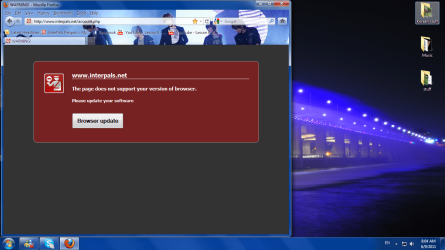
When I try to use the internet a page comes up that says to update browser info, but it's not legit. Both times my dad clicked it my pc got infected with a regular virus/trojan.
grrrr.png
^^^
That's what the page looks like.
I have no idea how to fix this and my dad just looks through my computer and seems to make things worse. I need help please!! :cry:
 

My Computer

OS
Windows 7
Both times my dad clicked it my pc got infected with a regular virus/trojan.

Hi Hopeless,

Welcome to Seven Forums.

I would start by doing a virus scan with your Anti-Virus then download/install and scan with:
Malwarebytes : Malwarebytes Anti-Malware is a free download that removes viruses and malware from your computer

SUPERAntiSpyware.com | Remove Malware | Remove Spyware - AntiMalware, AntiSpyware, AntiAdware!

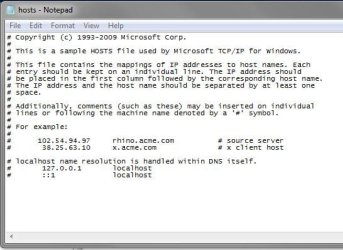
I would also check the host file to ensure there are no dodgy entries in there:
host file
Code:
C:\Windows\System32\drivers\etc\hosts
open the hosts file with notepad.

An untouched hosts file would look similar to this:
Capture.JPG

Regards,
JDobbsy1987
 

My Computer

Computer type
PC/Desktop
Computer Manufacturer/Model Number
Self Built
OS
Windows 8.1 Pro x64
CPU
Intel Core i5-2500K @ 3.30GHz - S1155
Motherboard
Asus P8P67 LE Rev3, Intel P67, S115
Memory
8GB Corsair DDR3 XMS3, PC3-12800
Graphics Card(s)
NVIDIA GeForce GTX 650
Sound Card
On-Board
Monitor(s) Displays
3 x 24" {Extended Display}
Screen Resolution
1920 x 1080
Hard Drives
300GB Seagate Barracuda 7200
PSU
550W Coolermaster GX550
Case
Silverstone Precision PS04B
Cooling
Stock
Keyboard
Logitech K120
Mouse
World of Warcraft Cataclysm MMO Gaming Mouse
Internet Speed
80 MB
Antivirus
MSE / Windows Defender
Browser
Chrome
  • Like
Reactions: 2xg
Both times my dad clicked it my pc got infected with a regular virus/trojan.

Hi Hopeless,

Welcome to Seven Forums.

I would start by doing a virus scan with your Anti-Virus then download/install and scan with:
Malwarebytes : Malwarebytes Anti-Malware is a free download that removes viruses and malware from your computer

SUPERAntiSpyware.com | Remove Malware | Remove Spyware - AntiMalware, AntiSpyware, AntiAdware!

I would also check the host file to ensure there are no dodgy entries in there:
host file
Code:
C:\Windows\System32\drivers\etc\hosts
open the hosts file with notepad.

An untouched hosts file would look similar to this:
View attachment 158863

Regards,
JDobbsy1987

Alright, I will scan my computer.
But any suggestions for how to fix my internet connection?
It only does this when I turn my computer on. Its frustrating, and my dad thinks he can fix it but he can't.
 

My Computer

OS
Windows 7
Back
Top