
Address bar in Aero theme just disappers for no reason.

DiracDeBroglie

New member
Member
Local time
8:28 AM
Messages
66
I got the Aero theme set as desktop environment on my Win7HP SP1 64-bit computer. The problem I have has nothing to do with the setting [Full file path in title bar] in Folder Options, as this is only valid for the Windows Classic theme.

In Aero, the (breadcrumbs) address bar, all together with the search box and the forward/back buttons, sporadically disappear in only ONE of the (File) Explorer windows; see attachment/snippet.
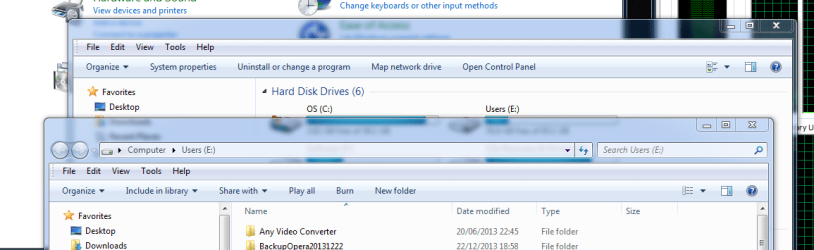
FolderPathGoneInFileExplorer1.PNG

The other File Explorer window(s) remain(s) intact. Then again, in a few other occasions, the address bar disappeared in ALL Explorer windows; see second attachment.
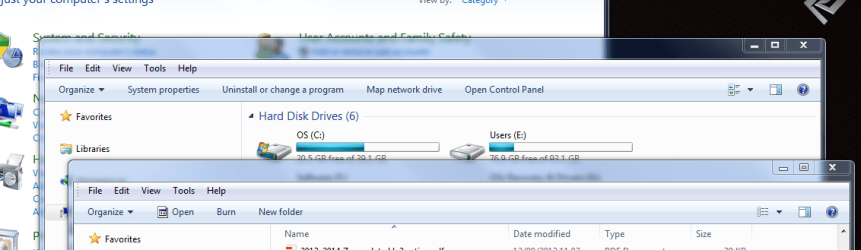
FolderPathGoneInFileExplorer2.PNG

In those cases the search box was initially present; I think I had the same problem before too with no search box at all enabled in the Explorer windows. The problem with disappearing address bars usually manifests itself right after (re)booting. However, when opening a new Explorer window, all seems OK and the address and search box are present.

Could that be a bug? What can be done about it? Sometimes I disable/re-enable the Search facility and all is back OK, but I have to say this is not a very elegant way getting the address bar back in Aero.

I ran the command >sfc /verifyonly but there are no problems with the Win7 system.

I've spent a lot of time already Googling the Internet, but unfortunately I haven't found any elegant solution yet.

I hope I can get the problem sorted out from your responses.

Thanks
j
 

My Computer My Computer

At a glance

Window 7 Home Premium 64-bit
OS
Window 7 Home Premium 64-bit
This is not an unusual bug going way back. Usually described just as you do. I don't think I've ever seen a specific fix beyond the sfc /scannow, which obviously won't apply to you. Is this problem happening frequently enough to test via a Clean Start?

http://www.sevenforums.com/tutorial...ation-conflicts-performing-clean-startup.html

This would at least confirm if it is a conflict. Since it is random, and only sometimes on one of many explorer windows, it will be hard to track this down.

A Guy
 

My Computer My Computer

At a glance

Windows 10 Home x64INTEL Core i5-750 Quad-Core 3.37GHzHyperX Fury Black Series 8GB (2 x 4GB) 1866MhzEVGA GeForce GTX 750 Superclocked 1GB 128-Bit...
Computer type
PC/Desktop
OS
Windows 10 Home x64
CPU
INTEL Core i5-750 Quad-Core 3.37GHz
Motherboard
ASUS P7P55D
Memory
HyperX Fury Black Series 8GB (2 x 4GB) 1866Mhz
Graphics Card(s)
EVGA GeForce GTX 750 Superclocked 1GB 128-Bit GDDR5
Monitor(s) Displays
LG 32MA68HY 32" IPS
Screen Resolution
1920 x 1080
Hard Drives
Samsung 840 Evo 120GB, SEAGATE 500GB Barracuda® 7200.12, SATA 3 Gb/s, 7200 RPM, 16MB cache
PSU
ANTEC TruePower New TP-550, 80 PLUS, 550W
Case
ANTEC Three Hundred Illusion
Cooling
COOLER MASTER Hyper 212 Plus, 4 x 120mm 1 x 140mm Noctua's
Internet Speed
85 + Mbps
Antivirus
Avast
Browser
Vivaldi
The problem with the disappearing address bars is definitely sporadic. At first sight, there is no 'easy' systematic behavior which might make it easy to analyze or debug the problem. I'm afraid you're right, it'll remain a troublesome bug where its appearance is driven by many underlying 'glitches'.

The 2 Explorer windows in my last screen shot are back normal, at the moment when writing this reply. Rebooting the computer sometimes solves the problem, but not always.

Forgot to mention earlier, in [Folder Options > View] the box [Restore previous folder windows at logon] is enabled. So at (re-)boot all my folders are restored.

The problem appears only for Explorer windows that are opened right after, or maybe during, the (re-)booting process of the computer. There are no problems for any Explorer windows being newly opened by the user or any app after the boot process has completely finished.

I cannot get rid of the impression the problem is caused during, or by, the boot process. Maybe the boot order of particular system files has something to do with it.

I was not really looking for a solution tacking the root cause of the disappearing address bars, rather I was hoping to find a bit more elegant Explorer windows 'reset' procedure, than switching off and on the Search facility or rebooting the computer all together.

I wonder if the problem still persists under Win8 or Win8.1

j
 

My Computer My Computer

At a glance

Window 7 Home Premium 64-bit
OS
Window 7 Home Premium 64-bit
I would expect a rouge security suite or virus something is tagging windows search as a risk,
What security suite do you have installed ?
Review Jacee’s instructions to run Adwcleaner here,
Ignore the title of the thread,
http://www.sevenforums.com/system-security/316404-instant-savings-app.html#post2638545


You can use these free tools to see if they find anything,
Manually Update them before running full scans,
Try not to use your computer while the scans are running, (one at a time of course).
Uncheck the box to Activate the Free trial from the final install options,
http://www.malwarebytes.org/products/malwarebytes_free
http://www.superantispyware.com/?tag=SUPERANTISPYWARE
This one is the longest up to 4 hours, the others are only about 45 minutes,
http://www.microsoft.com/security/scanner/en-us/default.aspx

Post any text reports from the scanners for more suggestions,
Cheers.
 

My Computer My Computer

At a glance

Win-7-Pro64bit 7-H-Prem-64biti7-5930K 2nd i9-9940x both water blocked VRM'...Trident-z 3200C14 2nd Trident-z 3600C16EVGA 1080ti ftw3 2nd Titan Xp both water blocked
Computer type
PC/Desktop
Computer Manufacturer/Model Number
Custom assembled by me :}
OS
Win-7-Pro64bit 7-H-Prem-64bit
CPU
i7-5930K 2nd i9-9940x both water blocked VRM's too
Motherboard
ASUS SABERTOOTH X99 2nd ASUS x299 Apex
Memory
Trident-z 3200C14 2nd Trident-z 3600C16
Graphics Card(s)
EVGA 1080ti ftw3 2nd Titan Xp both water blocked
Sound Card
Built-in Realtek
Monitor(s) Displays
1-AOC G2460PG 24"G-Sync 144Hz/ 2nd 1-ASUS VG248QE 24" 144Hz
Screen Resolution
1920 x 1080 144Hz
Hard Drives
2-Samsung M.2 Evo & Evo Plus
2-Samsung 850 EVO 500GB SSD's/ 3-2.5 W.D. Black 1tb-&3-1tb/3-3.5 WD Black 1tb hdd's
PSU
EVGA SuperNOVA 1000-P2 2nd 1200-P2
Case
2-Corsair Obsidian Series 450D Black ATX Mid Tower
Cooling
Custom water loops
Keyboard
Logitech G710+/ 2nd Logitech G910
Mouse
2-RedDragon M901 Perdition 16400 dpi Gaming mouse = wired
Internet Speed
Comcast Ping 19ms 89.31mbps download speed 6.12mbps upload
Antivirus
Malwarebytes Pro/ Superantispyware Pro
Browser
FireFox & Pale moon
Other Info
2nd ASUS X299 Apex/Intel i9-9940x with Custom water loop/7H-Prem-x64/Corsair 450D case/Ram Trident-z 3600C16 4x8gb / Samsung970Evo plus 500gb SSD/Dual ssd EZ swap evo/PSU EVGA SuperNova 1200w-P2 80+Platinum/GPU Titan Xp /8-ML-140 on push-pull on 2-280GTX rads

My Computer My Computer

At a glance

Windows 10 Home x64INTEL Core i5-750 Quad-Core 3.37GHzHyperX Fury Black Series 8GB (2 x 4GB) 1866MhzEVGA GeForce GTX 750 Superclocked 1GB 128-Bit...
Computer type
PC/Desktop
OS
Windows 10 Home x64
CPU
INTEL Core i5-750 Quad-Core 3.37GHz
Motherboard
ASUS P7P55D
Memory
HyperX Fury Black Series 8GB (2 x 4GB) 1866Mhz
Graphics Card(s)
EVGA GeForce GTX 750 Superclocked 1GB 128-Bit GDDR5
Monitor(s) Displays
LG 32MA68HY 32" IPS
Screen Resolution
1920 x 1080
Hard Drives
Samsung 840 Evo 120GB, SEAGATE 500GB Barracuda® 7200.12, SATA 3 Gb/s, 7200 RPM, 16MB cache
PSU
ANTEC TruePower New TP-550, 80 PLUS, 550W
Case
ANTEC Three Hundred Illusion
Cooling
COOLER MASTER Hyper 212 Plus, 4 x 120mm 1 x 140mm Noctua's
Internet Speed
85 + Mbps
Antivirus
Avast
Browser
Vivaldi
I use Norton Internet Security, latest release. Never had any problems with it. I also use CCleaner very regular to clean up all crap. I'm not sure if Windows Search has anything to do with it; I think I had the problem before with Search not at all enabled.

As for killing and restarting explorer.exe, I'll consider that option if problems start occurring again because all is OK since several days, even more than a week now.

I'll try to do the scans this eve or later.

Thanks, j
 

My Computer My Computer

At a glance

Window 7 Home Premium 64-bit
OS
Window 7 Home Premium 64-bit
I scanned the HDD using Instant Savings App and Malwarebytes , both said there was no malware.

SuperAntiSpyware managed to find in an old archive on the data partition (so not in the system) one file that was considered as malware named as:
Virus:Win32/Induc.A

Microsoft's Security scanner did find one piece of Adware described at:
Adware:Win32/OpenCandy

My Norton Internet Security, on the other hand, found out more than 25 tracking cookies, which are usually never a problem as I run the CCleaner very regular.

So, concluding, I think it is very unlikely that any malware is responsible for the sporadic disappearance of the address bar.

Something else I forgot to mention in my first post, is that the history of the blue-colored back-and-forth buttons in the top-left of any Explorer window disappear after (re)boot. After (re)booting the computer, the Explorer windows (including the address bar and the search box) get restored to the state as they were in previous session, except for the history of the back-and-forth buttons; those buttons are then both gray-colored. Going back to a higher level in the folder structure can only be done by clicking the appropriate level in the address bar, after which the history in the back-and-forth buttons seem to start building up again in a correct manner.

j
 

My Computer My Computer

At a glance

Window 7 Home Premium 64-bit
OS
Window 7 Home Premium 64-bit

My Computer My Computer

At a glance

Windows 10 Home x64INTEL Core i5-750 Quad-Core 3.37GHzHyperX Fury Black Series 8GB (2 x 4GB) 1866MhzEVGA GeForce GTX 750 Superclocked 1GB 128-Bit...
Computer type
PC/Desktop
OS
Windows 10 Home x64
CPU
INTEL Core i5-750 Quad-Core 3.37GHz
Motherboard
ASUS P7P55D
Memory
HyperX Fury Black Series 8GB (2 x 4GB) 1866Mhz
Graphics Card(s)
EVGA GeForce GTX 750 Superclocked 1GB 128-Bit GDDR5
Monitor(s) Displays
LG 32MA68HY 32" IPS
Screen Resolution
1920 x 1080
Hard Drives
Samsung 840 Evo 120GB, SEAGATE 500GB Barracuda® 7200.12, SATA 3 Gb/s, 7200 RPM, 16MB cache
PSU
ANTEC TruePower New TP-550, 80 PLUS, 550W
Case
ANTEC Three Hundred Illusion
Cooling
COOLER MASTER Hyper 212 Plus, 4 x 120mm 1 x 140mm Noctua's
Internet Speed
85 + Mbps
Antivirus
Avast
Browser
Vivaldi

My Computer My Computer

At a glance

Win-7-Pro64bit 7-H-Prem-64biti7-5930K 2nd i9-9940x both water blocked VRM'...Trident-z 3200C14 2nd Trident-z 3600C16EVGA 1080ti ftw3 2nd Titan Xp both water blocked
Computer type
PC/Desktop
Computer Manufacturer/Model Number
Custom assembled by me :}
OS
Win-7-Pro64bit 7-H-Prem-64bit
CPU
i7-5930K 2nd i9-9940x both water blocked VRM's too
Motherboard
ASUS SABERTOOTH X99 2nd ASUS x299 Apex
Memory
Trident-z 3200C14 2nd Trident-z 3600C16
Graphics Card(s)
EVGA 1080ti ftw3 2nd Titan Xp both water blocked
Sound Card
Built-in Realtek
Monitor(s) Displays
1-AOC G2460PG 24"G-Sync 144Hz/ 2nd 1-ASUS VG248QE 24" 144Hz
Screen Resolution
1920 x 1080 144Hz
Hard Drives
2-Samsung M.2 Evo & Evo Plus
2-Samsung 850 EVO 500GB SSD's/ 3-2.5 W.D. Black 1tb-&3-1tb/3-3.5 WD Black 1tb hdd's
PSU
EVGA SuperNOVA 1000-P2 2nd 1200-P2
Case
2-Corsair Obsidian Series 450D Black ATX Mid Tower
Cooling
Custom water loops
Keyboard
Logitech G710+/ 2nd Logitech G910
Mouse
2-RedDragon M901 Perdition 16400 dpi Gaming mouse = wired
Internet Speed
Comcast Ping 19ms 89.31mbps download speed 6.12mbps upload
Antivirus
Malwarebytes Pro/ Superantispyware Pro
Browser
FireFox & Pale moon
Other Info
2nd ASUS X299 Apex/Intel i9-9940x with Custom water loop/7H-Prem-x64/Corsair 450D case/Ram Trident-z 3600C16 4x8gb / Samsung970Evo plus 500gb SSD/Dual ssd EZ swap evo/PSU EVGA SuperNova 1200w-P2 80+Platinum/GPU Titan Xp /8-ML-140 on push-pull on 2-280GTX rads
I would expect a rouge security suite or virus something is tagging windows search as a risk,
What security suite do you have installed ?
Review Jacee’s instructions to run Adwcleaner here,
Ignore the title of the thread,
http://www.sevenforums.com/system-security/316404-instant-savings-app.html#post2638545


You can use these free tools to see if they find anything,
Manually Update them before running full scans,
Try not to use your computer while the scans are running, (one at a time of course).
Uncheck the box to Activate the Free trial from the final install options,
http://www.malwarebytes.org/products/malwarebytes_free
http://www.superantispyware.com/?tag=SUPERANTISPYWARE
This one is the longest up to 4 hours, the others are only about 45 minutes,
http://www.microsoft.com/security/scanner/en-us/default.aspx

Post any text reports from the scanners for more suggestions,
Cheers.

I scanned the HDD using Instant Savings App

That's a new one ?

Possibly referring to the title of the other thread?
 

My Computer My Computer

At a glance

Win 10 Pro x64Intel I5-2500K @3.3GHz16GB G.Skill Ripjaws X (4x4GB)EVGA GeForce 750 Ti SC 2GB
Computer type
PC/Desktop
Computer Manufacturer/Model Number
Self Built
OS
Win 10 Pro x64
CPU
Intel I5-2500K @3.3GHz
Motherboard
Asrock P67 Extreme4
Memory
16GB G.Skill Ripjaws X (4x4GB)
Graphics Card(s)
EVGA GeForce 750 Ti SC 2GB
Sound Card
ASUS Xonar DG 5.1 Channels 24-bit 96KHz PCI Interface Sound
Monitor(s) Displays
auria eq2367
Screen Resolution
1920 x 1080
Hard Drives
250GB Samsung 850 EVO SSD
1TB WD Blue
1TB Hitachi
PSU
SeaSonic X 650W 80 Plus Gold
Case
Corsair Obsidian 750D
Cooling
Corsair H60, Three 140mm case fans
Keyboard
Logitech Wireless Keyboard K520
Mouse
Logitech Wireless Mouse M310
Internet Speed
Wave Broadband ~ 100 dn 5 up
Antivirus
Windows Defender, Malwarebytes Premium
Browser
Edge, IE11, Chrome
Other Info
Laptop specs: HP g7-1365dx /
CPU: AMD A6-3420M APU with Radeon(tm) HD Graphics /
RAM: Crucial 8Gb (2x4Gb) /
SSD: Crucial M4-CT128M4SSD2 ATA Device/ FW 000F /
GFX: AMD Radeon HD 6520G /
OS: Windows 10 Pro x64
It's a virus, sure it was a mistake ;)

A Guy
 

My Computer My Computer

At a glance

Windows 10 Home x64INTEL Core i5-750 Quad-Core 3.37GHzHyperX Fury Black Series 8GB (2 x 4GB) 1866MhzEVGA GeForce GTX 750 Superclocked 1GB 128-Bit...
Computer type
PC/Desktop
OS
Windows 10 Home x64
CPU
INTEL Core i5-750 Quad-Core 3.37GHz
Motherboard
ASUS P7P55D
Memory
HyperX Fury Black Series 8GB (2 x 4GB) 1866Mhz
Graphics Card(s)
EVGA GeForce GTX 750 Superclocked 1GB 128-Bit GDDR5
Monitor(s) Displays
LG 32MA68HY 32" IPS
Screen Resolution
1920 x 1080
Hard Drives
Samsung 840 Evo 120GB, SEAGATE 500GB Barracuda® 7200.12, SATA 3 Gb/s, 7200 RPM, 16MB cache
PSU
ANTEC TruePower New TP-550, 80 PLUS, 550W
Case
ANTEC Three Hundred Illusion
Cooling
COOLER MASTER Hyper 212 Plus, 4 x 120mm 1 x 140mm Noctua's
Internet Speed
85 + Mbps
Antivirus
Avast
Browser
Vivaldi
Interesting the explorerframe.dll is responsible for those buttons. I know you ran SFC, but have you tried replacing explorer.exe, or explorerframe.dll

http://www.sevenforums.com/tutorials/42776-extract-files-windows-7-installation-dvd.html

A Repair install may also fix that. I assume the /verify will show the same files as /scannow?

A Guy

I re-installed the file explorerframe.dll from the Win7installer.iso file, which I have on my HDD on a separate data partition. That went without any problems, although I had to take ownership of the *.dll file. However the problem with the back-and-forward buttons loosing their history is clearly not solved; at *each* booting of the computer the history of the back-and-forward buttons is gone. I did not re-install the explorer.exe because I think is not going to solve the issue with the history of the buttons.

As for the sporadic disappearance of the address bar and search box, logging off and back on from the Windows account restores the address bar and search box---that is at least faster than rebooting the computer. I've done a test by consecutively rebooting the computer 10 to 20 times after each other, without running any apps in between. In my case the disappearance of the address bar and search box is really sporadic and has nothing to do with any apps doing whatever---also the address bar and search box of the control panel window disappeared a few times.

On my Asus computer I got 2 (TWO) Win7 HP SP1 system partitions. My everyday work account, which is a clean install from Digital River, and another up-to-date Win7 partition from Asus which I call the OEM version (and full of bloatware which I never needed). The OEM I almost never use but its handy as I can boot into the OEM version and do operations on my clean installed system partition.

Now I noticed that the OEM Win7 version has exactly the same problem as my work Win7 clean installed version; that is, address bars and search boxes disappear sporadically and the history of my back-and-forward buttons is always gone too after rebooting.

I cannot get rid of the impression that the problem of the disappearing address bar and search boxes, and the loss of the history of the back-and-forward buttons has little to do with damaged ExplorerFrame.dll and Explorer.exe files, as those files are probably not damaged at all. (Note that >sfc /verifyonly did not come up with any corrupted file(s), all files were intact.) If those 2 files would've been damaged, then logging off and on, or rebooting, would not have such a healing effect on the problem, and probably the frequency with which the problem would occur, in case of damaged ExplorerFrame.dll and Explorer.exe files, would be higher than what it is now, so meaning probably more systematic than sporadic.

The only option is clean re-install I think.

j
 

My Computer My Computer

At a glance

Window 7 Home Premium 64-bit
OS
Window 7 Home Premium 64-bit
I agree, loading of the files is the issue. Almost like a webpage that only partially loads without a refresh. And odd problem when not very infrequent. You could try a repair install if the next step would be a fresh install anyway. A Guy
 

My Computer My Computer

At a glance

Windows 10 Home x64INTEL Core i5-750 Quad-Core 3.37GHzHyperX Fury Black Series 8GB (2 x 4GB) 1866MhzEVGA GeForce GTX 750 Superclocked 1GB 128-Bit...
Computer type
PC/Desktop
OS
Windows 10 Home x64
CPU
INTEL Core i5-750 Quad-Core 3.37GHz
Motherboard
ASUS P7P55D
Memory
HyperX Fury Black Series 8GB (2 x 4GB) 1866Mhz
Graphics Card(s)
EVGA GeForce GTX 750 Superclocked 1GB 128-Bit GDDR5
Monitor(s) Displays
LG 32MA68HY 32" IPS
Screen Resolution
1920 x 1080
Hard Drives
Samsung 840 Evo 120GB, SEAGATE 500GB Barracuda® 7200.12, SATA 3 Gb/s, 7200 RPM, 16MB cache
PSU
ANTEC TruePower New TP-550, 80 PLUS, 550W
Case
ANTEC Three Hundred Illusion
Cooling
COOLER MASTER Hyper 212 Plus, 4 x 120mm 1 x 140mm Noctua's
Internet Speed
85 + Mbps
Antivirus
Avast
Browser
Vivaldi
Back
Top