Address bar missing

stirtonm

New member
Local time
6:01 PM
Messages
9
Ok, spent several hours trying to resolve an issue with a missing address bar in internet explorer 8 in Win7 Ultimate.

Things already done were to check the view settings for the toolbar entry, address bar option is not shown amongst the other choices like menu, favorites and command bar.

I searched through google for several ideas to fix this but in all instances, I could not find a solution. I tried looking through the registry settings on IE and found nothing there. I tried looking through the GPO entries and found nothing. There were a few registry tweaks I tried, along with a few from here to see what was wrong.

I even went so far as to do a trojan scan and found nothing there either.

In all instances, nothing, absolutely nothing has thus far fixed that problem. The strange thing is, the address bar is available in windows explorer.

I had downloaded the beta 9 in an attempt to see if that would correct the issue, but that has not, and seems to have made issues a bit worse, in that tabbed browsing is now missing, that is, tabs within the window. I can access the new tabs only from the task bar.

I am at the end of my wits here and about to reinstall windows. Has anyone else here ever encountered this issue and what did you do to resolve it, aside from the very common fixes (that do not work) found for this issue in google?
 

My Computer

OS
none
Hi,

Do you get the same issue if you log in as a different user?

I have a feeling this is related to the account you are using.

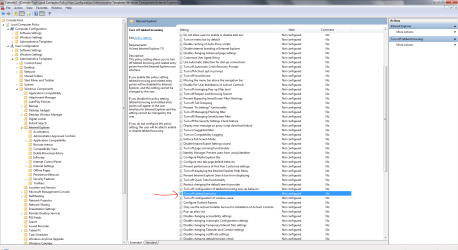
There might be a easier way to enable TAB browsing, but one way to check whether it has been changed is use Microsoft Management Console:

Click Start Orb, type mcc in the search box, and open Microsoft Management Console. Browse to the area shown in tha image. and see if TAB browsing has been configured not to show.


Regards,
Golden
 

Attachments

  • Capture.PNG
    Capture.PNG
    89.8 KB · Views: 398

My Computer

Computer type
PC/Desktop
Computer Manufacturer/Model Number
Golden Mk. I.4
OS
Windows 10 Pro x64 ; Xubuntu x64
CPU
Intel i7 860 @ 2.80 GHz O/C'ed to 4.0GHz
Motherboard
Gigabyte P55A-UD3R Rev.1. Award BIOS F13
Memory
16GB Corsair Vengance DDR3 @ 661 MHz Dual Channel (9-9-9-24)
Graphics Card(s)
EVGA NVidia GTX 560 1024MB
Sound Card
Realtek Integrated
Monitor(s) Displays
Dual Samsung SyncMaster 2494HS
Screen Resolution
1920*1080 and 1920*1080
Hard Drives
1*Samsung 840 EVO 120GB SSD;
1*OCZ Vertex 2 60GB SSD;
2*Samsung F3 SpinPoint 1TB in RAID0;
1*Samsung F1 SpinPoint 1TB;
2*Western Digital 1TB External USB 3.0
1*Western Digital 500GB External USB 3.0
1*Seagate 500GB External USB 2.0
PSU
Thermaltake ToughPower QFan 750W
Case
Thermaltake Element S VK60001W2Z
Cooling
Corsair H60 Water Cooling, 2*230mm and 2*80mm case fans
Keyboard
Logitech G110
Mouse
Logitech MX518
Did you try the Reset option? (Internet options>Advanced>Reset)
 

My Computer

Computer Manufacturer/Model Number
HCL
OS
Winbdows 7 ultimate x64 | Ubuntu 12.04 x64 LTS
CPU
Core 2 Duo e7400 @ 2.90GHz
Motherboard
Gigabyte G31M-ES2L
Memory
3GB DDR2
Graphics Card(s)
Asus Nvidia GTX 560Ti 1GB
Sound Card
On-board
Monitor(s) Displays
HCL eZeeBee 18.5" LCD
Screen Resolution
1366x768 @ 60Hz
Hard Drives
Western Digital 320GB
PSU
Corsair CX500 V2 500W
Cooling
Stock
Keyboard
Stock
Mouse
Stock
Internet Speed
15-25kBps D/L | 10kBps U/L | Hey Don't laugh
Thanks for the replies guys...

I had tried the reset option, it did not correct the issue.

as for the management console, it seems I have a deeper problem than first realized. When opening up the app, I have no extended tree as seen in the example. Different views, double clicking the root folder and so forth does not show me the tree.

I think at this time I am forced to reinstall the system unfortunately. Pretty frustrating as even system restore does not give me a point before this issue arose, which I assume happened sometime this past week, though perhaps sooner I cannot be certain. I normally use firefox, but I had to use IE because of compatibility issues with a printer web interface that firefox could not see, and that was when I noticed the problem, I could not type in the web address....

NUTS~!

Fortunately, the reinstall will be relatively quick, I have most of my stuff backed up in a second partition, so just a few apps need be installed and I am good to go.

Thanks anyway guys...
 

My Computer

OS
none
When opening up the app, I have no extended tree as seen in the example. Different views, double clicking the root folder and so forth does not show me the tree.

Hold on. You need to do the following to get that tree view (I assume you hadn't done that):

1. Open MMC
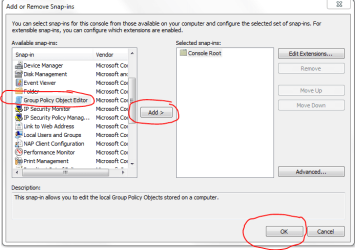
2. Click File > Add/Remove Snap-In
3. Select Group Policy Object Editor (see Image)
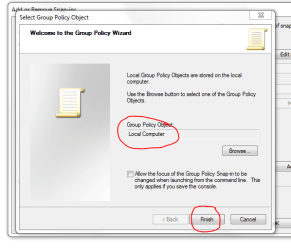
4. Click Finish on Pop-Up panel (see Image)
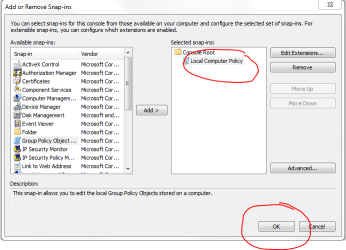
5. Highlight Localy Group Policy, click OK (see Image)
6. Now you can browse to get the extended tree as per my first post image.

BTW : does the same problem occur with a different user account?

Regards,
Golden
 

Attachments

  • Capture.PNG
    Capture.PNG
    19.5 KB · Views: 58
  • Capture2.PNG
    Capture2.PNG
    27.5 KB · Views: 26
  • Capture3.PNG
    Capture3.PNG
    19.4 KB · Views: 40

My Computer

Computer type
PC/Desktop
Computer Manufacturer/Model Number
Golden Mk. I.4
OS
Windows 10 Pro x64 ; Xubuntu x64
CPU
Intel i7 860 @ 2.80 GHz O/C'ed to 4.0GHz
Motherboard
Gigabyte P55A-UD3R Rev.1. Award BIOS F13
Memory
16GB Corsair Vengance DDR3 @ 661 MHz Dual Channel (9-9-9-24)
Graphics Card(s)
EVGA NVidia GTX 560 1024MB
Sound Card
Realtek Integrated
Monitor(s) Displays
Dual Samsung SyncMaster 2494HS
Screen Resolution
1920*1080 and 1920*1080
Hard Drives
1*Samsung 840 EVO 120GB SSD;
1*OCZ Vertex 2 60GB SSD;
2*Samsung F3 SpinPoint 1TB in RAID0;
1*Samsung F1 SpinPoint 1TB;
2*Western Digital 1TB External USB 3.0
1*Western Digital 500GB External USB 3.0
1*Seagate 500GB External USB 2.0
PSU
Thermaltake ToughPower QFan 750W
Case
Thermaltake Element S VK60001W2Z
Cooling
Corsair H60 Water Cooling, 2*230mm and 2*80mm case fans
Keyboard
Logitech G110
Mouse
Logitech MX518
Before you reinstall, try this-
Type 'Turn window features' in start menu search, click 'Turn windows features on or off'.
Browse to Internet Explorer 8. Uncheck it. Reboot.
Check it again. Reboot.
See if that helps.
 

My Computer

Computer Manufacturer/Model Number
HCL
OS
Winbdows 7 ultimate x64 | Ubuntu 12.04 x64 LTS
CPU
Core 2 Duo e7400 @ 2.90GHz
Motherboard
Gigabyte G31M-ES2L
Memory
3GB DDR2
Graphics Card(s)
Asus Nvidia GTX 560Ti 1GB
Sound Card
On-board
Monitor(s) Displays
HCL eZeeBee 18.5" LCD
Screen Resolution
1366x768 @ 60Hz
Hard Drives
Western Digital 320GB
PSU
Corsair CX500 V2 500W
Cooling
Stock
Keyboard
Stock
Mouse
Stock
Internet Speed
15-25kBps D/L | 10kBps U/L | Hey Don't laugh
Back
Top