Solved Adobe Acrobat won't associate with .pdf files

netadict

New member
Member
VIP
Local time
10:34 PM
Messages
155
Location
Egypt
I have the latest Adobe Acrobat reader installed but whenever I double click a .pdf file Windows gives me the "this file does not have a program associated with it" message so I went to control panel>Default Programs and associated pdf files with acrobat , pressed OK then restarted the PC. The problem is still there.
 

My Computer My Computer

Computer Manufacturer/Model Number
HP Compaq dc7600 Convertible Minitower PC
OS
Windows 7 Professional 32 bit
CPU
Pentium D 3.4 GHYz
Motherboard
original that came with the PC
Memory
4GB
Graphics Card(s)
Nvidia GE Force 9600 GT
Sound Card
intergrated on the motherboard
Monitor(s) Displays
Samsung SyncMaster 713N
Screen Resolution
1280X1024
Hard Drives
Maxtor 6V160E0 ATA
Case
mini tower
Keyboard
standard PS/2
Mouse
PS/2 compatible
Internet Speed
2 M/s ADSL
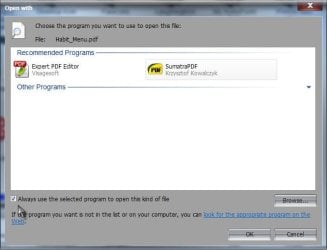
Try right clicking a pdf> Open with> Choose default program> Select Acrobat from list> Make sure Always use selected program to open this kind of file is checked

pdf.jpg

Use the Browse button if Acrobat isn't suggested. What programs are suggested on the list, if that doesn't work? A Guy
 

My Computer My Computer

Computer type
PC/Desktop
OS
Windows 10 Home x64
CPU
INTEL Core i5-750 Quad-Core 3.37GHz
Motherboard
ASUS P7P55D
Memory
HyperX Fury Black Series 8GB (2 x 4GB) 1866Mhz
Graphics Card(s)
EVGA GeForce GTX 750 Superclocked 1GB 128-Bit GDDR5
Monitor(s) Displays
LG 32MA68HY 32" IPS
Screen Resolution
1920 x 1080
Hard Drives
Samsung 840 Evo 120GB, SEAGATE 500GB Barracuda® 7200.12, SATA 3 Gb/s, 7200 RPM, 16MB cache
PSU
ANTEC TruePower New TP-550, 80 PLUS, 550W
Case
ANTEC Three Hundred Illusion
Cooling
COOLER MASTER Hyper 212 Plus, 4 x 120mm 1 x 140mm Noctua's
Internet Speed
85 + Mbps
Antivirus
Avast
Browser
Vivaldi
also you could try opening adobe reader select edit/preferences /General, then click the select default pdf handler button ,from the window that opens select adobe reader .
 

My Computer My Computer

Computer Manufacturer/Model Number
Hewlett packard/p6512uk
OS
Microsoft Windows 7 Home Premium 64-bit 7600
CPU
IIx4 amd athelon 635 processor
Motherboard
FOXCONN 2AA9
Memory
2x2gb
Graphics Card(s)
ati radeon HD 5450
Sound Card
(1) Realtek High Definition Audio (2) AMD High Definition
Monitor(s) Displays
samsung lcd tv 32"
Screen Resolution
1360x 768
Hard Drives
(1) WDC WD10 01FAES-60Z2A0 SATA Disk Device (2) Maxtor OneTouch USB Device (3) ST310003 33AS USB Device (4) WD My Book 1111 USB Device
PSU
?
Cooling
air!
Keyboard
wireless hp
Mouse
wireless Hp,optical
Internet Speed
1.10mb/s
Antivirus
MSE
Browser
Firefox
Thank you, I tried both your suggestions but it still didn't work

What solved the problem was downloading and installing a new version of Acrobat
 

My Computer My Computer

Computer Manufacturer/Model Number
HP Compaq dc7600 Convertible Minitower PC
OS
Windows 7 Professional 32 bit
CPU
Pentium D 3.4 GHYz
Motherboard
original that came with the PC
Memory
4GB
Graphics Card(s)
Nvidia GE Force 9600 GT
Sound Card
intergrated on the motherboard
Monitor(s) Displays
Samsung SyncMaster 713N
Screen Resolution
1280X1024
Hard Drives
Maxtor 6V160E0 ATA
Case
mini tower
Keyboard
standard PS/2
Mouse
PS/2 compatible
Internet Speed
2 M/s ADSL
Glad you got it sorted ;)

A Guy
 

My Computer My Computer

Computer type
PC/Desktop
OS
Windows 10 Home x64
CPU
INTEL Core i5-750 Quad-Core 3.37GHz
Motherboard
ASUS P7P55D
Memory
HyperX Fury Black Series 8GB (2 x 4GB) 1866Mhz
Graphics Card(s)
EVGA GeForce GTX 750 Superclocked 1GB 128-Bit GDDR5
Monitor(s) Displays
LG 32MA68HY 32" IPS
Screen Resolution
1920 x 1080
Hard Drives
Samsung 840 Evo 120GB, SEAGATE 500GB Barracuda® 7200.12, SATA 3 Gb/s, 7200 RPM, 16MB cache
PSU
ANTEC TruePower New TP-550, 80 PLUS, 550W
Case
ANTEC Three Hundred Illusion
Cooling
COOLER MASTER Hyper 212 Plus, 4 x 120mm 1 x 140mm Noctua's
Internet Speed
85 + Mbps
Antivirus
Avast
Browser
Vivaldi
Back
Top