
Adobe cancelling registrations

ColourOz

New member
Power User
Local time
1:08 AM
Messages
75
I have been using purchased Adobe software for several years and pleased with my purchases. The past week I received a notification from Adobe advising me that my license number will no longer be activated and I am to buy a new license number. I have been given 30 days to pay for a new license. I clicked on their link and their objective is for buyers to purchase new 2025 software on a monthly basis.

I contacted their Customer Service and the person told me that all previous Adobe software licenses to 2023 will be cancelled. I am now looking for graphic software at a reasonable price and the top of the list so far is PhotoWorks who advertise that the license is 'yours forever'...?? Not to forget that Microsoft is pushing for the 'world' to be using Windows 11 and is also deleting their previous Windows versions, but hopefully not their registrations.
 

My Computer

Computer type
PC/Desktop
Computer Manufacturer/Model Number
Custom built
OS
Windows 7 Ultimate x64 SP1
CPU
Intel i7 6700
Motherboard
Asus H170-Pro
Memory
Crucial 16 GB (x1)
Graphics Card(s)
Nvidia GeForce GTX1050Ti
Sound Card
(incorporated with Nvidia Graphics Card)
Monitor(s) Displays
LG HDR WFHD 29" Model 705948
Screen Resolution
3840 x 2160
Hard Drives
1 x M.2 2TB, 1 x WD black 1TB
PSU
650 W
Case
traditional design
Cooling
2 fans
Keyboard
Wireless
Mouse
Wireless
Internet Speed
NBN fixed wireless
Antivirus
Microsoft Security Essentials
Browser
Mozilla
Other Info
*Acer Ultrabook, 500GB M.2, 8GB RAM - partitioned Win7 & Linux Mint
*Gigabyte Mini-PC (x64) 1TB HDD, 8GB RAM Windows7

*Windows7 setup identical to Main computer*
The specs that you need for Windows are for version 10. Unfortunately there is no trial version.

I am using Windows 7 x64.
 

My Computer

Computer type
PC/Desktop
Computer Manufacturer/Model Number
Custom built
OS
Windows 7 Ultimate x64 SP1
CPU
Intel i7 6700
Motherboard
Asus H170-Pro
Memory
Crucial 16 GB (x1)
Graphics Card(s)
Nvidia GeForce GTX1050Ti
Sound Card
(incorporated with Nvidia Graphics Card)
Monitor(s) Displays
LG HDR WFHD 29" Model 705948
Screen Resolution
3840 x 2160
Hard Drives
1 x M.2 2TB, 1 x WD black 1TB
PSU
650 W
Case
traditional design
Cooling
2 fans
Keyboard
Wireless
Mouse
Wireless
Internet Speed
NBN fixed wireless
Antivirus
Microsoft Security Essentials
Browser
Mozilla
Other Info
*Acer Ultrabook, 500GB M.2, 8GB RAM - partitioned Win7 & Linux Mint
*Gigabyte Mini-PC (x64) 1TB HDD, 8GB RAM Windows7

*Windows7 setup identical to Main computer*

My Computers

System One System Two

  • Computer type
    Laptop
    Computer Manufacturer/Model Number
    Toshiba satellite C650D
    OS
    Windows 7 Home Premium x64
    CPU
    AMD V120
    Memory
    4GB
    Internet Speed
    150 Mbps
    Antivirus
    MSE
    Browser
    IE11, Edge, Firefox
    Other Info
    I also have W7 Pro on my System Two, and several W7 Hyper-V VMs. My other machines run Windows 10/11. Their specs are in my Ten Forums & Eleven Forum profiles.
  • Computer type
    Laptop
    System Manufacturer/Model Number
    Lenovo Thinkpad T430
    OS
    Windows 7 Pro x64
    CPU
    Intel i5-3320M
    Memory
    8 GB
    Hard Drives
    250GB Samsung SSD 860 EVO
    Other Info
    Antivirus: MSE
+1 for Paint Shop Pro. That's my everyday go-to program, and I find it easier to use than Adobe Photoshop . . . but maybe that's because I never got very proficient with Photoshop.

You don't clarify which Adobe program you're using now . . . Illustrator? Photoshop? If Photoshop and if you're already proficient with that, you might be happier with an older version of Photoshop -- it might lack some bells and whistles you've gotten used to, but might nevertheless be more familiar to you than some of the alternatives. Adobe released a download of Photoshop 9.0 (aka, CS2) many years ago that doesn't require activation because they discontinued the activation servers. That can still be found here if you want to try downgrading.
 

My Computer

Computer type
PC/Desktop
Computer Manufacturer/Model Number
Dell Optiplex 7050
OS
Windows 7/8.1/10 multiboot
CPU
Intel Core i7-7700
Motherboard
Dell, Intel Q270 chipset
Memory
48GB (2x16GB Crucial DDR4-3200 + 2x8GB Hynix DDR4-2400)
Graphics Card(s)
Intel HD630 + AMD Radeon R7 450 PCIe
Monitor(s) Displays
Asus VC279 (27")
Screen Resolution
1920x1080
Hard Drives
Toshiba M.2 NVMe (256GB),
Samsung 960 Evo (500GB),
WD Red Plus 80EFBX (8TB)
I have been using Photoshop Elements 9 for several years and have been happy with the program. I don't do any outstanding graphics, but able to make an old photo look good. Adobe have cancelled all their program licenses BEFORE 2022/2023 and will only allow later versions on a monthly basis.

I have done a lot of research for a graphic editing program and the old versions like PaintShop Pro I am having trouble installing them, don't know what the problem is although have not spent too much time trying to find out. Suggestions are most welcome, thank you.
 

My Computer

Computer type
PC/Desktop
Computer Manufacturer/Model Number
Custom built
OS
Windows 7 Ultimate x64 SP1
CPU
Intel i7 6700
Motherboard
Asus H170-Pro
Memory
Crucial 16 GB (x1)
Graphics Card(s)
Nvidia GeForce GTX1050Ti
Sound Card
(incorporated with Nvidia Graphics Card)
Monitor(s) Displays
LG HDR WFHD 29" Model 705948
Screen Resolution
3840 x 2160
Hard Drives
1 x M.2 2TB, 1 x WD black 1TB
PSU
650 W
Case
traditional design
Cooling
2 fans
Keyboard
Wireless
Mouse
Wireless
Internet Speed
NBN fixed wireless
Antivirus
Microsoft Security Essentials
Browser
Mozilla
Other Info
*Acer Ultrabook, 500GB M.2, 8GB RAM - partitioned Win7 & Linux Mint
*Gigabyte Mini-PC (x64) 1TB HDD, 8GB RAM Windows7

*Windows7 setup identical to Main computer*
the old versions like PaintShop Pro I am having trouble installing them

Have you tried skipping autorun? In some of my (very old) notes, I noted problems with autorun on some systems, especially with PSP4.

For instance, if installing PSP7 from Bree's link, skip "/autorun.exe" and navigate to the /PSP folder and launch "/PSP/setup.exe" or "/PSP/Paint Shop Pro 7 Anniversary Edition.msi" instead.

(I just tested this in both a "W7x32 Home Premium" VM and a "W7x64 Pro" VM, and both installed PSP7 successfully. Bypassing autorun.exe also seemed to work with PSP4, but hiccupped setting a registry entry.)


Aside: Adobe Photoshop 9.0/CS2 doesn't phone home or require activation, so I don't see how the recent shift in Adobe's policy could affect it or block it from functioning as it always has. In fact, that was the whole point of that old version -- Adobe didn't want to be bothered with having to police it and deal with activation or authentication issues because it was old, so they recompiled an activation-free variation.
 

My Computer

Computer type
PC/Desktop
Computer Manufacturer/Model Number
Dell Optiplex 7050
OS
Windows 7/8.1/10 multiboot
CPU
Intel Core i7-7700
Motherboard
Dell, Intel Q270 chipset
Memory
48GB (2x16GB Crucial DDR4-3200 + 2x8GB Hynix DDR4-2400)
Graphics Card(s)
Intel HD630 + AMD Radeon R7 450 PCIe
Monitor(s) Displays
Asus VC279 (27")
Screen Resolution
1920x1080
Hard Drives
Toshiba M.2 NVMe (256GB),
Samsung 960 Evo (500GB),
WD Red Plus 80EFBX (8TB)
It is clear that Adobe wants nothing to do with licenses before 2022/2023 hence their cancellations of all licenses before that date and would prefer purchases of the latest software on a monthly basis which suits Windows 10 & 11.

As you realise, I have been spending a lot of time on the internet to find a suitable image editor for Windows 7. I have in fact finally found the ideal program, PhotoWorks, that installs without hitches and is for Windows 7, 8, 10 & 11 as well as Mac. The tutorials are excellent. PhotoWorks has a lot more features than Photoshop Elements 9. Presently my hard drive is full of trial versions so will have to restore the drive from a backup and reinstall PhotoWorks.

Thank you everyone for your help; much appreciated!
 

My Computer

Computer type
PC/Desktop
Computer Manufacturer/Model Number
Custom built
OS
Windows 7 Ultimate x64 SP1
CPU
Intel i7 6700
Motherboard
Asus H170-Pro
Memory
Crucial 16 GB (x1)
Graphics Card(s)
Nvidia GeForce GTX1050Ti
Sound Card
(incorporated with Nvidia Graphics Card)
Monitor(s) Displays
LG HDR WFHD 29" Model 705948
Screen Resolution
3840 x 2160
Hard Drives
1 x M.2 2TB, 1 x WD black 1TB
PSU
650 W
Case
traditional design
Cooling
2 fans
Keyboard
Wireless
Mouse
Wireless
Internet Speed
NBN fixed wireless
Antivirus
Microsoft Security Essentials
Browser
Mozilla
Other Info
*Acer Ultrabook, 500GB M.2, 8GB RAM - partitioned Win7 & Linux Mint
*Gigabyte Mini-PC (x64) 1TB HDD, 8GB RAM Windows7

*Windows7 setup identical to Main computer*
Presently my hard drive is full of trial versions so will have to restore the drive from a backup and reinstall PhotoWorks.

Good planning ahead! Enjoy.
 

My Computer

Computer type
PC/Desktop
Computer Manufacturer/Model Number
Dell Optiplex 7050
OS
Windows 7/8.1/10 multiboot
CPU
Intel Core i7-7700
Motherboard
Dell, Intel Q270 chipset
Memory
48GB (2x16GB Crucial DDR4-3200 + 2x8GB Hynix DDR4-2400)
Graphics Card(s)
Intel HD630 + AMD Radeon R7 450 PCIe
Monitor(s) Displays
Asus VC279 (27")
Screen Resolution
1920x1080
Hard Drives
Toshiba M.2 NVMe (256GB),
Samsung 960 Evo (500GB),
WD Red Plus 80EFBX (8TB)
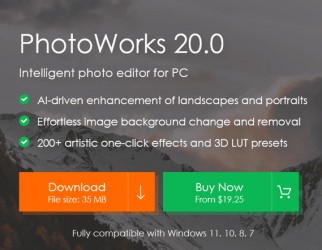
Should have mentioned that PhotoWorks is powered by AI.
PhotoWorks.png
 

My Computer

Computer type
PC/Desktop
Computer Manufacturer/Model Number
Custom built
OS
Windows 7 Ultimate x64 SP1
CPU
Intel i7 6700
Motherboard
Asus H170-Pro
Memory
Crucial 16 GB (x1)
Graphics Card(s)
Nvidia GeForce GTX1050Ti
Sound Card
(incorporated with Nvidia Graphics Card)
Monitor(s) Displays
LG HDR WFHD 29" Model 705948
Screen Resolution
3840 x 2160
Hard Drives
1 x M.2 2TB, 1 x WD black 1TB
PSU
650 W
Case
traditional design
Cooling
2 fans
Keyboard
Wireless
Mouse
Wireless
Internet Speed
NBN fixed wireless
Antivirus
Microsoft Security Essentials
Browser
Mozilla
Other Info
*Acer Ultrabook, 500GB M.2, 8GB RAM - partitioned Win7 & Linux Mint
*Gigabyte Mini-PC (x64) 1TB HDD, 8GB RAM Windows7

*Windows7 setup identical to Main computer*
Did you open sky replacement if you do you should be offered free download for lots of skys
 

My Computer

Computer type
PC/Desktop
OS
win 8 32 bit
There were no offers. The website is like a marketplace with everyone 'screaming' and wanting to sell. The installation file was difficult to find and the customer service is close to non-existant. I could go on but I am sure you get the idea of my experience.
 

My Computer

Computer type
PC/Desktop
Computer Manufacturer/Model Number
Custom built
OS
Windows 7 Ultimate x64 SP1
CPU
Intel i7 6700
Motherboard
Asus H170-Pro
Memory
Crucial 16 GB (x1)
Graphics Card(s)
Nvidia GeForce GTX1050Ti
Sound Card
(incorporated with Nvidia Graphics Card)
Monitor(s) Displays
LG HDR WFHD 29" Model 705948
Screen Resolution
3840 x 2160
Hard Drives
1 x M.2 2TB, 1 x WD black 1TB
PSU
650 W
Case
traditional design
Cooling
2 fans
Keyboard
Wireless
Mouse
Wireless
Internet Speed
NBN fixed wireless
Antivirus
Microsoft Security Essentials
Browser
Mozilla
Other Info
*Acer Ultrabook, 500GB M.2, 8GB RAM - partitioned Win7 & Linux Mint
*Gigabyte Mini-PC (x64) 1TB HDD, 8GB RAM Windows7

*Windows7 setup identical to Main computer*
Aside: Adobe Photoshop 9.0/CS2 doesn't phone home or require activation, so I don't see how the recent shift in Adobe's policy could affect it or block it from functioning as it always has. In fact, that was the whole point of that old version -- Adobe didn't want to be bothered with having to police it and deal with activation or authentication issues because it was old, so they recompiled an activation-free variation.[/QUOTE]

I cannot find this free version of Photoshop other than a monthly paid version. Adobe have probably removed it as a freebie.
 

My Computer

Computer type
PC/Desktop
Computer Manufacturer/Model Number
Custom built
OS
Windows 7 Ultimate x64 SP1
CPU
Intel i7 6700
Motherboard
Asus H170-Pro
Memory
Crucial 16 GB (x1)
Graphics Card(s)
Nvidia GeForce GTX1050Ti
Sound Card
(incorporated with Nvidia Graphics Card)
Monitor(s) Displays
LG HDR WFHD 29" Model 705948
Screen Resolution
3840 x 2160
Hard Drives
1 x M.2 2TB, 1 x WD black 1TB
PSU
650 W
Case
traditional design
Cooling
2 fans
Keyboard
Wireless
Mouse
Wireless
Internet Speed
NBN fixed wireless
Antivirus
Microsoft Security Essentials
Browser
Mozilla
Other Info
*Acer Ultrabook, 500GB M.2, 8GB RAM - partitioned Win7 & Linux Mint
*Gigabyte Mini-PC (x64) 1TB HDD, 8GB RAM Windows7

*Windows7 setup identical to Main computer*
Adobe Photoshop 9.0/CS2
[...]
I cannot find this free version of Photoshop

Link is in my post #5 (though note the forum software doesn't underline links).

Note you need to use the matching registration key, which is also copied on that webpage.
 

My Computer

Computer type
PC/Desktop
Computer Manufacturer/Model Number
Dell Optiplex 7050
OS
Windows 7/8.1/10 multiboot
CPU
Intel Core i7-7700
Motherboard
Dell, Intel Q270 chipset
Memory
48GB (2x16GB Crucial DDR4-3200 + 2x8GB Hynix DDR4-2400)
Graphics Card(s)
Intel HD630 + AMD Radeon R7 450 PCIe
Monitor(s) Displays
Asus VC279 (27")
Screen Resolution
1920x1080
Hard Drives
Toshiba M.2 NVMe (256GB),
Samsung 960 Evo (500GB),
WD Red Plus 80EFBX (8TB)
Thank you very much for your help! I have downloaded the program and to my surprise, there is a message that asks if you want your registration registered with Adobe. That is the first time I have seen that message on an Adobe program. I must confess, I have had Elements 9 for 15 years and it has done everything I needed. Thank you so much for the link.
 

My Computer

Computer type
PC/Desktop
Computer Manufacturer/Model Number
Custom built
OS
Windows 7 Ultimate x64 SP1
CPU
Intel i7 6700
Motherboard
Asus H170-Pro
Memory
Crucial 16 GB (x1)
Graphics Card(s)
Nvidia GeForce GTX1050Ti
Sound Card
(incorporated with Nvidia Graphics Card)
Monitor(s) Displays
LG HDR WFHD 29" Model 705948
Screen Resolution
3840 x 2160
Hard Drives
1 x M.2 2TB, 1 x WD black 1TB
PSU
650 W
Case
traditional design
Cooling
2 fans
Keyboard
Wireless
Mouse
Wireless
Internet Speed
NBN fixed wireless
Antivirus
Microsoft Security Essentials
Browser
Mozilla
Other Info
*Acer Ultrabook, 500GB M.2, 8GB RAM - partitioned Win7 & Linux Mint
*Gigabyte Mini-PC (x64) 1TB HDD, 8GB RAM Windows7

*Windows7 setup identical to Main computer*
dg1261

Thank you again for Photoshop. I have been using the program and finding the locations of some icons, but will no doubt get used to it as I did with Elements.
 

My Computer

Computer type
PC/Desktop
Computer Manufacturer/Model Number
Custom built
OS
Windows 7 Ultimate x64 SP1
CPU
Intel i7 6700
Motherboard
Asus H170-Pro
Memory
Crucial 16 GB (x1)
Graphics Card(s)
Nvidia GeForce GTX1050Ti
Sound Card
(incorporated with Nvidia Graphics Card)
Monitor(s) Displays
LG HDR WFHD 29" Model 705948
Screen Resolution
3840 x 2160
Hard Drives
1 x M.2 2TB, 1 x WD black 1TB
PSU
650 W
Case
traditional design
Cooling
2 fans
Keyboard
Wireless
Mouse
Wireless
Internet Speed
NBN fixed wireless
Antivirus
Microsoft Security Essentials
Browser
Mozilla
Other Info
*Acer Ultrabook, 500GB M.2, 8GB RAM - partitioned Win7 & Linux Mint
*Gigabyte Mini-PC (x64) 1TB HDD, 8GB RAM Windows7

*Windows7 setup identical to Main computer*
:thumbsup:
 

My Computer

Computer type
PC/Desktop
Computer Manufacturer/Model Number
Dell Optiplex 7050
OS
Windows 7/8.1/10 multiboot
CPU
Intel Core i7-7700
Motherboard
Dell, Intel Q270 chipset
Memory
48GB (2x16GB Crucial DDR4-3200 + 2x8GB Hynix DDR4-2400)
Graphics Card(s)
Intel HD630 + AMD Radeon R7 450 PCIe
Monitor(s) Displays
Asus VC279 (27")
Screen Resolution
1920x1080
Hard Drives
Toshiba M.2 NVMe (256GB),
Samsung 960 Evo (500GB),
WD Red Plus 80EFBX (8TB)
Back
Top