Adobe Flash 9 + Firefox 3.5.3 issues...

laguz1

New member
Local time
6:14 AM
Messages
9
Location
IL, US
Hey everyone,

I recently installed a RTM Windows 7 Pro on my laptop (upgraded from XP), and now I'm starting to run into a little browser issues involving Adobe Flash.

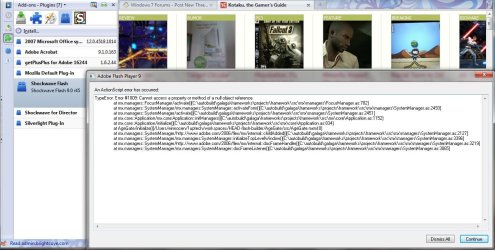
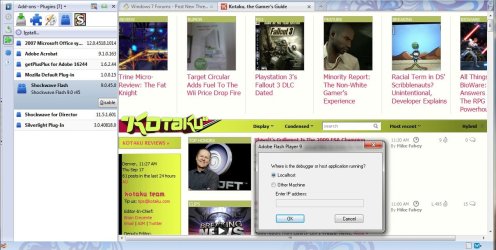
Youtube, and other video sites seem to work just fine, but for some odd reason, a couple sites, such as Kotaku.com, always initiates some random Adobe Flash 9 "where is the debugger or host application running?" popup error. The real annoyance is however, that this message pops up repeatedly for maybe 8-10 times before this second error log message is displayed. I have no idea what this message even means.

I noticed there is a new Adobe Flash 10 version out, as well as Shockwave 11, and have installed both, but in my Firefox's browser plugin menu, Shockwave Flash is still listed as version 9... Is there a way to completely remove this?

Thanks for any guidance you can provide!
 

Attachments
  • screenshot1.jpg
    screenshot1.jpg
    119.2 KB · Views: 69
  • screenshot2.jpg
    screenshot2.jpg
    124.7 KB · Views: 35

My Computer

Computer Manufacturer/Model Number
Dell Vostro 1500
OS
Windows 7 Professional RTM 32-bit
CPU
Intel Core 2 Duo T7100
Graphics Card(s)
NVidia Geforce 8600M GT
Download and install the Adobe Flash 10.. See how that works.. Let us know.
 

My Computer

Computer type
PC/Desktop
Computer Manufacturer/Model Number
DELL VOSTRO 3650
OS
Windows 8.1 PRO
CPU
3rd Generation Intel Core i7‐3612QM CPU @ 2.10GHZ
Memory
8GB DDR3
Graphics Card(s)
NVIDIA GeForce GT 525M (128 bit), 1GB Grpahics
Screen Resolution
1920X1080
Hard Drives
750GB 5400RPM
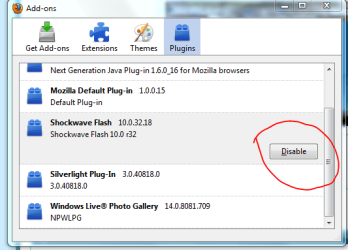
I installed it, and it added another plug-in called "Shockwave Flash 10.0.32.18"

Somehow, I still have my original Firefox default Shockwave Flash 9 though....I'd like the flash 10 to somehow replace this.

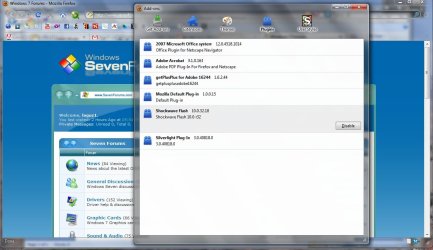
I attached a screenshot of my setup so far.

Also, I disabled Shockwave Flash 9, and yes, those previous sites I mentioned such as Kotaku now no longer have a debug issue, but now Youtube, google video, etc. don't work....I can't seem to fix both issues haha.

Is there a way to somehow get Firefox to get rid of Adobe Shockwave Flash 9?

Oh, and what is the difference between Shockwave player and Adobe Flash..?
 

Attachments

  • screenshot3.jpg
    screenshot3.jpg
    90 KB · Views: 119

My Computer

Computer Manufacturer/Model Number
Dell Vostro 1500
OS
Windows 7 Professional RTM 32-bit
CPU
Intel Core 2 Duo T7100
Graphics Card(s)
NVidia Geforce 8600M GT
Laguz1,

you can disable it until you find a way to completely take it off, i am searching online on how to take it off but for the mean time, you an disable the old one and leave the new one running.
 

Attachments

  • Capture.PNG
    Capture.PNG
    17.7 KB · Views: 36

My Computer

Computer Manufacturer/Model Number
DELL
OS
Windows 7 professional 32 bit
CPU
Intel T7200 2.0 GHz
Memory
4GB DDR2 RAM
1. Open Computer.
2. Navigate to C:\Windows\SysWOW64\.
3. Scroll down and open the Macromed directory.
4. Open the Flash directory.
5. Right-click FlashUtil9b or FlashUtil10a.
6. Select Run as Administrator.
7. When the UAC prompt appears, select Continue.
8. Follow the Flash Player installation wizard.
Once the wizard completes, Flash Player has been properly installed and will now function properly.
 

My Computer

Computer Manufacturer/Model Number
Samsung NP530U4B-S02IN
OS
Windows® 8 Pro (64-bit)
CPU
Intel® Core™ i5 Processor 2467M (1.60GHz, 3MB L3 Cache)
Motherboard
Samsung Electronics
Memory
6GB DDR3 System Memory at 1,333MHz (on BD 4GB + 2GB x 1)
Graphics Card(s)
AMD Radeon™ HD7550M 1GB DDR3 (Ext. Graphic)
Sound Card
Realtek High Definition Audio
Monitor(s) Displays
35.56cm (14.0) SuperBright 300nit HD LED Display
Screen Resolution
1366x768
Hard Drives
1TB S-ATA II Hard Drive (5400RPM) with ExpressCache 16GB SSD
Internet Speed
sucks
Antivirus
Microsoft Security Essentials
Browser
Google Chrome (Sync enabled)
Navigate to C:\Windows\SysWOW64\.

I searched my C:\Windows directory, but I do not have a SysWOW64 folder, only "system" and "System32"

I checked both folders and there was no Macromedia related folder either.

I have disabled it for now, except this where it gets weird.

Once I have Flash 10 going and Flash 9 disabled, youtube, google video, and pretty much any other flash-related site does NOT work. But that solves my weird Kotaku.com flash debugger issue.

Once I re-enable Flash 9, youtube and all that work, but now debugger posts errors again on Kotaku. This is pretty annoying.

I checked with a fellow student friend, and his Firefox came pre-installed with the Flash 10 variant. I have tried reinstalling Firefox on my laptop several times, but still always Flash 9. My friend upgraded from Vista while I installed Windows 7 over XP. This shouldn't be affecting my Firefox flash-type though....

I also have tried to custom Firefox, but there is no selection of plugin types to install.

Could you guys tell me if your firefox default plugins list "Shockwave Flash 9.0.45.0 r45" or do you have the flash 10 r32?
 

My Computer

Computer Manufacturer/Model Number
Dell Vostro 1500
OS
Windows 7 Professional RTM 32-bit
CPU
Intel Core 2 Duo T7100
Graphics Card(s)
NVidia Geforce 8600M GT
i m sorry. thats for 64 bit OS.
 

My Computer

Computer Manufacturer/Model Number
Samsung NP530U4B-S02IN
OS
Windows® 8 Pro (64-bit)
CPU
Intel® Core™ i5 Processor 2467M (1.60GHz, 3MB L3 Cache)
Motherboard
Samsung Electronics
Memory
6GB DDR3 System Memory at 1,333MHz (on BD 4GB + 2GB x 1)
Graphics Card(s)
AMD Radeon™ HD7550M 1GB DDR3 (Ext. Graphic)
Sound Card
Realtek High Definition Audio
Monitor(s) Displays
35.56cm (14.0) SuperBright 300nit HD LED Display
Screen Resolution
1366x768
Hard Drives
1TB S-ATA II Hard Drive (5400RPM) with ExpressCache 16GB SSD
Internet Speed
sucks
Antivirus
Microsoft Security Essentials
Browser
Google Chrome (Sync enabled)
OK guys, somehow now my issue seems fixed after I did nothing. I'm thinking it was just a bad flash object on Kotaku that trigger some error.

So anyhow, I guess I'll have Flash 9 and 10 working together in harmony for now until I can somehow get 10 to replace 9 without any issues.

Thanks for the help!
 

My Computer

Computer Manufacturer/Model Number
Dell Vostro 1500
OS
Windows 7 Professional RTM 32-bit
CPU
Intel Core 2 Duo T7100
Graphics Card(s)
NVidia Geforce 8600M GT
Okay, for clarification, I actually managed to replace the stubborn Flash 9 r45 finally.

After reading your post Dinesh, I manually typed in the C:\Windows\System32\Macromed, and it worked. It was just not visible by default for some reason...

Anyhow, I deleted all contents in the Flash folder, then installed Flash 10, and boom, Firefox only has Flash 10 detected now.

Everything works great. THANKS!
 

Attachments

  • screenshot4.jpg
    screenshot4.jpg
    92.9 KB · Views: 89

My Computer

Computer Manufacturer/Model Number
Dell Vostro 1500
OS
Windows 7 Professional RTM 32-bit
CPU
Intel Core 2 Duo T7100
Graphics Card(s)
NVidia Geforce 8600M GT
Glad to heat that you got it sorted. :)
 

My Computer

Computer Manufacturer/Model Number
Samsung NP530U4B-S02IN
OS
Windows® 8 Pro (64-bit)
CPU
Intel® Core™ i5 Processor 2467M (1.60GHz, 3MB L3 Cache)
Motherboard
Samsung Electronics
Memory
6GB DDR3 System Memory at 1,333MHz (on BD 4GB + 2GB x 1)
Graphics Card(s)
AMD Radeon™ HD7550M 1GB DDR3 (Ext. Graphic)
Sound Card
Realtek High Definition Audio
Monitor(s) Displays
35.56cm (14.0) SuperBright 300nit HD LED Display
Screen Resolution
1366x768
Hard Drives
1TB S-ATA II Hard Drive (5400RPM) with ExpressCache 16GB SSD
Internet Speed
sucks
Antivirus
Microsoft Security Essentials
Browser
Google Chrome (Sync enabled)
Back
Top