Adobe not installing

Amadauss

New member
Local time
9:43 PM
Messages
26
I have tried several times without success to re-install adobe cs4. I am running win 7 Ultimate. Installation starts fine and I start install as administrator, on personal computer with no network. I continually get this error message:
Adobe Color EU Extra Settings CS4
Error:
Error 1625. This installation is forbidden by system policy. Contact your system administrator.

Adobe Dynamiclink Support
Error:
Error 2.

I have tried several changes including changing and turning off the User Account Control with no luck. And I have run the Cleanscript from adobe. Any help appreciated. Thanks
 

My Computer

OS
Win 7
Welcome!

Try logging in as an Administrator, not running as Administrator. In other words, try using an actual Administrator account, if you are not already doing so.
 

My Computer

Computer Manufacturer/Model Number
Custom
OS
Windows 7 Professional x64
CPU
Intel i7 2600K OC'd @ 4620 MHz
Motherboard
Asus P8Z68-V Pro
Memory
16GB GSkill Sniper 2133 Mhz (4x4GB)
Graphics Card(s)
EVGA GeForce GTX 480 SuperClocked+
Sound Card
Realtek High Definition Audio
Monitor(s) Displays
2x Acer S273HLbmii 27"
Screen Resolution
2 x 1920x1080
Hard Drives
64GB Crucial M4 SSD

Storage: Hitachi 1TB 5400RPM, Samsung 1.5TB 5400RPM
PSU
Corsair HW Series 750w (modular)
Case
Cooler Master HAF 932 Advanced Blue Edition
Cooling
CM Hyper 212+ CPU cooler, 3x 230mm + 1x 140mm case fans
Keyboard
Logitech MK320 (wireless)
Mouse
Logitech MK320 (wireless)
Internet Speed
30 Mb/s : 2 Mb/s
Thank you for responding. Tried it as admin with no luck.
 

My Computer

OS
Win 7
Try browsing through this.
 

My Computer

Computer Manufacturer/Model Number
Custom
OS
Windows 7 Professional x64
CPU
Intel i7 2600K OC'd @ 4620 MHz
Motherboard
Asus P8Z68-V Pro
Memory
16GB GSkill Sniper 2133 Mhz (4x4GB)
Graphics Card(s)
EVGA GeForce GTX 480 SuperClocked+
Sound Card
Realtek High Definition Audio
Monitor(s) Displays
2x Acer S273HLbmii 27"
Screen Resolution
2 x 1920x1080
Hard Drives
64GB Crucial M4 SSD

Storage: Hitachi 1TB 5400RPM, Samsung 1.5TB 5400RPM
PSU
Corsair HW Series 750w (modular)
Case
Cooler Master HAF 932 Advanced Blue Edition
Cooling
CM Hyper 212+ CPU cooler, 3x 230mm + 1x 140mm case fans
Keyboard
Logitech MK320 (wireless)
Mouse
Logitech MK320 (wireless)
Internet Speed
30 Mb/s : 2 Mb/s
Have tried this also with no success. Almost at the point of just starting over and re-loading from a clean install windows and then trying adobe again. Never had this issue with any other program I have installed on machine so thus the frustration. By the way adobe tech is blaming windows 7.
 

My Computer

OS
Win 7
...and I'm sure Windows is blaming Adobe. :rolleyes:

You may try running sfc /scannow from the command prompt.
 

My Computer

Computer Manufacturer/Model Number
Custom
OS
Windows 7 Professional x64
CPU
Intel i7 2600K OC'd @ 4620 MHz
Motherboard
Asus P8Z68-V Pro
Memory
16GB GSkill Sniper 2133 Mhz (4x4GB)
Graphics Card(s)
EVGA GeForce GTX 480 SuperClocked+
Sound Card
Realtek High Definition Audio
Monitor(s) Displays
2x Acer S273HLbmii 27"
Screen Resolution
2 x 1920x1080
Hard Drives
64GB Crucial M4 SSD

Storage: Hitachi 1TB 5400RPM, Samsung 1.5TB 5400RPM
PSU
Corsair HW Series 750w (modular)
Case
Cooler Master HAF 932 Advanced Blue Edition
Cooling
CM Hyper 212+ CPU cooler, 3x 230mm + 1x 140mm case fans
Keyboard
Logitech MK320 (wireless)
Mouse
Logitech MK320 (wireless)
Internet Speed
30 Mb/s : 2 Mb/s
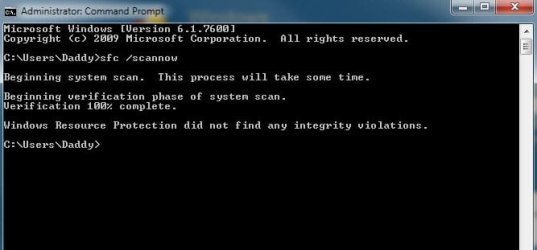
Ok, tried and and here is the response. Everything is fine. I have attached pic of the scan results. What does this help confirm? Thanks very much for the help.

One more thing, I do have several other photo and video programs on computer because of my work (free lance marketing company) and thought maybe some dlls might be conflicting or something like that. It seems though that the error is like windows being a big brother protecting me because its not recognizing me as the admin and someone else trying to put the program on the computer so its helping me from anything bad happening. The crazy part is the install starts and gets through a few programs installing but stops with this error always being the same. Also, I do have another computer with XP on it and it installs no problems and the program was on this computer with WIN 7 running fine until I thought it was acting funny so deleted it to re-install. "If it ain't broke, don't fix it" comes to mind right :) Any additional help very much appreciated.
 

Attachments

  • system scan.jpg
    system scan.jpg
    21.9 KB · Views: 86

My Computer

OS
Win 7
I don't really know what to tell you. I m just stalling for time until others come and help.

Have you tried downloading the program again? How about installing in Safe Mode?
 

My Computer

Computer Manufacturer/Model Number
Custom
OS
Windows 7 Professional x64
CPU
Intel i7 2600K OC'd @ 4620 MHz
Motherboard
Asus P8Z68-V Pro
Memory
16GB GSkill Sniper 2133 Mhz (4x4GB)
Graphics Card(s)
EVGA GeForce GTX 480 SuperClocked+
Sound Card
Realtek High Definition Audio
Monitor(s) Displays
2x Acer S273HLbmii 27"
Screen Resolution
2 x 1920x1080
Hard Drives
64GB Crucial M4 SSD

Storage: Hitachi 1TB 5400RPM, Samsung 1.5TB 5400RPM
PSU
Corsair HW Series 750w (modular)
Case
Cooler Master HAF 932 Advanced Blue Edition
Cooling
CM Hyper 212+ CPU cooler, 3x 230mm + 1x 140mm case fans
Keyboard
Logitech MK320 (wireless)
Mouse
Logitech MK320 (wireless)
Internet Speed
30 Mb/s : 2 Mb/s

My Computer

Computer Manufacturer/Model Number
Samsung NP550P5C-S02IN
OS
Windows 7 Ultimate - 64-bit | Windows 8 Pro - 64-bit
CPU
Intel® Core™ i7 Processor 3,610QM (2.30Hz, 6MB L3 Cach
Memory
8 GB
Graphics Card(s)
NVIDIA® GeForce® GT 650M 2GB Graphics, Optimus™ techno
Sound Card
SoundAlive™ JBL 3 Speakers (With sub-Woofer)
Monitor(s) Displays
39.62cm (15.6) SuperBright 300nit HD+ LED Display
Screen Resolution
1,600 x 900, Anti-Reflective
Hard Drives
1TB S-ATA II Hard Drive (5,400RPM)
If that didn't work then I suspect its an issue with AppLocker feature in Windows 7 or GPE setting for Windows Installer
 

My Computer

Computer Manufacturer/Model Number
Samsung NP550P5C-S02IN
OS
Windows 7 Ultimate - 64-bit | Windows 8 Pro - 64-bit
CPU
Intel® Core™ i7 Processor 3,610QM (2.30Hz, 6MB L3 Cach
Memory
8 GB
Graphics Card(s)
NVIDIA® GeForce® GT 650M 2GB Graphics, Optimus™ techno
Sound Card
SoundAlive™ JBL 3 Speakers (With sub-Woofer)
Monitor(s) Displays
39.62cm (15.6) SuperBright 300nit HD+ LED Display
Screen Resolution
1,600 x 900, Anti-Reflective
Hard Drives
1TB S-ATA II Hard Drive (5,400RPM)
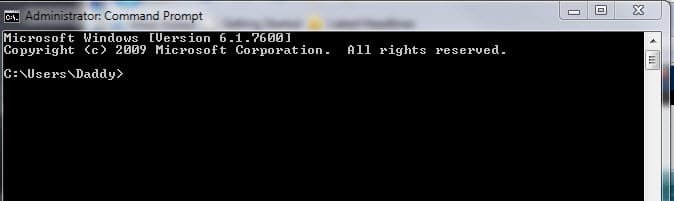
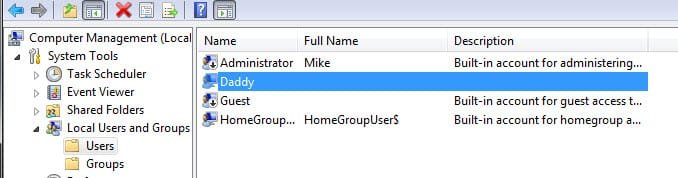
Capt. Jack, thanks for the response. I followed your directions on the admin thing and checked marked the bos for disabling. went to log off and when back on did not give me an admin selection but gave me my account name only as the only option which I am guessing is the admin (did I have two admins?) but any way went to do an elevated command prompt off my name following directions and after right clicking on run as adimin the command prompt I still get my name and not the windows/sys32? Here are the screens of this and users.

On the first listing under users, I did check the box to disable.
 

Attachments

  • command prompt.jpg
    command prompt.jpg
    11.3 KB · Views: 12
  • users.jpg
    users.jpg
    22.5 KB · Views: 18

My Computer

OS
Win 7
Start > CMD > Right Click and Run as administrator > net user administrator /active:yes

After typing so did it say "Command ran sucessfully" ??
 

My Computer

Computer Manufacturer/Model Number
Samsung NP550P5C-S02IN
OS
Windows 7 Ultimate - 64-bit | Windows 8 Pro - 64-bit
CPU
Intel® Core™ i7 Processor 3,610QM (2.30Hz, 6MB L3 Cach
Memory
8 GB
Graphics Card(s)
NVIDIA® GeForce® GT 650M 2GB Graphics, Optimus™ techno
Sound Card
SoundAlive™ JBL 3 Speakers (With sub-Woofer)
Monitor(s) Displays
39.62cm (15.6) SuperBright 300nit HD+ LED Display
Screen Resolution
1,600 x 900, Anti-Reflective
Hard Drives
1TB S-ATA II Hard Drive (5,400RPM)
You are not going to believe this one. I thought ok, maybe need to disable all the admins so went back to users and clicked on daddy and checked the disable box and logged off. Logged on and now I have a larger icon of daddy on welcome screen with asking me to enter my password which I do and its not accepting it. I have an option of reset password but when clicking this I need to insert something into A drive which I don't even have (a Drive floppy) so now I am logged out and can't get in:cry:. I can switch user which when clicking it get the two icons with one being daddy and the other, other user. when I click other user, it is asking for user name and password. What should I do? Please help.... thanks
 

My Computer

OS
Win 7

My Computer

Computer Manufacturer/Model Number
Custom
OS
Windows 7 Professional x64
CPU
Intel i7 2600K OC'd @ 4620 MHz
Motherboard
Asus P8Z68-V Pro
Memory
16GB GSkill Sniper 2133 Mhz (4x4GB)
Graphics Card(s)
EVGA GeForce GTX 480 SuperClocked+
Sound Card
Realtek High Definition Audio
Monitor(s) Displays
2x Acer S273HLbmii 27"
Screen Resolution
2 x 1920x1080
Hard Drives
64GB Crucial M4 SSD

Storage: Hitachi 1TB 5400RPM, Samsung 1.5TB 5400RPM
PSU
Corsair HW Series 750w (modular)
Case
Cooler Master HAF 932 Advanced Blue Edition
Cooling
CM Hyper 212+ CPU cooler, 3x 230mm + 1x 140mm case fans
Keyboard
Logitech MK320 (wireless)
Mouse
Logitech MK320 (wireless)
Internet Speed
30 Mb/s : 2 Mb/s
I just went to the link for password help, then I went out to my garage to get a hammer, just kidding, but is this the only way? I have a great deal of important stuff on this computer and have some backed up but not all. This could be very damaging if I lose the stuff on this drive. What do you suggest as the safest way. I do know that my account listed as Daddy has a password I I know it but on the original Mike account, no password was ever created.
 

My Computer

OS
Win 7
I am actually confused. What accounts do you have on your machine, and which one are you locked out of?
 

My Computer

Computer Manufacturer/Model Number
Custom
OS
Windows 7 Professional x64
CPU
Intel i7 2600K OC'd @ 4620 MHz
Motherboard
Asus P8Z68-V Pro
Memory
16GB GSkill Sniper 2133 Mhz (4x4GB)
Graphics Card(s)
EVGA GeForce GTX 480 SuperClocked+
Sound Card
Realtek High Definition Audio
Monitor(s) Displays
2x Acer S273HLbmii 27"
Screen Resolution
2 x 1920x1080
Hard Drives
64GB Crucial M4 SSD

Storage: Hitachi 1TB 5400RPM, Samsung 1.5TB 5400RPM
PSU
Corsair HW Series 750w (modular)
Case
Cooler Master HAF 932 Advanced Blue Edition
Cooling
CM Hyper 212+ CPU cooler, 3x 230mm + 1x 140mm case fans
Keyboard
Logitech MK320 (wireless)
Mouse
Logitech MK320 (wireless)
Internet Speed
30 Mb/s : 2 Mb/s
Oh Man that's a real mess .. OK first you have to relax .. Then try to Reboot the Computer in Safe Mode see whether you can login under there of you can then create a new administrator

Good Luck Buddy ,
Captain
 

My Computer

Computer Manufacturer/Model Number
Samsung NP550P5C-S02IN
OS
Windows 7 Ultimate - 64-bit | Windows 8 Pro - 64-bit
CPU
Intel® Core™ i7 Processor 3,610QM (2.30Hz, 6MB L3 Cach
Memory
8 GB
Graphics Card(s)
NVIDIA® GeForce® GT 650M 2GB Graphics, Optimus™ techno
Sound Card
SoundAlive™ JBL 3 Speakers (With sub-Woofer)
Monitor(s) Displays
39.62cm (15.6) SuperBright 300nit HD+ LED Display
Screen Resolution
1,600 x 900, Anti-Reflective
Hard Drives
1TB S-ATA II Hard Drive (5,400RPM)
If you look up at the user pic I posted, you will see Administrator Mike and Daddy. I went into both following the directions of creating a new admin or disabling the admin to become the Master Admin as it were to control the install. I checked the box to disable both Admin Mike and Daddy thinking a new admin icon or box would show up on welcome screen that I could click to open and run the adobe program. Right now I cannot get into anyone even the daddy even when I type the correct password in to open it. I hope I am making sense.
 

My Computer

OS
Win 7
So basically you disabled both your accounts?
 

My Computer

Computer Manufacturer/Model Number
Custom
OS
Windows 7 Professional x64
CPU
Intel i7 2600K OC'd @ 4620 MHz
Motherboard
Asus P8Z68-V Pro
Memory
16GB GSkill Sniper 2133 Mhz (4x4GB)
Graphics Card(s)
EVGA GeForce GTX 480 SuperClocked+
Sound Card
Realtek High Definition Audio
Monitor(s) Displays
2x Acer S273HLbmii 27"
Screen Resolution
2 x 1920x1080
Hard Drives
64GB Crucial M4 SSD

Storage: Hitachi 1TB 5400RPM, Samsung 1.5TB 5400RPM
PSU
Corsair HW Series 750w (modular)
Case
Cooler Master HAF 932 Advanced Blue Edition
Cooling
CM Hyper 212+ CPU cooler, 3x 230mm + 1x 140mm case fans
Keyboard
Logitech MK320 (wireless)
Mouse
Logitech MK320 (wireless)
Internet Speed
30 Mb/s : 2 Mb/s
ok so restart and click which key during boot up for safe mode? Not taking any chances here and want to do this right. I thought F 6 or F 8 but not sure And thanks for staying with me on this....

And yes disable both accounts
 

My Computer

OS
Win 7
Back
Top