Solved Advanced System Optimizer, System Protector, Start up problem

unknown01

New member
Member
Local time
9:53 AM
Messages
28
Hello guys,

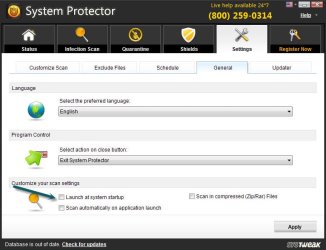
I have this program in my computer called "Advanced System Optimizer" and it has a program called "System Protector" and I just want to disable it forever or at least not to show at my system start up, every time I turn on my computer it comes up and it is really annoying. There is no option in "msconfig" but there is option in program's settings that I unchecked it but still it comes up at system start up.
And FYI: my advanced system optimizer is fully registered.
Any Would would be greatly appreciate it.
ASO-01.jpg

Thank you.
~0UnknowN1
 

My Computer

OS
Windows 8 RTM Professional X64
CPU
Intel Core 2 Duo E8400 3.0GHz
Motherboard
Gigabyte EP43-DS3
Memory
4GB OCZ
Graphics Card(s)
EVGA GTX 275
Monitor(s) Displays
Samsung SyncMaster T200
Screen Resolution
1680x1050
Keyboard
Logitech
Mouse
Logitech
Hey unknown01,


I am Sampad from Dell Social Media and Communities team.

First go to system configuration utility ( Run ... type - Msconfig ) .
From services unclick ASO3DiskOptimizer .
And from under Start Up unclick System Optimizer.
Usually this is enough but they've made this program tricky ( kind of strange since the program is about making things run smoother and it has lot of useful tools in it ) .
Also download free program autoruns found f.exp. here Lataa Autoruns v11.32 (ilmainen ohjelma / freeware) - download.fi ) .
(THIS IS FREEWARE AND IT IS A RECOMMENDATION)

Start the program and choose Scheduled Tasks . From there unclick ASOService.job and now you can only use the program when you want to, not when the program decides to come around ...
Let me know if it worked or not.

Regards
Dell-Sampad C
Dell Social Media and Communities Professional

 
Last edited:

My Computer

OS
windows 7 64bit
I would just uninstall that, Windows 7 doesn't need any optimizing.

Those self proclaimed fix-all programs don't usually fix anything.

It's your call though, let us know how it goes.
 

My Computer

Computer type
PC/Desktop
Computer Manufacturer/Model Number
Self Built
OS
Win 10 Pro x64
CPU
Intel I5-2500K @3.3GHz
Motherboard
Asrock P67 Extreme4
Memory
16GB G.Skill Ripjaws X (4x4GB)
Graphics Card(s)
EVGA GeForce 750 Ti SC 2GB
Sound Card
ASUS Xonar DG 5.1 Channels 24-bit 96KHz PCI Interface Sound
Monitor(s) Displays
auria eq2367
Screen Resolution
1920 x 1080
Hard Drives
250GB Samsung 850 EVO SSD
1TB WD Blue
1TB Hitachi
PSU
SeaSonic X 650W 80 Plus Gold
Case
Corsair Obsidian 750D
Cooling
Corsair H60, Three 140mm case fans
Keyboard
Logitech Wireless Keyboard K520
Mouse
Logitech Wireless Mouse M310
Internet Speed
Wave Broadband ~ 100 dn 5 up
Antivirus
Windows Defender, Malwarebytes Premium
Browser
Edge, IE11, Chrome
Other Info
Laptop specs: HP g7-1365dx /
CPU: AMD A6-3420M APU with Radeon(tm) HD Graphics /
RAM: Crucial 8Gb (2x4Gb) /
SSD: Crucial M4-CT128M4SSD2 ATA Device/ FW 000F /
GFX: AMD Radeon HD 6520G /
OS: Windows 10 Pro x64
Thank you "DELLsampadc" it worked and it doesn't show up at system start up. Thank you.

~0UnknowN1
 

My Computer

OS
Windows 8 RTM Professional X64
CPU
Intel Core 2 Duo E8400 3.0GHz
Motherboard
Gigabyte EP43-DS3
Memory
4GB OCZ
Graphics Card(s)
EVGA GTX 275
Monitor(s) Displays
Samsung SyncMaster T200
Screen Resolution
1680x1050
Keyboard
Logitech
Mouse
Logitech
Back
Top