
Hello guys,
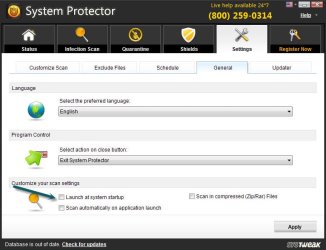
I have this program in my computer called "Advanced System Optimizer" and it has a program called "System Protector" and I just want to disable it forever or at least not to show at my system start up, every time I turn on my computer it comes up and it is really annoying. There is no option in "msconfig" but there is option in program's settings that I unchecked it but still it comes up at system start up.
And FYI: my advanced system optimizer is fully registered.
Any Would would be greatly appreciate it.
Thank you.
~0UnknowN1
I have this program in my computer called "Advanced System Optimizer" and it has a program called "System Protector" and I just want to disable it forever or at least not to show at my system start up, every time I turn on my computer it comes up and it is really annoying. There is no option in "msconfig" but there is option in program's settings that I unchecked it but still it comes up at system start up.
And FYI: my advanced system optimizer is fully registered.
Any Would would be greatly appreciate it.
Thank you.
~0UnknowN1
My Computer
- OS
- Windows 8 RTM Professional X64
- CPU
- Intel Core 2 Duo E8400 3.0GHz
- Motherboard
- Gigabyte EP43-DS3
- Memory
- 4GB OCZ
- Graphics Card(s)
- EVGA GTX 275
- Monitor(s) Displays
- Samsung SyncMaster T200
- Screen Resolution
- 1680x1050
- Keyboard
- Logitech
- Mouse
- Logitech


