Advice for moving a Windows 7 install to an SSD.

Nitesco

New member
Member
Local time
9:08 AM
Messages
42
There's two 500GB SSDs on sale at Newegg that I'm eyeing right now (Samsung | Crucial). I did some comparisons at UserBenchmark, and I've narrowed down my choices to those two SSDs, however I'm open to suggestions.


I've given my main 1TB C drive a look with TreeSize and I think 500GB should cover the Windows 7 installation and Program Files, with more than enough clearance for whatever else I wish to put on the SSD.


The problem comes with the drive itself. There's only one partition on my C drive, which altogether contains much more than just Windows 7 and the Program Files folders.
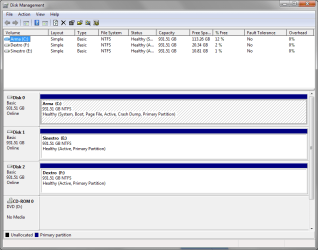

mmc_2019-03-25_14-32-31.png


Yes, I know that lack of free space on ALL my drives is universally terrible. I need to get to Spring Cleaning ASAP.


Since my C is just one big partition, I can't actually image my Windows 7 installation onto the 500GB SSD, since that's simply not enough space. Is there a way to move only what is necessary for my Windows 7 install to the SSD? I have no experience with making partitions, so I may be overlooking an easier solution. In any case, I want to keep all of my files intact.


I plan on buying either of the two SSDs soon, so I appreciate any help with this.
 

My Computer My Computer

At a glance

Windows 7 Ultimate x64Intel Core i5-3570 CPU @ 3.40GHzCorsair Vengeance Low Profile 16GBSapphire NITRO+ Radeon RX 480 4GB
Computer type
PC/Desktop
Computer Manufacturer/Model Number
Custom
OS
Windows 7 Ultimate x64
CPU
Intel Core i5-3570 CPU @ 3.40GHz
Motherboard
ASRock Z75 Pro3
Memory
Corsair Vengeance Low Profile 16GB
Graphics Card(s)
Sapphire NITRO+ Radeon RX 480 4GB
Screen Resolution
1920x1080
Hard Drives
Crucial MX500 SSD (C:)
Western Digital 1TB (D:)
Western Digital 1TB (E:)
Western Digital 1TB (F:)
PSU
Corsair CX 550M (550W)
Case
Zalman Z9
Cooling
ARCTIC Freezer 34 eSports DUO Edition
Keyboard
Corsair K70 LUX RGB Rapidfire
Mouse
Logitech G502 Proteus Spectrum
Internet Speed
150/150
Antivirus
ESET NOD32 Antivirus
Browser
Mozilla Firefox Quantum 67.1 (64-bit)
I suggest you make a folder on C - call it something like NOT-THIS. Then MOVE evrything you don't want on your SSD into that folder.

Then you can use something that can make clones/images and allows you to exclude folders.

Only a few programs do exclusions. O&O DiskImage does both for clones and images - I think you maight still be able to get Diskimge pro v11 on free giveaway.

Pro 11 is still available on free giveaway - also works on win10

Enter your email address at the registration page. They send an email, you click the link to confirm it is you then your reg key arrives.


Registration
Registrieren Sie sich hier fur Ihre kostenlose Vollversion von O&O DiskImage 11
Download English Version
Download Archive

Useful feature is the ability to exclude files/folders from backup.


Another possibilty is Partition Guru/DiskGenius - it can exclude files/folders from images. Last time I looked, the free version has that ability.
Free Download DiskGenius Online
 

My Computers My Computers

  • At a glance

    7 X64i5 84002x8gb 3200mhz
    Computer type
    PC/Desktop
    OS
    7 X64
    CPU
    i5 8400
    Motherboard
    gigabyte b365m ds3h
    Memory
    2x8gb 3200mhz
    Hard Drives
    various
    PSU
    pure power 11 400w cm
    Case
    Coolermaster
    Cooling
    cryorig m9i
  • At a glance

    7x64g54008gb ddr4 2400
    Computer type
    PC/Desktop
    OS
    7x64
    CPU
    g5400
    Motherboard
    ga b365m ds3h
    Memory
    8gb ddr4 2400
    PSU
    xfx pro 450w
The drive in UK money is £77 I got a 480 big for £54 so it's not cheap you will need an adapter to fit the drive unless you have 3.5 bays. If you transfer 7 you need to make system changes for a ssd drive and disable defrag as well
 

My Computer My Computer

At a glance

win 8 32 bit
Computer type
PC/Desktop
OS
win 8 32 bit
I suggest you make a folder on C - call it something like NOT-THIS. Then MOVE evrything you don't want on your SSD into that folder.

Then you can use something that can make clones/images and allows you to exclude folders.

Only a few programs do exclusions. O&O DiskImage does both for clones and images - I think you maight still be able to get Diskimge pro v11 on free giveaway.

Pro 11 is still available on free giveaway - also works on win10

Enter your email address at the registration page. They send an email, you click the link to confirm it is you then your reg key arrives.


Registration
Registrieren Sie sich hier fur Ihre kostenlose Vollversion von O&O DiskImage 11
Download English Version
Download Archive

Useful feature is the ability to exclude files/folders from backup.


Another possibilty is Partition Guru/DiskGenius - it can exclude files/folders from images. Last time I looked, the free version has that ability.
Free Download DiskGenius Online


Aces. I have Macrium Reflect Free leftover from when I used that to restore an old C image to rollback from a Windows 10 install (just to get the free upgrade), but it doesn't allow me to exclude files. I assume that it might be a feature for the paid version, haven't checked.


O&O DiskImage Pro being able to exclude the files I don't want in the image is a massive help. Good looking out on that free Pro Version giveaway. Thanks a lot.


The drive in UK money is £77 I got a 480 big for £54 so it's not cheap you will need an adapter to fit the drive unless you have 3.5 bays. If you transfer 7 you need to make system changes for a ssd drive and disable defrag as well


Turns out my PC case has a spot specifically made for one SSD on the back of the motherboard plate. I also have a few 6Gbps SATA Cables that I can use for this.


I forgot that I needed to turn off Defragmenting for SSDs, but I also wasn't aware of other System-level changes I needed to make. Found a 3 part guide that seems to lay out what I need to do: 10 Tips for SSD Optimization in Windows 7 - Part 1


Anything else I need to do to prepare? I've ordered the Crucial MX500, and it'll arrive in 2 days.
 

My Computer My Computer

At a glance

Windows 7 Ultimate x64Intel Core i5-3570 CPU @ 3.40GHzCorsair Vengeance Low Profile 16GBSapphire NITRO+ Radeon RX 480 4GB
Computer type
PC/Desktop
Computer Manufacturer/Model Number
Custom
OS
Windows 7 Ultimate x64
CPU
Intel Core i5-3570 CPU @ 3.40GHz
Motherboard
ASRock Z75 Pro3
Memory
Corsair Vengeance Low Profile 16GB
Graphics Card(s)
Sapphire NITRO+ Radeon RX 480 4GB
Screen Resolution
1920x1080
Hard Drives
Crucial MX500 SSD (C:)
Western Digital 1TB (D:)
Western Digital 1TB (E:)
Western Digital 1TB (F:)
PSU
Corsair CX 550M (550W)
Case
Zalman Z9
Cooling
ARCTIC Freezer 34 eSports DUO Edition
Keyboard
Corsair K70 LUX RGB Rapidfire
Mouse
Logitech G502 Proteus Spectrum
Internet Speed
150/150
Antivirus
ESET NOD32 Antivirus
Browser
Mozilla Firefox Quantum 67.1 (64-bit)
I'm having problems cloning my C drive onto my SSD with O&O DiskImage 11. I made sure to move all of the files and folders into a single "DO-NOT-MOVE" folder on C, placed those into the exclusions as shown, and I'm still getting an error telling me that the target drive is too small.


oodipro_2019-03-29_00-49-00.png


It seems like the DO-NOT-MOVE folder isn't actually being excluded if the error being returned is that that the target drive is too small. What am I doing wrong here?
 

My Computer My Computer

At a glance

Windows 7 Ultimate x64Intel Core i5-3570 CPU @ 3.40GHzCorsair Vengeance Low Profile 16GBSapphire NITRO+ Radeon RX 480 4GB
Computer type
PC/Desktop
Computer Manufacturer/Model Number
Custom
OS
Windows 7 Ultimate x64
CPU
Intel Core i5-3570 CPU @ 3.40GHz
Motherboard
ASRock Z75 Pro3
Memory
Corsair Vengeance Low Profile 16GB
Graphics Card(s)
Sapphire NITRO+ Radeon RX 480 4GB
Screen Resolution
1920x1080
Hard Drives
Crucial MX500 SSD (C:)
Western Digital 1TB (D:)
Western Digital 1TB (E:)
Western Digital 1TB (F:)
PSU
Corsair CX 550M (550W)
Case
Zalman Z9
Cooling
ARCTIC Freezer 34 eSports DUO Edition
Keyboard
Corsair K70 LUX RGB Rapidfire
Mouse
Logitech G502 Proteus Spectrum
Internet Speed
150/150
Antivirus
ESET NOD32 Antivirus
Browser
Mozilla Firefox Quantum 67.1 (64-bit)
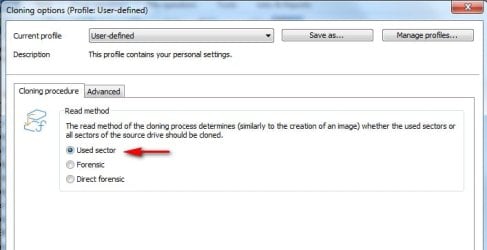
Are you are sure you have moved enough into the DO-NOT-MOVE folder? Check the used space on the source partition. Then check the size of the DO-NOT-MOVE folder and deduct it from the used space.

Have you selected to clone only used sectors?

clone-1.jpg
 

My Computers My Computers

  • At a glance

    7 X64i5 84002x8gb 3200mhz
    Computer type
    PC/Desktop
    OS
    7 X64
    CPU
    i5 8400
    Motherboard
    gigabyte b365m ds3h
    Memory
    2x8gb 3200mhz
    Hard Drives
    various
    PSU
    pure power 11 400w cm
    Case
    Coolermaster
    Cooling
    cryorig m9i
  • At a glance

    7x64g54008gb ddr4 2400
    Computer type
    PC/Desktop
    OS
    7x64
    CPU
    g5400
    Motherboard
    ga b365m ds3h
    Memory
    8gb ddr4 2400
    PSU
    xfx pro 450w
Are you are sure you have moved enough into the DO-NOT-MOVE folder? Check the used space on the source partition. Then check the size of the DO-NOT-MOVE folder and deduct it from the used space.

Have you selected to clone only used sectors?

View attachment 407537


Yes. I'm moving more files now. Here's a shot of the C drive from TreeSize. Many of the bigger files that aren't system files are now in the DO-NOT-MOVE folder, and the 608.5 GB is how much space that should be subtracted from the total used space (assuming it's being excluded correctly).


TreeSizeFree_2019-03-29_06-41-02.png


So going by that, what should be left is only 128 GB of space to be cloned onto the SSD, right?


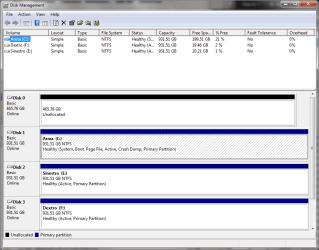
Also, here's a shot of the SSD in Disk Management.


mmc_2019-03-29_06-41-29.png


All I did was the basic initialization so the SSD could be recognized by cloning software (which it is). Do I need to make a New Simple Volume on it as well?
 

My Computer My Computer

At a glance

Windows 7 Ultimate x64Intel Core i5-3570 CPU @ 3.40GHzCorsair Vengeance Low Profile 16GBSapphire NITRO+ Radeon RX 480 4GB
Computer type
PC/Desktop
Computer Manufacturer/Model Number
Custom
OS
Windows 7 Ultimate x64
CPU
Intel Core i5-3570 CPU @ 3.40GHz
Motherboard
ASRock Z75 Pro3
Memory
Corsair Vengeance Low Profile 16GB
Graphics Card(s)
Sapphire NITRO+ Radeon RX 480 4GB
Screen Resolution
1920x1080
Hard Drives
Crucial MX500 SSD (C:)
Western Digital 1TB (D:)
Western Digital 1TB (E:)
Western Digital 1TB (F:)
PSU
Corsair CX 550M (550W)
Case
Zalman Z9
Cooling
ARCTIC Freezer 34 eSports DUO Edition
Keyboard
Corsair K70 LUX RGB Rapidfire
Mouse
Logitech G502 Proteus Spectrum
Internet Speed
150/150
Antivirus
ESET NOD32 Antivirus
Browser
Mozilla Firefox Quantum 67.1 (64-bit)
Cleared out some more space.


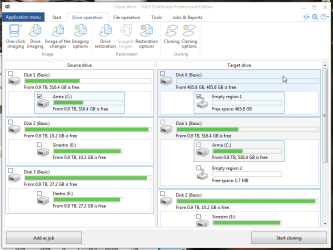
oodipro_ihq4H8P2EE.png


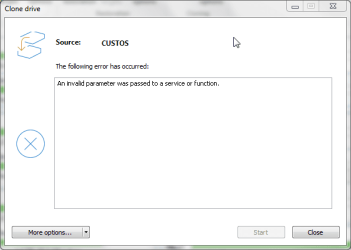
Then O&O seems like it's starting to move forward after I begin cloning, and then this happens.


oodipro_tceFv6pmMI.png


I have no idea what's causing that message to be displayed. I'll keep trying.
 

My Computer My Computer

At a glance

Windows 7 Ultimate x64Intel Core i5-3570 CPU @ 3.40GHzCorsair Vengeance Low Profile 16GBSapphire NITRO+ Radeon RX 480 4GB
Computer type
PC/Desktop
Computer Manufacturer/Model Number
Custom
OS
Windows 7 Ultimate x64
CPU
Intel Core i5-3570 CPU @ 3.40GHz
Motherboard
ASRock Z75 Pro3
Memory
Corsair Vengeance Low Profile 16GB
Graphics Card(s)
Sapphire NITRO+ Radeon RX 480 4GB
Screen Resolution
1920x1080
Hard Drives
Crucial MX500 SSD (C:)
Western Digital 1TB (D:)
Western Digital 1TB (E:)
Western Digital 1TB (F:)
PSU
Corsair CX 550M (550W)
Case
Zalman Z9
Cooling
ARCTIC Freezer 34 eSports DUO Edition
Keyboard
Corsair K70 LUX RGB Rapidfire
Mouse
Logitech G502 Proteus Spectrum
Internet Speed
150/150
Antivirus
ESET NOD32 Antivirus
Browser
Mozilla Firefox Quantum 67.1 (64-bit)
No idea. I haven't had any problems with it.

Maybe try creating partition and formatting the target disk.

Also scroll down the target drive list and make sure there isn't anything ticked inadvertently.

What does CUSTOS mean, is that your PC name?
 

My Computers My Computers

  • At a glance

    7 X64i5 84002x8gb 3200mhz
    Computer type
    PC/Desktop
    OS
    7 X64
    CPU
    i5 8400
    Motherboard
    gigabyte b365m ds3h
    Memory
    2x8gb 3200mhz
    Hard Drives
    various
    PSU
    pure power 11 400w cm
    Case
    Coolermaster
    Cooling
    cryorig m9i
  • At a glance

    7x64g54008gb ddr4 2400
    Computer type
    PC/Desktop
    OS
    7x64
    CPU
    g5400
    Motherboard
    ga b365m ds3h
    Memory
    8gb ddr4 2400
    PSU
    xfx pro 450w
Yes, Custos is just the name of my PC.


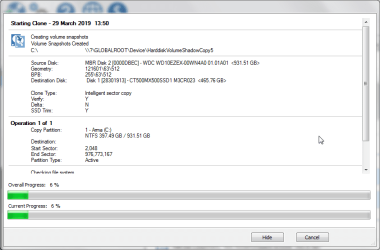
Cleared out some more space. EaseUS Todo Backup Home (Trial) had issues, as did Acronis True Image for Crucial, so I'm giving Macrium Reflect's Cloning function a shot.


So far so good, as slow as it is.


udQu4LQRk7.png


I'll keep you posted. Thanks for the help so far.
 
Last edited:

My Computer My Computer

At a glance

Windows 7 Ultimate x64Intel Core i5-3570 CPU @ 3.40GHzCorsair Vengeance Low Profile 16GBSapphire NITRO+ Radeon RX 480 4GB
Computer type
PC/Desktop
Computer Manufacturer/Model Number
Custom
OS
Windows 7 Ultimate x64
CPU
Intel Core i5-3570 CPU @ 3.40GHz
Motherboard
ASRock Z75 Pro3
Memory
Corsair Vengeance Low Profile 16GB
Graphics Card(s)
Sapphire NITRO+ Radeon RX 480 4GB
Screen Resolution
1920x1080
Hard Drives
Crucial MX500 SSD (C:)
Western Digital 1TB (D:)
Western Digital 1TB (E:)
Western Digital 1TB (F:)
PSU
Corsair CX 550M (550W)
Case
Zalman Z9
Cooling
ARCTIC Freezer 34 eSports DUO Edition
Keyboard
Corsair K70 LUX RGB Rapidfire
Mouse
Logitech G502 Proteus Spectrum
Internet Speed
150/150
Antivirus
ESET NOD32 Antivirus
Browser
Mozilla Firefox Quantum 67.1 (64-bit)
Something odd about your system if several applications had difficulty. Particularly strange the Acronis application which is suggested by crucial had difficulties.

I have an MX300 which is larger at 525gb. O&O works great.
 

My Computers My Computers

  • At a glance

    7 X64i5 84002x8gb 3200mhz
    Computer type
    PC/Desktop
    OS
    7 X64
    CPU
    i5 8400
    Motherboard
    gigabyte b365m ds3h
    Memory
    2x8gb 3200mhz
    Hard Drives
    various
    PSU
    pure power 11 400w cm
    Case
    Coolermaster
    Cooling
    cryorig m9i
  • At a glance

    7x64g54008gb ddr4 2400
    Computer type
    PC/Desktop
    OS
    7x64
    CPU
    g5400
    Motherboard
    ga b365m ds3h
    Memory
    8gb ddr4 2400
    PSU
    xfx pro 450w
It's strange. I expected this to just go forward after moving files and clearing out more space.


Did some more searching, and I saw a few suggestions that a virus scanner might be interfering with the Cloning process. Is it possible that my NOD32 might be causing problems with disk imaging software? I seriously doubt it, since I'm not seeing any logs in NOD32 showing that any actions from what I tried so far were being prevented.
 

My Computer My Computer

At a glance

Windows 7 Ultimate x64Intel Core i5-3570 CPU @ 3.40GHzCorsair Vengeance Low Profile 16GBSapphire NITRO+ Radeon RX 480 4GB
Computer type
PC/Desktop
Computer Manufacturer/Model Number
Custom
OS
Windows 7 Ultimate x64
CPU
Intel Core i5-3570 CPU @ 3.40GHz
Motherboard
ASRock Z75 Pro3
Memory
Corsair Vengeance Low Profile 16GB
Graphics Card(s)
Sapphire NITRO+ Radeon RX 480 4GB
Screen Resolution
1920x1080
Hard Drives
Crucial MX500 SSD (C:)
Western Digital 1TB (D:)
Western Digital 1TB (E:)
Western Digital 1TB (F:)
PSU
Corsair CX 550M (550W)
Case
Zalman Z9
Cooling
ARCTIC Freezer 34 eSports DUO Edition
Keyboard
Corsair K70 LUX RGB Rapidfire
Mouse
Logitech G502 Proteus Spectrum
Internet Speed
150/150
Antivirus
ESET NOD32 Antivirus
Browser
Mozilla Firefox Quantum 67.1 (64-bit)
You could try temporarily turning off real time protection or whatever NOD calls it
 

My Computers My Computers

  • At a glance

    7 X64i5 84002x8gb 3200mhz
    Computer type
    PC/Desktop
    OS
    7 X64
    CPU
    i5 8400
    Motherboard
    gigabyte b365m ds3h
    Memory
    2x8gb 3200mhz
    Hard Drives
    various
    PSU
    pure power 11 400w cm
    Case
    Coolermaster
    Cooling
    cryorig m9i
  • At a glance

    7x64g54008gb ddr4 2400
    Computer type
    PC/Desktop
    OS
    7x64
    CPU
    g5400
    Motherboard
    ga b365m ds3h
    Memory
    8gb ddr4 2400
    PSU
    xfx pro 450w
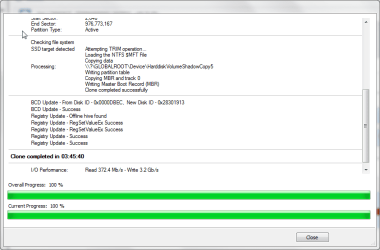
Macrium Reflect came through when the others couldn't.

ibddvpLx2M.png


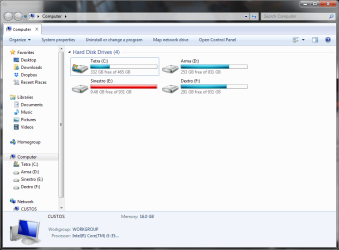
Restarted, changed the boot drive to the SSD in the BIOS, everything is all good. And fast. Windows 7 feels like a brand new install now. W7 seemed to just disable defragmenting for the SSD drive (it's not even showing up in Disk Defragmenter) despite showing that it was defragged once last night. I made sure TRIM is enabled, too. I'm not sure if there's anything missing.


explorer_2019-03-29_22-02-18.png


The weird thing about this situation is that the DO-NOT-MOVE folder couldn't be excluded, but Macrium Reflect was still able to clone the drive just fine to the SSD, with space to spare. This leaves a bunch a copies of files, but nothing some time and careful comparisons can't fix.


At least I can use D (the former C) as a backups drive and place to toss stuff into. Still might buy a brand new 1TB HDD when I can.


O&O DiskImage couldn't cut it for whatever reason. I'm still interested in finding out the reason why.


Still, cheers for the help. :party:
 

My Computer My Computer

At a glance

Windows 7 Ultimate x64Intel Core i5-3570 CPU @ 3.40GHzCorsair Vengeance Low Profile 16GBSapphire NITRO+ Radeon RX 480 4GB
Computer type
PC/Desktop
Computer Manufacturer/Model Number
Custom
OS
Windows 7 Ultimate x64
CPU
Intel Core i5-3570 CPU @ 3.40GHz
Motherboard
ASRock Z75 Pro3
Memory
Corsair Vengeance Low Profile 16GB
Graphics Card(s)
Sapphire NITRO+ Radeon RX 480 4GB
Screen Resolution
1920x1080
Hard Drives
Crucial MX500 SSD (C:)
Western Digital 1TB (D:)
Western Digital 1TB (E:)
Western Digital 1TB (F:)
PSU
Corsair CX 550M (550W)
Case
Zalman Z9
Cooling
ARCTIC Freezer 34 eSports DUO Edition
Keyboard
Corsair K70 LUX RGB Rapidfire
Mouse
Logitech G502 Proteus Spectrum
Internet Speed
150/150
Antivirus
ESET NOD32 Antivirus
Browser
Mozilla Firefox Quantum 67.1 (64-bit)
Back
Top