Advice needed re. Page File

martinlest

New member
Power User
VIP
Local time
9:33 PM
Messages
661
I wonder if the way I have my current page file(s) set up is really the best that I could arrange. There are so many different (and contradictory) recommendations on websites that I am not sure any more which to follow. This is what I have at the moment:

1. Page File on my C Drive set at min and max 1000MBs. The C Drive is a 50GB partition on a 120GB SSD. Ideally I would rather have no page file on the C Drive - both for space reasons and because I think the read/writes may shorten the life of the drive (but I am sure some will disagree!).
2. Page file (system managed) on a physically separate drive (SATA). This is on a small partition (10GBs) reserved for the PF only at the start of the 1TB drive, which has two other partitions of almost 500MBs each
3. Another page file, exactly as (2) above, but on a third (SATA) drive.

So, I have three page files. I have not removed the file on the C drive as I understand it is needed there for crash dump files etc. But what is the minimum size for that? I set it at 1000MBs after reading various threads advising this as the smallest one should allow, but given that I have 2 x 6GBs of virtual memory on other drives...? Is it possible somehow to dispense with the page file on the C drive entirely?Maybe I don't need so much virtual memory, but the two 10GB partitions are tiny compared to the overall space I have available (some 5TBs), so I might as well keep them. (Can a page file be TOO large??).

My physical RAM is 6GBs...

Be interested to see what people say - and how many people disagree with each other!! :-)

Thanks for any input,

Martin
 

My Computer

Computer type
PC/Desktop
Computer Manufacturer/Model Number
Custom Build
OS
Windows 7 Home Premium SP1 64-bit
CPU
Intel Core i7-4790K CPU @ 4.5GHz
Motherboard
Asus H97I-PLUS
Memory
16GB KINGSTON HYPER-X FURY DUAL-DDR3 1600MHz
Graphics Card(s)
8GB NVIDIA GEFORCE GTX 1070
Monitor(s) Displays
HannsG 28" & Dell 24"
Screen Resolution
1920x1200
Hard Drives
1 x 2TB Samsung Evo 860 SSD
2 x 500GB Samsung Evo 850 SSD
PSU
CORSAIR 650W CS SERIES
Case
Thermaltake Core V1 Mini ITX Cube
Cooling
NOCTUA NH-L12
Browser
Firefox
Other Info
Custom PC used for X-Plane 11
I would want the Paging File on the SSD. Is it divided so that you keep data on D for purposes of keeping the C image smaller? If not I'd make it one partition and include the Paging file. Set it to System Managed on C drive. Let Win7 decide until it creates a space issue then you can trim it a bit if it doesn't affect performance, which it shouldn't with 6gb RAM.

Virtual Memory Paging File - Change
 
I must agree with gregrocker.
From a performance perspective the typical usage patterns of the pagefile are an almost perfect match for SSD performance characteristics. A conventional drive could hardly be more wrong. If you can spare the space an SSD is the best place for the pagefile. SSDs do have limited writes but under typical situations this will not be a problem. If you were to believe some misinformed articles you might get the impression that Windows is madly reading and writing to the pagefile all the time. This is not the case.

For technical reasons if you wish to have crash dump files you must have a pagefile on the Windows partition, no exceptions.
Placing the pagefile on a separate partition of a conventional drive is a bad idea with no redeeming qualities. This is often suggested as a means of minimizing pagefile fragmentation. This is a solution looking for a problem. Under typical conditions pagefile fragmentation will be virtually non-existent, even after years of heavy use. Even when the pagefile is system managed.
 

My Computer

Computer type
PC/Desktop
Computer Manufacturer/Model Number
HP
OS
Windows 7 Pro 64 bit
CPU
Xeon W3520
Memory
8 GB
Graphics Card(s)
Nvidia Geforce 210
Thanks for the replies. I tend to agree with what you say. The problem is that I do not have so much space on the C drive now - if I keep my system restore points down to three or four then I have about 8GBs of free space on a 50GB partition. The other partition on the same SSD is also quite full (about 80%) so I don't really have the option of trying to redistribute free space on the drive.

With 6GBs of RAM (and a desktop 'gadget' which shows that there is rarely less than 2GBs of physical memory free at any one time), I suppose the page files are not accessed to any great extent (although of course they are being constantly accessed even so, as shown by the Task Manager). If I left 1000MBs of virtual memory on the C drive (clearly, as I had thought, it would not be a very good idea to set the C drive PF at zero and use the two PF partitions on the SATA drives) and deleted the other two page file partitions? I can add their small free space to other partitions on the SATA drives I suppose.

My thinking in creating the latter was based on habit and recommendations in such publications as "Windows XP Inside Out" (relatively reputable) rather than just website 'gossip' as to what was best for performance, but no doubt Windows 7 is very different from XP in this respect? Or perhaps what was written was not even true for Windows XP...

M
 

My Computer

Computer type
PC/Desktop
Computer Manufacturer/Model Number
Custom Build
OS
Windows 7 Home Premium SP1 64-bit
CPU
Intel Core i7-4790K CPU @ 4.5GHz
Motherboard
Asus H97I-PLUS
Memory
16GB KINGSTON HYPER-X FURY DUAL-DDR3 1600MHz
Graphics Card(s)
8GB NVIDIA GEFORCE GTX 1070
Monitor(s) Displays
HannsG 28" & Dell 24"
Screen Resolution
1920x1200
Hard Drives
1 x 2TB Samsung Evo 860 SSD
2 x 500GB Samsung Evo 850 SSD
PSU
CORSAIR 650W CS SERIES
Case
Thermaltake Core V1 Mini ITX Cube
Cooling
NOCTUA NH-L12
Browser
Firefox
Other Info
Custom PC used for X-Plane 11
What is so important you need it stored on a data partition on an SSD?

The point of an SSD is to first run the OS and Programs on it. Sure, User folders can benefit a bit from the speed but they suffer less if need to be moved to a HD as shown in User Folders - Change Default Location.

To have a data partition on an SSD which is squeezing out important functions of the OS like paging file, System Protection - Change Disk Space Usage, or the perfected Hibernate feature in Win7 is having one's priorities backward.

I would move the data off of D, delete it, extend C into the space, use System Managed Paging and System Protection. If space becomes tight move the User folders to HD as needed.
 
If space is really that much of a concern, make the C Drive PF 512MB.
Then have a system managed PF on another disk. BUT, as a last resort.

I agree with the advice given thus far.
You really are better off leaving the PF on the SSD.
Ideally, with space concerns, you'd want to have the PF, OS, and apps only on the SSD and put all other User DATA, Games, etc elsewhere.
This will give the best overall performance.

I would do as GregRocker suggests. Just use the entire SSD as a single partition.
While games and USer DATA can benefit from the faster speed, its insignificant in comparison to the OS/Programs advantages.
 

My Computer

Computer Manufacturer/Model Number
Custom (Self Build)
OS
Windows 7 Home Premium 64bit
CPU
Intel Core i7 2700k
Motherboard
eVGA P67 SLI
Memory
8GB Mushkin Redline Ridgebacks @1866
Graphics Card(s)
EVGA GTX570 SC
Sound Card
XiFi Titanium HD
Monitor(s) Displays
LG W2453V
Screen Resolution
1920x1080
Hard Drives
Intel 320 80GB -- Intel X25-V 40GB --WD Black 1TB x2 -- WD Blue 640GB
PSU
Seasonic x750
Case
Corsair 600T SE White
Cooling
eVGA Superclocked CPU Cooler
Keyboard
Saitek Cyborg
Antivirus
Kaspersky
Browser
IE
Other Info
LG BD/DVD
Hi. The other partition on the SSD contains just Microsoft Flight Simulator X, so it's not 'data storage' (which I quite agree would be a waste of SSD space). I have FS9 on another SSD on the PC (which I only use for flightsimming)..

In fact, I have already moved a number of very large FSX 'data' folders, some 120GBs worth onto one of the SATA drives, linked by simlink/junctions I set up (which work fine). Maybe I can find more folders within FSX which I can move and link via a junction in the same way.

I would be a bit frightened about re-allocating free space from the FSX partition to the C partition though - it's never guaranteed to work (and I have had disasters before). Am not sure what tools are best for Win7. I have some old tools that worked in XP but don't in Win7. To be honest, I don't want to buy software for what would be most likely a one-off use.. maybe someone has some suggestions?

Thanks.
 

My Computer

Computer type
PC/Desktop
Computer Manufacturer/Model Number
Custom Build
OS
Windows 7 Home Premium SP1 64-bit
CPU
Intel Core i7-4790K CPU @ 4.5GHz
Motherboard
Asus H97I-PLUS
Memory
16GB KINGSTON HYPER-X FURY DUAL-DDR3 1600MHz
Graphics Card(s)
8GB NVIDIA GEFORCE GTX 1070
Monitor(s) Displays
HannsG 28" & Dell 24"
Screen Resolution
1920x1200
Hard Drives
1 x 2TB Samsung Evo 860 SSD
2 x 500GB Samsung Evo 850 SSD
PSU
CORSAIR 650W CS SERIES
Case
Thermaltake Core V1 Mini ITX Cube
Cooling
NOCTUA NH-L12
Browser
Firefox
Other Info
Custom PC used for X-Plane 11
Thanks .. last two posts overlapped!

I think that, rather than start reinstalling FSX on a SATA drive, I'd be best, as I said, using dynamic linking to move folders off the SSD drive, freeing up space that I could (when I find a way) move to the C partition. I'd need a stiff brandy before hitting the 'Go' button though! (There's no native tool in Win7 to do this is there???).

Anyone used this, for instance:

http://www.disk-partition.com/
 

My Computer

Computer type
PC/Desktop
Computer Manufacturer/Model Number
Custom Build
OS
Windows 7 Home Premium SP1 64-bit
CPU
Intel Core i7-4790K CPU @ 4.5GHz
Motherboard
Asus H97I-PLUS
Memory
16GB KINGSTON HYPER-X FURY DUAL-DDR3 1600MHz
Graphics Card(s)
8GB NVIDIA GEFORCE GTX 1070
Monitor(s) Displays
HannsG 28" & Dell 24"
Screen Resolution
1920x1200
Hard Drives
1 x 2TB Samsung Evo 860 SSD
2 x 500GB Samsung Evo 850 SSD
PSU
CORSAIR 650W CS SERIES
Case
Thermaltake Core V1 Mini ITX Cube
Cooling
NOCTUA NH-L12
Browser
Firefox
Other Info
Custom PC used for X-Plane 11
OK, thanks for the advice. All done. I moved another 40GBs of folders from the FSX partition using a dynamic link and then used Mini Tool Partition Wizard (Boot version, as you suggested) to take about 20GBs from there and added the space to the C drive. Rebooted ... Slight panic as my FSX partition had gone. But Windows had simply changed the drive letter!! Fixed in a few mouse clicks..

Then, removed the Page Files from the two 10GB partitions, deleted them and used Mini Tool Partition Wizard to add the space (waste not, want not!) to the adjacent partitions on the same physical disc. Finally, set the Page File on the C drive to be managed by Windows.

All seems just fine. I can re-enable hibernation now!

I didn't even need the brandy :-)

Thanks again.
 

My Computer

Computer type
PC/Desktop
Computer Manufacturer/Model Number
Custom Build
OS
Windows 7 Home Premium SP1 64-bit
CPU
Intel Core i7-4790K CPU @ 4.5GHz
Motherboard
Asus H97I-PLUS
Memory
16GB KINGSTON HYPER-X FURY DUAL-DDR3 1600MHz
Graphics Card(s)
8GB NVIDIA GEFORCE GTX 1070
Monitor(s) Displays
HannsG 28" & Dell 24"
Screen Resolution
1920x1200
Hard Drives
1 x 2TB Samsung Evo 860 SSD
2 x 500GB Samsung Evo 850 SSD
PSU
CORSAIR 650W CS SERIES
Case
Thermaltake Core V1 Mini ITX Cube
Cooling
NOCTUA NH-L12
Browser
Firefox
Other Info
Custom PC used for X-Plane 11
Used to be, you would set your minimum and maximum size the same so that Windows wouldn't be constantly resizing it, and about equal to however much RAM you had. These days with 8 GB not all that unusual, I'm not sure the average user even needs a page file.

I have mine set at 2048/2048 on my E drive and I don't think it actually gets used. I have an SSD for the C drive and I don't care what anyone says, I'm going to minimize the amount of writes as much as I can.
 

My Computer

Computer type
PC/Desktop
Computer Manufacturer/Model Number
Self assembled
OS
Windows 7 64-bit Professional
CPU
Core i5-3570K
Motherboard
Z77X-UD3H
Memory
8 GB
Graphics Card(s)
GTX-1050 Ti
Monitor(s) Displays
42" Sanyo LED TV
Screen Resolution
1920x1080
Hard Drives
Crucial MX200 250 GB
Western Digital Black 2 x 1 TB
PSU
Seasonic
Internet Speed
Cheapest that Comcast sells
Antivirus
What?
Browser
Pale Moon
Yes, used to be, it's true. Whatever your amount of physical RAM, it is pretty much agreed that having NO page file is not a good policy (Google it). Also, on a SATA or IDE disc, I would set the minimum and maximum the same, but on a SSD there's no point as 'fragmentation' on an SSD has no meaning in practical terms. (One never - or almost - defrags an SSD).
 

My Computer

Computer type
PC/Desktop
Computer Manufacturer/Model Number
Custom Build
OS
Windows 7 Home Premium SP1 64-bit
CPU
Intel Core i7-4790K CPU @ 4.5GHz
Motherboard
Asus H97I-PLUS
Memory
16GB KINGSTON HYPER-X FURY DUAL-DDR3 1600MHz
Graphics Card(s)
8GB NVIDIA GEFORCE GTX 1070
Monitor(s) Displays
HannsG 28" & Dell 24"
Screen Resolution
1920x1200
Hard Drives
1 x 2TB Samsung Evo 860 SSD
2 x 500GB Samsung Evo 850 SSD
PSU
CORSAIR 650W CS SERIES
Case
Thermaltake Core V1 Mini ITX Cube
Cooling
NOCTUA NH-L12
Browser
Firefox
Other Info
Custom PC used for X-Plane 11
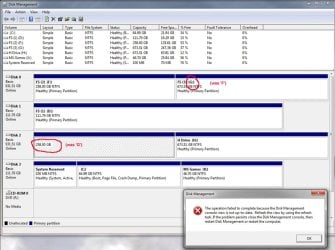
OMG, problems!! I see in Disc Management that one of the large partitions (to which I added the 10GBs unallocated space from the old PF partitions) now has no drive letter, or any other info apart from its size. It used to be 'G', but that has now been given to what was 'F', so things are mixed up. When I right-click on the 'blank partition' in Disc Manager and select any of the options, I get an error message saying 'The operation failed because the Disk Management Console view is not up-to-date....' Refreshing the console view and rebooting have no effect.

If I try to change what is now 'G' back to 'F', that doesn't work either, because although no partition in Disk Managemnt is labelled 'F', that letter is no longer available in the drop-down box.

In Windows Explorer, what was 'F' is now 'G' and vice-versa. I knew something bad was going to happen....

Any idea what to do now, short of formatting both partitions and losing all the data (even that is a pain as when I right-click the partition with no information in Disk Management, I just get a message saying 'an error has occurred)?? Maybe I need to do something back in Mini Tool Partition Wizard to fix things?

M
 

My Computer

Computer type
PC/Desktop
Computer Manufacturer/Model Number
Custom Build
OS
Windows 7 Home Premium SP1 64-bit
CPU
Intel Core i7-4790K CPU @ 4.5GHz
Motherboard
Asus H97I-PLUS
Memory
16GB KINGSTON HYPER-X FURY DUAL-DDR3 1600MHz
Graphics Card(s)
8GB NVIDIA GEFORCE GTX 1070
Monitor(s) Displays
HannsG 28" & Dell 24"
Screen Resolution
1920x1200
Hard Drives
1 x 2TB Samsung Evo 860 SSD
2 x 500GB Samsung Evo 850 SSD
PSU
CORSAIR 650W CS SERIES
Case
Thermaltake Core V1 Mini ITX Cube
Cooling
NOCTUA NH-L12
Browser
Firefox
Other Info
Custom PC used for X-Plane 11
Please post back a screenshot of Disk Management - Post a Screen Capture Image .

Reboot again to see if Disk Mgmt will add a Drive Letter: Drive Letter - Add, Change, or Remove in Windows 7 . Can you rightclick>Explore to see data?

If not install PW Home Edition and try that: http://partitionwizard.com/video-help/change-letter/change-letter.html. Try also rightclick>Explore.

Why do these data partitions need to have a set letter? You'll need to find what's holding F to release it, or just accept another letter. I rarely even notice if a data partition changes letters. They are completely relative and not dependent upon fixed letters, except for your booted OS.
 
No, I don't assume I have lost my files - I back up my backups, so a format, if necessary, would be a pain but not a disaster! I think I have everything on the two partitions elsewhere (have to double-check that).

Screenshot to follow in a few minutes. Thanks! :-)
 

My Computer

Computer type
PC/Desktop
Computer Manufacturer/Model Number
Custom Build
OS
Windows 7 Home Premium SP1 64-bit
CPU
Intel Core i7-4790K CPU @ 4.5GHz
Motherboard
Asus H97I-PLUS
Memory
16GB KINGSTON HYPER-X FURY DUAL-DDR3 1600MHz
Graphics Card(s)
8GB NVIDIA GEFORCE GTX 1070
Monitor(s) Displays
HannsG 28" & Dell 24"
Screen Resolution
1920x1200
Hard Drives
1 x 2TB Samsung Evo 860 SSD
2 x 500GB Samsung Evo 850 SSD
PSU
CORSAIR 650W CS SERIES
Case
Thermaltake Core V1 Mini ITX Cube
Cooling
NOCTUA NH-L12
Browser
Firefox
Other Info
Custom PC used for X-Plane 11
Screenshot... As I say, can't access the 'blank' partition in DM, error message when I right-click; and can't change 'G' back to 'F' as that letter is not available now.
 

Attachments

  • DM.jpg
    DM.jpg
    99.8 KB · Views: 1

My Computer

Computer type
PC/Desktop
Computer Manufacturer/Model Number
Custom Build
OS
Windows 7 Home Premium SP1 64-bit
CPU
Intel Core i7-4790K CPU @ 4.5GHz
Motherboard
Asus H97I-PLUS
Memory
16GB KINGSTON HYPER-X FURY DUAL-DDR3 1600MHz
Graphics Card(s)
8GB NVIDIA GEFORCE GTX 1070
Monitor(s) Displays
HannsG 28" & Dell 24"
Screen Resolution
1920x1200
Hard Drives
1 x 2TB Samsung Evo 860 SSD
2 x 500GB Samsung Evo 850 SSD
PSU
CORSAIR 650W CS SERIES
Case
Thermaltake Core V1 Mini ITX Cube
Cooling
NOCTUA NH-L12
Browser
Firefox
Other Info
Custom PC used for X-Plane 11
.. I have a lot of batch files and other stuff assigned to particular partitions. Much more important, these drives are where the dynamic links point to I just created in FSX. Now they don't work. I'd really like to get my original drive letters back :-(

Right-click/explore gives the same error message as trying to change the drive letter (as screenshot). On the now 'G' drive, I see what used to be 'F'...

Am trying Partition wizard again..
 

My Computer

Computer type
PC/Desktop
Computer Manufacturer/Model Number
Custom Build
OS
Windows 7 Home Premium SP1 64-bit
CPU
Intel Core i7-4790K CPU @ 4.5GHz
Motherboard
Asus H97I-PLUS
Memory
16GB KINGSTON HYPER-X FURY DUAL-DDR3 1600MHz
Graphics Card(s)
8GB NVIDIA GEFORCE GTX 1070
Monitor(s) Displays
HannsG 28" & Dell 24"
Screen Resolution
1920x1200
Hard Drives
1 x 2TB Samsung Evo 860 SSD
2 x 500GB Samsung Evo 850 SSD
PSU
CORSAIR 650W CS SERIES
Case
Thermaltake Core V1 Mini ITX Cube
Cooling
NOCTUA NH-L12
Browser
Firefox
Other Info
Custom PC used for X-Plane 11
Booted with PW disc. No option at all to change the drive letter in the 'Action Panel'. From the partition menu and right-clicking, the change drive letter option is greyed out, for all partitions on the PC, not just the two 'problem' ones.
 

My Computer

Computer type
PC/Desktop
Computer Manufacturer/Model Number
Custom Build
OS
Windows 7 Home Premium SP1 64-bit
CPU
Intel Core i7-4790K CPU @ 4.5GHz
Motherboard
Asus H97I-PLUS
Memory
16GB KINGSTON HYPER-X FURY DUAL-DDR3 1600MHz
Graphics Card(s)
8GB NVIDIA GEFORCE GTX 1070
Monitor(s) Displays
HannsG 28" & Dell 24"
Screen Resolution
1920x1200
Hard Drives
1 x 2TB Samsung Evo 860 SSD
2 x 500GB Samsung Evo 850 SSD
PSU
CORSAIR 650W CS SERIES
Case
Thermaltake Core V1 Mini ITX Cube
Cooling
NOCTUA NH-L12
Browser
Firefox
Other Info
Custom PC used for X-Plane 11
Used to be, you would set your minimum and maximum size the same so that Windows wouldn't be constantly resizing it, and about equal to however much RAM you had.

It is conventional wisdom that if allowed to Windows will continuously resize the pagefile according to need, with the expected negative impact on performance. Supposedly the only way to prevent this is to set the initial and maximum size of the pagefile to the same size. Statements to that effect can be found all over the Internet.

I really don't know where that idea came from. Simple observation of the pagefile size in Windows Explorer shows that this just isn't so.
 

My Computer

Computer type
PC/Desktop
Computer Manufacturer/Model Number
HP
OS
Windows 7 Pro 64 bit
CPU
Xeon W3520
Memory
8 GB
Graphics Card(s)
Nvidia Geforce 210
Back
Top