gromwood
New member
Hello all,
First post here and seeking some advice please.
The intention is that eventually I (and other family users) will "migrate" to being Win7 users.
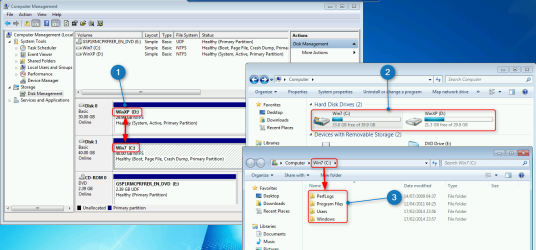
The crux of what I want to end up with is Win7 being C:\windows(7)..... etc and XP being D:\Windows(XP).....etc. I want to keep the idea that the OS will be on drive letter C (because other users cannot get their heads around drives other than C
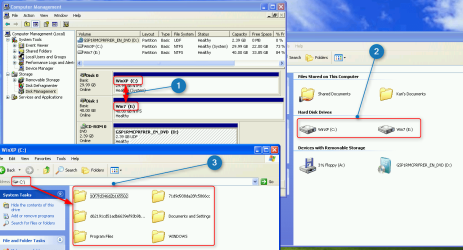
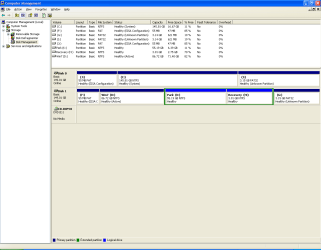
Current arrangement is Disk0 has C: with XP and all my current programs, user documents etc. Disk1 has D: with new install of Win 7 Pro. So far have not copied any existing user files into Win7, but I'm happy with doing that together with re-installing software as I come to needing it.
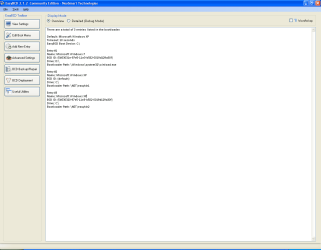
Disk 0 - C:\ is marked as system disk and has bootmgr which is currently dual boot Win7/XP (actually it is triple boot) because Disk1 also has a 3GB partition of H:\ which has a "skeleton" XP install with just an admin account - put there in case I ever had trouble with C:\ or wanted to backup C:\ with all files closed.
I know (from helpful advice on here) that I cannot change drive letter of the system disk (currently C
but is there a way to get to where I want to be.
In summary,
The Win7 install is new, so could be sacrificed and re-installed if need be - presumably there would be no issue putting the activation code in again ?
I have external storage onto which I can image any of the partitions. Disk0 has already been done.
I use Macrium Reflect (free) for my imaging. I've d/loaded Paragon Backup and Recovery Free 2014 after reading other threads on here.
Any help or pointers very gratefully appreciated.
Regards
Gromwood
First post here and seeking some advice please.
The intention is that eventually I (and other family users) will "migrate" to being Win7 users.
The crux of what I want to end up with is Win7 being C:\windows(7)..... etc and XP being D:\Windows(XP).....etc. I want to keep the idea that the OS will be on drive letter C (because other users cannot get their heads around drives other than C
Current arrangement is Disk0 has C: with XP and all my current programs, user documents etc. Disk1 has D: with new install of Win 7 Pro. So far have not copied any existing user files into Win7, but I'm happy with doing that together with re-installing software as I come to needing it.
Disk 0 - C:\ is marked as system disk and has bootmgr which is currently dual boot Win7/XP (actually it is triple boot) because Disk1 also has a 3GB partition of H:\ which has a "skeleton" XP install with just an admin account - put there in case I ever had trouble with C:\ or wanted to backup C:\ with all files closed.
I know (from helpful advice on here) that I cannot change drive letter of the system disk (currently C
but is there a way to get to where I want to be.
In summary,
The Win7 install is new, so could be sacrificed and re-installed if need be - presumably there would be no issue putting the activation code in again ?
I have external storage onto which I can image any of the partitions. Disk0 has already been done.
I use Macrium Reflect (free) for my imaging. I've d/loaded Paragon Backup and Recovery Free 2014 after reading other threads on here.
Any help or pointers very gratefully appreciated.
Regards
Gromwood
Attachments
My Computer
At a glance
Windows XP Pro and Windows 7 ProIntel Core 2 x 6400 @2.13GHz2GbNVidia GeForce7300LE
- Computer type
- PC/Desktop
- Computer Manufacturer/Model Number
- Dell E520
- OS
- Windows XP Pro and Windows 7 Pro
- CPU
- Intel Core 2 x 6400 @2.13GHz
- Motherboard
- Dell
- Memory
- 2Gb
- Graphics Card(s)
- NVidia GeForce7300LE
- Hard Drives
- 2 x Seagate 150Gb
- Antivirus
- AVAST 2014
- Browser
- Chrome, IE8