Solved Advice re Win7 x64 installation problem on Dell T5400

Unterberg

New member
Local time
1:26 AM
Messages
8
Hi there,

I've got a problem and was hoping to find some advice here.

I have a Dell T5400 that has Vista x32 running and I wanted to upgrade to Win7 x64 to make use of increased RAM.

First I tried to do a clean install of Win7 from DVD. This did not work as I got the missing cd/dvd driver error when trying to get through the installation.
So I've tried to make a bootable USB but whenever I get to the step when I run the bootsect.exe it says access denied.

I was pretty sure the DVD is working so I installed Win7 from within the Vista OS onto a separate HDD. No problems whatsoever.

I can now decide to use either Vista or Win7 when I boot up. Both work.
However Win7 is now on F: and Vista still on C:

I removed the Vista HDD to see if I can get just Win7 working but it comes up with the message that Bootmgr is missing so cant access Win7 alone.
I tried using the DVD to repair the install. It does recognize the Win7 but it didnt fix the bootmgr problem.

I couldn't find any drivers for Win7 for the T5400 on the dell website either, only Vista.

So now I'm not sure where to best go from here.
I have 3 HDDs in the computer and I only really want/need one OS.
Ideally I wanted to use the 160gb WD Raptor for the OS/Apps and then use the 2 1TB Hitachi in Raid 1.
The Win7 installation is on the newly formatted WD Raptor whereas Vista is on one of the 2 Hitachi in a big partition. So thats not overly convenient for me.

What would be the best way for me to get either a new clean install in the above mentioned format or to fix up the existing working Win7? Any advice is appreciated
 

My Computer My Computer

At a glance

MS Windows 7 Ultimate 64-bit SP12x Intel Xeon E5440 @ 2.83GHz Harpertown 45nm...8.00 GB FB-DDR2 @ 332MHz (5-5-5-15)1024MB GeForce GTX 550 Ti (Palit)
Computer Manufacturer/Model Number
Dell T5400 Desktop
OS
MS Windows 7 Ultimate 64-bit SP1
CPU
2x Intel Xeon E5440 @ 2.83GHz Harpertown 45nm Technology
Motherboard
Dell Inc. 0RW203 (CPU)
Memory
8.00 GB FB-DDR2 @ 332MHz (5-5-5-15)
Graphics Card(s)
1024MB GeForce GTX 550 Ti (Palit)
Sound Card
Onboard
Monitor(s) Displays
DELL U2312HM
Screen Resolution
1920x1080@60Hz
Hard Drives
156GB Western Digital WDC WD1600ADFS-75SLR2 ATA Device (SATA) 35 °C
977GB Hitachi Hitachi HDS721010KLA330 ATA Device (SATA) 27 °C
977GB Hitachi Hitachi HDS721010KLA330 ATA Device (SATA)
Optiarc DVD+-RW AD-7200S ATA Device
PSU
Dell 875W
Case
Dell T5400
Keyboard
Dell USB Standard Keyboard
Mouse
Logitech MX500
Internet Speed
ADSL2
Other Info
TP-LINK 300Mbps Wireless N Adapter
Hello Unterberg Welcome to the Seven Forums!

I can start off here explaining just why 7 won't load up by simply stating the 7 boot entries as well as the shared BCD store containing the boot entries for both versions are on C! Once you removed the Vista boot drive from the equation you now have to build a new BCD store which isn't quite what you are looking for to make the F drive bootable on it's own. http://www.sevenforums.com/tutorials/20864-mbr-restore-windows-7-master-boot-record.html

The fast way to deal with replacing the factory preinstall of Vista x86 is either reformat C with the drive tools available on the 7 dvd when first starting up the Windows installer there. Or you could use a drive partitioning tool to remove C only not the hidden recovery partition however in case you want to go back to Vista later in order to see a totally fresh new C primary to work with.

Either way with the Vista preinstall removed you are now ready to follow the clean install instructions for seeing 7 go onto the C primary. http://www.sevenforums.com/tutorials/1649-clean-install-windows-7-a.html

In fact you could go one step further and see SP1 and MS updates included as well. http://www.sevenforums.com/tutorial...ows-7-sp1-into-installation-dvd-iso-file.html
 

My Computers My Computers

  • At a glance

    W7 Ultimate x64/W10 Pro x64/W11 Pro Triple Bo...AMD Phenom II X4 975 Deneb 3.6ghz - 965 2nd r...Kingston Hyper X DDR3 1600 1.5v 16gb - Hyper ...MSI HD Radeon 5750 1gb - MSI HD Radeon 6450 o...
    Computer type
    PC/Desktop
    Computer Manufacturer/Model Number
    Custom builds = 2
    OS
    W7 Ultimate x64/W10 Pro x64/W11 Pro Triple Boot - Main PC W7 Remote PC Micro ATX W7 Pro x64/W11 Pro
    CPU
    AMD Phenom II X4 975 Deneb 3.6ghz - 965 2nd remote pc
    Motherboard
    Gigabyte GA-790XTA-UD4-Gigabyte GA-880GM-D2H remote pc
    Memory
    Kingston Hyper X DDR3 1600 1.5v 16gb - Hyper X Fury 8gb 2nd
    Graphics Card(s)
    MSI HD Radeon 5750 1gb - MSI HD Radeon 6450 on mini tower
    Sound Card
    Creative Labs X-Fi Xtreme Audio P - Realtek onooard 2nd case
    Monitor(s) Displays
    ASUS VW199T-P 19" HP 2082a Main-HP 2082a 20" remote pc
    Screen Resolution
    Asus 1440x900 - HP 1600x900
    Hard Drives
    WD Black 1TB HD per OS W7, W10, and pending W11 presently on 500gb OS Drive - Pending Triple 1TB HDs for Spanned Storage/backup volume
    Single 2TB external USB enclosure, single 1TB System 7 Host/Boot drive, Pending 8TB external HD for system image b
    PSU
    Corsair 750TX - primary / Corsair CX600 - second
    Case
    Antec 900-2 - SSD compatible / NZXT Vulcan mini tower
    Cooling
    Zalman CNPS9900A
    Keyboard
    AZIO L70 Backlit Letters Gaming - ONN Cordless/USB
    Mouse
    MSI DS200 Programmable, Logitech Cordless
    Internet Speed
    30mbps upgrade - primary hard wired - mini tower usb WiFi
    Antivirus
    GFI VIPRE Internet Security 2014 on W7 2016 beta on W10,
    Browser
    Cyberfox, WaterFox 64bit FF variants, FireFox x64, Pale Moon
    Other Info
    Accomdata fan cooled usb 2.0 PIDE/Sata II, III external enclosure.
    Sambient usb/eSata PATA/Sata II, III external enclosure.
  • At a glance

    W7 Pro x64/W11 ProAMD Deneb 3.6ghz - 965Kingston Hyper X Fury 8gbMSI HD Radeon 6450 DVI Output
    Computer type
    PC/Desktop
    System Manufacturer/Model Number
    CUSTOM ASSEMBLY
    OS
    W7 Pro x64/W11 Pro
    CPU
    AMD Deneb 3.6ghz - 965
    Motherboard
    Gigabyte GA-880GM-D2H remote pc
    Memory
    Kingston Hyper X Fury 8gb
    Graphics Card(s)
    MSI HD Radeon 6450 DVI Output
    Sound Card
    Realtek onooard Creative or Other separate PENDING
    Monitor(s) Displays
    VIZIO 32" LCD TV Separate LCD Pending
    Screen Resolution
    1600x1080
    Hard Drives
    WD 500GB OS Host/Boot WD Green 1TB Storage/Backup
    PSU
    Corsair 600W - THERMALTAKE 600W spare case
    Case
    NZXT Vulcan mini tower
    Cooling
    Twin 120mm Top Fans - 240mm Side Cover
    Keyboard
    ONN Cordless/USB Logitech Cordless
    Mouse
    ONN USB/Cordless - Logitech Cordless
    Internet Speed
    DSL 5G
    Browser
    MS Edge, FireFox, WaterFox x64, FireFox Nightly
    Other Info
    OS Testing-Remote Access to Main TeamViewer
Please plug back in both HD's and post back a screenshot of your maximized Disk Management drive map with listings, using Snipping Tool in Start Menu.

The CD/DVD driver error means a bad installer. Did you burn it yourself? Confirm the ISO and burn another using ImgBurn at 4x speed, or write to flash stick using Universal USB Installer.

When you installed Win7 from Vista it locked out the C letter so WIn7 will not see itself as C when booted as it will when correctly installed from boot with all other HD's unplugged.

If you want to repair Win7, unplug Vista HD, set Win7 HD first to boot in BIOS setup, Mark Win7 Partition Active then run Startup Repair - Run 3 Separate Times.
 
He's running the 64bit 7 so cancel the ImgBurn idea! Passcape ISO Burner is an updated free program for burning to disk or creating a bootable USB Install Key with a flash drive.

You actually have three options as far as what you want to see done.
1)You can repair the 7 boot information and files and run a dual boot leaving the OEM Vista install intact.
2)You could repair the 7 boot sector and remove the OEM drive entirely leaving only the drive 7 is on.
3)Or totall wipe the Vista installation off completely and then put a clean install of 7 on that drive leaving the other in for storage and backup.

If you are going to run 7 then it would be the choice of which drive you want to run 7 on. Since you originally intended to replace Vista with 7 you would have to had run the setup while booted in Vista seeing the custom install of 7 over on the wrong drive rather then having selected the upgrade option to replace the copy of Vista.

Just remember to boot live from the 7 dvd once the Vista drive is reformatted or reparitioned if you plan to remove the hidden recovery partition as well.
 

My Computers My Computers

  • At a glance

    W7 Ultimate x64/W10 Pro x64/W11 Pro Triple Bo...AMD Phenom II X4 975 Deneb 3.6ghz - 965 2nd r...Kingston Hyper X DDR3 1600 1.5v 16gb - Hyper ...MSI HD Radeon 5750 1gb - MSI HD Radeon 6450 o...
    Computer type
    PC/Desktop
    Computer Manufacturer/Model Number
    Custom builds = 2
    OS
    W7 Ultimate x64/W10 Pro x64/W11 Pro Triple Boot - Main PC W7 Remote PC Micro ATX W7 Pro x64/W11 Pro
    CPU
    AMD Phenom II X4 975 Deneb 3.6ghz - 965 2nd remote pc
    Motherboard
    Gigabyte GA-790XTA-UD4-Gigabyte GA-880GM-D2H remote pc
    Memory
    Kingston Hyper X DDR3 1600 1.5v 16gb - Hyper X Fury 8gb 2nd
    Graphics Card(s)
    MSI HD Radeon 5750 1gb - MSI HD Radeon 6450 on mini tower
    Sound Card
    Creative Labs X-Fi Xtreme Audio P - Realtek onooard 2nd case
    Monitor(s) Displays
    ASUS VW199T-P 19" HP 2082a Main-HP 2082a 20" remote pc
    Screen Resolution
    Asus 1440x900 - HP 1600x900
    Hard Drives
    WD Black 1TB HD per OS W7, W10, and pending W11 presently on 500gb OS Drive - Pending Triple 1TB HDs for Spanned Storage/backup volume
    Single 2TB external USB enclosure, single 1TB System 7 Host/Boot drive, Pending 8TB external HD for system image b
    PSU
    Corsair 750TX - primary / Corsair CX600 - second
    Case
    Antec 900-2 - SSD compatible / NZXT Vulcan mini tower
    Cooling
    Zalman CNPS9900A
    Keyboard
    AZIO L70 Backlit Letters Gaming - ONN Cordless/USB
    Mouse
    MSI DS200 Programmable, Logitech Cordless
    Internet Speed
    30mbps upgrade - primary hard wired - mini tower usb WiFi
    Antivirus
    GFI VIPRE Internet Security 2014 on W7 2016 beta on W10,
    Browser
    Cyberfox, WaterFox 64bit FF variants, FireFox x64, Pale Moon
    Other Info
    Accomdata fan cooled usb 2.0 PIDE/Sata II, III external enclosure.
    Sambient usb/eSata PATA/Sata II, III external enclosure.
  • At a glance

    W7 Pro x64/W11 ProAMD Deneb 3.6ghz - 965Kingston Hyper X Fury 8gbMSI HD Radeon 6450 DVI Output
    Computer type
    PC/Desktop
    System Manufacturer/Model Number
    CUSTOM ASSEMBLY
    OS
    W7 Pro x64/W11 Pro
    CPU
    AMD Deneb 3.6ghz - 965
    Motherboard
    Gigabyte GA-880GM-D2H remote pc
    Memory
    Kingston Hyper X Fury 8gb
    Graphics Card(s)
    MSI HD Radeon 6450 DVI Output
    Sound Card
    Realtek onooard Creative or Other separate PENDING
    Monitor(s) Displays
    VIZIO 32" LCD TV Separate LCD Pending
    Screen Resolution
    1600x1080
    Hard Drives
    WD 500GB OS Host/Boot WD Green 1TB Storage/Backup
    PSU
    Corsair 600W - THERMALTAKE 600W spare case
    Case
    NZXT Vulcan mini tower
    Cooling
    Twin 120mm Top Fans - 240mm Side Cover
    Keyboard
    ONN Cordless/USB Logitech Cordless
    Mouse
    ONN USB/Cordless - Logitech Cordless
    Internet Speed
    DSL 5G
    Browser
    MS Edge, FireFox, WaterFox x64, FireFox Nightly
    Other Info
    OS Testing-Remote Access to Main TeamViewer
He's running the 64bit 7 so cancel the ImgBurn idea! Passcape ISO Burner is an updated free program for burning to disk or creating a bootable USB Install Key with a flash drive..........

Hi Night Hawk,

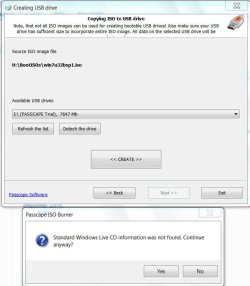
Passcape ISO Burner looked promising, but when I tried to create bootable USB pendrive with Windows 7 Home Premium ISO and also Ultimate 32bit ISO, it failed to. ( Ran it as Administrator too ! ) I only get the following error message.

PscapeTrial.jpg

When I click on continue anyway, the final outcome is just one readme file in the drive which states "This disc contains a "UDF" file system and requires an operating system that supports the ISO-13346 "UDF" file system specification."

( I have used both the ISOs to create bootable pendrives using Rufus and only a day before http://www.sevenforums.com/installation-setup/230893-win7-32-bit-via-usb.html#post1931999 )

Have you tried the Passcape program to create a bootable Windows 7 install pendrive?
 

My Computer My Computer

At a glance

Windows 7 Home Premium 32 bit
OS
Windows 7 Home Premium 32 bit
Thanks for all your help.

I managed to prevail but not 100% on exactly how it all worked out.

I simply tried to repair the Win7 a couple of times as I've only done it once. Back in Win7 I could now actually see the Win7 partition as active and boot. That allowed me to format the Vista HDD which I couldn't do before.
I was worried that the DVD would not work again for a clean install so I tried to make a bootable USB but again I failed on the cmd process when it comes to the bootsect.exe step as I get access denied error. Anyway I just copied the files from the DVD over to the USB hoping it might do the trick.
I then tried a clean install of Win7 from the DVD. Yay! Worked like a treat this time.
Its now on C: and starts up in 4s. Goodbye Vista.
My next step is to update BIOS and drivers including the Intel Matrix Manager driver so that I can get the 2x 1Tb Hitachi in Raid 1 which should be possible post-OS install.
 

My Computer My Computer

At a glance

MS Windows 7 Ultimate 64-bit SP12x Intel Xeon E5440 @ 2.83GHz Harpertown 45nm...8.00 GB FB-DDR2 @ 332MHz (5-5-5-15)1024MB GeForce GTX 550 Ti (Palit)
Computer Manufacturer/Model Number
Dell T5400 Desktop
OS
MS Windows 7 Ultimate 64-bit SP1
CPU
2x Intel Xeon E5440 @ 2.83GHz Harpertown 45nm Technology
Motherboard
Dell Inc. 0RW203 (CPU)
Memory
8.00 GB FB-DDR2 @ 332MHz (5-5-5-15)
Graphics Card(s)
1024MB GeForce GTX 550 Ti (Palit)
Sound Card
Onboard
Monitor(s) Displays
DELL U2312HM
Screen Resolution
1920x1080@60Hz
Hard Drives
156GB Western Digital WDC WD1600ADFS-75SLR2 ATA Device (SATA) 35 °C
977GB Hitachi Hitachi HDS721010KLA330 ATA Device (SATA) 27 °C
977GB Hitachi Hitachi HDS721010KLA330 ATA Device (SATA)
Optiarc DVD+-RW AD-7200S ATA Device
PSU
Dell 875W
Case
Dell T5400
Keyboard
Dell USB Standard Keyboard
Mouse
Logitech MX500
Internet Speed
ADSL2
Other Info
TP-LINK 300Mbps Wireless N Adapter
What you're looking for is System flag to know that Win7 has its System boot files, not just the Active flag which tells Repair where to write or repair them, or boot which only means that's the OS you're booted into at the time.

If you'll post back a screenshot of your maximized Disk mgmt drive map and listings we can look it over for you.

I gave you the tool which works best to write Win7 ISO to flash stick. I've never heard of anyone having problems with ImgBurn no matter what the bit version.

Plug in the external to see if it loads the driver as it should in Win7. First enable Automatically get recommended drivers and updates for your hardware. Check repeatedly for newer drivers while doing the Updates.

Look over these steps for Clean Reinstall - Factory OEM Windows 7 which also outline best practices for getting a perfect reinstall for retail as well.
 
Thanks very much.
I think its flagged as system as well. I'll post a screenshot when I get home from work. I will make a bootable USB as well just to have as a backup.

Getting the drivers automatically sounds good. Saves me from getting them.
Should I still update the BIOS? I'd have to do that manually right?

I'll go through the Clean Reinstall - Factory OEM Windows 7 and make a recovery once I have updated everything and installed the software.

Regarding Raid setup - Would it be just as easy to setup raid in Windows rather than hardware? I basically just wanted that extra bit of piece of mind for my photos in case one of the older Hitachi dies.
 

My Computer My Computer

At a glance

MS Windows 7 Ultimate 64-bit SP12x Intel Xeon E5440 @ 2.83GHz Harpertown 45nm...8.00 GB FB-DDR2 @ 332MHz (5-5-5-15)1024MB GeForce GTX 550 Ti (Palit)
Computer Manufacturer/Model Number
Dell T5400 Desktop
OS
MS Windows 7 Ultimate 64-bit SP1
CPU
2x Intel Xeon E5440 @ 2.83GHz Harpertown 45nm Technology
Motherboard
Dell Inc. 0RW203 (CPU)
Memory
8.00 GB FB-DDR2 @ 332MHz (5-5-5-15)
Graphics Card(s)
1024MB GeForce GTX 550 Ti (Palit)
Sound Card
Onboard
Monitor(s) Displays
DELL U2312HM
Screen Resolution
1920x1080@60Hz
Hard Drives
156GB Western Digital WDC WD1600ADFS-75SLR2 ATA Device (SATA) 35 °C
977GB Hitachi Hitachi HDS721010KLA330 ATA Device (SATA) 27 °C
977GB Hitachi Hitachi HDS721010KLA330 ATA Device (SATA)
Optiarc DVD+-RW AD-7200S ATA Device
PSU
Dell 875W
Case
Dell T5400
Keyboard
Dell USB Standard Keyboard
Mouse
Logitech MX500
Internet Speed
ADSL2
Other Info
TP-LINK 300Mbps Wireless N Adapter
As long as the BIOS update can be run from within Win7, I always do them if available. Just be extra careful in following the instructions and allowing no distractions.

I do not use RAID which is more trouble than it's worth IMO. I'd use the other HD for image backups done manually by typing Backup in start search box, or scheduled if you feel better having it automated. I don't like all the bloat in the file backup program so I just drag User folders to storage or to my Skydrive folder which immediately uploads them to MS Skydrive free servers and then sync's the ones I want with my other machines.
 
Glad to hear things worked for you! Unterberg

He's running the 64bit 7 so cancel the ImgBurn idea! Passcape ISO Burner is an updated free program for burning to disk or creating a bootable USB Install Key with a flash drive..........

Hi Night Hawk,

Passcape ISO Burner looked promising, but when I tried to create bootable USB pendrive with Windows 7 Home Premium ISO and also Ultimate 32bit ISO, it failed to. ( Ran it as Administrator too ! ) I only get the following error message.

View attachment 213140

When I click on continue anyway, the final outcome is just one readme file in the drive which states "This disc contains a "UDF" file system and requires an operating system that supports the ISO-13346 "UDF" file system specification."

( I have used both the ISOs to create bootable pendrives using Rufus and only a day before http://www.sevenforums.com/installation-setup/230893-win7-32-bit-via-usb.html#post1931999 )

Have you tried the Passcape program to create a bootable Windows 7 install pendrive?

I used the Passcape program there for burning the SP1 slipstreamed iso created with the RT 7 Lite and found that reliable. The usb keys I use another program entirely for those while the Passcape won't work for anything other then Windows Install keys.
 

My Computers My Computers

  • At a glance

    W7 Ultimate x64/W10 Pro x64/W11 Pro Triple Bo...AMD Phenom II X4 975 Deneb 3.6ghz - 965 2nd r...Kingston Hyper X DDR3 1600 1.5v 16gb - Hyper ...MSI HD Radeon 5750 1gb - MSI HD Radeon 6450 o...
    Computer type
    PC/Desktop
    Computer Manufacturer/Model Number
    Custom builds = 2
    OS
    W7 Ultimate x64/W10 Pro x64/W11 Pro Triple Boot - Main PC W7 Remote PC Micro ATX W7 Pro x64/W11 Pro
    CPU
    AMD Phenom II X4 975 Deneb 3.6ghz - 965 2nd remote pc
    Motherboard
    Gigabyte GA-790XTA-UD4-Gigabyte GA-880GM-D2H remote pc
    Memory
    Kingston Hyper X DDR3 1600 1.5v 16gb - Hyper X Fury 8gb 2nd
    Graphics Card(s)
    MSI HD Radeon 5750 1gb - MSI HD Radeon 6450 on mini tower
    Sound Card
    Creative Labs X-Fi Xtreme Audio P - Realtek onooard 2nd case
    Monitor(s) Displays
    ASUS VW199T-P 19" HP 2082a Main-HP 2082a 20" remote pc
    Screen Resolution
    Asus 1440x900 - HP 1600x900
    Hard Drives
    WD Black 1TB HD per OS W7, W10, and pending W11 presently on 500gb OS Drive - Pending Triple 1TB HDs for Spanned Storage/backup volume
    Single 2TB external USB enclosure, single 1TB System 7 Host/Boot drive, Pending 8TB external HD for system image b
    PSU
    Corsair 750TX - primary / Corsair CX600 - second
    Case
    Antec 900-2 - SSD compatible / NZXT Vulcan mini tower
    Cooling
    Zalman CNPS9900A
    Keyboard
    AZIO L70 Backlit Letters Gaming - ONN Cordless/USB
    Mouse
    MSI DS200 Programmable, Logitech Cordless
    Internet Speed
    30mbps upgrade - primary hard wired - mini tower usb WiFi
    Antivirus
    GFI VIPRE Internet Security 2014 on W7 2016 beta on W10,
    Browser
    Cyberfox, WaterFox 64bit FF variants, FireFox x64, Pale Moon
    Other Info
    Accomdata fan cooled usb 2.0 PIDE/Sata II, III external enclosure.
    Sambient usb/eSata PATA/Sata II, III external enclosure.
  • At a glance

    W7 Pro x64/W11 ProAMD Deneb 3.6ghz - 965Kingston Hyper X Fury 8gbMSI HD Radeon 6450 DVI Output
    Computer type
    PC/Desktop
    System Manufacturer/Model Number
    CUSTOM ASSEMBLY
    OS
    W7 Pro x64/W11 Pro
    CPU
    AMD Deneb 3.6ghz - 965
    Motherboard
    Gigabyte GA-880GM-D2H remote pc
    Memory
    Kingston Hyper X Fury 8gb
    Graphics Card(s)
    MSI HD Radeon 6450 DVI Output
    Sound Card
    Realtek onooard Creative or Other separate PENDING
    Monitor(s) Displays
    VIZIO 32" LCD TV Separate LCD Pending
    Screen Resolution
    1600x1080
    Hard Drives
    WD 500GB OS Host/Boot WD Green 1TB Storage/Backup
    PSU
    Corsair 600W - THERMALTAKE 600W spare case
    Case
    NZXT Vulcan mini tower
    Cooling
    Twin 120mm Top Fans - 240mm Side Cover
    Keyboard
    ONN Cordless/USB Logitech Cordless
    Mouse
    ONN USB/Cordless - Logitech Cordless
    Internet Speed
    DSL 5G
    Browser
    MS Edge, FireFox, WaterFox x64, FireFox Nightly
    Other Info
    OS Testing-Remote Access to Main TeamViewer
+1 to Greg's advice re Raid and also re SkyDrive which I also use. Great minds think alike.
 

My Computer My Computer

At a glance

MS Windows 7 Ultimate SP1 64-bitAMD A10-4600M6.00 GB Dual-Channel DDR3 @ 798MHz (11-11-12-28)AMD Radeon HD 7660G
Computer Manufacturer/Model Number
Toshiba Satellite S875D-S7239 laptop
OS
MS Windows 7 Ultimate SP1 64-bit
CPU
AMD A10-4600M
Motherboard
AMD Pumori (Socket FT1)
Memory
6.00 GB Dual-Channel DDR3 @ 798MHz (11-11-12-28)
Graphics Card(s)
AMD Radeon HD 7660G
Sound Card
High Definition Audio Device
Monitor(s) Displays
Generic PnP Monitor (1600x900@60Hz)
Screen Resolution
1600x900@60Hz
Hard Drives
SSD 119GB Corsair CSSD-V128GB2 ATA Device
Keyboard
Standard PS/2 Keyboard
Mouse
HP Wireless Optical Mobile Mouse Model FHA-3410
Internet Speed
What the local pub, local coffee shop offers.
Other Info
Optical Drive:MATSHITA BD-CMB UJ160B ATA Device


Also have an Asus ha1002xp netbook with Win 7 Ultimate installed.
Unterberg,
Just for the record, here is how I put an iso file on to a USB stick.

1. Prepare the USB stick.
2. Extract the ISO to the USB using 7-zip.

Code:
  [B]PREPARE A UFD FOR USE (USB FLASH DRIVE)[/B]

   
  Run CMD.EXE as administrator
   
  [U]Type following commands and hit ENTER key after each command.[/U]
  [B]DISKPART[/B] [I]starts the DiskPart program[/I]
  [B]LIST DISK [/B][I]shows numeral assigned to disks[/I][I]
[/I]note the numeral assigned to your usb stick
The numeral 2 will be used in this example
  [B]SELECT DISK 2[/B]
  [B]DETAIL DISK[/B] [I]the info shown will confirm the correctness of your selection[/I]
  [B]CLEAN ALL[/B] [I]the entire usb stick will be overwritten with zeros
[/I]This can take awhile if usb stick has large capacity.
Keep the faith-the DiskPart prompt will eventually return.
  [B]CREATE PARTITION PRIMARY [/B][I]create a primary partition on the USB stick[/I]
  [B]FORMAT FS=NTFS [/B][I]format the partition[/I]
  [B]ACTIVE [/B][I]the partition can contain operating system startup files[/I]
  [B]ASSIGN [/B][I]the next available letter is assigned to the USB stick[/I]
  [B]EXIT [/B][I]exit from the DISKPART program[/I]
  [B]EXIT [/B][I]exit from the command shell [/I]

Now simply use 7-zip to extract the ISO to your USB stick.

If you already have a dvd, then simply copy the entire DVD over to your prepared USB stick.
 

My Computer My Computer

At a glance

MS Windows 7 Ultimate SP1 64-bitAMD A10-4600M6.00 GB Dual-Channel DDR3 @ 798MHz (11-11-12-28)AMD Radeon HD 7660G
Computer Manufacturer/Model Number
Toshiba Satellite S875D-S7239 laptop
OS
MS Windows 7 Ultimate SP1 64-bit
CPU
AMD A10-4600M
Motherboard
AMD Pumori (Socket FT1)
Memory
6.00 GB Dual-Channel DDR3 @ 798MHz (11-11-12-28)
Graphics Card(s)
AMD Radeon HD 7660G
Sound Card
High Definition Audio Device
Monitor(s) Displays
Generic PnP Monitor (1600x900@60Hz)
Screen Resolution
1600x900@60Hz
Hard Drives
SSD 119GB Corsair CSSD-V128GB2 ATA Device
Keyboard
Standard PS/2 Keyboard
Mouse
HP Wireless Optical Mobile Mouse Model FHA-3410
Internet Speed
What the local pub, local coffee shop offers.
Other Info
Optical Drive:MATSHITA BD-CMB UJ160B ATA Device


Also have an Asus ha1002xp netbook with Win 7 Ultimate installed.
Tried that already here only with GParted to make up a live sttick rather then burn any new cd for that. The method does work for both Vista and 7 alike however as far as a command line approach.
 

My Computers My Computers

  • At a glance

    W7 Ultimate x64/W10 Pro x64/W11 Pro Triple Bo...AMD Phenom II X4 975 Deneb 3.6ghz - 965 2nd r...Kingston Hyper X DDR3 1600 1.5v 16gb - Hyper ...MSI HD Radeon 5750 1gb - MSI HD Radeon 6450 o...
    Computer type
    PC/Desktop
    Computer Manufacturer/Model Number
    Custom builds = 2
    OS
    W7 Ultimate x64/W10 Pro x64/W11 Pro Triple Boot - Main PC W7 Remote PC Micro ATX W7 Pro x64/W11 Pro
    CPU
    AMD Phenom II X4 975 Deneb 3.6ghz - 965 2nd remote pc
    Motherboard
    Gigabyte GA-790XTA-UD4-Gigabyte GA-880GM-D2H remote pc
    Memory
    Kingston Hyper X DDR3 1600 1.5v 16gb - Hyper X Fury 8gb 2nd
    Graphics Card(s)
    MSI HD Radeon 5750 1gb - MSI HD Radeon 6450 on mini tower
    Sound Card
    Creative Labs X-Fi Xtreme Audio P - Realtek onooard 2nd case
    Monitor(s) Displays
    ASUS VW199T-P 19" HP 2082a Main-HP 2082a 20" remote pc
    Screen Resolution
    Asus 1440x900 - HP 1600x900
    Hard Drives
    WD Black 1TB HD per OS W7, W10, and pending W11 presently on 500gb OS Drive - Pending Triple 1TB HDs for Spanned Storage/backup volume
    Single 2TB external USB enclosure, single 1TB System 7 Host/Boot drive, Pending 8TB external HD for system image b
    PSU
    Corsair 750TX - primary / Corsair CX600 - second
    Case
    Antec 900-2 - SSD compatible / NZXT Vulcan mini tower
    Cooling
    Zalman CNPS9900A
    Keyboard
    AZIO L70 Backlit Letters Gaming - ONN Cordless/USB
    Mouse
    MSI DS200 Programmable, Logitech Cordless
    Internet Speed
    30mbps upgrade - primary hard wired - mini tower usb WiFi
    Antivirus
    GFI VIPRE Internet Security 2014 on W7 2016 beta on W10,
    Browser
    Cyberfox, WaterFox 64bit FF variants, FireFox x64, Pale Moon
    Other Info
    Accomdata fan cooled usb 2.0 PIDE/Sata II, III external enclosure.
    Sambient usb/eSata PATA/Sata II, III external enclosure.
  • At a glance

    W7 Pro x64/W11 ProAMD Deneb 3.6ghz - 965Kingston Hyper X Fury 8gbMSI HD Radeon 6450 DVI Output
    Computer type
    PC/Desktop
    System Manufacturer/Model Number
    CUSTOM ASSEMBLY
    OS
    W7 Pro x64/W11 Pro
    CPU
    AMD Deneb 3.6ghz - 965
    Motherboard
    Gigabyte GA-880GM-D2H remote pc
    Memory
    Kingston Hyper X Fury 8gb
    Graphics Card(s)
    MSI HD Radeon 6450 DVI Output
    Sound Card
    Realtek onooard Creative or Other separate PENDING
    Monitor(s) Displays
    VIZIO 32" LCD TV Separate LCD Pending
    Screen Resolution
    1600x1080
    Hard Drives
    WD 500GB OS Host/Boot WD Green 1TB Storage/Backup
    PSU
    Corsair 600W - THERMALTAKE 600W spare case
    Case
    NZXT Vulcan mini tower
    Cooling
    Twin 120mm Top Fans - 240mm Side Cover
    Keyboard
    ONN Cordless/USB Logitech Cordless
    Mouse
    ONN USB/Cordless - Logitech Cordless
    Internet Speed
    DSL 5G
    Browser
    MS Edge, FireFox, WaterFox x64, FireFox Nightly
    Other Info
    OS Testing-Remote Access to Main TeamViewer
Yes, the procedure works perfectly and for XP, Vista, Win 7.

This is the only procedure I've ever used to put a MS ISO on to USB from a DVD.

With Win 7, putting an ISO on to a a DVD is as simple as dbl-clicking on the ISO.
 

My Computer My Computer

At a glance

MS Windows 7 Ultimate SP1 64-bitAMD A10-4600M6.00 GB Dual-Channel DDR3 @ 798MHz (11-11-12-28)AMD Radeon HD 7660G
Computer Manufacturer/Model Number
Toshiba Satellite S875D-S7239 laptop
OS
MS Windows 7 Ultimate SP1 64-bit
CPU
AMD A10-4600M
Motherboard
AMD Pumori (Socket FT1)
Memory
6.00 GB Dual-Channel DDR3 @ 798MHz (11-11-12-28)
Graphics Card(s)
AMD Radeon HD 7660G
Sound Card
High Definition Audio Device
Monitor(s) Displays
Generic PnP Monitor (1600x900@60Hz)
Screen Resolution
1600x900@60Hz
Hard Drives
SSD 119GB Corsair CSSD-V128GB2 ATA Device
Keyboard
Standard PS/2 Keyboard
Mouse
HP Wireless Optical Mobile Mouse Model FHA-3410
Internet Speed
What the local pub, local coffee shop offers.
Other Info
Optical Drive:MATSHITA BD-CMB UJ160B ATA Device


Also have an Asus ha1002xp netbook with Win 7 Ultimate installed.
That's due to 7 having native iso support over the previous versions. Here I tend to make up more then one option just in case one dvd or usb key fails somehow.

I have one SP1 key already made up with a good deal of the updates pending a fresh install(slightly overdue no less) and will be making a second key with the same iso using the Passcape iso burner to see if any problem comes up. I've seen the exact same error screen jumanji was pointing out but not with a 7 iso indicating it won't support an open source iso like GParted.

The present 7 install still running but now starting to see a few glitches with different programs was first put on back in May 2010(clean install) and months later restoring a full image made the same month. Just a little house cleaning as far as the registry, drive. :D

I just ran into the same error with a 7 iso without having first reformatted or nuked the existing contents on an 8gb flash drive used to transfer downloads to a laptop I restored. You need to clean everything off first before trying to use the Passcape ISO Burner.

One requirement found in the readme.txt file.

This disc contains a "UDF" file system and requires an operating system
that supports the ISO-13346 "UDF" file system specification.

So much for the SP1 plus Windows updates slipstreamed iso.
 
Last edited:

My Computers My Computers

  • At a glance

    W7 Ultimate x64/W10 Pro x64/W11 Pro Triple Bo...AMD Phenom II X4 975 Deneb 3.6ghz - 965 2nd r...Kingston Hyper X DDR3 1600 1.5v 16gb - Hyper ...MSI HD Radeon 5750 1gb - MSI HD Radeon 6450 o...
    Computer type
    PC/Desktop
    Computer Manufacturer/Model Number
    Custom builds = 2
    OS
    W7 Ultimate x64/W10 Pro x64/W11 Pro Triple Boot - Main PC W7 Remote PC Micro ATX W7 Pro x64/W11 Pro
    CPU
    AMD Phenom II X4 975 Deneb 3.6ghz - 965 2nd remote pc
    Motherboard
    Gigabyte GA-790XTA-UD4-Gigabyte GA-880GM-D2H remote pc
    Memory
    Kingston Hyper X DDR3 1600 1.5v 16gb - Hyper X Fury 8gb 2nd
    Graphics Card(s)
    MSI HD Radeon 5750 1gb - MSI HD Radeon 6450 on mini tower
    Sound Card
    Creative Labs X-Fi Xtreme Audio P - Realtek onooard 2nd case
    Monitor(s) Displays
    ASUS VW199T-P 19" HP 2082a Main-HP 2082a 20" remote pc
    Screen Resolution
    Asus 1440x900 - HP 1600x900
    Hard Drives
    WD Black 1TB HD per OS W7, W10, and pending W11 presently on 500gb OS Drive - Pending Triple 1TB HDs for Spanned Storage/backup volume
    Single 2TB external USB enclosure, single 1TB System 7 Host/Boot drive, Pending 8TB external HD for system image b
    PSU
    Corsair 750TX - primary / Corsair CX600 - second
    Case
    Antec 900-2 - SSD compatible / NZXT Vulcan mini tower
    Cooling
    Zalman CNPS9900A
    Keyboard
    AZIO L70 Backlit Letters Gaming - ONN Cordless/USB
    Mouse
    MSI DS200 Programmable, Logitech Cordless
    Internet Speed
    30mbps upgrade - primary hard wired - mini tower usb WiFi
    Antivirus
    GFI VIPRE Internet Security 2014 on W7 2016 beta on W10,
    Browser
    Cyberfox, WaterFox 64bit FF variants, FireFox x64, Pale Moon
    Other Info
    Accomdata fan cooled usb 2.0 PIDE/Sata II, III external enclosure.
    Sambient usb/eSata PATA/Sata II, III external enclosure.
  • At a glance

    W7 Pro x64/W11 ProAMD Deneb 3.6ghz - 965Kingston Hyper X Fury 8gbMSI HD Radeon 6450 DVI Output
    Computer type
    PC/Desktop
    System Manufacturer/Model Number
    CUSTOM ASSEMBLY
    OS
    W7 Pro x64/W11 Pro
    CPU
    AMD Deneb 3.6ghz - 965
    Motherboard
    Gigabyte GA-880GM-D2H remote pc
    Memory
    Kingston Hyper X Fury 8gb
    Graphics Card(s)
    MSI HD Radeon 6450 DVI Output
    Sound Card
    Realtek onooard Creative or Other separate PENDING
    Monitor(s) Displays
    VIZIO 32" LCD TV Separate LCD Pending
    Screen Resolution
    1600x1080
    Hard Drives
    WD 500GB OS Host/Boot WD Green 1TB Storage/Backup
    PSU
    Corsair 600W - THERMALTAKE 600W spare case
    Case
    NZXT Vulcan mini tower
    Cooling
    Twin 120mm Top Fans - 240mm Side Cover
    Keyboard
    ONN Cordless/USB Logitech Cordless
    Mouse
    ONN USB/Cordless - Logitech Cordless
    Internet Speed
    DSL 5G
    Browser
    MS Edge, FireFox, WaterFox x64, FireFox Nightly
    Other Info
    OS Testing-Remote Access to Main TeamViewer
Ok this is a screenshot from the disk management view
Disk%20management.png


Is it a problem that one of the Hitachi is marked as System?
 

My Computer My Computer

At a glance

MS Windows 7 Ultimate 64-bit SP12x Intel Xeon E5440 @ 2.83GHz Harpertown 45nm...8.00 GB FB-DDR2 @ 332MHz (5-5-5-15)1024MB GeForce GTX 550 Ti (Palit)
Computer Manufacturer/Model Number
Dell T5400 Desktop
OS
MS Windows 7 Ultimate 64-bit SP1
CPU
2x Intel Xeon E5440 @ 2.83GHz Harpertown 45nm Technology
Motherboard
Dell Inc. 0RW203 (CPU)
Memory
8.00 GB FB-DDR2 @ 332MHz (5-5-5-15)
Graphics Card(s)
1024MB GeForce GTX 550 Ti (Palit)
Sound Card
Onboard
Monitor(s) Displays
DELL U2312HM
Screen Resolution
1920x1080@60Hz
Hard Drives
156GB Western Digital WDC WD1600ADFS-75SLR2 ATA Device (SATA) 35 °C
977GB Hitachi Hitachi HDS721010KLA330 ATA Device (SATA) 27 °C
977GB Hitachi Hitachi HDS721010KLA330 ATA Device (SATA)
Optiarc DVD+-RW AD-7200S ATA Device
PSU
Dell 875W
Case
Dell T5400
Keyboard
Dell USB Standard Keyboard
Mouse
Logitech MX500
Internet Speed
ADSL2
Other Info
TP-LINK 300Mbps Wireless N Adapter
Unterberg,
A good start. Would you please drag those field separators so that we can see the uinreadable?

Here's a write-up.

HOW TO POST A SNAPSHOT OF DISK MANAGEMENT DISPLAY
Run disk management:
WIN |
type DISKMGMT.MSC | ENTER
WIN=
key with Microsoft logo on top.


Maximize the output of Disk Management:
ALT-Spacebar
key combo | X key (selects Maximize) |
Drag the field separators (such as between Status and Capacity) to show entire field.


Make a snapshot:
WIN |
type SNIPPING | ENTER | New
Drag the cursor around the area you want to snip.
File | Save as | select save location and name | Save


Post the snapshot:
Post a File or Screenshot in Seven Forums

===============================================
thanks,
karl
 

My Computer My Computer

At a glance

MS Windows 7 Ultimate SP1 64-bitAMD A10-4600M6.00 GB Dual-Channel DDR3 @ 798MHz (11-11-12-28)AMD Radeon HD 7660G
Computer Manufacturer/Model Number
Toshiba Satellite S875D-S7239 laptop
OS
MS Windows 7 Ultimate SP1 64-bit
CPU
AMD A10-4600M
Motherboard
AMD Pumori (Socket FT1)
Memory
6.00 GB Dual-Channel DDR3 @ 798MHz (11-11-12-28)
Graphics Card(s)
AMD Radeon HD 7660G
Sound Card
High Definition Audio Device
Monitor(s) Displays
Generic PnP Monitor (1600x900@60Hz)
Screen Resolution
1600x900@60Hz
Hard Drives
SSD 119GB Corsair CSSD-V128GB2 ATA Device
Keyboard
Standard PS/2 Keyboard
Mouse
HP Wireless Optical Mobile Mouse Model FHA-3410
Internet Speed
What the local pub, local coffee shop offers.
Other Info
Optical Drive:MATSHITA BD-CMB UJ160B ATA Device


Also have an Asus ha1002xp netbook with Win 7 Ultimate installed.
Unterberg,
Another help would be for you to fill out your system specs and I recommend using Speccy when you do.

Update your SevenForums System Specs
User CP (located on the top menu bar) |
Your Profile | Edit System Spec
(left-hand column)

To gather info, use Speccy (my favorite) or SIW or System Info

Add the word laptop or desktop or netbook to the
“system manufacturer” block, for example,
Toshiba Satellite L305D notebook.

Provide full windows version info, for example:
MS Windows 7 Ultimate SP1 64-bit

Use the “Other Info” block for Optical Reader,
Mouse, touchpad, wifi adapter, speakers, monitor, etc

Scroll down and click on SAVE CHANGES.
==========================================================
thanks,
karl
 

My Computer My Computer

At a glance

MS Windows 7 Ultimate SP1 64-bitAMD A10-4600M6.00 GB Dual-Channel DDR3 @ 798MHz (11-11-12-28)AMD Radeon HD 7660G
Computer Manufacturer/Model Number
Toshiba Satellite S875D-S7239 laptop
OS
MS Windows 7 Ultimate SP1 64-bit
CPU
AMD A10-4600M
Motherboard
AMD Pumori (Socket FT1)
Memory
6.00 GB Dual-Channel DDR3 @ 798MHz (11-11-12-28)
Graphics Card(s)
AMD Radeon HD 7660G
Sound Card
High Definition Audio Device
Monitor(s) Displays
Generic PnP Monitor (1600x900@60Hz)
Screen Resolution
1600x900@60Hz
Hard Drives
SSD 119GB Corsair CSSD-V128GB2 ATA Device
Keyboard
Standard PS/2 Keyboard
Mouse
HP Wireless Optical Mobile Mouse Model FHA-3410
Internet Speed
What the local pub, local coffee shop offers.
Other Info
Optical Drive:MATSHITA BD-CMB UJ160B ATA Device


Also have an Asus ha1002xp netbook with Win 7 Ultimate installed.
Unterberg,
A good start. Would you please drag those field separators so that we can see the uinreadable?

Here's a write-up.

HOW TO POST A SNAPSHOT OF DISK MANAGEMENT DISPLAY
Run disk management:
WIN |
type DISKMGMT.MSC | ENTER
WIN=
key with Microsoft logo on top.


Maximize the output of Disk Management:
ALT-Spacebar
key combo | X key (selects Maximize) |
Drag the field separators (such as between Status and Capacity) to show entire field.


Make a snapshot:
WIN |
type SNIPPING | ENTER | New
Drag the cursor around the area you want to snip.
File | Save as | select save location and name | Save


Post the snapshot:
Post a File or Screenshot in Seven Forums

===============================================
thanks,
karl

I realized that I had not dragged the operator over as I posted and fixed that up.
 

My Computer My Computer

At a glance

MS Windows 7 Ultimate 64-bit SP12x Intel Xeon E5440 @ 2.83GHz Harpertown 45nm...8.00 GB FB-DDR2 @ 332MHz (5-5-5-15)1024MB GeForce GTX 550 Ti (Palit)
Computer Manufacturer/Model Number
Dell T5400 Desktop
OS
MS Windows 7 Ultimate 64-bit SP1
CPU
2x Intel Xeon E5440 @ 2.83GHz Harpertown 45nm Technology
Motherboard
Dell Inc. 0RW203 (CPU)
Memory
8.00 GB FB-DDR2 @ 332MHz (5-5-5-15)
Graphics Card(s)
1024MB GeForce GTX 550 Ti (Palit)
Sound Card
Onboard
Monitor(s) Displays
DELL U2312HM
Screen Resolution
1920x1080@60Hz
Hard Drives
156GB Western Digital WDC WD1600ADFS-75SLR2 ATA Device (SATA) 35 °C
977GB Hitachi Hitachi HDS721010KLA330 ATA Device (SATA) 27 °C
977GB Hitachi Hitachi HDS721010KLA330 ATA Device (SATA)
Optiarc DVD+-RW AD-7200S ATA Device
PSU
Dell 875W
Case
Dell T5400
Keyboard
Dell USB Standard Keyboard
Mouse
Logitech MX500
Internet Speed
ADSL2
Other Info
TP-LINK 300Mbps Wireless N Adapter
Unterberg,
Another help would be for you to fill out your system specs and I recommend using Speccy when you do.

Update your SevenForums System Specs
User CP (located on the top menu bar) |
Your Profile | Edit System Spec
(left-hand column)

To gather info, use Speccy (my favorite) or SIW or System Info

Add the word laptop or desktop or netbook to the
“system manufacturer” block, for example,
Toshiba Satellite L305D notebook.

Provide full windows version info, for example:
MS Windows 7 Ultimate SP1 64-bit

Use the “Other Info” block for Optical Reader,
Mouse, touchpad, wifi adapter, speakers, monitor, etc

Scroll down and click on SAVE CHANGES.
==========================================================
thanks,
karl

Yep I've done that. Thanks for the hint!

So what do you think of the Disk Management image? Does that look about right or are there any problems I should address?
 

My Computer My Computer

At a glance

MS Windows 7 Ultimate 64-bit SP12x Intel Xeon E5440 @ 2.83GHz Harpertown 45nm...8.00 GB FB-DDR2 @ 332MHz (5-5-5-15)1024MB GeForce GTX 550 Ti (Palit)
Computer Manufacturer/Model Number
Dell T5400 Desktop
OS
MS Windows 7 Ultimate 64-bit SP1
CPU
2x Intel Xeon E5440 @ 2.83GHz Harpertown 45nm Technology
Motherboard
Dell Inc. 0RW203 (CPU)
Memory
8.00 GB FB-DDR2 @ 332MHz (5-5-5-15)
Graphics Card(s)
1024MB GeForce GTX 550 Ti (Palit)
Sound Card
Onboard
Monitor(s) Displays
DELL U2312HM
Screen Resolution
1920x1080@60Hz
Hard Drives
156GB Western Digital WDC WD1600ADFS-75SLR2 ATA Device (SATA) 35 °C
977GB Hitachi Hitachi HDS721010KLA330 ATA Device (SATA) 27 °C
977GB Hitachi Hitachi HDS721010KLA330 ATA Device (SATA)
Optiarc DVD+-RW AD-7200S ATA Device
PSU
Dell 875W
Case
Dell T5400
Keyboard
Dell USB Standard Keyboard
Mouse
Logitech MX500
Internet Speed
ADSL2
Other Info
TP-LINK 300Mbps Wireless N Adapter
Back
Top