advice removing XP on old HDD in dual boot setup with Win7 on new HDD

Sandeman7

New member
Local time
5:20 PM
Messages
3
Location
Fairport, New York
Situation is similar to what happened to member GeeDee: installed Win 7 on system with new HDD while XP was resident on old HDD creating a dual-boot config with systems on both drives. Everything works right now but I'd like to remove XP and clean old HDD.

Details:
Originally, C HDD (WD 1 TB) with XP was 90% full and six years old.
Added new HDD (became D) same size to replace old.
Added external HDD (3 TB, XP only recognized 750 GB) for Easy Transfer.
During 7 install noticed new D HDD became C (?!) and dual-boot was set-up.
Next time system restarted got error 'no disc found', and after visiting Bios changed drive order making new HDD with 7 first to boot and everything worked. It was a lucky accident for in truth did not know what I was doing!

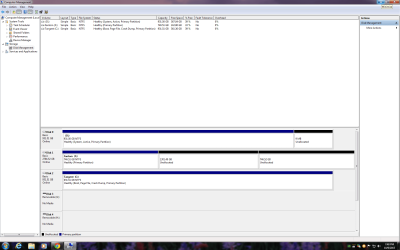
Currently this is what Disk Mgmt shows:
D with XP is disk 0 and is shown as 'System, Active, Primary Partition'
C with 7 is disk 2 with 'Boot, Page File, Crash Dump, Primary Partition'
F is disk 1, an external 3TB that I need to re-partition once everything is fixed.
No 100 MB MBR is shown, but D (XP) has a 9 MB unallocated section on it?

First thoughts after reading through some threads here was simply to make C 'active', remove this status from D, perhaps change the drive order in Disk Mgmt and Bios, and all would be well (lol).
While everything works now would rather remove XP and old HDD in fear it is too old and close to failure.

Hope this is an easy fix
 

My Computer My Computer

At a glance

Windows 7 Home Premium x64Intel quad-core8 GBNvidia Geforce GT 730
Computer type
PC/Desktop
Computer Manufacturer/Model Number
Shuttle (custom build)
OS
Windows 7 Home Premium x64
CPU
Intel quad-core
Motherboard
Shuttle
Memory
8 GB
Graphics Card(s)
Nvidia Geforce GT 730
Hard Drives
(2) WD Caviar Black 1 TB (2010 & 2015)
(1) Fantom external 3 TB SATA (2015)
(1) WD external 2 TB, USB 2.0 (2014)
Antivirus
Avast
Browser
Chrome & Mozilla
You could use EasyBCD to move/create the BCD on the Win7 drive, or you could burn a win7 repair disk, then unplug all disks except the Win7 disk, then run the repair disk and let it build the BCD. Make sure all data is backed up before doing anything.
 

My Computer My Computer

At a glance

Linux Lite 3.2 x64; Windows 7, 8.1Core2Duo 2.46GB ddr2nVidia
Computer type
PC/Desktop
Computer Manufacturer/Model Number
dell precision t3400 tower
OS
Linux Lite 3.2 x64; Windows 7, 8.1
CPU
Core2Duo 2.4
Memory
6GB ddr2
Graphics Card(s)
nVidia
Hard Drives
120gb SSD, 1TB HD, 2TB HD; sata II
Internet Speed
12/2
Browser
Vivaldi, Slimjet (Chromium) x64
Had heard good things about EasyBCD. Is it correct to say Win7 installation copied boot files to the XP HDD and these files are what EasyBCD will move to Win7 HDD? So my thought about making current Win7 HDD 'active' in Disk Mgr would not have fixed my problem, right? I sort of figured that. Using EasyBCD is easier then opening the case, but using the Win7 repair disk is probably safer, right?
 

Attachments

  • Disk Manager.png
    Disk Manager.png
    63.7 KB · Views: 2

My Computer My Computer

At a glance

Windows 7 Home Premium x64Intel quad-core8 GBNvidia Geforce GT 730
Computer type
PC/Desktop
Computer Manufacturer/Model Number
Shuttle (custom build)
OS
Windows 7 Home Premium x64
CPU
Intel quad-core
Motherboard
Shuttle
Memory
8 GB
Graphics Card(s)
Nvidia Geforce GT 730
Hard Drives
(2) WD Caviar Black 1 TB (2010 & 2015)
(1) Fantom external 3 TB SATA (2015)
(1) WD external 2 TB, USB 2.0 (2014)
Antivirus
Avast
Browser
Chrome & Mozilla
I honestly don't know if Ebcd moves or creates afresh the BCD. Which is easier depends on whether WRE makes you input the commands manually. It may. Whenever I do something like this the first step is to take an image of the drive I'm playing with. That way anything I do becomes a technical exercise, and it provides a backup for future use. I prefer that to strict cloning.
 

My Computer My Computer

At a glance

Linux Lite 3.2 x64; Windows 7, 8.1Core2Duo 2.46GB ddr2nVidia
Computer type
PC/Desktop
Computer Manufacturer/Model Number
dell precision t3400 tower
OS
Linux Lite 3.2 x64; Windows 7, 8.1
CPU
Core2Duo 2.4
Memory
6GB ddr2
Graphics Card(s)
nVidia
Hard Drives
120gb SSD, 1TB HD, 2TB HD; sata II
Internet Speed
12/2
Browser
Vivaldi, Slimjet (Chromium) x64
To your question, you could switch the Active flag from XP to W7 to find out, but it seems the W7 installer planted the BCD on the XP drive. You should be able to find it there by unhiding system files and going exploring. And if that's the case, merely making W7 Active is not going to solve the problem - unless it enables WRE to see the install and do the required repairs automatically.
 

My Computer My Computer

At a glance

Linux Lite 3.2 x64; Windows 7, 8.1Core2Duo 2.46GB ddr2nVidia
Computer type
PC/Desktop
Computer Manufacturer/Model Number
dell precision t3400 tower
OS
Linux Lite 3.2 x64; Windows 7, 8.1
CPU
Core2Duo 2.4
Memory
6GB ddr2
Graphics Card(s)
nVidia
Hard Drives
120gb SSD, 1TB HD, 2TB HD; sata II
Internet Speed
12/2
Browser
Vivaldi, Slimjet (Chromium) x64
Took a look at system files and noticed there appears to be some intermingling of files between the two O/S, suggesting W7 installer did put BCD on the XP drive. Know this sounds crazy but have never imaged a drive before and was wondering what software you use? (or suggest). I'll image C onto the F disk (3TB), and then EBCD which looks fairly straightforward.

Greatly appreciate your help, Paul.
 

My Computer My Computer

At a glance

Windows 7 Home Premium x64Intel quad-core8 GBNvidia Geforce GT 730
Computer type
PC/Desktop
Computer Manufacturer/Model Number
Shuttle (custom build)
OS
Windows 7 Home Premium x64
CPU
Intel quad-core
Motherboard
Shuttle
Memory
8 GB
Graphics Card(s)
Nvidia Geforce GT 730
Hard Drives
(2) WD Caviar Black 1 TB (2010 & 2015)
(1) Fantom external 3 TB SATA (2015)
(1) WD external 2 TB, USB 2.0 (2014)
Antivirus
Avast
Browser
Chrome & Mozilla
My pleasure, Sandeman. I personally use AOMEI Backupper. I like the interface. It has performed very well, except sometimes it doesn't faithfully reproduce factory restore partitions for some reason. But I don't value them highly anyway. I use the Verify option on important saves. Many here like Macrium Reflect. It has an excellent track record, but I don't like the interface.
 

My Computer My Computer

At a glance

Linux Lite 3.2 x64; Windows 7, 8.1Core2Duo 2.46GB ddr2nVidia
Computer type
PC/Desktop
Computer Manufacturer/Model Number
dell precision t3400 tower
OS
Linux Lite 3.2 x64; Windows 7, 8.1
CPU
Core2Duo 2.4
Memory
6GB ddr2
Graphics Card(s)
nVidia
Hard Drives
120gb SSD, 1TB HD, 2TB HD; sata II
Internet Speed
12/2
Browser
Vivaldi, Slimjet (Chromium) x64
Back
Top