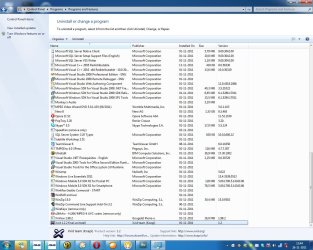
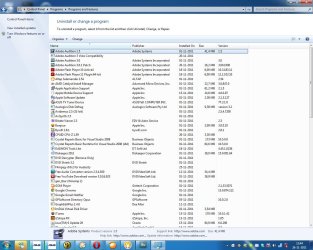
I am currently using windows 7 sp1 ultimate 64bits, and even having 8gb ram and a computer with the kind of specs i have i notice that sometimes after a few days windows starts getting REAL slow, i mean, starting to use a lot of virtual memory, i also notice that Windows7 start taking longer to draw windows graphics on screen and opening programs (even when not using virtual memory). Of course that when restarting windows fixes all these problems, but eventually the problem comes back. By the way i use windows's default swap file management, so i have a single 8191mb swap file, and the drives are defragmented.
Also unfortunately i need several programs installed everytime i re-install windows (it's always the same "pack" of software) so getting rid of them is not an option UNLESS i am able to find out exactly which ones are slowing things down and this is the problem, how to know which one is.
The problem is that i need the computer 24/7 turned on, and doing a daily restart is real boring (mostly because i can't afford SSD drives so please don't bother advising to go SSD) because with all these programs i get around 1 minute to have windows ready to be used after a restart, and i want to avoid restarts since apparently the HHD's get power cyles (i am not sure about this, doing a soft reset does make a power cycle on the HHDs just like when we turn off and on the computer?) and in other computers i had i definetly noticed that in a computer with the same model of harddrives, the harddrive got worned out a lot faster than in my computer which is always turned on, but let's not discuss this.
I also noticed that just having all these programs installed don't cause much slowdowns, it appears that it's when i run certain programs windows starts to get slow, and this is what i need, i would like to know if there is any software that is able to directly measure Windows7 response time or measure slowdowns by virtual memory without i having to do it visually ? I would prefer watching actual numbers of the milliseconds to be able to judge more accuratly which program does slowdown more the pc when open, because like this it can just be any program, and there's way too many programs to be closing or uninstalling one by one to try to find the "culprit".
I already checked the windows resource manager but i found nothing unusual (altough i don't have much experience analizyng it therefore the reason of this post as well), the amount of memory used by each program is more or less the same than it was after a restart, so i suspect that probably this is a problem of cache that is slowly "eating" up memory and doesn't get cleared. (i usually move large video files between harddrives i am not sure if the cache could be causing problems).
Also some kind of tool to be able to "optimize" memory or clear any cache or resources that aren't used anymore would be great, all of this to avoid doing soft resets in a daily basis. Unless doing a log-off/in solves the problem ? I haven't tried it yet but in case it doesn't i would appreciate some advices.
Also could downgrading from ultimate to premium improve this ?
Now, i am aware that i should be saying a lot more details about my situation, but there is so much to tell that i prefer that you people do the questions instead, just check out my profile before since i just updated it with my current hardware specs.
Oh one more thing i am aware of the more basic "tricks" to speed up windows, even tough i already deactivated search service most of the others i prefer to avoid (like turning off aero) because i dont' think that is the problem since in the first hours of use the computer is quite fast even when using aero (besides turning off aero only improves speed noticeably when that problem starts happening).
Also unfortunately i need several programs installed everytime i re-install windows (it's always the same "pack" of software) so getting rid of them is not an option UNLESS i am able to find out exactly which ones are slowing things down and this is the problem, how to know which one is.
The problem is that i need the computer 24/7 turned on, and doing a daily restart is real boring (mostly because i can't afford SSD drives so please don't bother advising to go SSD) because with all these programs i get around 1 minute to have windows ready to be used after a restart, and i want to avoid restarts since apparently the HHD's get power cyles (i am not sure about this, doing a soft reset does make a power cycle on the HHDs just like when we turn off and on the computer?) and in other computers i had i definetly noticed that in a computer with the same model of harddrives, the harddrive got worned out a lot faster than in my computer which is always turned on, but let's not discuss this.
I also noticed that just having all these programs installed don't cause much slowdowns, it appears that it's when i run certain programs windows starts to get slow, and this is what i need, i would like to know if there is any software that is able to directly measure Windows7 response time or measure slowdowns by virtual memory without i having to do it visually ? I would prefer watching actual numbers of the milliseconds to be able to judge more accuratly which program does slowdown more the pc when open, because like this it can just be any program, and there's way too many programs to be closing or uninstalling one by one to try to find the "culprit".
I already checked the windows resource manager but i found nothing unusual (altough i don't have much experience analizyng it therefore the reason of this post as well), the amount of memory used by each program is more or less the same than it was after a restart, so i suspect that probably this is a problem of cache that is slowly "eating" up memory and doesn't get cleared. (i usually move large video files between harddrives i am not sure if the cache could be causing problems).
Also some kind of tool to be able to "optimize" memory or clear any cache or resources that aren't used anymore would be great, all of this to avoid doing soft resets in a daily basis. Unless doing a log-off/in solves the problem ? I haven't tried it yet but in case it doesn't i would appreciate some advices.
Also could downgrading from ultimate to premium improve this ?
Now, i am aware that i should be saying a lot more details about my situation, but there is so much to tell that i prefer that you people do the questions instead, just check out my profile before since i just updated it with my current hardware specs.
Oh one more thing i am aware of the more basic "tricks" to speed up windows, even tough i already deactivated search service most of the others i prefer to avoid (like turning off aero) because i dont' think that is the problem since in the first hours of use the computer is quite fast even when using aero (besides turning off aero only improves speed noticeably when that problem starts happening).
My Computer
At a glance
Windows 7 Ultimate 64bit SP1AMD Phenom(tm) II X4 955 Processor 3200 BE8GB DD3 PC3-10700 (4X2GB modules)ATI Radeon HD 5770
- OS
- Windows 7 Ultimate 64bit SP1
- CPU
- AMD Phenom(tm) II X4 955 Processor 3200 BE
- Motherboard
- Asus M4A785TD-V EVO
- Memory
- 8GB DD3 PC3-10700 (4X2GB modules)
- Graphics Card(s)
- ATI Radeon HD 5770
- Sound Card
- Onboard
- Screen Resolution
- 1024x768
- Hard Drives
- 320GB SAMSUNG SATA2
500GB SEAGATE SATA2
2000GB SAMSUNG SATA2
250GB HITACHI SATA2