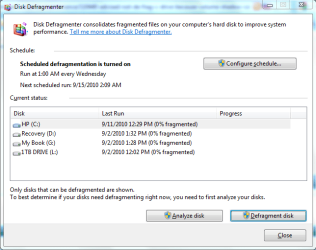
I was in the process of de-fraging my drives using UniBlue Disk Rescue, and I got the advisory message not to de-frag the C: drive (Windows 7 system drive) because it was owned by volume shadow copy (I back up this drive automatically each week).
Should I worry about not de-fraging the drive or can I turn off volume shadow copy, de-frag, then turn volume shadow copy back on?
I've been using this drive since I installed Win 7 earlier this year and imaging there's a lot of fragments floating around.
Should I worry about not de-fraging the drive or can I turn off volume shadow copy, de-frag, then turn volume shadow copy back on?
I've been using this drive since I installed Win 7 earlier this year and imaging there's a lot of fragments floating around.
My Computer
At a glance
Windows 7 Pro 64-bit Service Pack 1AMD FX 8370 BE 8-core32G Corsair DDR3 16002 GTX660 SC in SLI
- Computer type
- PC/Desktop
- Computer Manufacturer/Model Number
- DIY
- OS
- Windows 7 Pro 64-bit Service Pack 1
- CPU
- AMD FX 8370 BE 8-core
- Motherboard
- Gigabyte 990FXA-UD3
- Memory
- 32G Corsair DDR3 1600
- Graphics Card(s)
- 2 GTX660 SC in SLI
- Sound Card
- Reaktek
- Monitor(s) Displays
- Samsung 23" LCD
- Screen Resolution
- 1920x1080
- Hard Drives
- 5 SATA HDD
1 eSATA HDD
- PSU
- Corsair 850w
- Case
- AZZA Hurricane
- Cooling
- Case fans
- Keyboard
- Microsoft
- Mouse
- Logitech
- Internet Speed
- T3
- Antivirus
- Norton Internet Security
- Browser
- IE, Firefox


 If you enter "disk defragmenter" into the search dialog, you'll get info about the last run. It showed all my drives had been processed sucessfully so I just leave it alone to do its thing and enjoy Microsoft's best OS so far