Advised not to de-frag C: drive because of volume shadow copy

rzn6jw

New member
Member
VIP
Local time
3:30 PM
Messages
114
I was in the process of de-fraging my drives using UniBlue Disk Rescue, and I got the advisory message not to de-frag the C: drive (Windows 7 system drive) because it was owned by volume shadow copy (I back up this drive automatically each week).

Should I worry about not de-fraging the drive or can I turn off volume shadow copy, de-frag, then turn volume shadow copy back on?

I've been using this drive since I installed Win 7 earlier this year and imaging there's a lot of fragments floating around.
 

My Computer My Computer

At a glance

Windows 7 Pro 64-bit Service Pack 1AMD FX 8370 BE 8-core32G Corsair DDR3 16002 GTX660 SC in SLI
Computer type
PC/Desktop
Computer Manufacturer/Model Number
DIY
OS
Windows 7 Pro 64-bit Service Pack 1
CPU
AMD FX 8370 BE 8-core
Motherboard
Gigabyte 990FXA-UD3
Memory
32G Corsair DDR3 1600
Graphics Card(s)
2 GTX660 SC in SLI
Sound Card
Reaktek
Monitor(s) Displays
Samsung 23" LCD
Screen Resolution
1920x1080
Hard Drives
5 SATA HDD
1 eSATA HDD
PSU
Corsair 850w
Case
AZZA Hurricane
Cooling
Case fans
Keyboard
Microsoft
Mouse
Logitech
Internet Speed
T3
Antivirus
Norton Internet Security
Browser
IE, Firefox
I was in the process of de-fraging my drives using UniBlue Disk Rescue, and I got the advisory message not to de-frag the C: drive (Windows 7 system drive) because it was owned by volume shadow copy (I back up this drive automatically each week).

Should I worry about not de-fraging the drive or can I turn off volume shadow copy, de-frag, then turn volume shadow copy back on?

I've been using this drive since I installed Win 7 earlier this year and imaging there's a lot of fragments floating around.

Defragging on a normal drive is advised, why not use a de-fragger that can do C:\ like the built in one, or perfect disk?
 

My Computer My Computer

At a glance

Win 8 Release candidate 8400[email protected]4 gigsNvidia 9600M
Computer Manufacturer/Model Number
HP Pavillion dv-7 1005 Tx
OS
Win 8 Release candidate 8400
CPU
[email protected]
Memory
4 gigs
Graphics Card(s)
Nvidia 9600M
Sound Card
HD built-in
Monitor(s) Displays
17" Wxga
Screen Resolution
1440x900
Cooling
none
Internet Speed
45Mb down 5Mb up
The reason for this massage has to do with the way the defragmentation software does it. In other words it would cause System Restore to bloat up in size because the software causes the system to move files in a way that is not compatibily with System Restore.
 

My Computer My Computer

At a glance

Windows 10 Pro (x64)Intel Core i7-3930K (3.2GHz - 4.5GHz)4x Samsung 4GB PC3-12800 DDR3 (16GB 1600MHz)Nvidia Geforce GTX 690
Computer type
PC/Desktop
Computer Manufacturer/Model Number
Alienware Aurora ALX R4
OS
Windows 10 Pro (x64)
CPU
Intel Core i7-3930K (3.2GHz - 4.5GHz)
Motherboard
Alienware Aurora-R4 x79
Memory
4x Samsung 4GB PC3-12800 DDR3 (16GB 1600MHz)
Graphics Card(s)
Nvidia Geforce GTX 690
Sound Card
SteelSeries Siberia Elite
Monitor(s) Displays
Dell UltraSharp U3011
Screen Resolution
2560x1600
Hard Drives
Samsung 850 Pro 256 GB, Seagate 1TB Desktop Hybrid HDD, 2x Western Digital 4TB Green HDD
PSU
875W Some Dell PSU <.<
Case
Alienware Aurora ALX
Cooling
Custom Liquid Cooling (EK CPU & GPU blocks) dual EK 480RAD
Keyboard
Logitech G710+ Mechanical
Mouse
Logitech G700s
Internet Speed
Verizon Fios (50 mbps average)
Other Info
Server: Intel NUC D54250WYK: i5-4250U, 16GB, 256 GB mSATA, Windows Server 2012 R2
Which makes me wonder, if (especially with today's faster harddrives) there is still a point in defragging.
Do I actually gain anything or is it just a weekly HDD stress test ?

-DG
 

My Computer My Computer

At a glance

Windows 7 Ultimate x86DualCore AMD Athlon 64 X2, 2600 MHz 5200+Samsung 2GB DDR2Onboard NVIDIA GeForce 6150SE nForce 430
Computer Manufacturer/Model Number
HP m8000n
OS
Windows 7 Ultimate x86
CPU
DualCore AMD Athlon 64 X2, 2600 MHz 5200+
Motherboard
Asus M2N68-LA (Narra)
Memory
Samsung 2GB DDR2
Graphics Card(s)
Onboard NVIDIA GeForce 6150SE nForce 430
Sound Card
Onboard nVIDIA nForce 6100-430 (MCP61P)
Monitor(s) Displays
Westinghouse 19" LED
Screen Resolution
1280x1024
Hard Drives
SATA II Seagate Barracuda 500GB
USB II WD Elements 500GB
USB II WD My Book 1TB
USB II WD My Book 2TB
PSU
Stock (HP)
Case
Stock (HP)
Cooling
Stock
Keyboard
Logitech Classic KB 200
Mouse
Standard HP opticle USB mouse
Which makes me wonder, if (especially with today's faster harddrives) there is still a point in defragging.
Do I actually gain anything or is it just a weekly HDD stress test ?

-DG


Probably not much of an improvement, but in Windows 7 just let it do its thing.
 

My Computers My Computers

  • At a glance

    WIN10AMD Ryzen 5 3600 6-Core Processor 3.59 GHz16.0 GB
    Computer type
    PC/Desktop
    Computer Manufacturer/Model Number
    PowerSpec G164
    OS
    WIN10
    CPU
    AMD Ryzen 5 3600 6-Core Processor 3.59 GHz
    Memory
    16.0 GB
    Internet Speed
    VERY FAST>>>!!!
  • Antivirus
    ESET Security Premium
Thanks everybody for all the information. Seems that UniBlue is over-cautious. Will use the Windows de-frag on the C: drive.
 

My Computer My Computer

At a glance

Windows 7 Pro 64-bit Service Pack 1AMD FX 8370 BE 8-core32G Corsair DDR3 16002 GTX660 SC in SLI
Computer type
PC/Desktop
Computer Manufacturer/Model Number
DIY
OS
Windows 7 Pro 64-bit Service Pack 1
CPU
AMD FX 8370 BE 8-core
Motherboard
Gigabyte 990FXA-UD3
Memory
32G Corsair DDR3 1600
Graphics Card(s)
2 GTX660 SC in SLI
Sound Card
Reaktek
Monitor(s) Displays
Samsung 23" LCD
Screen Resolution
1920x1080
Hard Drives
5 SATA HDD
1 eSATA HDD
PSU
Corsair 850w
Case
AZZA Hurricane
Cooling
Case fans
Keyboard
Microsoft
Mouse
Logitech
Internet Speed
T3
Antivirus
Norton Internet Security
Browser
IE, Firefox
Which makes me wonder, if (especially with today's faster harddrives) there is still a point in defragging.
Do I actually gain anything or is it just a weekly HDD stress test ?

-DG

With today's faster (7200+) drives and more efficient Operating Systems, normal fragmentation is virtually a non-issue.

Even heavily fragmented drives aren't the major performance boogeyman they used to be.
 

My Computer My Computer

At a glance

8 Pro x64i7 3770K 4.6GHz16GB G.Skill Trident X 2666mhzx2 EVGA 780 Ti Superclocked SLI
Computer type
PC/Desktop
Computer Manufacturer/Model Number
Systems by SmartEyeball
OS
8 Pro x64
CPU
i7 3770K 4.6GHz
Motherboard
ASUS P8Z77 WS
Memory
16GB G.Skill Trident X 2666mhz
Graphics Card(s)
x2 EVGA 780 Ti Superclocked SLI
Sound Card
SB X-FI Surround 5.1 PRO USB / ATH-AD900 Headphones
Monitor(s) Displays
x3 Dell U2410 / 58" Samsung
Screen Resolution
5760*1200/ 1920*1200
Hard Drives
2x Intel 520 240GB (RAID 0) * 2x WD Caviar Blacks 2TB (RAID 0) * 2TB WD Caviar Black * Sony Optirac DVD
PSU
Silverstone Strider Evolution 1200W
Case
Thermaltake Level 10 GT Snow Edition
Cooling
Noctua NH-D14
Keyboard
Topre Realforce // Ducky Shine MX Black // Filco Ninja TKL
Mouse
Thermaltake Theron (Highly Recommended) + Razer Imperator
Antivirus
MSE
Browser
IE, FF, WaterFox
Other Info
GT Extreme V2 Sim Racing Cockpit + 40" LCD and K/B Mouse stand ▼
Fanatec CSR Elite Wheel + Clubsport V1 Pedals + CSR shifter/7G-H ▼Saitek X52 Pro ▼ TrackIR 5 Pro
Buttkicker v2 Seat Rumbler with Dedicated 5.1 and Sub Woofer attached to frame ▼
=
Bloody Big Grin
Which makes me wonder, if (especially with today's faster harddrives) there is still a point in defragging.
Do I actually gain anything or is it just a weekly HDD stress test ?

-DG

With today's faster (7200+) drives and more efficient Operating Systems, normal fragmentation is virtually a non-issue.

Even heavily fragmented drives aren't the major performance boogeyman they used to be.


That and Windows 7 isn't like XP, where in the past we had a number of 3rd party applications to run it efficiently. Windows 7 is pretty efficient and doesn't require sooo many 3rd applications.
 

My Computers My Computers

  • At a glance

    WIN10AMD Ryzen 5 3600 6-Core Processor 3.59 GHz16.0 GB
    Computer type
    PC/Desktop
    Computer Manufacturer/Model Number
    PowerSpec G164
    OS
    WIN10
    CPU
    AMD Ryzen 5 3600 6-Core Processor 3.59 GHz
    Memory
    16.0 GB
    Internet Speed
    VERY FAST>>>!!!
  • Antivirus
    ESET Security Premium
Actually, from my experience, it isn't so much performance, but also just dealing with the minor quirks with programs in general. Whether or not that issue has been really or truly resolved since the days of 95... I have found that fragmentation not only leads to a decrease in performance over time, but sometimes introduces program loading quirks.

I've seen some programs where if it is fragmented just enough (Like hasn't been defragged for months...) You can get a program to load up, but then fault out on something it has done numerous times before without problems.
 

My Computer My Computer

At a glance

Windows 7 Ultimate x64 and Home Premium x64Intel i7 960 (3.2 GHz Quad Core)12 Gigs (Triple Channel)Alienware OEM nVidia GTX 560 Ti (1.25 Gig)
Computer Manufacturer/Model Number
Alienware Area 51 Desktop and Dell Inspirion 17R (N7010)
OS
Windows 7 Ultimate x64 and Home Premium x64
CPU
Intel i7 960 (3.2 GHz Quad Core)
Motherboard
Alienware Intel based X58
Memory
12 Gigs (Triple Channel)
Graphics Card(s)
Alienware OEM nVidia GTX 560 Ti (1.25 Gig)
Sound Card
Creative Labs X-Fi Titanium
Monitor(s) Displays
Samsung PX2370 LED 23" Monitor
Screen Resolution
1920x1080
Hard Drives
2 320 Gig SATA in Raid 1 Configuration (System/App)
1 1 Tera SATA (Games)
1 1 Tera SATA (Data/Music/Videos)
PSU
750 Watt Power Supply
Case
Alienware Area 51 Desktop
Cooling
Liquid Cooled
Keyboard
Logitech G510
Mouse
Microsoft Trackball Explorer
Internet Speed
Cable
I have tried 3rd party defragers and I went back to built in W7 defrager. Will it help, well IMHO it can't hurt and it might help. With W7 defrager you can analyze you hard drive and you will know in a minute or so weather you need to defrag. For me it seems that W7 don't get fragmented very much. I don't know why that is. Keep this in mind, 10% fragmented on a 300gig drive won't take long but 10% on a tig drive will take a lot of time.
 

My Computer My Computer

At a glance

Windows 10 Pro. 64/ version 1709 Windows 7 Pr...Intel i7-6800K @ 4.3Corsair Platinum 16 gig @2400EVGA GTX 1070 OC
Computer type
PC/Desktop
Computer Manufacturer/Model Number
Home made Desktop
OS
Windows 10 Pro. 64/ version 1709 Windows 7 Pro/64
CPU
Intel i7-6800K @ 4.3
Motherboard
ASUS X-99 Deluxe II
Memory
Corsair Platinum 16 gig @2400
Graphics Card(s)
EVGA GTX 1070 OC
Monitor(s) Displays
Asus 27" LED LCD/VE278Q
Screen Resolution
1920-1080 or 1280-720 HDMI
Hard Drives
INTEL SSD 730-240 Gb Sata 3.0/
PSU
EVGA Platium 1200W
Case
Phanteks Luxe Tempered Glass 8 fans/ one radiator
Cooling
XSPC/ Water Cooled CPU
Keyboard
Das 4 Professional
Mouse
Logitech M705/MX Anywhere 2-S
Internet Speed
100 mbits
Antivirus
Microsoft Security Essentials/ Malwarebytes Premium 3.0/ SAS
Browser
I.E. 11 default/Firefox/ ISP Time Warner Cable/Spectrum
Other Info
LG BluRay Burner/
Sound system-KLipsch-THX/
Icy Dock ssd Hot Swap bays.
I haven't manually defragmented my drives ever since I switched from XP to Vista (~about 2 years ago).
This thread made me check it out again. When I learned, that Windows 7 runs an automated defragment once a week I got curious/investigative. ;) If you enter "disk defragmenter" into the search dialog, you'll get info about the last run. It showed all my drives had been processed sucessfully so I just leave it alone to do its thing and enjoy Microsoft's best OS so far :D
Thanks to all here who helped giving me their opinion on that matter.
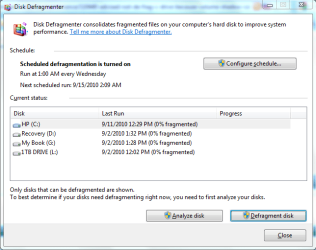
BTW: since the last run my C-drive fragmented by 5%. To see how long it would take I ran the program manually..it took less than 20 minutes.
Capture.PNG


-DG
 

My Computer My Computer

At a glance

Windows 7 Ultimate x86DualCore AMD Athlon 64 X2, 2600 MHz 5200+Samsung 2GB DDR2Onboard NVIDIA GeForce 6150SE nForce 430
Computer Manufacturer/Model Number
HP m8000n
OS
Windows 7 Ultimate x86
CPU
DualCore AMD Athlon 64 X2, 2600 MHz 5200+
Motherboard
Asus M2N68-LA (Narra)
Memory
Samsung 2GB DDR2
Graphics Card(s)
Onboard NVIDIA GeForce 6150SE nForce 430
Sound Card
Onboard nVIDIA nForce 6100-430 (MCP61P)
Monitor(s) Displays
Westinghouse 19" LED
Screen Resolution
1280x1024
Hard Drives
SATA II Seagate Barracuda 500GB
USB II WD Elements 500GB
USB II WD My Book 1TB
USB II WD My Book 2TB
PSU
Stock (HP)
Case
Stock (HP)
Cooling
Stock
Keyboard
Logitech Classic KB 200
Mouse
Standard HP opticle USB mouse
When you defrag, the computer moves all the files, and parts of files, around on the physical disk surface, to optimize their layout and reduce seek times. When this happens, VSS (Volume shadow copy) interprets each movement as a change to a file, and tries to record the previous version. Obviously,that will make your hard disk fill up extremely rapidly, which is why it’s a bad idea to use a defragmenter if VSS is running.

If you dont want to use the inbuilt win7 defrag, then use something that is compatible with VSS. I believe the recent versions of Auslogics and Diskeeper are VSS compatible.


My Computer My Computer

At a glance

Windows 7 x64 pro/ Windows 7 x86 Pro/ XP SP3 x86
Computer Manufacturer/Model Number
Too many to describe...
OS
Windows 7 x64 pro/ Windows 7 x86 Pro/ XP SP3 x86
Back
Top