
You are using an out of date browser. It may not display this or other websites correctly.
You should upgrade or use an alternative browser.
You should upgrade or use an alternative browser.
aero effect and transparency
- Thread starter ej18
- Start date

Well, it's set to 256MB by default, but since it seems that you have not been in the BIOS before, then I would recommend to not worry about it to be safe. I wouldn't want you to accidentally change something by mistake and cause some other issue. 256MB meets the requirements for Aero.
How long as Aero not been working for you?
How long as Aero not been working for you?
My Computer
- Computer type
- PC/Desktop
- Computer Manufacturer/Model Number
- Self built custom
- OS
- 64-bit Windows 11 Pro for Workstations
- CPU
- Intel i7-8700K OC'd to 5 GHz
- Motherboard
- ASUS ROG Maximus XI Formula Z390
- Memory
- 64 GB (4x16GB) G.SKILL TridentZ RGB DDR4 3600 MHz
- Graphics Card(s)
- ASUS ROG-STRIX-GTX1080TI-O11G-GAMING
- Sound Card
- Integrated
- Monitor(s) Displays
- 2 x Samsung Odyssey G7 27"
- Screen Resolution
- 2560x1440
- Hard Drives
- 1TB Samsung 990 PRO M.2,
4TB Samsung 990 PRO PRO M.2,
TerraMaster F8 SSD Plus NAS
- PSU
- Seasonic Prime Titanium 850W
- Case
- Thermaltake Core P3
- Cooling
- Corsair Hydro H115i
- Keyboard
- Logitech wireless K800
- Mouse
- Logitech MX Master 4
- Internet Speed
- 2 Gb/s Download and 100 Mb/s Upload
- Antivirus
- Malwarebyte Anti-Malware Premium
- Browser
- Google Chrome
- Other Info
- Logitech Z625 speaker system,
Logitech BRIO 4K Pro webcam,
HP Color LaserJet Pro MFP M477fdn,
APC SMART-UPS RT 1000 XL - SURT1000XLI,
Galaxy S23 Plus phone

- Local time
- 1:07 PM
- Messages
- 300
ej18 go to computer on the start menu and right click it and select properties. Left click properties.
Your systmes "rateing" is displayed on that page. It will be a number rangeing from 1.0 to 7.9.
last step:
http://www.sevenforums.com/general-discussion/86186-aero-effect-transparency.html#post745115
If your rateing is below 3.0 areo will shut itself down and become unusable.
Your systmes "rateing" is displayed on that page. It will be a number rangeing from 1.0 to 7.9.
last step:
http://www.sevenforums.com/general-discussion/86186-aero-effect-transparency.html#post745115
If your rateing is below 3.0 areo will shut itself down and become unusable.
My Computer
- Computer Manufacturer/Model Number
- I trust nobody!
- OS
- Windows 7 Ultimate x64/x86 Windows 7 Pro x64/x86 Windows 7 Home Premium x64/x86
- CPU
- Intel C2Q 9650
- Motherboard
- Intel
- Memory
- 8GB DDR2800 Corsair
- Graphics Card(s)
- NVIDIA 260 GTX
- Sound Card
- Onboard
- Monitor(s) Displays
- Dell 2409w
- Screen Resolution
- 1920x1080
- Hard Drives
- 10 of em!
- PSU
- 600 Watt FSP Group
- Case
- Antec
- Cooling
- Fresh Air
- Keyboard
- Microsoft
- Mouse
- Razer
- Internet Speed
- Fast enough
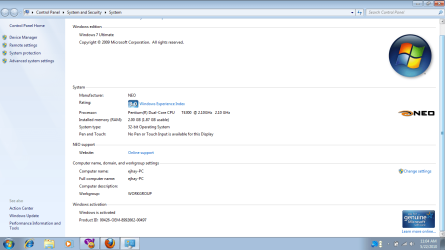
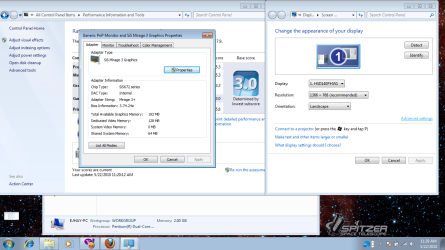
EJ,
Well, since it worked before you formated, do you have the latest graphics driver installed? If you do, then you might see if uninstalling and reinstalling it may help.
Well, since it worked before you formated, do you have the latest graphics driver installed? If you do, then you might see if uninstalling and reinstalling it may help.
My Computer
- Computer type
- PC/Desktop
- Computer Manufacturer/Model Number
- Self built custom
- OS
- 64-bit Windows 11 Pro for Workstations
- CPU
- Intel i7-8700K OC'd to 5 GHz
- Motherboard
- ASUS ROG Maximus XI Formula Z390
- Memory
- 64 GB (4x16GB) G.SKILL TridentZ RGB DDR4 3600 MHz
- Graphics Card(s)
- ASUS ROG-STRIX-GTX1080TI-O11G-GAMING
- Sound Card
- Integrated
- Monitor(s) Displays
- 2 x Samsung Odyssey G7 27"
- Screen Resolution
- 2560x1440
- Hard Drives
- 1TB Samsung 990 PRO M.2,
4TB Samsung 990 PRO PRO M.2,
TerraMaster F8 SSD Plus NAS
- PSU
- Seasonic Prime Titanium 850W
- Case
- Thermaltake Core P3
- Cooling
- Corsair Hydro H115i
- Keyboard
- Logitech wireless K800
- Mouse
- Logitech MX Master 4
- Internet Speed
- 2 Gb/s Download and 100 Mb/s Upload
- Antivirus
- Malwarebyte Anti-Malware Premium
- Browser
- Google Chrome
- Other Info
- Logitech Z625 speaker system,
Logitech BRIO 4K Pro webcam,
HP Color LaserJet Pro MFP M477fdn,
APC SMART-UPS RT 1000 XL - SURT1000XLI,
Galaxy S23 Plus phone
 im loosing hope.
I'm extremely sorry to intercept and as Im not adding any solution to the problem and I dont even doubt your intelligency but this is not true.If your rating is below 3.0 areo will shut itself down and become unusable.
My system rating is 2.9 and AERO works for me as it works for any other normal aero user.
I humbly request you to check your facts again.
My Computer
- Computer type
- Laptop
- Computer Manufacturer/Model Number
- Sony Vaio VPCEH25EN
- OS
- Windows 8.1u1 x64
- CPU
- i3
- Memory
- DDR3 6GB
- Graphics Card(s)
- Nvidia 410
- Screen Resolution
- 1366*768
- Hard Drives
- Toshiba 1TB
- Internet Speed
- Dial Up 56kbps
EJ,
I'm starting to believe that your graphics or graphics driver may just not support Aero either.
I'm not sure what generic or otherwise graphics driver version Windows 7 installed for you, but this is all that I could find for your SiS Mirage 3+ at the manufacturer's website quoted below. There's not even any support for Vista.
The B3140 N is not even listed anymore at Neo's driver website either.
NEO Manufacturing and Services, Inc. - Laptop, Notebook, Netbook
I'm starting to believe that your graphics or graphics driver may just not support Aero either.
I'm not sure what generic or otherwise graphics driver version Windows 7 installed for you, but this is all that I could find for your SiS Mirage 3+ at the manufacturer's website quoted below. There's not even any support for Vista.
SiS UniVGA3 graphics driver
File Name R391_logo.zip
Version v 3.91
Release Date 2010-01-21
Support Products
SiS661FX , SiS661GX , SiS662 , SiS671 , SiS671FX , SiS672 , SiS672FX , SiS760 , SiS760GX , SiS761GL , SiS761GX , SiSM661FX , SiSM661GX , SiSM661MX , SiSM662 , SiSM662MX , SiSM671 , SiSM671MX , SiSM672 , SiSM672MX , File Size 17,684KB
Support OS Windows 2000 , Windows ME , Windows XP , Windows Server 2003 , Windows 98 SE , Windows 98
The B3140 N is not even listed anymore at Neo's driver website either.
NEO Manufacturing and Services, Inc. - Laptop, Notebook, Netbook
My Computer
- Computer type
- PC/Desktop
- Computer Manufacturer/Model Number
- Self built custom
- OS
- 64-bit Windows 11 Pro for Workstations
- CPU
- Intel i7-8700K OC'd to 5 GHz
- Motherboard
- ASUS ROG Maximus XI Formula Z390
- Memory
- 64 GB (4x16GB) G.SKILL TridentZ RGB DDR4 3600 MHz
- Graphics Card(s)
- ASUS ROG-STRIX-GTX1080TI-O11G-GAMING
- Sound Card
- Integrated
- Monitor(s) Displays
- 2 x Samsung Odyssey G7 27"
- Screen Resolution
- 2560x1440
- Hard Drives
- 1TB Samsung 990 PRO M.2,
4TB Samsung 990 PRO PRO M.2,
TerraMaster F8 SSD Plus NAS
- PSU
- Seasonic Prime Titanium 850W
- Case
- Thermaltake Core P3
- Cooling
- Corsair Hydro H115i
- Keyboard
- Logitech wireless K800
- Mouse
- Logitech MX Master 4
- Internet Speed
- 2 Gb/s Download and 100 Mb/s Upload
- Antivirus
- Malwarebyte Anti-Malware Premium
- Browser
- Google Chrome
- Other Info
- Logitech Z625 speaker system,
Logitech BRIO 4K Pro webcam,
HP Color LaserJet Pro MFP M477fdn,
APC SMART-UPS RT 1000 XL - SURT1000XLI,
Galaxy S23 Plus phone

I'm extremely sorry to intercept and as Im not adding any solution to the problem and I dont even doubt your intelligency but this is not true.If your rating is below 3.0 areo will shut itself down and become unusable.
My system rating is 2.9 and AERO works for me as it works for any other normal aero user.
I humbly request you to check your facts again.
Well it actually depends on the computer. On mine when my system rating was 1.0 ( i didn't have some required drivers) my aero got shut of. But on my freinds comp who has a rating of 2 something his aero works perfectly.
My Computer
- Computer Manufacturer/Model Number
- Self-built on 31/1/11
- OS
- Windows 7 Ultimate 64 bit
- CPU
- Intel i5 2400 @ 3.80 GHz
- Motherboard
- Ashrock P67 Extreme 4
- Memory
- Mushkin Silverline 996768 4GB
- Graphics Card(s)
- MSI GTX 460 760MB Cyclone Overclocked
- Sound Card
- Integrated
- Monitor(s) Displays
- Asus VH202T 20" Widescreen
- Screen Resolution
- 1600x900
- Hard Drives
- SSD: OCZ Vertex 2 60GB
HDD: Hitachi Deskstar 7K1000.C 500GB
- PSU
- Silverstone Strider 500W
- Case
- Zalman Z9 Plus
- Cooling
- Cooler Master Hyper 212 Plus
- Keyboard
- Logitech Wireless Keyboard MK520
- Mouse
- Logitech M310
- Internet Speed
- 3 Mbps
- Other Info
- UEFI: Ashrock P67/
Network Card :TP-Link WN350GD/
WEI: 7.4/
ODD: Lite-On IHAS324

- Local time
- 5:07 AM
- Messages
- 50,634
Run the Aero troubleshooter and it will tell you what is keeping Aero from running. Type aero in start search box to get to it: Find and Fix Problems with Transparency.
Did you right click Desktop, select Personalize and choose an Aero theme?
Rightclick Computer>Properties>Advanced Sys Settings>Performance settings to make sure transparency is enabled.
Finally, post your driver issue in the Drivers forum here to get help finding and installing the latest display driver. There may be a modded driver for that chip/card via Google. If the latest you come up with is XP, then try installing it by running Setup in compatibility mode: rightclick setup>Properties>Compatibility>set to XP SP2>Run as Admin.
Did you right click Desktop, select Personalize and choose an Aero theme?
Rightclick Computer>Properties>Advanced Sys Settings>Performance settings to make sure transparency is enabled.
Finally, post your driver issue in the Drivers forum here to get help finding and installing the latest display driver. There may be a modded driver for that chip/card via Google. If the latest you come up with is XP, then try installing it by running Setup in compatibility mode: rightclick setup>Properties>Compatibility>set to XP SP2>Run as Admin.
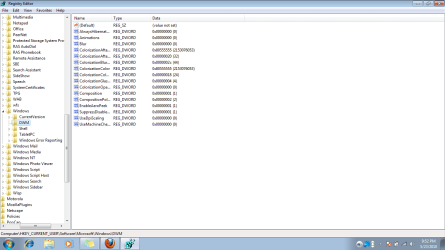
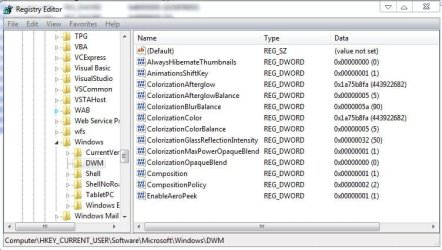
really?can you post your registry editor,DWM format?
Can you please brief me what you exactly want?
My Computer
- Computer type
- Laptop
- Computer Manufacturer/Model Number
- Sony Vaio VPCEH25EN
- OS
- Windows 8.1u1 x64
- CPU
- i3
- Memory
- DDR3 6GB
- Graphics Card(s)
- Nvidia 410
- Screen Resolution
- 1366*768
- Hard Drives
- Toshiba 1TB
- Internet Speed
- Dial Up 56kbps
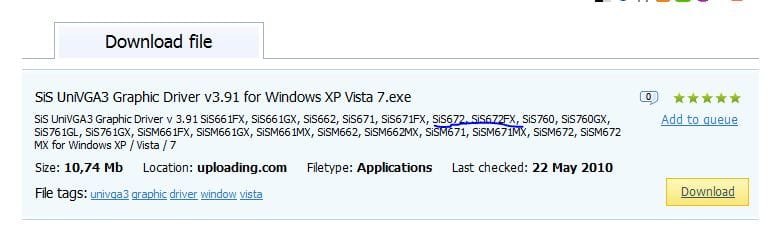
thnx...my video card is sis672. Anyone, is there any driver compatible to this to run the aero?
Can you try this and tell us please
Download SiS UniVGA3 Graphic Driver v3.91 for Windows XP Vista 7.exe from General-Search.com
Attachments
My Computer
- Computer type
- Laptop
- Computer Manufacturer/Model Number
- Sony Vaio VPCEH25EN
- OS
- Windows 8.1u1 x64
- CPU
- i3
- Memory
- DDR3 6GB
- Graphics Card(s)
- Nvidia 410
- Screen Resolution
- 1366*768
- Hard Drives
- Toshiba 1TB
- Internet Speed
- Dial Up 56kbps
- Local time
- 5:07 AM
- Messages
- 50,634
when i install in compatibility mode XP sp2 and restart it desktop totally black out!so i restart it again and i go to safe mode to change into XP sp3 again.are you kidding me!?
XP SP2 is normally the place to start if you have an XP program or driver. Then try other modes to see if they work.
No, I was not kidding. Most apps/drivers from XP which I install in compat. mode work in SP2, which is why I suggested it.

My Computer
- Computer type
- Laptop
- Computer Manufacturer/Model Number
- Sony Vaio VPCEH25EN
- OS
- Windows 8.1u1 x64
- CPU
- i3
- Memory
- DDR3 6GB
- Graphics Card(s)
- Nvidia 410
- Screen Resolution
- 1366*768
- Hard Drives
- Toshiba 1TB
- Internet Speed
- Dial Up 56kbps