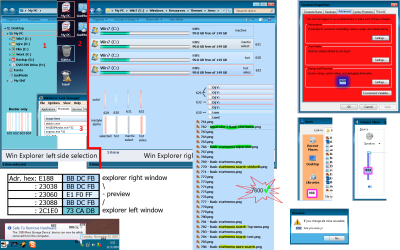
Aero.Msstyle Image #'s

Kukag

New member
Pro User
Local time
12:39 PM
Messages
239
Location
California
Hey all so I have some questions, I'm trying to create a windows 7 theme but I'm having trouble finding the images I need to edit. So I'm looking to see if anyone know what image # these are in aero.msstyle....

Check Images attached below

1. Pinned Startmenu Screen background ( white area )
2. Mouseover link on the right ( George )
3. Jumplist Arrow
4. Opened Program Highlight
5. Taskbar
6. Expand Notification Area Arrow
7. Shortcut Arrow Box

codes.png

8. Back And Forward Buttons
9. Organize, System Properties, etc Text Font / Color
10. Opened Folder Highlight
11. Sections Header Font / Color
12. Drive Outline Color
13. Detail Pane Bg Color
14. Organize, System Properties, etc Bg Color
15. Those Icons
16. Min / Max / Close, Buttons / BG's
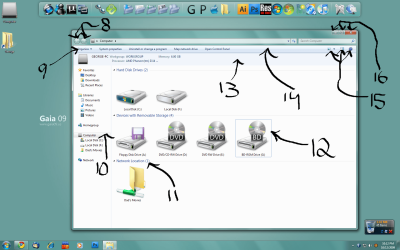
codes2.png

I think thats it lol I know its a lot but hopefully combined with everyone we can figure it out! =P

Thanks,
Kukag
 

My Computer

Computer Manufacturer/Model Number
Custom
OS
Windows 7
CPU
AMD Phenom II X4 940 3.0 Stock
Motherboard
Gigabyte GA-MA78GM-S2H
Memory
G.SKILL DDR2 800 PI Black 4GB+Corsair XMS2 Xtrm Gaming 2GB
Graphics Card(s)
ASUS EN8800GT TOP (Fact OC)
Monitor(s) Displays
Optiquest 20" Flatscreen
Screen Resolution
1680x1050
Hard Drives
Seagate 3.5' 7200RPM 750GB HDD
PSU
Antec NeoHE 550W
Cooling
Stock AMD Phenom HSF
Keyboard
Logitech G15
Internet Speed
Charter HighSpeed 10 Down / 5 Up
The Shortcut Overlay icon isn't part of the themes/styles, it's hiding in shell32.dll as an icon, its named as #16769.
(the other icons you're looking for (#15 in your list) look to be hiding in shell32.dll too as icons at the rear end of the list, but I havn't tried editing these so I can't promise they are the right ones)

as for the Min/Max/Restore buttons, have a look at the 'STREAM' resource folder back inside the msstyle you're editing. (its another .png file but its one big one)

EDIT:
Regarding the taskbar, have a look at these threads:
http://www.sevenforums.com/tutorials/4315-taskbar-customize-skin.html?filter
&
http://www.sevenforums.com/customization/14104-skinning-question-taskbar-transparency.html
 

My Computer

Computer Manufacturer/Model Number
Self Built
OS
XP Pro SP3 x86/Vista SP2 x64/Win7 x64 Triple-boot
CPU
AMD64 X2 AM2 5000+
Motherboard
Asus MSN-X Plus
Memory
Corsair TWX 2Gb (2x1Gb) DDR2 800Mhz
Graphics Card(s)
PCI-X 2.0 Inno3D (NVidia) 9500GT 1Gb DDR2
Sound Card
Onboard Realtec ALC662-GR
Monitor(s) Displays
Relisys 17' CRT (model unknown)
Screen Resolution
1024x768
Hard Drives
750Gb Samsung 7200-3Gb/s 32Mb Cache SATA
PSU
500W
Cooling
Standard AMD CPU Fan, One side, front and rear case fan.
Keyboard
Microsoft Multimedia Keyboard
Mouse
Samsung Optical
Internet Speed
10M
Hmm thanks a lot for the info and the links, the first link the image #'s don't seem to match with what appears with mine, for example 990 in aero.msstyle has like nothing as its image and for 829 its like a long line cut into 4 with diffferent colors in each?

Thanks for the help +rep anyone else wanna have a stab at this?
Kukag
 

My Computer

Computer Manufacturer/Model Number
Custom
OS
Windows 7
CPU
AMD Phenom II X4 940 3.0 Stock
Motherboard
Gigabyte GA-MA78GM-S2H
Memory
G.SKILL DDR2 800 PI Black 4GB+Corsair XMS2 Xtrm Gaming 2GB
Graphics Card(s)
ASUS EN8800GT TOP (Fact OC)
Monitor(s) Displays
Optiquest 20" Flatscreen
Screen Resolution
1680x1050
Hard Drives
Seagate 3.5' 7200RPM 750GB HDD
PSU
Antec NeoHE 550W
Cooling
Stock AMD Phenom HSF
Keyboard
Logitech G15
Internet Speed
Charter HighSpeed 10 Down / 5 Up
Same here. All the tutorials I've found link to incorrect images. My guess is that it's because they were made for non build 7600 versions?

Ugh, this is irritating!
 

My Computer

OS
Windows 7 / Ubuntu Jaunty
CPU
Intel Core 2 Duo E6600
Motherboard
Intel D975XBX2
Memory
4GB DDR2 800
Graphics Card(s)
Nvidia 8800GTX
Sound Card
M-Audio Delta 1010LT
Monitor(s) Displays
Apple 23" Cinema Display
Hard Drives
Seagate Barracuda 500GB
Seagate Barracuda 750GB
LaCie 1TB external drive
PSU
XClio Greatpower 850W
Case
Cooler Master CMSTACKER 810
Cooling
Xigmatek Dark Knight
Keyboard
MS Wireless Laser Desktop 6000 v2
Mouse
MS Wirelss Laser Mouse 6000 v1
Internet Speed
AT&T 3MBPS
Ya i got fed up so I spent the $25 and bought Vista Style Builder =P fairly happy with my purchase its just hard to figure out where to start with lol

Thanks,
Kukag
 

My Computer

Computer Manufacturer/Model Number
Custom
OS
Windows 7
CPU
AMD Phenom II X4 940 3.0 Stock
Motherboard
Gigabyte GA-MA78GM-S2H
Memory
G.SKILL DDR2 800 PI Black 4GB+Corsair XMS2 Xtrm Gaming 2GB
Graphics Card(s)
ASUS EN8800GT TOP (Fact OC)
Monitor(s) Displays
Optiquest 20" Flatscreen
Screen Resolution
1680x1050
Hard Drives
Seagate 3.5' 7200RPM 750GB HDD
PSU
Antec NeoHE 550W
Cooling
Stock AMD Phenom HSF
Keyboard
Logitech G15
Internet Speed
Charter HighSpeed 10 Down / 5 Up
I think I may have found it... 1028 in the msstyles folder. Not entirely sure yet though.
 

My Computer

OS
Windows 7 / Ubuntu Jaunty
CPU
Intel Core 2 Duo E6600
Motherboard
Intel D975XBX2
Memory
4GB DDR2 800
Graphics Card(s)
Nvidia 8800GTX
Sound Card
M-Audio Delta 1010LT
Monitor(s) Displays
Apple 23" Cinema Display
Hard Drives
Seagate Barracuda 500GB
Seagate Barracuda 750GB
LaCie 1TB external drive
PSU
XClio Greatpower 850W
Case
Cooler Master CMSTACKER 810
Cooling
Xigmatek Dark Knight
Keyboard
MS Wireless Laser Desktop 6000 v2
Mouse
MS Wirelss Laser Mouse 6000 v1
Internet Speed
AT&T 3MBPS
I've confirmed the locations of the taskbar images for aero!

845 = Taskbar areas under start orb, notification area (oft incorrectly referred to as the system tray), and time/date.
1028 = Main taskbar area (where the applications are).
1062 = Show Hidden Icons button.

The reason why they're hard to find is because MS has used images that are smaller than the full size for a lot of them (they are automatically resized) - logical when you think about it, because the taskbar doesn't have much to it to be honest.

Edit: When I get some free time I'll make a post with all of the locations along with some extra instructions when necessary.
 

My Computer

OS
Windows 7 / Ubuntu Jaunty
CPU
Intel Core 2 Duo E6600
Motherboard
Intel D975XBX2
Memory
4GB DDR2 800
Graphics Card(s)
Nvidia 8800GTX
Sound Card
M-Audio Delta 1010LT
Monitor(s) Displays
Apple 23" Cinema Display
Hard Drives
Seagate Barracuda 500GB
Seagate Barracuda 750GB
LaCie 1TB external drive
PSU
XClio Greatpower 850W
Case
Cooler Master CMSTACKER 810
Cooling
Xigmatek Dark Knight
Keyboard
MS Wireless Laser Desktop 6000 v2
Mouse
MS Wirelss Laser Mouse 6000 v1
Internet Speed
AT&T 3MBPS
did anyone find the start menu images in aero.msstyles for windows 7 build 7600. i've ovly managed to change 1 thing, the pinned programs back ground. image 781 and 811 .
as i try to change the rest i loose the aero affect, really need help with this...
 
Last edited:

My Computer

Computer Manufacturer/Model Number
Targa
OS
windows 7 ultimate 64 Build 7600
CPU
Intel i5 750 @ 2.73
Motherboard
Asus P7P55D LE P7P55D LE
Memory
Corsair 4GB (KIT) DDR3 1600MHz/CL8/XMS3 DOMINATOR with DHX+
Graphics Card(s)
Nvidia Geforce 7300gs
Hard Drives
Intel x-15 g2 80gig
Case
corsair 520w
Cooling
H50 Liquid Cooling
ok i managed to figure out why i loose the aero affect. i have windows 7 ver 6.1 build 7600 and the image numbers here doesn't match the ones in this build.

i think you people that know how to do this is very very cheap with information about it,

i've been searching diffrenst forums for 3 day's and this is all i got


Looks kind of crappy in my eye, not the color i want either, i want to learn how to do it right before i start making it the way i want it

when i edit the all programs tab i looose aero affect. this is killing my brain, if i compare to others and other images i find i am edeting the right ones (brain exploding)

i cant understand why the would remove this setting that were sooooo quick and easy in xp i went from xp to win7. this is the kind of thing that makes me want to change op, thinking of going back to the good old easy tweaking xp...

As you can see i am in neeed of help with this

so now on to my next question, does any one have the correct image numbers for:
Start Menu backgrounds (installed programs,search field/result and all programs)
Explorer background/fields
Mouse Over/marked/inactive.

Remember has to be a Windows 7 version 6.1 7600 build

if some kind soul has these image numbers i can finish, these are the last thing's i need to change.
then i am done.

i will be posting theme,icons and my aero.msstyles file here when i am done, along with a nice tutorial, so the next one after me doesn't have to spend 3-4 days figuring out what to do?


\\Targa
 
Last edited:

My Computer

Computer Manufacturer/Model Number
Targa
OS
windows 7 ultimate 64 Build 7600
CPU
Intel i5 750 @ 2.73
Motherboard
Asus P7P55D LE P7P55D LE
Memory
Corsair 4GB (KIT) DDR3 1600MHz/CL8/XMS3 DOMINATOR with DHX+
Graphics Card(s)
Nvidia Geforce 7300gs
Hard Drives
Intel x-15 g2 80gig
Case
corsair 520w
Cooling
H50 Liquid Cooling
Same here every iD number I found not worked for me
but this is 7600 x64
try this
selection in explorer basic/aero are the same
100% corect basic start/search menu (find the exact pics for aero)
 

Attachments

  • MSImageiDs.png
    MSImageiDs.png
    126.4 KB · Views: 640

My Computer

Computer type
PC/Desktop
Computer Manufacturer/Model Number
696
OS
7 Ultimate x64 sp1
CPU
Intel i5-4690K
Motherboard
GA Z97X Gaming 5
Memory
16Gb HyperX fury
Graphics Card(s)
R9-270x 2Gb
Sound Card
On Board
Monitor(s) Displays
2443NW
Screen Resolution
1920x1200
Hard Drives
WD5000 -
WD5001 -
WD1002
PSU
Cft-650-14cs
Case
Very Big Case
Cooling
stock
Keyboard
G11
Mouse
Logitech
Internet Speed
Adsl
Browser
FF
Other Info
RWD
Back
Top