aero performance warning?

Urbwolf

New member
Power User
Local time
12:30 PM
Messages
201
I am constantly receiving this pop up even with hitting do not show again. I dont understand how im running out of resources when im not even hitting anywhere near 100% usage of cpu, ram or GC. Is there a way to completely disable this message? I have already unchecked the windows troubleshooting box in the action center but still receive pop up.
 

My Computer

Computer type
PC/Desktop
Computer Manufacturer/Model Number
Custom
OS
Windows 7 64bit
CPU
Intel I7 4770k @4.5
Motherboard
Asus z87-pro
Memory
16GB corsair Vengence
Graphics Card(s)
EVGA GTX 980 TI SC acx2.0
Sound Card
XFI fatality gamer
Monitor(s) Displays
Samsung
Screen Resolution
1920 x 1080
Hard Drives
OCZ ssd Baracuda 1tb x2
PSU
Corsair 1200 watt
Case
NZXT Noctis 450
Cooling
Kraken X61
Keyboard
Logitech G510
Mouse
Razer naga
Internet Speed
100 down 25 up
Other Info
Nzxt Hue +
Your right that aero performance thingy is so annoying, and always interferes with what ever was on ones mind at it's occurrence. (Make sure you select the ...do not show again... option with your keyboard), or whatever. I cant reproduce the pop up my self now, because I also received it way too many times usually when I Alt+Tab allot and also if I did not restart Pc at least once a day but I might have fixed it some how but I'm not sure what exactly I did to solve it:

I am constantly receiving this pop up even with hitting do not show again. I dont understand how im running out of resources when im not even hitting anywhere near 100% usage of cpu, ram or GC. Is there a way to completely disable this message? I have already unchecked the windows troubleshooting box in the action center but still receive pop up.

Ok I think this is what I did to solve this: "aero performance warning"

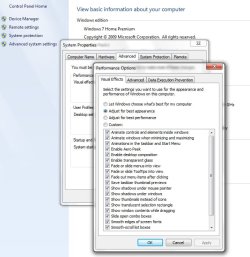
1.Go to this menu after you get that pop up again and have selected do not show again.
I'm sure you should be able to find it, attachment1.

2.Select adjust for best performance, then click apply, then select let windows choose what's best for my computer, then click apply, then select adjust for best appearance, then click apply.

3.Notice the differences for your particular pc hardware on the various selections.

4.Check all selection boxes if it does not do it by default with the select for best appearance option, (if your hardware supports that without lag) then click apply, click ok.

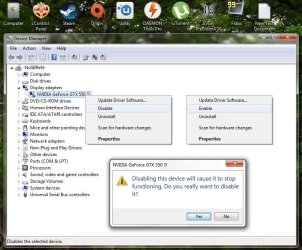
**Disable and Re-enable "GPU" in [Device manager]<<[Display Adapters] when no graphics applications are open without restarting the Pc (this will reset your "GPU" and free memory)
attatchment2.
 

Attachments

  • UntitledI.jpg
    UntitledI.jpg
    139.1 KB · Views: 1
  • Untitledz.jpg
    Untitledz.jpg
    173 KB · Views: 1
Last edited:

My Computer

OS
[Genuine Custom DOS 5.0] & [Genuine Custom Windows 7 Home Premium 64Bit SP1]
Never have seen or even heard of this, either Aero works or it doesn`t.

With your specs, you shouldn`t have any issues with aero.
 

My Computer

Computer type
PC/Desktop
Computer Manufacturer/Model Number
Skylake Special #666
OS
Windows 10 Pro x64
CPU
Intel Core i7 6700K
Motherboard
Asus Sabertooth Z170 Mark 1
Memory
GSkill TridentZ RGB 16GB 3600 16-16-16-36
Graphics Card(s)
EVGA GTX 980 Ti SC x2
Sound Card
Realtek High Definition
Monitor(s) Displays
AOC G2460PG
Screen Resolution
1920 x 1080 144Hz
Hard Drives
Samsung 860 Pro 256GB, Seagate Barracuda 4TB x2
PSU
EVGA 1000 P2, EVGA White Custom Braided Cables
Case
Corsair Vengeance C70 Gunmetal Black
Cooling
Corsair H100i v2, Corsair ML120 x2, Thermal Grizzly Kryonaut
Keyboard
Logitech G910 Orion Spectrum
Mouse
Logitech G700s
Internet Speed
Verizon Fios Quantum Gateway 75/75
Antivirus
Windows Defender, Malwarebytes Free 3.8.3
Browser
Chrome
Other Info
Corsair SP120 x4, LG Blu-ray Drive, Durabrand HT-395 100 Watt Dolby Digital Amp, Corsair H2100 Wireless 7.1 Headset
Never have seen or even heard of this, either Aero works or it doesn`t.

With your specs, you shouldn`t have any issues with aero.

Not having heard of or experienced this aero performance pop up might be true to many, but we still don't know what the cause of this issue is, My guess would be windows with a specific combination of windows updates installed, I base this on the fact that I never had this pop up on the same windows and hardware when I did not have internet, thus having a non updated installed windows running.

There are also some methods to reset aero if it doesn't work, one of them is to run windows experience index (this is also the one of the best methods to start aero after a fresh windows install), but that doesn't cure one from the performance warning.
 

My Computer

OS
[Genuine Custom DOS 5.0] & [Genuine Custom Windows 7 Home Premium 64Bit SP1]
Back
Top