Aero Window Panes sporadically available.

squeeian

New member
Local time
7:45 AM
Messages
16
Greeting fellow Community members, I am working in the IT field helping a company switch from Windows XP to 7 and on over 35 terminals we are having the issue that Aero Peek not working correctly and or greyed out, I am also unable to use the 3D Aero flip feature.

Here is a list of the steps I have thus far tried and had no luck on:


1. Going into Services for the Windows Desktop Manager to stop and restart. Partial success, I was able to view the thumbnail windows window panes, but if I clicked on the Win 7 Theme or show desktop, I lost the ability to view thumbnail windows. I was also able to access what I would consider the normal performance check boxes in performances under the advanced system properties. Ex: Enable Aero, Show thumbnails instead of Icons, Enable transparent glass, ect..., but after clicking on the Win 7 Theme or show desktop all of those options in performance do not even show up.


2. Going through the troubleshoot for Aero, while making sure to apply repairs automatically. partial success here, but still running into the same problem of the fix not staying fixed.

(Side Note: Interestingly after I run the Aero trouble shoot, my screen and all the windows flickers a few times then goes black, but after I minimize and maxamise the windows they look normal with Aero transparance, just no background.)


3. Going in the regedit and changing the value from 1 to 0 and back to 1 again.


4. Running the Windows Experience Index, again partial success here, but still running into the same problem of the fix not staying fixed.


5. Using the Microsoft Fix It download, no luck.


6. Also a while back I tried added some values to the registy in order to have Aero work, no luck then, I can't seem to find what those values were so I can't post them on here.


The only other thing I can see is that I have a repeating fatal error in the event viewer for the Desktop Window Manager (0x88980406)


PLEASE ANY HELP WOULD BE SO APPRECEATED, I AM OFFICALLY BRAIN FRIED.
THANK YOU ALL SO MUCH FOR ANY AND ALL HELP YOU CAN PROVIDE.


OS Name Microsoft Windows 7 Enterprise
Version 6.1.7601 Service Pack 1 Build 7601
Other OS Description Not Available
OS Manufacturer Microsoft Corporation
System Manufacturer Hewlett-Packard
System Model HP rp5700 Business System
System Type X86-based PC
Processor Intel(R) Core(TM)2 Duo CPU E7400 @ 2.80GHz, 2800 Mhz, 2 Core(s), 2 Logical Processor(s)
BIOS Version/Date Hewlett-Packard 786E4 v01.17, 04/26/2010
SMBIOS Version 2.4
Windows Directory C:\WINDOWS
System Directory C:\WINDOWS\system32
Boot Device \Device\HarddiskVolume1
Installed Physical Memory (RAM) 4.00 GB
Total Physical Memory 3.49 GB
Available Physical Memory 2.13 GB
Total Virtual Memory 6.98 GB
Available Virtual Memory 5.43 GB
Page File Space 3.49 GB
Page File C:\pagefile.sys

Sorry for not including the GC info carwiz. I was able to locate it, though.

HP Intel DVI-D ADD2 Sdvo PCI Express
Silicon Image Orion ADD2-N Dual Pad x16 Card
 
Last edited:

My Computer My Computer

Computer type
PC/Desktop
Computer Manufacturer/Model Number
HP rp5700 Business System
OS
Windows 7 Enterprise 32-bit
CPU
Intel (R) Core2 Duo CPU E7400 @ 2.80GHz, 2800 Mhz, 2 Core(s)
Memory
4.00 GB (3.49 GB usable)
Graphics Card(s)
Intel ® Q965/Q963 Express Chipset Family (WDDM 1.0)
Monitor(s) Displays
Dual Monitor, Landscape view
Browser
IE
You didn't mention what graphics card, if any, is being used.

Here's the requirements for Aero:
Your computer's hardware and video card must meet hardware requirements to able to display Aero graphics. Check that your computer meets the minimum hardware requirements for running Aero:

  • 1-gigahertz (GHz) 32-bit (x86) or 64-bit (x64) processor
  • 1 gigabyte (GB) of random access memory (RAM)
  • 128-megabyte (MB) graphics card
You also need to use a Windows theme to display Aero graphics. If you are using an Ease of Access theme, some elements such as transparency and thumbnail previews will not appear. To view which theme you are using, open Personalization in Control Panel.
Open Theme Settings by clicking the Start button, clicking Control Panel, clicking Appearance and Personalization, clicking Personalization, and then clicking Theme.
The theme currently in use is highlighted.

Aero also requires a DirectX 9 class graphics processor that supports a Windows Display Driver Model Driver, Pixel Shader 2.0 in hardware, and 32 bits per pixel.

For best results, you might also want to follow these graphics processor recommendations:

  • 64 MB of graphics memory to support a single monitor with a resolution that is less than 1,310,720 pixels (for example, a 17–inch flat panel LCD monitor that has a 1280 × 1024 resolution)
  • 128 MB of graphics memory to support a single monitor with a resolution from 1,310,720 to 2,304,000 pixels (for example, a 21.1–inch flat panel LCD monitor that has up to a 1600 × 1200 resolution)
  • 256 MB of graphics memory to support a single monitor with a resolution greater than 2,304,000 pixels (for example, a 30–inch wide-screen flat panel LCD monitor that has up to a 2560 × 1600 resolution)
 

My Computer My Computer

Computer type
PC/Desktop
Computer Manufacturer/Model Number
Built 2/11/2011
OS
Windows 7 Pro-x64
CPU
i7-2600 3.4GHz - 3.8GHz Turbo
Motherboard
Intel DH67BL-B3
Memory
8Gb - 2x4GB, Muskin 991770 PC3-1333
Graphics Card(s)
Integrated Intel HD 2000
Sound Card
Integrated Intel 10.1 HD, RealTek ALC892
Monitor(s) Displays
Asus LCD VH222H, Haier HL24XSL2a
Screen Resolution
1920x1080, 1920x1080
Hard Drives
Crucial SSD C300-128Gb,
Western Digital WD5002AALX - 500Gb,
Western Digital WD7501AALS - 750Gb
PSU
Seasonic 650W 80+ Gold Modular
Case
Rosewill Defender
Cooling
Stock CPU, Four 120mm case fans, PCH fan added
Keyboard
Logitech EX100 Y-RBH94 Wireless
Mouse
Logitech EX100 M-RCE95 Wireless
Internet Speed
3.0/1.5 Mbs
Antivirus
Microsoft Security Essentials
Browser
Microsoft Internet Explorer 11
Other Info
Antec Veris Premier-Multimedia IR Station,
Cyber Accoustics-3602 Speakers,
AFT XM-5U Card Reader,
Hauppauge TV-HVR-2250,
Sony LX300 USB Turntable
The graphics card is a Nvidia G-Force 6200, video-338PCI-LP VGA with 256MB DDR. Hopefully this is the right information. Sorry things are kind of hecktic, just got back from holiday break.

Specs / Performance
Memory Interface
shim.gif
128-bit
shim.gif
64-bit
shim.gif
Fill Rate
shim.gif
1.2 billion texels/sec.
shim.gif
1.4 billion texels/sec.
shim.gif
Vertices per Second
shim.gif
225 million
shim.gif
262.5 million
shim.gif
Pixels per Clock
shim.gif
shim.gif

shim.gif
(peak)
shim.gif
4
shim.gif
4
shim.gif
RAMDACs
shim.gif
400 MHz
shim.gif
400 MHz
Memory Interface
shim.gif
128-bit
shim.gif
64-bit
shim.gif
Fill Rate
shim.gif
1.2 billion texels/sec.
shim.gif
1.4 billion texels/sec.
shim.gif
Vertices per Second
shim.gif
225 million
shim.gif
262.5 million
shim.gif
Pixels per Clock
shim.gif
shim.gif

shim.gif
(peak)
shim.gif
4
shim.gif
4
shim.gif
RAMDACs
shim.gif
400 MHz
shim.gif
400 MHz
Memory Interface 128-bit /64-bit
Fill Rate 1.2 Billion texels/sec. / 1.4 Billion texels/sec.
Vertices per Second 225 million / 262.5 million
pixels per clock (peak) 4
RAMDAC's 400 MHz

I am not exactly sure how to get the GHz info, I am a bit out of practice.
 
Last edited:

My Computer My Computer

Computer type
PC/Desktop
Computer Manufacturer/Model Number
HP rp5700 Business System
OS
Windows 7 Enterprise 32-bit
CPU
Intel (R) Core2 Duo CPU E7400 @ 2.80GHz, 2800 Mhz, 2 Core(s)
Memory
4.00 GB (3.49 GB usable)
Graphics Card(s)
Intel ® Q965/Q963 Express Chipset Family (WDDM 1.0)
Monitor(s) Displays
Dual Monitor, Landscape view
Browser
IE
Ok, so I was mis-informed the type of video card. Here is the correct specs for the video card.

Product Description

HP Intel DVI-D ADD2 Sdvo PCI Express
Silicon Image Orion ADD2-N Dual Pad x16 Card

HP Spare Part No: 398333-001, 359301-003

Main Specification

Interface Type: PCI Express x16

Enclosure Type: Plug-in card

Device Type: Add-on interface board

General Compatibility: PC

Device Type: Add-on interface board

Enclosure Type: Plug-in card

Interface Type: PCI Express x16

Video Output Digital Video Standard: Digital Visual Interface (DVI)

Expansion / Connectivity Compatible Slots: 1 x PCI Express x16

Interfaces: 1 x DVI-D
 

My Computer My Computer

Computer type
PC/Desktop
Computer Manufacturer/Model Number
HP rp5700 Business System
OS
Windows 7 Enterprise 32-bit
CPU
Intel (R) Core2 Duo CPU E7400 @ 2.80GHz, 2800 Mhz, 2 Core(s)
Memory
4.00 GB (3.49 GB usable)
Graphics Card(s)
Intel ® Q965/Q963 Express Chipset Family (WDDM 1.0)
Monitor(s) Displays
Dual Monitor, Landscape view
Browser
IE
You could try updating the driver for it I suppose.
 

My Computer My Computer

Computer type
Laptop
Computer Manufacturer/Model Number
MSI GE72VR Apache Pro-416
OS
Windows 10x64 Build 1709
CPU
Intel i7 7700HQ Kaby Lake
Motherboard
Micro-Star Intl. MS-179B (U3C1)
Memory
16 GB DDR4 @2400
Graphics Card(s)
Nvidia Geforce GTX 1060
Screen Resolution
1920x1080 120Hz
Hard Drives
256 GB Nvme M.2 SSD

1TB HDD@7200
Cooling
Cooler Blast 4
Keyboard
Steel Series
Antivirus
Bit Defender Free
Browser
Edge
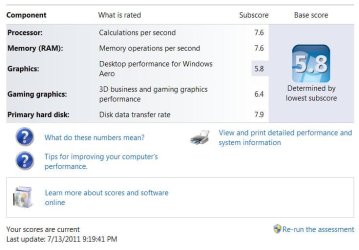
I couldn't find any detailed specs on that video card but at $10, I highly suspect it's not capable of supporting Aero. The driver is too general and goes back to Windows 98. There's a few sites that claim the driver supports Windows 7 but that is probably for simple graphics. Aero has a Huge overhead. Check one of the machines and see what the Windows Experience Index (WEI) scores are. I'd be surprised if the card cracked 2.0. IIRC, Aero requires 3.5 or better.

Added: Sample WEI Scores
 

Attachments

  • WEI-7-13-2011.JPG
    WEI-7-13-2011.JPG
    45.7 KB · Views: 0
Last edited:

My Computer My Computer

Computer type
PC/Desktop
Computer Manufacturer/Model Number
Built 2/11/2011
OS
Windows 7 Pro-x64
CPU
i7-2600 3.4GHz - 3.8GHz Turbo
Motherboard
Intel DH67BL-B3
Memory
8Gb - 2x4GB, Muskin 991770 PC3-1333
Graphics Card(s)
Integrated Intel HD 2000
Sound Card
Integrated Intel 10.1 HD, RealTek ALC892
Monitor(s) Displays
Asus LCD VH222H, Haier HL24XSL2a
Screen Resolution
1920x1080, 1920x1080
Hard Drives
Crucial SSD C300-128Gb,
Western Digital WD5002AALX - 500Gb,
Western Digital WD7501AALS - 750Gb
PSU
Seasonic 650W 80+ Gold Modular
Case
Rosewill Defender
Cooling
Stock CPU, Four 120mm case fans, PCH fan added
Keyboard
Logitech EX100 Y-RBH94 Wireless
Mouse
Logitech EX100 M-RCE95 Wireless
Internet Speed
3.0/1.5 Mbs
Antivirus
Microsoft Security Essentials
Browser
Microsoft Internet Explorer 11
Other Info
Antec Veris Premier-Multimedia IR Station,
Cyber Accoustics-3602 Speakers,
AFT XM-5U Card Reader,
Hauppauge TV-HVR-2250,
Sony LX300 USB Turntable
Hey Guys, Here is the WEI Assessment results for the desktops I am working on. My current working theory (Thanks to Carwiz for the update of the WEI score) is that the terminals that are having the aero greyed out issue have this as their WEI score.

I am currently waiting for employees who actually have the aero feature that is in use and working well to run their own WEI scores so I can see if it's just the fact that those individuals with the problems just have a score below 3.5 and then comes the question on how to raise their score by what ever percent to allow the employees here to use aero?

Prior to Carwiz's comment about the WEI minimum score being 3.5, the other help pages and forums were telling me that if a user had a score of 3.0 or higher could use the Aero 3D effects and window panes.
 

Attachments

  • clip_image002.jpg
    clip_image002.jpg
    74.8 KB · Views: 8

My Computer My Computer

Computer type
PC/Desktop
Computer Manufacturer/Model Number
HP rp5700 Business System
OS
Windows 7 Enterprise 32-bit
CPU
Intel (R) Core2 Duo CPU E7400 @ 2.80GHz, 2800 Mhz, 2 Core(s)
Memory
4.00 GB (3.49 GB usable)
Graphics Card(s)
Intel ® Q965/Q963 Express Chipset Family (WDDM 1.0)
Monitor(s) Displays
Dual Monitor, Landscape view
Browser
IE
So I have new info on the graphics card that is being used by the desktops in the offices that I am temping at. The graphics card is a Intel ® Q965/Q963 Express Chipset Family (Microsoft Corp. –WDDM 1.0). Also everytime I do a Windows experience index score test on the desktops they keep coming up as a score of 3.4 I am trying to research if said graphics card is compadable with using the Aero 3-D features within Windows 7, though I am not sure. Any assistance in this matter would be appreceated. Thank you all for the all the help you have given thus far and all of your continued help.

-Squeeian
 

My Computer My Computer

Computer type
PC/Desktop
Computer Manufacturer/Model Number
HP rp5700 Business System
OS
Windows 7 Enterprise 32-bit
CPU
Intel (R) Core2 Duo CPU E7400 @ 2.80GHz, 2800 Mhz, 2 Core(s)
Memory
4.00 GB (3.49 GB usable)
Graphics Card(s)
Intel ® Q965/Q963 Express Chipset Family (WDDM 1.0)
Monitor(s) Displays
Dual Monitor, Landscape view
Browser
IE
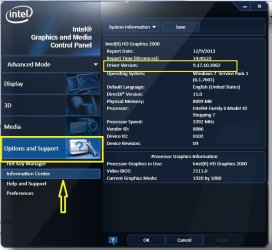
The chip set should be compatible with Aero but the driver must also. Intel states that to be a WDDM driver the version must be level 7 or above or the driver is XPDM. The level is the first digit of the version number.

To determine the current version:
1. Right-click on the Windows desktop and select Graphics Properties. The Intel graphics driver window opens.

Note: If the Graphic Properties option is not available, then your computer is not using an Intel® Graphics Controller or an Intel® graphics driver. You will need to obtain the driver from the OEM of the machine or you can use Intel's WDDM.

2. In the driver window, click Support, and then select Information Center in the dropdown options. The driver version is listed as Driver Version.

3. In older drivers, click Options & Support > Information Center. The driver version is listed under System Information. For example: 8.15.10.2639.

Here's an example of the later versions.
 

Attachments

  • Graphics Properties - Intel.JPG
    Graphics Properties - Intel.JPG
    73.8 KB · Views: 0

My Computer My Computer

Computer type
PC/Desktop
Computer Manufacturer/Model Number
Built 2/11/2011
OS
Windows 7 Pro-x64
CPU
i7-2600 3.4GHz - 3.8GHz Turbo
Motherboard
Intel DH67BL-B3
Memory
8Gb - 2x4GB, Muskin 991770 PC3-1333
Graphics Card(s)
Integrated Intel HD 2000
Sound Card
Integrated Intel 10.1 HD, RealTek ALC892
Monitor(s) Displays
Asus LCD VH222H, Haier HL24XSL2a
Screen Resolution
1920x1080, 1920x1080
Hard Drives
Crucial SSD C300-128Gb,
Western Digital WD5002AALX - 500Gb,
Western Digital WD7501AALS - 750Gb
PSU
Seasonic 650W 80+ Gold Modular
Case
Rosewill Defender
Cooling
Stock CPU, Four 120mm case fans, PCH fan added
Keyboard
Logitech EX100 Y-RBH94 Wireless
Mouse
Logitech EX100 M-RCE95 Wireless
Internet Speed
3.0/1.5 Mbs
Antivirus
Microsoft Security Essentials
Browser
Microsoft Internet Explorer 11
Other Info
Antec Veris Premier-Multimedia IR Station,
Cyber Accoustics-3602 Speakers,
AFT XM-5U Card Reader,
Hauppauge TV-HVR-2250,
Sony LX300 USB Turntable

My Computer My Computer

Computer type
PC/Desktop
Computer Manufacturer/Model Number
Built 2/11/2011
OS
Windows 7 Pro-x64
CPU
i7-2600 3.4GHz - 3.8GHz Turbo
Motherboard
Intel DH67BL-B3
Memory
8Gb - 2x4GB, Muskin 991770 PC3-1333
Graphics Card(s)
Integrated Intel HD 2000
Sound Card
Integrated Intel 10.1 HD, RealTek ALC892
Monitor(s) Displays
Asus LCD VH222H, Haier HL24XSL2a
Screen Resolution
1920x1080, 1920x1080
Hard Drives
Crucial SSD C300-128Gb,
Western Digital WD5002AALX - 500Gb,
Western Digital WD7501AALS - 750Gb
PSU
Seasonic 650W 80+ Gold Modular
Case
Rosewill Defender
Cooling
Stock CPU, Four 120mm case fans, PCH fan added
Keyboard
Logitech EX100 Y-RBH94 Wireless
Mouse
Logitech EX100 M-RCE95 Wireless
Internet Speed
3.0/1.5 Mbs
Antivirus
Microsoft Security Essentials
Browser
Microsoft Internet Explorer 11
Other Info
Antec Veris Premier-Multimedia IR Station,
Cyber Accoustics-3602 Speakers,
AFT XM-5U Card Reader,
Hauppauge TV-HVR-2250,
Sony LX300 USB Turntable
Hello again Carwiz, So I am at one of the terminals and under the system info, the driver version is 8.15.10.1749. So it appears that the driver version is above 7. Thank you for the links, I will be going over those to see if they can help. However knowing what we know now that the Windows Experience Index is 3.4, that the graphics card supports Aero and the graphics driver is able to support it as well. I am still at a loss to fix the problem with aero peek being greyed out and the Desktop Window Manager looking disabled in the Aero troubleshooter and when going into services it states it's running fine? Hopefully there will be something in the links you sent me, but if not, anything else you can think of would be so helpful. I really want to fix this problem for this company.
 

My Computer My Computer

Computer type
PC/Desktop
Computer Manufacturer/Model Number
HP rp5700 Business System
OS
Windows 7 Enterprise 32-bit
CPU
Intel (R) Core2 Duo CPU E7400 @ 2.80GHz, 2800 Mhz, 2 Core(s)
Memory
4.00 GB (3.49 GB usable)
Graphics Card(s)
Intel ® Q965/Q963 Express Chipset Family (WDDM 1.0)
Monitor(s) Displays
Dual Monitor, Landscape view
Browser
IE

My Computer My Computer

Computer type
PC/Desktop
Computer Manufacturer/Model Number
Built 2/11/2011
OS
Windows 7 Pro-x64
CPU
i7-2600 3.4GHz - 3.8GHz Turbo
Motherboard
Intel DH67BL-B3
Memory
8Gb - 2x4GB, Muskin 991770 PC3-1333
Graphics Card(s)
Integrated Intel HD 2000
Sound Card
Integrated Intel 10.1 HD, RealTek ALC892
Monitor(s) Displays
Asus LCD VH222H, Haier HL24XSL2a
Screen Resolution
1920x1080, 1920x1080
Hard Drives
Crucial SSD C300-128Gb,
Western Digital WD5002AALX - 500Gb,
Western Digital WD7501AALS - 750Gb
PSU
Seasonic 650W 80+ Gold Modular
Case
Rosewill Defender
Cooling
Stock CPU, Four 120mm case fans, PCH fan added
Keyboard
Logitech EX100 Y-RBH94 Wireless
Mouse
Logitech EX100 M-RCE95 Wireless
Internet Speed
3.0/1.5 Mbs
Antivirus
Microsoft Security Essentials
Browser
Microsoft Internet Explorer 11
Other Info
Antec Veris Premier-Multimedia IR Station,
Cyber Accoustics-3602 Speakers,
AFT XM-5U Card Reader,
Hauppauge TV-HVR-2250,
Sony LX300 USB Turntable
Hey Carwiz, So I have checked and set both Desktop Window Manager" and "Themes" to automatic start. However when looking over the last two Totorials that you listed I am unable to follow them. Under taskbar properties the enable aero peek is greyed out and checked, it will not allow me uncheck or recheck the box. Also when I am in performance options, visual effects, certain options like enable aero, all the animate check boxes, show thumbnails instead of icons, and other check boxes are not even there to check or un-check. With my test desktop, I was able to check the enable aero feature in the taskbar and all the options for performance options were available, this was after I either restarted the windows desktop manager or doing Aero repairs in the troubleshooter, but as I mentioned in the begining I would then lose the ability to view the thumbnails and lose the ability to enable aero in visual effects performance options along with other check boxes once I clicked on show desktop or clicking on the Aero theme in personalization. So that leaves me in a head scratching position.
 

My Computer My Computer

Computer type
PC/Desktop
Computer Manufacturer/Model Number
HP rp5700 Business System
OS
Windows 7 Enterprise 32-bit
CPU
Intel (R) Core2 Duo CPU E7400 @ 2.80GHz, 2800 Mhz, 2 Core(s)
Memory
4.00 GB (3.49 GB usable)
Graphics Card(s)
Intel ® Q965/Q963 Express Chipset Family (WDDM 1.0)
Monitor(s) Displays
Dual Monitor, Landscape view
Browser
IE
ok, I'm going to try to use Snag-It to do a movie so you can see what I am going through.
 

My Computer My Computer

Computer type
PC/Desktop
Computer Manufacturer/Model Number
HP rp5700 Business System
OS
Windows 7 Enterprise 32-bit
CPU
Intel (R) Core2 Duo CPU E7400 @ 2.80GHz, 2800 Mhz, 2 Core(s)
Memory
4.00 GB (3.49 GB usable)
Graphics Card(s)
Intel ® Q965/Q963 Express Chipset Family (WDDM 1.0)
Monitor(s) Displays
Dual Monitor, Landscape view
Browser
IE

My Computer My Computer

Computer type
PC/Desktop
Computer Manufacturer/Model Number
HP rp5700 Business System
OS
Windows 7 Enterprise 32-bit
CPU
Intel (R) Core2 Duo CPU E7400 @ 2.80GHz, 2800 Mhz, 2 Core(s)
Memory
4.00 GB (3.49 GB usable)
Graphics Card(s)
Intel ® Q965/Q963 Express Chipset Family (WDDM 1.0)
Monitor(s) Displays
Dual Monitor, Landscape view
Browser
IE
Well it looks like seven forum will not let me attach the mp4 file I get an 500 internal service error. I'm going to see if I can do it through google chrome.

Well it wouldn't let me do the attachment through Google Chrome either.
 
Last edited:

My Computer My Computer

Computer type
PC/Desktop
Computer Manufacturer/Model Number
HP rp5700 Business System
OS
Windows 7 Enterprise 32-bit
CPU
Intel (R) Core2 Duo CPU E7400 @ 2.80GHz, 2800 Mhz, 2 Core(s)
Memory
4.00 GB (3.49 GB usable)
Graphics Card(s)
Intel ® Q965/Q963 Express Chipset Family (WDDM 1.0)
Monitor(s) Displays
Dual Monitor, Landscape view
Browser
IE
When I was recording at the end when it looked like I was doing Alt-Tab, I was also trying to do the Windows Key & Tab to do the Aero Flip feature, that was something else that changed the screen from the black background which seems to be the only way to see the Aero window panes to a Windows 7 setting without the 3D aero feature.
 

My Computer My Computer

Computer type
PC/Desktop
Computer Manufacturer/Model Number
HP rp5700 Business System
OS
Windows 7 Enterprise 32-bit
CPU
Intel (R) Core2 Duo CPU E7400 @ 2.80GHz, 2800 Mhz, 2 Core(s)
Memory
4.00 GB (3.49 GB usable)
Graphics Card(s)
Intel ® Q965/Q963 Express Chipset Family (WDDM 1.0)
Monitor(s) Displays
Dual Monitor, Landscape view
Browser
IE
What Theme are you using? Try using something besides the black desktop. Also, reboot after making any system changes.
 

My Computer My Computer

Computer type
PC/Desktop
Computer Manufacturer/Model Number
Built 2/11/2011
OS
Windows 7 Pro-x64
CPU
i7-2600 3.4GHz - 3.8GHz Turbo
Motherboard
Intel DH67BL-B3
Memory
8Gb - 2x4GB, Muskin 991770 PC3-1333
Graphics Card(s)
Integrated Intel HD 2000
Sound Card
Integrated Intel 10.1 HD, RealTek ALC892
Monitor(s) Displays
Asus LCD VH222H, Haier HL24XSL2a
Screen Resolution
1920x1080, 1920x1080
Hard Drives
Crucial SSD C300-128Gb,
Western Digital WD5002AALX - 500Gb,
Western Digital WD7501AALS - 750Gb
PSU
Seasonic 650W 80+ Gold Modular
Case
Rosewill Defender
Cooling
Stock CPU, Four 120mm case fans, PCH fan added
Keyboard
Logitech EX100 Y-RBH94 Wireless
Mouse
Logitech EX100 M-RCE95 Wireless
Internet Speed
3.0/1.5 Mbs
Antivirus
Microsoft Security Essentials
Browser
Microsoft Internet Explorer 11
Other Info
Antec Veris Premier-Multimedia IR Station,
Cyber Accoustics-3602 Speakers,
AFT XM-5U Card Reader,
Hauppauge TV-HVR-2250,
Sony LX300 USB Turntable
The theme is automaticly set to Windows 7 Aero Theme. It only went to a black screen when I stopped and started the Desktop Windows Manager. When recreating the issues that you saw, I did restart the computer after making said changes. The video you saw was a second recreation of what was happening. When I did the first recreation I did restart perodicly to see if the changes would stick. Though for the sake of making the video I don't think Snag-It would allow me to keep the video going if I restarted the machine.
 

My Computer My Computer

Computer type
PC/Desktop
Computer Manufacturer/Model Number
HP rp5700 Business System
OS
Windows 7 Enterprise 32-bit
CPU
Intel (R) Core2 Duo CPU E7400 @ 2.80GHz, 2800 Mhz, 2 Core(s)
Memory
4.00 GB (3.49 GB usable)
Graphics Card(s)
Intel ® Q965/Q963 Express Chipset Family (WDDM 1.0)
Monitor(s) Displays
Dual Monitor, Landscape view
Browser
IE
Ok, what state are you in now? I'm lost. It was hard to follow what you were doing in the video. When you disable DWM, the theme will go away and I don't know what will work at that point. Can you get to a desktop with Aero? Lets start there and work on one thing at a time.

Added:
When you got the screen below, did it fix it? What did the Details show?
 

Attachments

  • Aero Error.JPG
    Aero Error.JPG
    40 KB · Views: 0
Last edited:

My Computer My Computer

Computer type
PC/Desktop
Computer Manufacturer/Model Number
Built 2/11/2011
OS
Windows 7 Pro-x64
CPU
i7-2600 3.4GHz - 3.8GHz Turbo
Motherboard
Intel DH67BL-B3
Memory
8Gb - 2x4GB, Muskin 991770 PC3-1333
Graphics Card(s)
Integrated Intel HD 2000
Sound Card
Integrated Intel 10.1 HD, RealTek ALC892
Monitor(s) Displays
Asus LCD VH222H, Haier HL24XSL2a
Screen Resolution
1920x1080, 1920x1080
Hard Drives
Crucial SSD C300-128Gb,
Western Digital WD5002AALX - 500Gb,
Western Digital WD7501AALS - 750Gb
PSU
Seasonic 650W 80+ Gold Modular
Case
Rosewill Defender
Cooling
Stock CPU, Four 120mm case fans, PCH fan added
Keyboard
Logitech EX100 Y-RBH94 Wireless
Mouse
Logitech EX100 M-RCE95 Wireless
Internet Speed
3.0/1.5 Mbs
Antivirus
Microsoft Security Essentials
Browser
Microsoft Internet Explorer 11
Other Info
Antec Veris Premier-Multimedia IR Station,
Cyber Accoustics-3602 Speakers,
AFT XM-5U Card Reader,
Hauppauge TV-HVR-2250,
Sony LX300 USB Turntable
Back
Top