Hey there,
I would like to ask for your support!
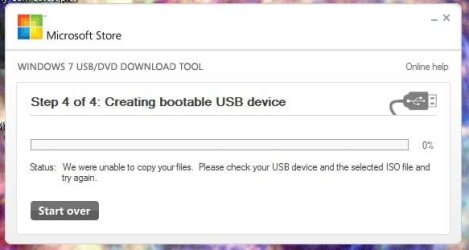
I’m trying to install the Windows 7 Ultimate operation system on my Dell N5040 laptop and after choosing in the BIOS to boot from a USB it says “ windows is loading files...” and right after this red screen appears and my laptop shuts down.
I upgraded my system from 3 GB to 8 GB memory two weeks ago.
Currently, I have the Windows 7 Professional 32-bit version running on my laptop and due to this reason, it says that out of the 8 GB memory only 3 GB is usable. So I decided to use a better version of Windows 7 and also to set it to 64 bit not 32 bit to be able to use all the 8 GB memory.
I would really appreciate if you could support me with this issue!
I would like to ask for your support!
I’m trying to install the Windows 7 Ultimate operation system on my Dell N5040 laptop and after choosing in the BIOS to boot from a USB it says “ windows is loading files...” and right after this red screen appears and my laptop shuts down.
I upgraded my system from 3 GB to 8 GB memory two weeks ago.
Currently, I have the Windows 7 Professional 32-bit version running on my laptop and due to this reason, it says that out of the 8 GB memory only 3 GB is usable. So I decided to use a better version of Windows 7 and also to set it to 64 bit not 32 bit to be able to use all the 8 GB memory.
I would really appreciate if you could support me with this issue!
Attachments
My Computer
At a glance
Windows 7 Professional 32 bitIntel Core i3-380M3072 MB (1 x 1024 MB + 1 x 2048 MB) 1333 MHz ...Intel HD Graphics
- Computer type
- Laptop
- Computer Manufacturer/Model Number
- Dell N5040
- OS
- Windows 7 Professional 32 bit
- CPU
- Intel Core i3-380M
- Motherboard
- Mobile Intel® HM57 express chipset
- Memory
- 3072 MB (1 x 1024 MB + 1 x 2048 MB) 1333 MHz Dual Channel DD
- Graphics Card(s)
- Intel HD Graphics
- Hard Drives
- 320 GB - 60 GB empty
- Antivirus
- Eset 32
- Browser
- Google chrome