
After Format Access is denied when editing text files,pics in D drive

truemate

New member
Local time
7:29 PM
Messages
32
i just format one of my HDD where i was using win 7 sp1 32bit ... and jump to win7 sp1 64bit

while tday when i was opening some txt file to edit & when i was saving back... a pop up message came "Access is Denied"

so i change the D drive whole permission to Full ctrl...
i check the drive permission-
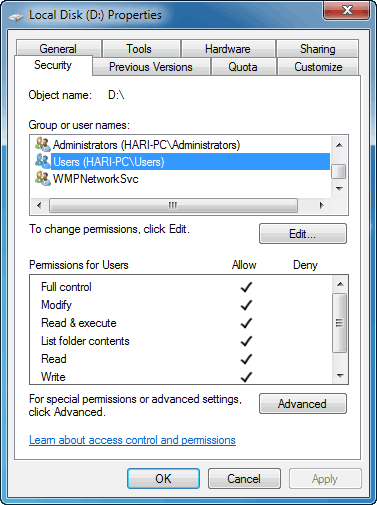
TRscc6i.png


restarted the pc... but same thing access denied ...

that file permission setting is like this
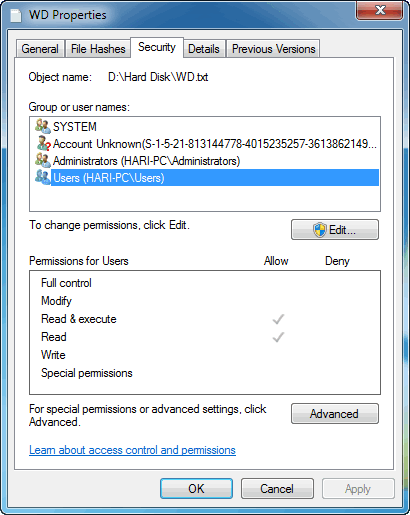
n2mgl3R.png


Now for some files no prob but for some this denied message comes..
Even when try to edit and save the pic back ..and when try to copy some files it says "You will need to provide a administrator permission to copy this folder"
WTH... i am only admin and i only need permission...frm whom ?

i just done a clean fresh installation and all this permission it asking.. before that it was nothing like this..


and are there 2 users ?? i mean isn't it should be only administrator .. From where that Users.. came from ?
 

My Computer My Computer

At a glance

Windows 7 Ultimate x64 & Win10 x64bit LTSC4gb/8GB
Computer type
PC/Desktop
OS
Windows 7 Ultimate x64 & Win10 x64bit LTSC
Memory
4gb/8GB
Hard Drives
WD SATA 500GB
Seagate Barracuda 1TB
Antivirus
EIS v13
Humans see permission as a username but windows uses SID which is the number you see as unknown user even if you use same name to windows it has a different sid so all the files used from an old system will be owned by the old user who created them with a different sid. You may need to take ownership of all folders to acces them
 

My Computer My Computer

At a glance

win 8 32 bit
Computer type
PC/Desktop
OS
win 8 32 bit
Humans see permission as a username but windows uses SID which is the number you see as unknown user even if you use same name to windows it has a different sid so all the files used from an old system will be owned by the old user who created them with a different sid. You may need to take ownership of all folders to acces them

i m only old user its my machine only bro....and frm my good hands i formatted it :D

so you mean i have to do manually to take ownership of each files... :shock:
past i done format never use to face all this.. now after nearly 3 yrs gap i format the PC and facing this issue.. is this because from 32bit i jump to 64bit ?
 

My Computer My Computer

At a glance

Windows 7 Ultimate x64 & Win10 x64bit LTSC4gb/8GB
Computer type
PC/Desktop
OS
Windows 7 Ultimate x64 & Win10 x64bit LTSC
Memory
4gb/8GB
Hard Drives
WD SATA 500GB
Seagate Barracuda 1TB
Antivirus
EIS v13
It's down to the old files being owned by the old user nothing to do with 64 bit. You can use our tool to take ownership you apply it to folders not files
 

My Computer My Computer

At a glance

win 8 32 bit
Computer type
PC/Desktop
OS
win 8 32 bit
ok... which tool plz share
and for files i need to do manually.... dammm they r in tons :/
 

My Computer My Computer

At a glance

Windows 7 Ultimate x64 & Win10 x64bit LTSC4gb/8GB
Computer type
PC/Desktop
OS
Windows 7 Ultimate x64 & Win10 x64bit LTSC
Memory
4gb/8GB
Hard Drives
WD SATA 500GB
Seagate Barracuda 1TB
Antivirus
EIS v13
"...and for files i need to do manually...."
I think Samuria said one can gain permissions for folders, folder by folder, I think he implied that it is not necessary to do each file. Samuria, did I get that correct?
 

My Computer My Computer

At a glance

Windows 7 Professional 64-bitDesktop i5; Acers i5 & i7desktop 16GB; 1 Acer 8GB & 1 Acer 16GB
Computer type
PC/Desktop
Computer Manufacturer/Model Number
Antec desktop; Acer Aspire laptops
OS
Windows 7 Professional 64-bit
CPU
Desktop i5; Acers i5 & i7
Memory
desktop 16GB; 1 Acer 8GB & 1 Acer 16GB
Hard Drives
1TB split into 2 equal partitions [OS and data] usable by RJS
Internet Speed
AT&T DSL
Browser
FF, GChrome, msIE
Other Info
Windows 7 Firewall, Emsisoft AM/AV, MSE [scan-only], SpywareBlaster, Ruiware/BillP combine
just now i checked even in C drive..system folders.. windows,users,progdata etc me not able to do anything... not even make a new txt file by right click option...

when right click it shows only folder option

8trHSS8.png


wat the hell is happening... no where i am getting full ctrl..


i dont know where more like these full ctrl are denied
 

My Computer My Computer

At a glance

Windows 7 Ultimate x64 & Win10 x64bit LTSC4gb/8GB
Computer type
PC/Desktop
OS
Windows 7 Ultimate x64 & Win10 x64bit LTSC
Memory
4gb/8GB
Hard Drives
WD SATA 500GB
Seagate Barracuda 1TB
Antivirus
EIS v13
It's all there to keep the system files safe after the ransomeware killed thousands of PCs
 

My Computer My Computer

At a glance

win 8 32 bit
Computer type
PC/Desktop
OS
win 8 32 bit
just now i checked even in C drive..system folders.. windows,users,progdata etc me not able to do anything... not even make a new txt file by right click option...

when right click it shows only folder option

8trHSS8.png


wat the hell is happening... no where i am getting full ctrl..


i dont know where more like these full ctrl are denied


I have also only the new folder option, I do not think you can create directly by right click in C:/ a .txt file...
 

My Computer My Computer

At a glance

Windows 7 Professional SP1 - x64 [Non-UEFI Boot]Ivy Bridge Core i5 3570K (Delidded)G.Skill "Ares" DDR3 PC3-12800 - 1600MHz (16Gb)Asus Dual-RX480-O4G
Computer type
PC/Desktop
Computer Manufacturer/Model Number
Custom Build
OS
Windows 7 Professional SP1 - x64 [Non-UEFI Boot]
CPU
Ivy Bridge Core i5 3570K (Delidded)
Motherboard
Asus P8Z77-V LE PLUS
Memory
G.Skill "Ares" DDR3 PC3-12800 - 1600MHz (16Gb)
Graphics Card(s)
Asus Dual-RX480-O4G
Sound Card
Creative Sound Blaster Z w/5.1 sound system
Monitor(s) Displays
Asus IPS 23"
Screen Resolution
16/9
Hard Drives
Internal:
500Go Sata 6Gb/s (x2)
500Go Sata 3Gb/s (x2)
SSD 60Go Sata 6Gb/s
PSU
In Win C 900W Series 80+ Platinum
Case
Thermaltake Chaser A71
Cooling
Custom Water Cooling Loop
Keyboard
Cooler Master QuickFire XTi
Mouse
Razer Imperator 2012 (4G)
Antivirus
MSE
Browser
IE 11.0.xxx Rtm
Other Info
"Raid0" with Intel Smart Response Technology (HDD/SSD)
that ownership tool/reg is awesome.. now able to take ctrl of everything in drive D ... :D

1st i thought my pc is been some virus/malware attack,, that i am not able to do anything.. i scan whole pc... nothing out there.. and than i use this tool/reg.. voilaaa :party:

but this not working on C sys drive...


It's all there to keep the system files safe after the ransomware killed thousands of PCs

when it was there... just 2 weeks back when i was on 32bit that time i was not facing all these issues

SO now how to take full ctl on c drive sys folder... should i do it manually
 

My Computer My Computer

At a glance

Windows 7 Ultimate x64 & Win10 x64bit LTSC4gb/8GB
Computer type
PC/Desktop
OS
Windows 7 Ultimate x64 & Win10 x64bit LTSC
Memory
4gb/8GB
Hard Drives
WD SATA 500GB
Seagate Barracuda 1TB
Antivirus
EIS v13
I have also only the new folder option, I do not think you can create directly by right click in C:/ a .txt file...

we can ,, was doing this frm 2012....
 

My Computer My Computer

At a glance

Windows 7 Ultimate x64 & Win10 x64bit LTSC4gb/8GB
Computer type
PC/Desktop
OS
Windows 7 Ultimate x64 & Win10 x64bit LTSC
Memory
4gb/8GB
Hard Drives
WD SATA 500GB
Seagate Barracuda 1TB
Antivirus
EIS v13
Back
Top