Access denied editing text files to root C drive

Sorry - real life got in the way!

Add the Value and data in yourself :)
in Regedit, navigate to
HKEY_LOCAL_MACHINE\Software\Microsoft\Windows\CurrentVersion\Policies\System
and right-click on the System entry - select New> DWORD Value
entry the Name, then double-click on the name to open it up and change the data point to 1
 

My Computer My Computer

At a glance

Win 7 x64 Home Premium (and x86 VirtualBox VM...i3 370M/i7 6500U8GB - finally :)/8GBit's an i3, dude!/dual Intel&nVidia
Computer type
Laptop
Computer Manufacturer/Model Number
Asus K52F or Lenovo B51-80
OS
Win 7 x64 Home Premium (and x86 VirtualBox VM)/Win10
CPU
i3 370M/i7 6500U
Motherboard
Asus/Lenovo
Memory
8GB - finally :)/8GB
Graphics Card(s)
it's an i3, dude!/dual Intel&nVidia
Sound Card
onboard
Monitor(s) Displays
15.6" built-in
Screen Resolution
1366x768/1920x1080
Hard Drives
750GB Seagate internal
Sundry external drives attached to other computers on the local network
1TB SSD on the Lenovo
PSU
n/a
Internet Speed
as much as I can get - usually on a dongle/phone, so <1MB/s
Antivirus
MSE/Defender
Browser
IE11/12/Edge/Chrome/FF(if I must)
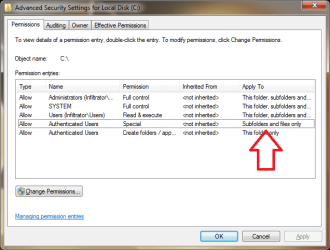
Are you falling into the trap of not watching "Applies to" in the permissions? See below for the default permissions placed on the system drive.
 

Attachments

  • Untitled.png
    Untitled.png
    17.7 KB · Views: 11

My Computer My Computer

At a glance

Windows 10 Pro (x64)Intel Core i7-3930K (3.2GHz - 4.5GHz)4x Samsung 4GB PC3-12800 DDR3 (16GB 1600MHz)Nvidia Geforce GTX 690
Computer type
PC/Desktop
Computer Manufacturer/Model Number
Alienware Aurora ALX R4
OS
Windows 10 Pro (x64)
CPU
Intel Core i7-3930K (3.2GHz - 4.5GHz)
Motherboard
Alienware Aurora-R4 x79
Memory
4x Samsung 4GB PC3-12800 DDR3 (16GB 1600MHz)
Graphics Card(s)
Nvidia Geforce GTX 690
Sound Card
SteelSeries Siberia Elite
Monitor(s) Displays
Dell UltraSharp U3011
Screen Resolution
2560x1600
Hard Drives
Samsung 850 Pro 256 GB, Seagate 1TB Desktop Hybrid HDD, 2x Western Digital 4TB Green HDD
PSU
875W Some Dell PSU <.<
Case
Alienware Aurora ALX
Cooling
Custom Liquid Cooling (EK CPU & GPU blocks) dual EK 480RAD
Keyboard
Logitech G710+ Mechanical
Mouse
Logitech G700s
Internet Speed
Verizon Fios (50 mbps average)
Other Info
Server: Intel NUC D54250WYK: i5-4250U, 16GB, 256 GB mSATA, Windows Server 2012 R2
Sorry - real life got in the way!

Add the Value and data in yourself :)
in Regedit, navigate to
HKEY_LOCAL_MACHINE\Software\Microsoft\Windows\CurrentVersion\Policies\System
and right-click on the System entry - select New> DWORD Value
entry the Name, then double-click on the name to open it up and change the data point to 1

Made the registry entry and tried it out, did not work :( Even restarted the pc and tried it out again still didnt work.
 

My Computer My Computer

At a glance

windows 7 64bit professional
Computer type
PC/Desktop
OS
windows 7 64bit professional
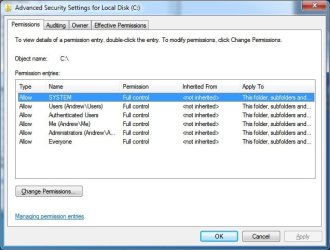
Are you falling into the trap of not watching "Applies to" in the permissions? See below for the default permissions placed on the system drive.

Here is what I got set.
 

Attachments

  • sevenforums1.jpg
    sevenforums1.jpg
    45.1 KB · Views: 9

My Computer My Computer

At a glance

windows 7 64bit professional
Computer type
PC/Desktop
OS
windows 7 64bit professional
Please run the following command, and post the results...

REG QUERY HKEY_LOCAL_MACHINE\Software\Microsoft\Windows\CurrentVersion\Policies\System
 

My Computer My Computer

At a glance

Win 7 x64 Home Premium (and x86 VirtualBox VM...i3 370M/i7 6500U8GB - finally :)/8GBit's an i3, dude!/dual Intel&nVidia
Computer type
Laptop
Computer Manufacturer/Model Number
Asus K52F or Lenovo B51-80
OS
Win 7 x64 Home Premium (and x86 VirtualBox VM)/Win10
CPU
i3 370M/i7 6500U
Motherboard
Asus/Lenovo
Memory
8GB - finally :)/8GB
Graphics Card(s)
it's an i3, dude!/dual Intel&nVidia
Sound Card
onboard
Monitor(s) Displays
15.6" built-in
Screen Resolution
1366x768/1920x1080
Hard Drives
750GB Seagate internal
Sundry external drives attached to other computers on the local network
1TB SSD on the Lenovo
PSU
n/a
Internet Speed
as much as I can get - usually on a dongle/phone, so <1MB/s
Antivirus
MSE/Defender
Browser
IE11/12/Edge/Chrome/FF(if I must)
C:\Windows\system32>REG QUERY HKEY_LOCAL_MACHINE\Software\Microsoft\Windows\Curr
entVersion\Policies\System

HKEY_LOCAL_MACHINE\Software\Microsoft\Windows\CurrentVersion\Policies\System
ConsentPromptBehaviorAdmin REG_DWORD 0x0
ConsentPromptBehaviorUser REG_DWORD 0x3
EnableInstallerDetection REG_DWORD 0x1
EnableLUA REG_DWORD 0x0
EnableSecureUIAPaths REG_DWORD 0x1
EnableUIADesktopToggle REG_DWORD 0x0
EnableVirtualization REG_DWORD 0x1
PromptOnSecureDesktop REG_DWORD 0x0
ValidateAdminCodeSignatures REG_DWORD 0x0
dontdisplaylastusername REG_DWORD 0x0
legalnoticecaption REG_SZ
legalnoticetext REG_SZ
scforceoption REG_DWORD 0x0
shutdownwithoutlogon REG_DWORD 0x1
undockwithoutlogon REG_DWORD 0x1
FilterAdministratorToken REG_DWORD 0x0
LocalAccountTokenFilterPolicy REG_DWORD 0x1

HKEY_LOCAL_MACHINE\Software\Microsoft\Windows\CurrentVersion\Policies\System\UIP
I
 

My Computer My Computer

At a glance

windows 7 64bit professional
Computer type
PC/Desktop
OS
windows 7 64bit professional
Please re-enable User Account Control (LUA) and retest - disabling it does change the effects of some policies.
 

My Computer My Computer

At a glance

Win 7 x64 Home Premium (and x86 VirtualBox VM...i3 370M/i7 6500U8GB - finally :)/8GBit's an i3, dude!/dual Intel&nVidia
Computer type
Laptop
Computer Manufacturer/Model Number
Asus K52F or Lenovo B51-80
OS
Win 7 x64 Home Premium (and x86 VirtualBox VM)/Win10
CPU
i3 370M/i7 6500U
Motherboard
Asus/Lenovo
Memory
8GB - finally :)/8GB
Graphics Card(s)
it's an i3, dude!/dual Intel&nVidia
Sound Card
onboard
Monitor(s) Displays
15.6" built-in
Screen Resolution
1366x768/1920x1080
Hard Drives
750GB Seagate internal
Sundry external drives attached to other computers on the local network
1TB SSD on the Lenovo
PSU
n/a
Internet Speed
as much as I can get - usually on a dongle/phone, so <1MB/s
Antivirus
MSE/Defender
Browser
IE11/12/Edge/Chrome/FF(if I must)
I moved the UAC slider bar all the way up and restarted my pc. This is the new results.

C:\Users\Me>REG QUERY HKEY_LOCAL_MACHINE\Software\Microsoft\Windows\CurrentVersi
on\Policies\System

HKEY_LOCAL_MACHINE\Software\Microsoft\Windows\CurrentVersion\Policies\System
ConsentPromptBehaviorAdmin REG_DWORD 0x2
ConsentPromptBehaviorUser REG_DWORD 0x3
EnableInstallerDetection REG_DWORD 0x1
EnableLUA REG_DWORD 0x1
EnableSecureUIAPaths REG_DWORD 0x1
EnableUIADesktopToggle REG_DWORD 0x0
EnableVirtualization REG_DWORD 0x1
PromptOnSecureDesktop REG_DWORD 0x1
ValidateAdminCodeSignatures REG_DWORD 0x0
dontdisplaylastusername REG_DWORD 0x0
legalnoticecaption REG_SZ
legalnoticetext REG_SZ
scforceoption REG_DWORD 0x0
shutdownwithoutlogon REG_DWORD 0x1
undockwithoutlogon REG_DWORD 0x1
FilterAdministratorToken REG_DWORD 0x0
LocalAccountTokenFilterPolicy REG_DWORD 0x1

HKEY_LOCAL_MACHINE\Software\Microsoft\Windows\CurrentVersion\Policies\System\UIP
I
 

My Computer My Computer

At a glance

windows 7 64bit professional
Computer type
PC/Desktop
OS
windows 7 64bit professional
It only needs to be at the default position - one down from the top.

What happens with file changes after that?
(I'm off to bed now, so no hurry :))
 

My Computer My Computer

At a glance

Win 7 x64 Home Premium (and x86 VirtualBox VM...i3 370M/i7 6500U8GB - finally :)/8GBit's an i3, dude!/dual Intel&nVidia
Computer type
Laptop
Computer Manufacturer/Model Number
Asus K52F or Lenovo B51-80
OS
Win 7 x64 Home Premium (and x86 VirtualBox VM)/Win10
CPU
i3 370M/i7 6500U
Motherboard
Asus/Lenovo
Memory
8GB - finally :)/8GB
Graphics Card(s)
it's an i3, dude!/dual Intel&nVidia
Sound Card
onboard
Monitor(s) Displays
15.6" built-in
Screen Resolution
1366x768/1920x1080
Hard Drives
750GB Seagate internal
Sundry external drives attached to other computers on the local network
1TB SSD on the Lenovo
PSU
n/a
Internet Speed
as much as I can get - usually on a dongle/phone, so <1MB/s
Antivirus
MSE/Defender
Browser
IE11/12/Edge/Chrome/FF(if I must)
Ok, just tested it with UAC turned to second from the top. Unfortunately i still have the problem :( Should I switch it back to off again?
 

My Computer My Computer

At a glance

windows 7 64bit professional
Computer type
PC/Desktop
OS
windows 7 64bit professional
Best left to default - that way everything should be where it normally is expected to be :) - unless you have an actual need for it to be switched off?
 

My Computer My Computer

At a glance

Win 7 x64 Home Premium (and x86 VirtualBox VM...i3 370M/i7 6500U8GB - finally :)/8GBit's an i3, dude!/dual Intel&nVidia
Computer type
Laptop
Computer Manufacturer/Model Number
Asus K52F or Lenovo B51-80
OS
Win 7 x64 Home Premium (and x86 VirtualBox VM)/Win10
CPU
i3 370M/i7 6500U
Motherboard
Asus/Lenovo
Memory
8GB - finally :)/8GB
Graphics Card(s)
it's an i3, dude!/dual Intel&nVidia
Sound Card
onboard
Monitor(s) Displays
15.6" built-in
Screen Resolution
1366x768/1920x1080
Hard Drives
750GB Seagate internal
Sundry external drives attached to other computers on the local network
1TB SSD on the Lenovo
PSU
n/a
Internet Speed
as much as I can get - usually on a dongle/phone, so <1MB/s
Antivirus
MSE/Defender
Browser
IE11/12/Edge/Chrome/FF(if I must)
Best left to default - that way everything should be where it normally is expected to be :) - unless you have an actual need for it to be switched off?

Right now w/e gets this working but i don't see why i would need this on to do something as simple as this. Right now it's set to default position. What else should I do?
 

My Computer My Computer

At a glance

windows 7 64bit professional
Computer type
PC/Desktop
OS
windows 7 64bit professional
Lets have a look at the permissions again

ICACLS C:
ICACLS C:\
ICACLS C:\links.txt

(of course - there's always the option of not working in the root folder?? :))
 

My Computer My Computer

At a glance

Win 7 x64 Home Premium (and x86 VirtualBox VM...i3 370M/i7 6500U8GB - finally :)/8GBit's an i3, dude!/dual Intel&nVidia
Computer type
Laptop
Computer Manufacturer/Model Number
Asus K52F or Lenovo B51-80
OS
Win 7 x64 Home Premium (and x86 VirtualBox VM)/Win10
CPU
i3 370M/i7 6500U
Motherboard
Asus/Lenovo
Memory
8GB - finally :)/8GB
Graphics Card(s)
it's an i3, dude!/dual Intel&nVidia
Sound Card
onboard
Monitor(s) Displays
15.6" built-in
Screen Resolution
1366x768/1920x1080
Hard Drives
750GB Seagate internal
Sundry external drives attached to other computers on the local network
1TB SSD on the Lenovo
PSU
n/a
Internet Speed
as much as I can get - usually on a dongle/phone, so <1MB/s
Antivirus
MSE/Defender
Browser
IE11/12/Edge/Chrome/FF(if I must)
(of course - there's always the option of not working in the root folder?? :))

Surrender? Never!!

C:\Users\Me>ICACLS C:
C: NT AUTHORITY\SYSTEM:(OI)(CI)(F)
BUILTIN\Administrators:(OI)(CI)(F)
Andrew\Me:(OI)(CI)(F)
Andrew\HomeUsers:(RX)
Andrew\Me:(RX)

Successfully processed 1 files; Failed processing 0 files

C:\Users\Me>ICACLS C:\
C:\ NT AUTHORITY\SYSTEM:(F)
NT AUTHORITY\Authenticated Users:(AD)
NT AUTHORITY\Authenticated Users:(OI)(CI)(IO)(F)
Everyone:(OI)(CI)(F)
NT AUTHORITY\Authenticated Users:(OI)(CI)(F)
Andrew\Me:(OI)(CI)(F)
BUILTIN\Administrators:(OI)(CI)(F)
NT AUTHORITY\SYSTEM:(OI)(CI)(F)
BUILTIN\Users:(OI)(CI)(F)
Mandatory Label\High Mandatory Level:(OI)(NP)(IO)(NW)

Successfully processed 1 files; Failed processing 0 files

C:\Users\Me>ICACLS C:\links.txt
C:\links.txt Everyone:(F)
Andrew\Me:(F)
BUILTIN\Administrators:(F)
NT AUTHORITY\SYSTEM:(F)
BUILTIN\Users:(F)
Mandatory Label\High Mandatory Level:(I)(NW)

Successfully processed 1 files; Failed processing 0 files
 

My Computer My Computer

At a glance

windows 7 64bit professional
Computer type
PC/Desktop
OS
windows 7 64bit professional
Ah - a man (?) after my own heart :)

Too many beers tonight - if you haven't heard in 24 hrs, SHOUT!
:)
 

My Computer My Computer

At a glance

Win 7 x64 Home Premium (and x86 VirtualBox VM...i3 370M/i7 6500U8GB - finally :)/8GBit's an i3, dude!/dual Intel&nVidia
Computer type
Laptop
Computer Manufacturer/Model Number
Asus K52F or Lenovo B51-80
OS
Win 7 x64 Home Premium (and x86 VirtualBox VM)/Win10
CPU
i3 370M/i7 6500U
Motherboard
Asus/Lenovo
Memory
8GB - finally :)/8GB
Graphics Card(s)
it's an i3, dude!/dual Intel&nVidia
Sound Card
onboard
Monitor(s) Displays
15.6" built-in
Screen Resolution
1366x768/1920x1080
Hard Drives
750GB Seagate internal
Sundry external drives attached to other computers on the local network
1TB SSD on the Lenovo
PSU
n/a
Internet Speed
as much as I can get - usually on a dongle/phone, so <1MB/s
Antivirus
MSE/Defender
Browser
IE11/12/Edge/Chrome/FF(if I must)
I need to test something...
please create a file on your desktop and then Move it to the root (do NOT copy it!)

then run ICACLS on it, and post the results.
now create a new file directly in the root folder and run ICACLS on that.

Try modifying both files - what happens?
 

My Computer My Computer

At a glance

Win 7 x64 Home Premium (and x86 VirtualBox VM...i3 370M/i7 6500U8GB - finally :)/8GBit's an i3, dude!/dual Intel&nVidia
Computer type
Laptop
Computer Manufacturer/Model Number
Asus K52F or Lenovo B51-80
OS
Win 7 x64 Home Premium (and x86 VirtualBox VM)/Win10
CPU
i3 370M/i7 6500U
Motherboard
Asus/Lenovo
Memory
8GB - finally :)/8GB
Graphics Card(s)
it's an i3, dude!/dual Intel&nVidia
Sound Card
onboard
Monitor(s) Displays
15.6" built-in
Screen Resolution
1366x768/1920x1080
Hard Drives
750GB Seagate internal
Sundry external drives attached to other computers on the local network
1TB SSD on the Lenovo
PSU
n/a
Internet Speed
as much as I can get - usually on a dongle/phone, so <1MB/s
Antivirus
MSE/Defender
Browser
IE11/12/Edge/Chrome/FF(if I must)
I need to test something...
please create a file on your desktop and then Move it to the root (do NOT copy it!)

then run ICACLS on it, and post the results.
now create a new file directly in the root folder and run ICACLS on that.

Try modifying both files - what happens?

Ok i was able to make a text file and move it over to the C: drive. I was able to modify across network.

C:\Users\Me>ICACLS C:\test2.txt
C:\test2.txt NT AUTHORITY\Authenticated Users:(I)(F)
Everyone:(I)(F)
Andrew\Me:(I)(F)
BUILTIN\Administrators:(I)(F)
NT AUTHORITY\SYSTEM:(I)(F)
BUILTIN\Users:(I)(F)

Successfully processed 1 files; Failed processing 0 files


When i tried to make a text file on the C: it gave me this error message.
 

Attachments

  • error1.jpg
    error1.jpg
    15.1 KB · Views: 4

My Computer My Computer

At a glance

windows 7 64bit professional
Computer type
PC/Desktop
OS
windows 7 64bit professional
Are you logged on on winxp and trying to access win7's C:\ drive (root folder)?
 

My Computer My Computer

At a glance

Microsoft Windows 7 Home Premium 64-bits 7601...Intel(R) Core(TM) i3 CPU M 370 @ 2.40GHz4,00 GBATI Mobility Radeon HD 5400 Series
Computer type
Laptop
Computer Manufacturer/Model Number
ACER ASPIRE 5742G
OS
Microsoft Windows 7 Home Premium 64-bits 7601 Multiprocessor Free Service Pack 1
CPU
Intel(R) Core(TM) i3 CPU M 370 @ 2.40GHz
Motherboard
Acer Aspire 5742G
Memory
4,00 GB
Graphics Card(s)
ATI Mobility Radeon HD 5400 Series
Sound Card
(1) AMD High Definition Audio Device (2) Realtek High Defi
Screen Resolution
1366 x 768 x 32 bits (4294967296 colors) @ 60 Hz
Hard Drives
WDC WD5000BEVT-22ZAT0
The results you got are pretty much what I expected.

The problem is that the C:\ folder has that odd permission "Mandatory Label\High Mandatory Level:(OI)(NP)(IO)(NW)"
This means that you require local Admin permissions to create a new file there.
the NP means that the permissions are inherited by objects created in the C:\root - but the permissions don't propagate further down the hierarchy.

Moving a file into the folder, it brings its own set of permissions with it, and doesn't inherit the root permissions in the same way, so modification is allowed.
So the solution would appear to be to ensure that whatever file you need to use is created elsewhere, and then moved into the folder, at which point you should be able to modify it at will :)
(If not - move it out of root, modify it, then move it back!)


I've been unable to remove or modify that permission in my VM
 

My Computer My Computer

At a glance

Win 7 x64 Home Premium (and x86 VirtualBox VM...i3 370M/i7 6500U8GB - finally :)/8GBit's an i3, dude!/dual Intel&nVidia
Computer type
Laptop
Computer Manufacturer/Model Number
Asus K52F or Lenovo B51-80
OS
Win 7 x64 Home Premium (and x86 VirtualBox VM)/Win10
CPU
i3 370M/i7 6500U
Motherboard
Asus/Lenovo
Memory
8GB - finally :)/8GB
Graphics Card(s)
it's an i3, dude!/dual Intel&nVidia
Sound Card
onboard
Monitor(s) Displays
15.6" built-in
Screen Resolution
1366x768/1920x1080
Hard Drives
750GB Seagate internal
Sundry external drives attached to other computers on the local network
1TB SSD on the Lenovo
PSU
n/a
Internet Speed
as much as I can get - usually on a dongle/phone, so <1MB/s
Antivirus
MSE/Defender
Browser
IE11/12/Edge/Chrome/FF(if I must)
Hmmm that sucks. I thought we were getting close to solving this.
 

My Computer My Computer

At a glance

windows 7 64bit professional
Computer type
PC/Desktop
OS
windows 7 64bit professional
Back
Top