
I did a Repair Install today using this process http://www.sevenforums.com/tutorials/3413-repair-install.html
One of the things I 'lost' was my Creative D100 Bluetooth speaker - I think I have 'recovered' everything else
It shows up in cpl->hardware and sound->devices and printers->bluetooth devices but I cant get it to connect.
Until now, if it hasn't connected for some reason, I've pressed a button the front of it until its light flashes blue, then I've right clicked on the device icon, selected Advance Operation->Connect to Audio device; the light would flash green and then go steady blue and it would work
Now, when I right click the icon often I get a spinning wheel for 10-20 secs and no response, occassionaly I will get the context menu, but selecting Connect to Audio device does zilch
The Bluetooth usb gadget is from ASUS - I don't recall doing anything when I got it a couple of years ago, just plugged it in, the drivers installed themselves and it all worked. I've tried plugging it into usb ports where other devices work - so its not the usb port.
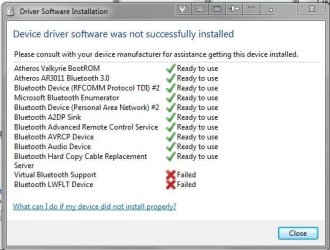
I just noticed this error screen in the notification area, see attachment - I've never seen that screen before, so I cant say whether or not the errors were there before. I also notice that I have a Realtek HD Audio Manager icon in the notification area that wasn't there before and the volume icon has a red cross on it
Computer sound systems have always been PITA for me
Anyone have any ideas
pjd
One of the things I 'lost' was my Creative D100 Bluetooth speaker - I think I have 'recovered' everything else
It shows up in cpl->hardware and sound->devices and printers->bluetooth devices but I cant get it to connect.
Until now, if it hasn't connected for some reason, I've pressed a button the front of it until its light flashes blue, then I've right clicked on the device icon, selected Advance Operation->Connect to Audio device; the light would flash green and then go steady blue and it would work
Now, when I right click the icon often I get a spinning wheel for 10-20 secs and no response, occassionaly I will get the context menu, but selecting Connect to Audio device does zilch
The Bluetooth usb gadget is from ASUS - I don't recall doing anything when I got it a couple of years ago, just plugged it in, the drivers installed themselves and it all worked. I've tried plugging it into usb ports where other devices work - so its not the usb port.
I just noticed this error screen in the notification area, see attachment - I've never seen that screen before, so I cant say whether or not the errors were there before. I also notice that I have a Realtek HD Audio Manager icon in the notification area that wasn't there before and the volume icon has a red cross on it
Computer sound systems have always been PITA for me
Anyone have any ideas
pjd
Attachments
My Computer
At a glance
Win 7 Professional 64bitI5 650 @ 3.2GHz6GAMD Radeon R7 200 Series
- Computer type
- PC/Desktop
- Computer Manufacturer/Model Number
- generic - made to spec
- OS
- Win 7 Professional 64bit
- CPU
- I5 650 @ 3.2GHz
- Motherboard
- Gigabyte H55M-UD2H
- Memory
- 6G
- Graphics Card(s)
- AMD Radeon R7 200 Series
- Sound Card
- whatever is on mobo
- Monitor(s) Displays
- 1 x 24" Samsung
- Screen Resolution
- 1920x1200
- Hard Drives
- Internal 1x256GB Toshiba SSD
Internal 1x2TB
External 2 slot USB 3.0 dock (various drives)
External 1 500GB USB 2.0 drive
- PSU
- 850W Antech Modular
- Case
- Shiny Black Aluminium
- Cooling
- extra fans - sucker in front, blower at back - noisy & cool
- Keyboard
- Microsoft USB Dual Receiver Wireless Keyboard
- Mouse
- Microsoft USB Dual Receiver Wireless Mouse
- Internet Speed
- 20/1Mbps down/up
- Antivirus
- MSE
- Browser
- Firefox and Chrome
- Other Info
- Hitachi USB 3.0 adapter


