After major hardware upgrade can't boot into Win 7 nor repair it

RevRobertJ

New member
Local time
2:26 AM
Messages
7
I have just upgraded a PC which dual booted Windows 7 Pro 64bit (an OEM version), and Linux Mint xfce.
I replaced the motherboard, CPU, memory (8GB) and PSU using retailed kit from last year, so as not to cause problems with the linux installation.
The Windows 7 is not in regular use but I keep it for occasional trips down software memory lane.

The Linux system is working fine, hardly noticed the upgrade! (all the necessary drivers are in the Linux Mint system by default) - but Windows won't boot, presumably due to driver issues.

I have a supergrub2 usb stick which will boot almost anything, and that managed to get a Windows boot started, but of course it complains about new hardware and wants to do a repair, but then if I try and run the repair setup, it complains about the upgrade, requiring reactivation then hangs.

After changing the BIOS boot settings to UEFI + Legacy, I got my dual boot menu back, and was able to choose a Windows 7 boot, but again it wouldn't complete.

The windows half of the HDD has three partitions, for boot repair and system.

I have an OEM repair DVD but that is over 10 years old.
I have an MSI driver DVD for the new motherboard and I have also downloaded from MSI the available drivers, and utilities for the new motherboard that are specifically for Windows 7 Pro 64, which can be available on a usb stick or the HDD or ext HDD, and I can access the Windows partitions from Linux, but of course can only copy/paste, not run anything..
I have a full backup of the files from each of the Windows partitions, on an external HDD (not clones, not images)

I'm in touch with the OEM manufacturer (who supplied me with the hardware so may be interested!) but haven't heard yet.

I don't have NO specific data on the Windows system but there are one or two programs, and a virtual machine that I don't want to lose (XP) which has some useful DOS programs running on it.

I know I could, as a last resort, reinstall the Windows 7 Pro using a downloaded iso, but it would still need reactivating, and I would lose my customised installed programs in both the Win 7 and the XP virtual machines so I am prepared to do some experimenting.
Alternatively I can give up the dual boot and install Windows 7 and XP as virtual machines inside Linux, but again, I lose my customisation.

Can anyone help me to get the drivers that I have available, to this system, given that it hangs v near the beginning of a "repair" process, in the hope that I can get my "old" Windows 7 setup back in action?

Many thanks.
 

My Computers My Computers

  • At a glance

    Windows 7 Pro 64bitAMD
    Computer type
    PC/Desktop
    Computer Manufacturer/Model Number
    Zoomstorm
    OS
    Windows 7 Pro 64bit
    CPU
    AMD
  • Computer type
    PC/Desktop

My Computers My Computers

  • At a glance

    7 X64i5 84002x8gb 3200mhz
    Computer type
    PC/Desktop
    OS
    7 X64
    CPU
    i5 8400
    Motherboard
    gigabyte b365m ds3h
    Memory
    2x8gb 3200mhz
    Hard Drives
    various
    PSU
    pure power 11 400w cm
    Case
    Coolermaster
    Cooling
    cryorig m9i
  • At a glance

    7x64g54008gb ddr4 2400
    Computer type
    PC/Desktop
    OS
    7x64
    CPU
    g5400
    Motherboard
    ga b365m ds3h
    Memory
    8gb ddr4 2400
    PSU
    xfx pro 450w
thank you for that prompt reply.
That looks a useful program. It will be a while before I can set up a PE usb stick and try it owing to other things happening here, but when you say "point it at the folder containing the drivers" - are we talking about the driver/utilities disk that came with the mobo, or the collection of Win7 drivers/utilities that I specifically downloaded direct from MSi or maybe both?

The MSi DVD doesn't have any specific folder named drivers - the whole DVD is a mix of drivers. Is it sufficient just to point the programme at the root folder and let it search itself?

Sorry to be basic - I've never used the program so don't know how it works.

Once again, thanks for the help.
 

My Computers My Computers

  • At a glance

    Windows 7 Pro 64bitAMD
    Computer type
    PC/Desktop
    Computer Manufacturer/Model Number
    Zoomstorm
    OS
    Windows 7 Pro 64bit
    CPU
    AMD
  • Computer type
    PC/Desktop
I would extract this iso file which contains dism++ and other fun things :ar: 23v7.iso

to usb stick using usb7ice :ar: View attachment Usb7ice.zip

usb7ice.JPG

then copy your drivers into a folder on the same usb stick call the folder something sensible so you can find it easily

then boot from the usb stick

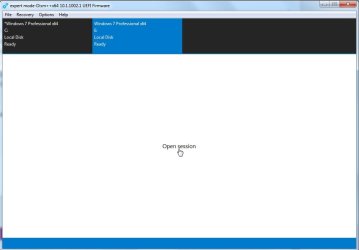
dism++ will be linked from the usb stick via a shortcut on the pe desktop

click the dism++ shortcut

select the win 7 os in the top pane

click open session

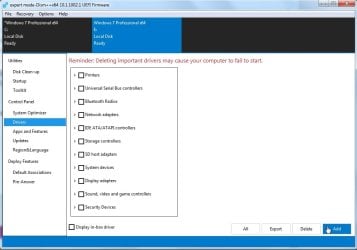
click Drivers in the left pane

click the ADD button

browse to the FOLDER containing the drivers and it will recurse through the folder

- - - Updated - - -

what is the exact MSI motherboard ?
 

My Computers My Computers

  • At a glance

    7 X64i5 84002x8gb 3200mhz
    Computer type
    PC/Desktop
    OS
    7 X64
    CPU
    i5 8400
    Motherboard
    gigabyte b365m ds3h
    Memory
    2x8gb 3200mhz
    Hard Drives
    various
    PSU
    pure power 11 400w cm
    Case
    Coolermaster
    Cooling
    cryorig m9i
  • At a glance

    7x64g54008gb ddr4 2400
    Computer type
    PC/Desktop
    OS
    7x64
    CPU
    g5400
    Motherboard
    ga b365m ds3h
    Memory
    8gb ddr4 2400
    PSU
    xfx pro 450w
Thanks again for the prompt reply. The new Motherboard is: MSI B450M-A PRO MAX AM4 DDR4 M-ATX The new CPU is - AMD Ryzen 5 PRO 4650G AM4 65W It's years since I ran a live Windows session - back then it was BartPE on a CDROM. I'll negotiate with my wife to borrow her Win 10 laptop to make the bootable usb stick (as my only Windows installation is the one that needs fixing) - I'm assuming you don't want me to make it with Linux USB image writer, and I'm assuming FAT32 is the format for the stick? Thanks again,
 

My Computers My Computers

  • At a glance

    Windows 7 Pro 64bitAMD
    Computer type
    PC/Desktop
    Computer Manufacturer/Model Number
    Zoomstorm
    OS
    Windows 7 Pro 64bit
    CPU
    AMD
  • Computer type
    PC/Desktop
yes fat32.

It would be the same as creating a bootable windows installation disk from within linux. Much easier to use usb7ice from within windows.

MSI B450M-A PRO MAX Ryzen 5 PRO 4650G

If you are transfering a disk with win7 already installed, you might need to sysprep/generalize the win7 first, or point an adjust to new hardware module at the win7 installation from another os/winpe.

apu and chipset drivers are here:
https://winraid.level1techs.com/t/solution-win-7-win8-1-x64-ryzen-apu-video-driver/34203
 
Last edited:

My Computers My Computers

  • At a glance

    7 X64i5 84002x8gb 3200mhz
    Computer type
    PC/Desktop
    OS
    7 X64
    CPU
    i5 8400
    Motherboard
    gigabyte b365m ds3h
    Memory
    2x8gb 3200mhz
    Hard Drives
    various
    PSU
    pure power 11 400w cm
    Case
    Coolermaster
    Cooling
    cryorig m9i
  • At a glance

    7x64g54008gb ddr4 2400
    Computer type
    PC/Desktop
    OS
    7x64
    CPU
    g5400
    Motherboard
    ga b365m ds3h
    Memory
    8gb ddr4 2400
    PSU
    xfx pro 450w
yes fat32.
If you are transfering a disk with win7 already installed, you might need to sysprep/generalize the win7 first, or point an adjust to new hardware module at the win7 installation from another os/winpe.
apu and chipset drivers are here:
https://winraid.level1techs.com/t/solution-win-7-win8-1-x64-ryzen-apu-video-driver/34203

Sorry, still trying to puzzle this one out.
As the new B450M-A PRO MAX motherbard, the AMD Ryzen 5 PRO 4650G AM4 65W CPU and Memory are already installed and connected to the "old" Win 7 & Linux dual booting HDD, presumably the sysprep/generalize operation can't be done now? I understood that the dism++ programme was the alternative to that - to "insert" the new drivers into the existing Windows folders on the HDD.

When using the dism++, does the program decide where it is going to put the drivers on its own (once I have pointed it at the right drive/partition)? Or do I need to know the specific driver/utility destination folders in advance?

You referred to apu and chipset drivers - at

https://winraid.level1techs.com/t/solution-win-7-win8-1-x64-ryzen-apu-video-driver/34203

that page confused me completely - I didn't really understand it at all or which sections were relevant to my motherboard. is this a separate set of drivers that I should use instead of the ones I have from MSi disk and website?
At the moment I have the driver/utility disk that came with the new motherboard, and a set of drivers and utilities that I downloaded from MSi site
B450M-A PRO MAX | Motherboard | MSI Global
and

but am not at all sure which source I should be using to "insert" into my existing Windows 7 Pro installation.

I am not aiming at high performance for the Windows setup - I hardly ever use it and then, only for very low spec programs.

Sorry to sound thick. I want to get this right before I start.
 

My Computers My Computers

  • At a glance

    Windows 7 Pro 64bitAMD
    Computer type
    PC/Desktop
    Computer Manufacturer/Model Number
    Zoomstorm
    OS
    Windows 7 Pro 64bit
    CPU
    AMD
  • Computer type
    PC/Desktop
OEM keys are tied to the original motherboard. You can only transfer a retail key unless you bought a system builder key for multiple computers. If it came with the computer that wouldn't be the case. Newegg has a pro retail upgrade copy available for $99. Microsoft Windows 7 Professional Upgrade - Newegg.com I would trust them to sell a legitimate copy.
 

My Computers My Computers

  • At a glance

    Windows 7 pro/Windows 10 ProIntel i7 860 Quad core 2.8 ghz8 gbATI Radeon HD 5770 1 gb ram
    Computer type
    PC/Desktop
    Computer Manufacturer/Model Number
    HP Pavillion Elite HPE-250f
    OS
    Windows 7 pro/Windows 10 Pro
    CPU
    Intel i7 860 Quad core 2.8 ghz
    Memory
    8 gb
    Graphics Card(s)
    ATI Radeon HD 5770 1 gb ram
    Monitor(s) Displays
    Alienware 25 AW2521HF & Viewsonic
    Screen Resolution
    1920 x1080 & 1680x1050
    Hard Drives
    WD blue 1 tb & 500 gb.
    Browser
    FF of course.
    Other Info
    https://www.bestbuy.com/site/hp-pavilion-elite-desktop-intel-core-i7-processor-8gb-memory-1tb-hard-drive/9921493.p?skuId=9921493
  • At a glance

    Windows 2012 R2 Data center/Linux Minti3 9100 3.6GHz, 8M cache, 4C/4T8GB 2666MT/s DDR4 ECC UDIMM
    Computer type
    PC/Desktop
    System Manufacturer/Model Number
    Dell Poweredge T140
    OS
    Windows 2012 R2 Data center/Linux Mint
    CPU
    i3 9100 3.6GHz, 8M cache, 4C/4T
    Memory
    8GB 2666MT/s DDR4 ECC UDIMM
    Monitor(s) Displays
    Viewsonic
    Screen Resolution
    1680x1050
    Hard Drives
    1 TB & 750 GB
    Other Info
    https://www.dell.com/en-us/work/shop/productdetailstxn/poweredge-t140?~ck=bt
drivers that I should use instead of the ones I have from MSi disk and website?

yes

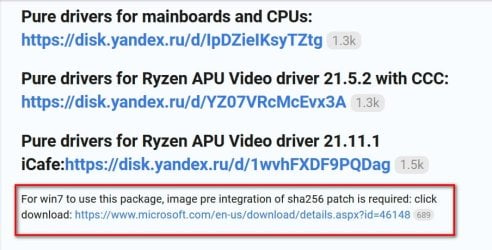
it says install the sha2 update

and the drivers

The driver package already contains all the supporting drivers of AMD, so there is no need to install the AMD CHIPSET DRIVER.

canonkong-ryzen.jpg

can install them using dism++

Then your win7 installation should have the necessary drivers in its filerepository.

Whether it will be able to swap out the existing drivers on boot up is a different question. Usually it is best to sysprep generalize the win7 installation before moving it to new hardware - OR point an "adjust to new hardware " program at it.
 

My Computers My Computers

  • At a glance

    7 X64i5 84002x8gb 3200mhz
    Computer type
    PC/Desktop
    OS
    7 X64
    CPU
    i5 8400
    Motherboard
    gigabyte b365m ds3h
    Memory
    2x8gb 3200mhz
    Hard Drives
    various
    PSU
    pure power 11 400w cm
    Case
    Coolermaster
    Cooling
    cryorig m9i
  • At a glance

    7x64g54008gb ddr4 2400
    Computer type
    PC/Desktop
    OS
    7x64
    CPU
    g5400
    Motherboard
    ga b365m ds3h
    Memory
    8gb ddr4 2400
    PSU
    xfx pro 450w
Back
Top